# cnMaestro 5.2.1 (Cloud) Release Notes
**URL:** https://community.cambiumnetworks.com/t/cnmaestro-5-2-1-cloud-release-notes/105539
**Category:** cnMaestro
**Tags:** release-notes
**Created:** [May 21, 2025, 4:43pm UTC](https://community.cambiumnetworks.com/t/cnmaestro-5-2-1-cloud-release-notes/105539 "2025-05-21T16:43:05Z")
**Posts on this page:** 2
**Page:** 1
### Author:  [@Simon\_King](https://community.cambiumnetworks.com/u/Simon_King)
#### Post date: [May 21, 2025, 4:43pm UTC](https://community.cambiumnetworks.com/t/cnmaestro-5-2-1-cloud-release-notes/105539/1 "2025-05-21T16:43:05Z")
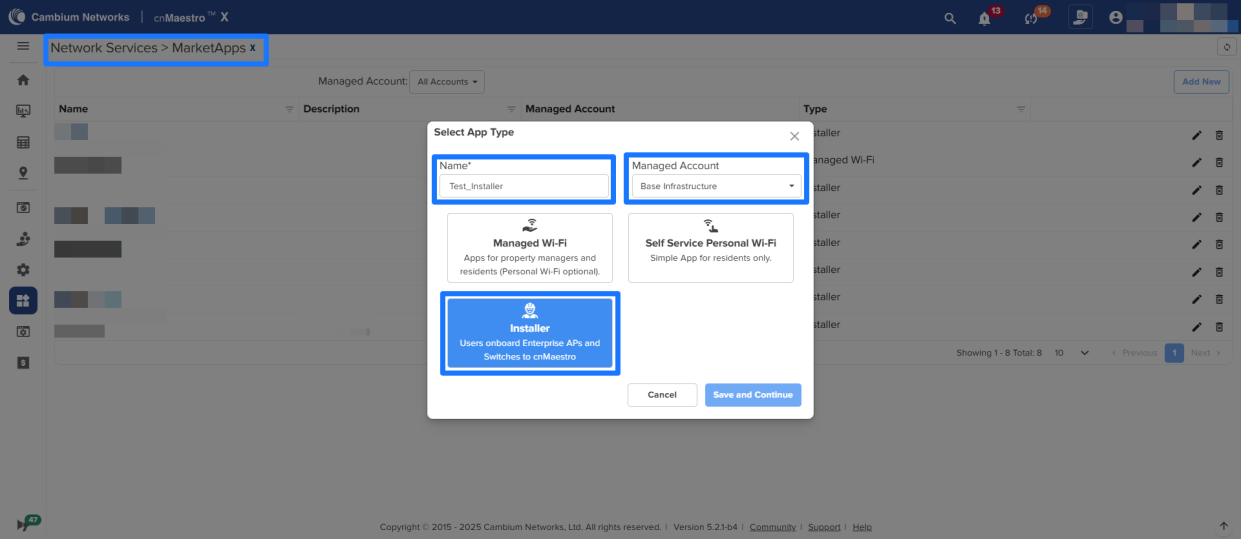
**cnMaestro 5.2.1** introduces powerful features to streamline deployments and elevate managed Wi-Fi experiences for MSPs. The new **MarketApps Installer** enables real-time AP claiming, renaming, and on-site documentation—capturing GPS, photos, and installer details instantly for true zero-touch onboarding.
The **NSE 3000** now supports a **subscription-free mode** , **AutoVPN** , and **VPN Translation** , simplifying secure site-to-site connectivity—even across duplicate subnets.
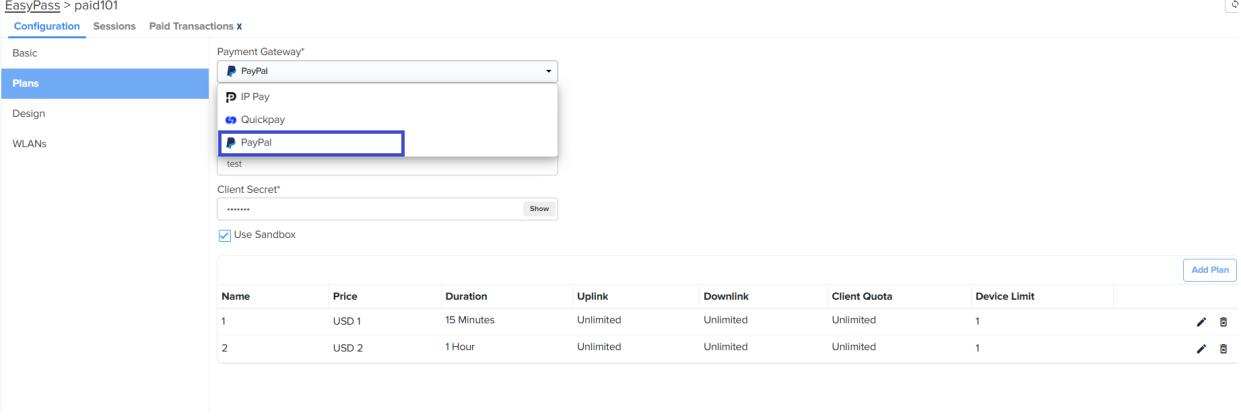
**EasyPass** enhancements include **PayPal support** , **multi-language splash pages** , and improved workflows for resident password management.
This release delivers speed, control, and scalability—empowering MSPs to deploy smarter and deliver exceptional customer experiences.
**Important: Web Browser**
Restart your browser or clear the browser cache with a hard reload if you have UI
problems after the 5.2.1 update.
**Important: Enterprise Wi-Fi AP Version**
Update to the Enterprise Wi-Fi AP 6.6.1 or later if you plan to use MarketApps.
## MarketApps Installer App :cnmx:
The Installer App supports ISPs and MSPs during on-site device installation. It streamlines the zero-touch onboarding process by allowing installers to log in, record installation details (like placement, photos, and height), and automatically provision the device to the correct site with the pre-determined configuration. This removes manual coordination
between field staff and backend teams, ensuring faster and error-free onboarding. Installers receive invitations via email and access the app through their email IDs. The app displays a list of Apps they have access to, using the configured display name. Once logged in, installers can select the site, attach the necessary AP or Switch Group, and
complete the provisioning with minimal effort.
See the following #knowledge-base article for more information:
> [@MarketApps-Installer](https://community.cambiumnetworks.com/t/marketapps-installer/105429):
>
> Overview The Installer app allows installers to onboard Enterprise Wi-Fi APs and cnMatrix switches to cnMaestro without directly accessing the cnMaestro interface. This simplifies the onboarding process, especially for installers who do not have admin access to cnMaestro. Prerequisites Before creating an Installer app, the MSP admin must: Create Enterprise Sites Create AP Groups and Switch Groups in the Managed Account Step 1: Create Installer App Navigate to Network Services \> MarketAp…
[Installer App Documentation](https://docs.cloud.cambiumnetworks.com/help/5.2.1/index.htm#UG_files/MarketApps.htm#Installe)
## MarketApps MDU App Enhancements :cnmx:
MarketApps has two apps for the Multi-Dwelling Unit (MDU) market —”Managed Wi-Fi" and “Self-Service Personal Wi-Fi". These applications simplify the management of Wi-Fi services for property managers, residents, and service providers by featuring an intuitive and streamlined workflow.
[MarketApps Documentation](https://docs.cloud.cambiumnetworks.com/help/5.2.1/index.htm#UG_files/MarketApps.htm?TocPath=Network%2520Services%257C _____ 4)
- **Dynamically changing WLAN**
- **Email edit of the Resident from the Manager Portal**
- **Email is made optional during the unit assignment**
- **AP Health Widget**
- **cnMaestro Admin Access to MarketApps Manager Portal**
- **Multilingual support for the Manager and Resident portal**
- **New KPIs in the Manager portal**
- **Residents move option in the Manager portal**
- **MarketApps selector**
- **Multi-select option in Table view**
- **New Check out time picker for manager settings**
- **New duration picker for unit Assignment**
- **Refresh button in the Manager portal**
- **AP Groups and WLAN details in the MarketApps settings page**
- **Password generator for PSKs**
- **Suspend/terminate will send an email notification**
- **Resend the invite for the resident from the cnMaestro MarketApps page**
- **Light and Dark themes**
- **Details view and recent history in the Manager portal**
## EasyPass PayPal Integration :cnmx:
PayPal payment option has been added to the **Paid X** , **Voucher + Paid X** , and **Oneclick + Paid X**
[EasyPass PayPal Documentation](https://docs.cloud.cambiumnetworks.com/help/5.2.1/index.htm#UG_files/WiFi/EasyPass.htm#PayPal)
### Settings
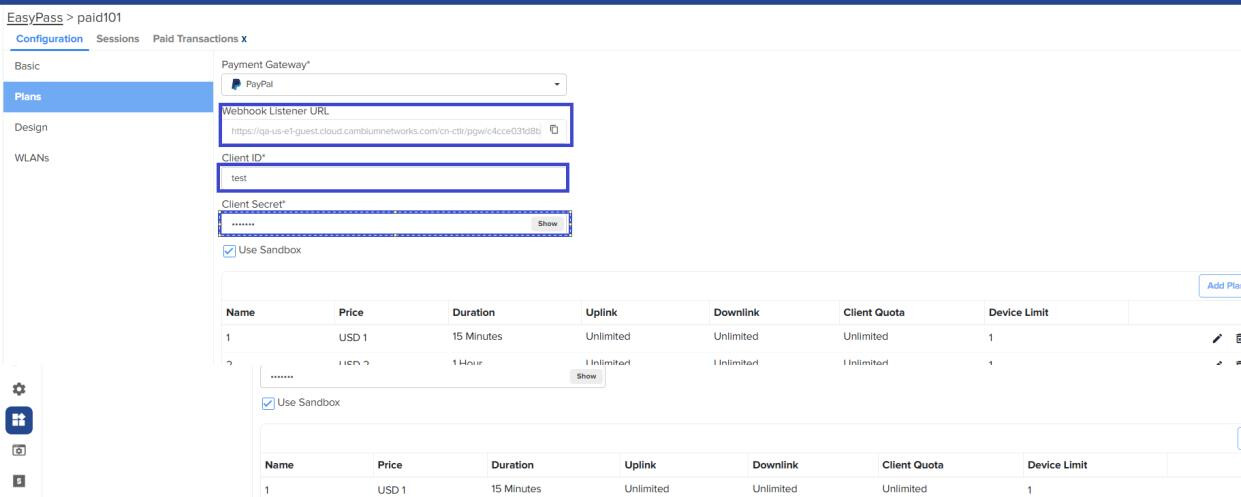
**Webhook Listener URL** : URL used by the payment gateway to call back after a transaction is processed. By default, this field is automatically generated and cannot be modified. Configure this URL in the PayPal application settings when creating the PayPal API client.
**Client ID** : ID that the PayPal API uses to identify the client. This value is available in the PayPal application.
**Client Secret** : Secret key that the PayPal API uses to authenticate the client’s Identity. This value is available in the PayPal application.
**Use Sandbox** : Select this checkbox to use the PayPal developer account.
## Localization for EasyPass Splash Page
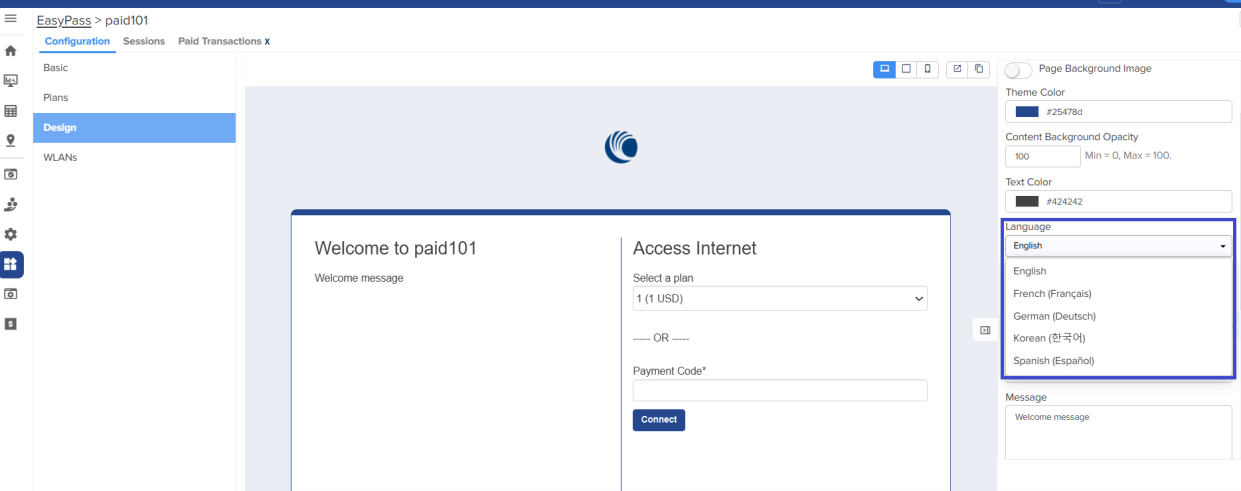
It allows users to select the language from the drop-down menu of all the supported EasyPass portals.
cnMaestro supports the following languages:
1. English
2. French
3. German
4. Korean
5. Spanish
## Suppression of Outlier Clients in the Analytics Dashboard
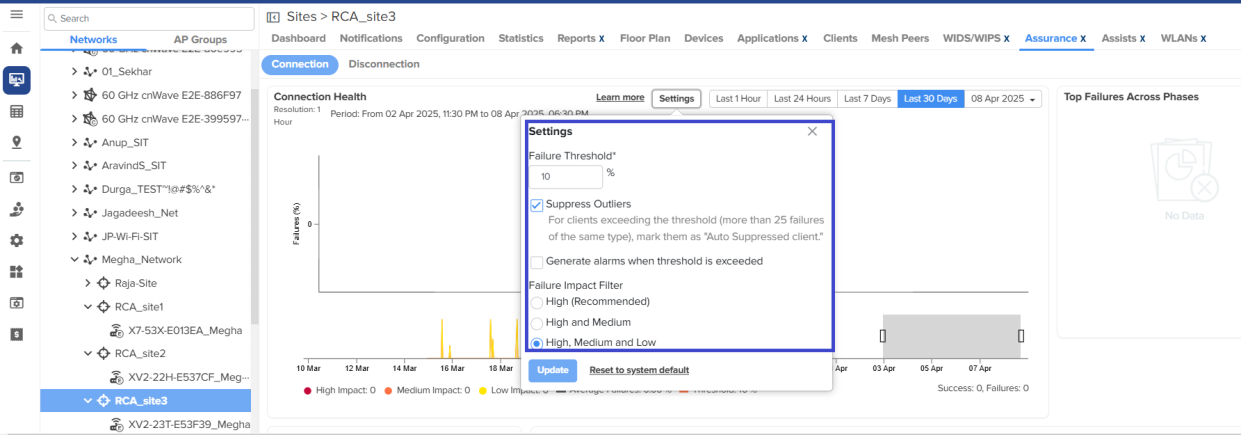
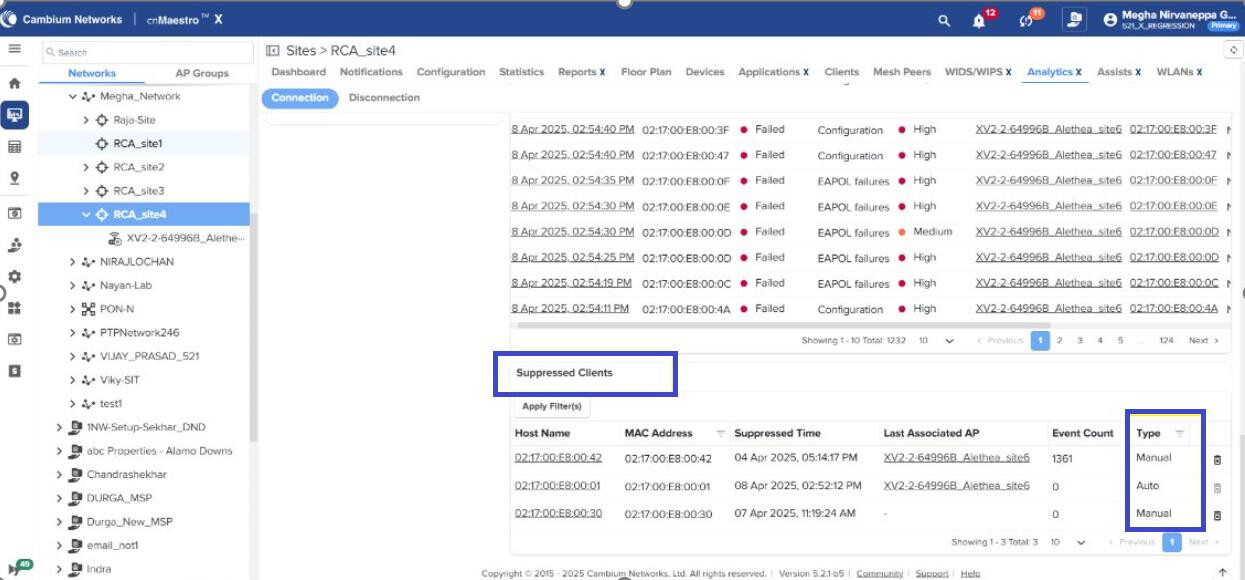
If a wireless client encounters the same failure code more than 25 times in a row within an hour, it will be flagged as a suppressed client to avoid repetitive events in site aggregation. This removes the noise data from these clients (typically with a wrong PSK) from hiding the more important and legitimate failure reports from other clients.
[Suppressed Clients Documentation](https://docs.cloud.cambiumnetworks.com/help/5.2.1/index.htm#UG_files/Analytics/Analytics_RCA.htm#Suppress)
### Settings
Client suppression is a setting enabled by default at the site level. Customers can choose to disable it for individual sites.
## NSE 3000 Features / Enhancements
### NSE Security Plus & NSE Security Subscriptions
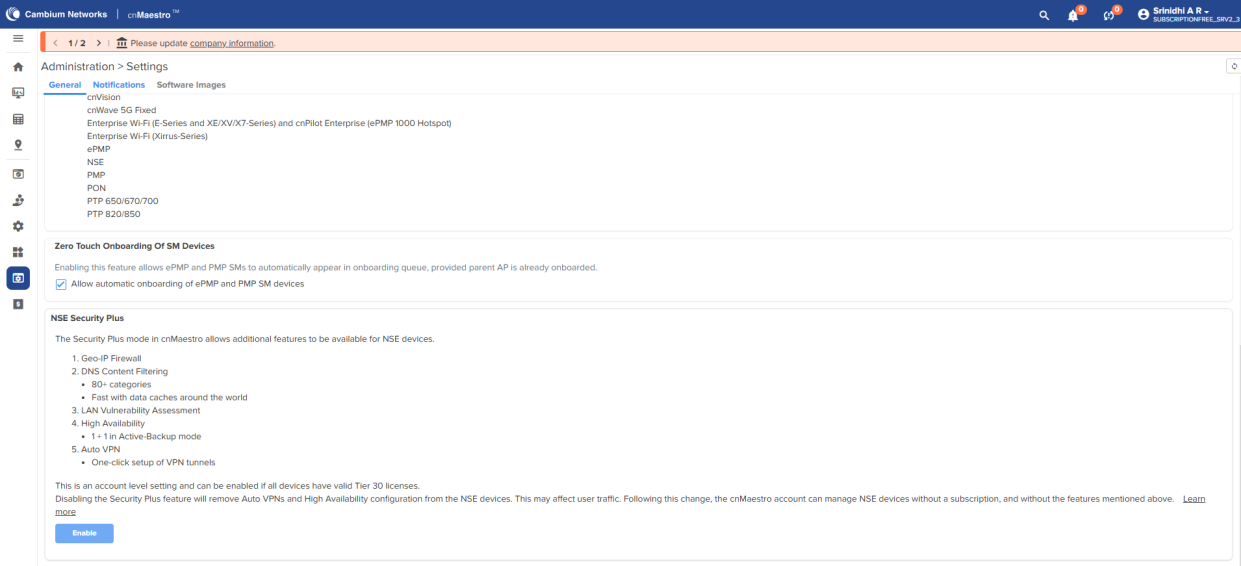
Starting with cnMaestro release 5.2.1, a subscription-free version is supported on NSE 3000. This subscription-free version is available only on cnMaestro Essentials.
The subscription-based mode is referred to as Security Plus, and the subscription-free mode is referred to as Security. All the security features, including Device Fingerprinting, Vulnerability, geo-IP firewall, High Availability, and DNS Content Filtering, are available only in the Security Plus mode (with Subscription).
The Security mode (subscription-free version) allows you to onboard and operate an NSE 3000 device with limited features. Using the cnMaestro UI, you can enable or disable the Security Plus mode for NSE.
[NSE 3000 Subscription Documentation](https://docs.cloud.cambiumnetworks.com/help/5.2.1/index.htm#UG_files/Managing%20NSE%20in%20cnMaestro.htm#Disabling_enabling_SecurityPlus_h1)
### Auto VPN
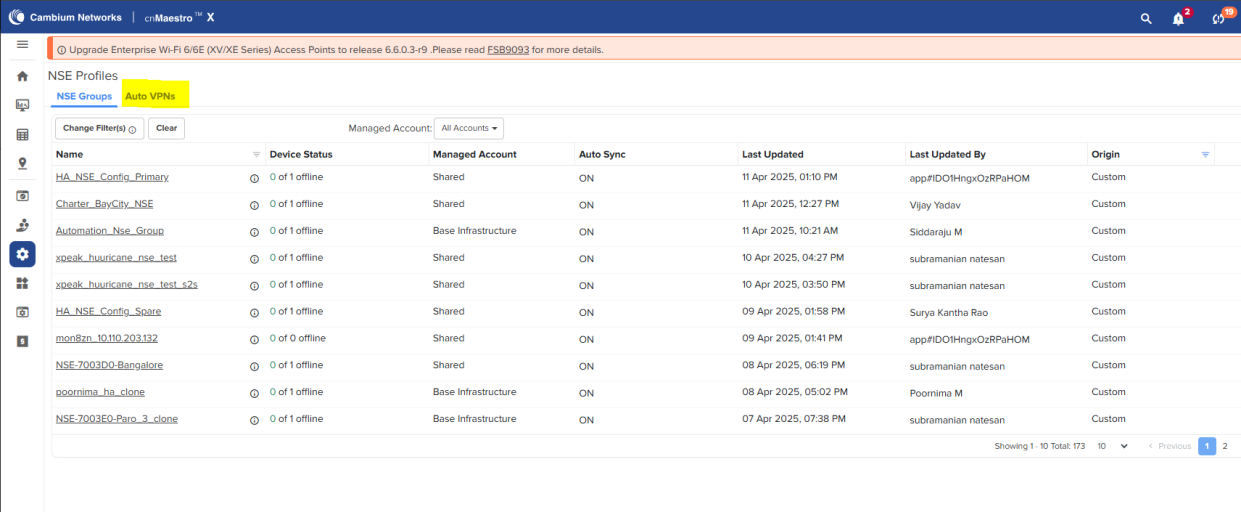
Starting with cnMaestro release 5.2.1, Auto-VPN is supported on NSE 3000.
Auto VPN is a feature that automatically establishes secure, encrypted connections between remote networks using IPSec tunneling protocols. It simplifies VPN deploymentby handling key exchange, authentication, and routing automatically, ensuring secure and seamless communication across sites without manual configuration.
NSE supports both hub and spoke as well as mesh through Auto-VPN.
[Auto VPN Documentation](https://docs.cloud.cambiumnetworks.com/help/5.2.1/index.htm#UG_files/Managing%20NSE%20in%20cnMaestro.htm#Configuring_Auto_VPN_h1)
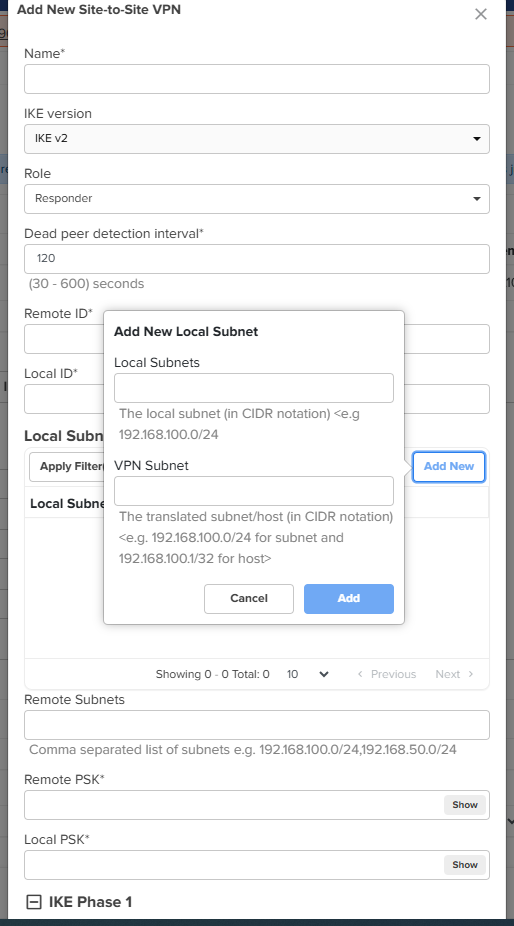
### IPsec VPN NAT Translation
Starting with cnMaestro release 5.2.1, VPN translation is supported on the NSE 3000. The local subnets that are advertised to peers are configured to translate into a different, equally sized subnet. This is useful in deployments where the same local subnet is used in multiple locations. The VPN Translation feature applies to both Site-to-Site VPN
configuration and Auto VPN configuration.
## 60 GHz cnWave
### Channel and Golay Configuration Update from Maps
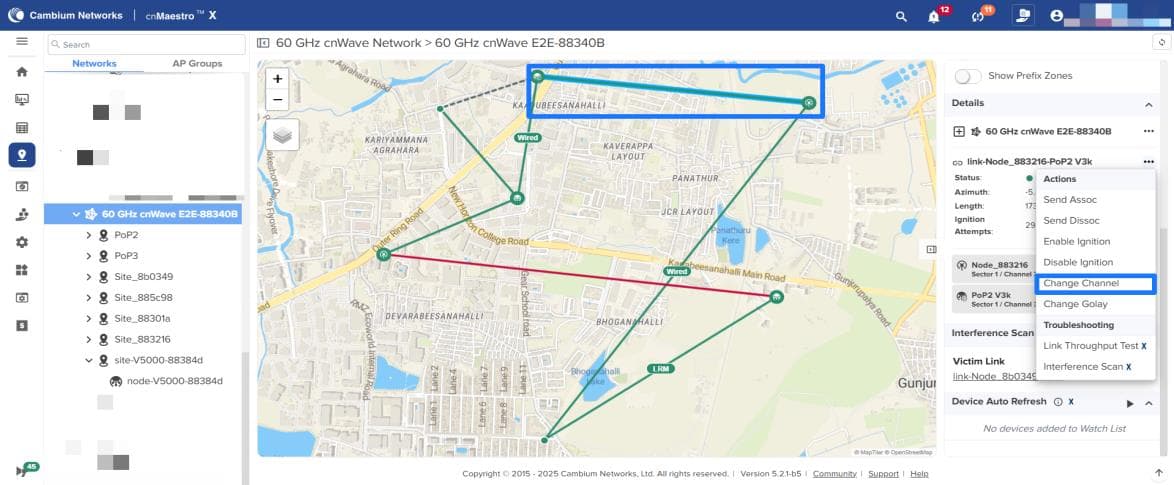
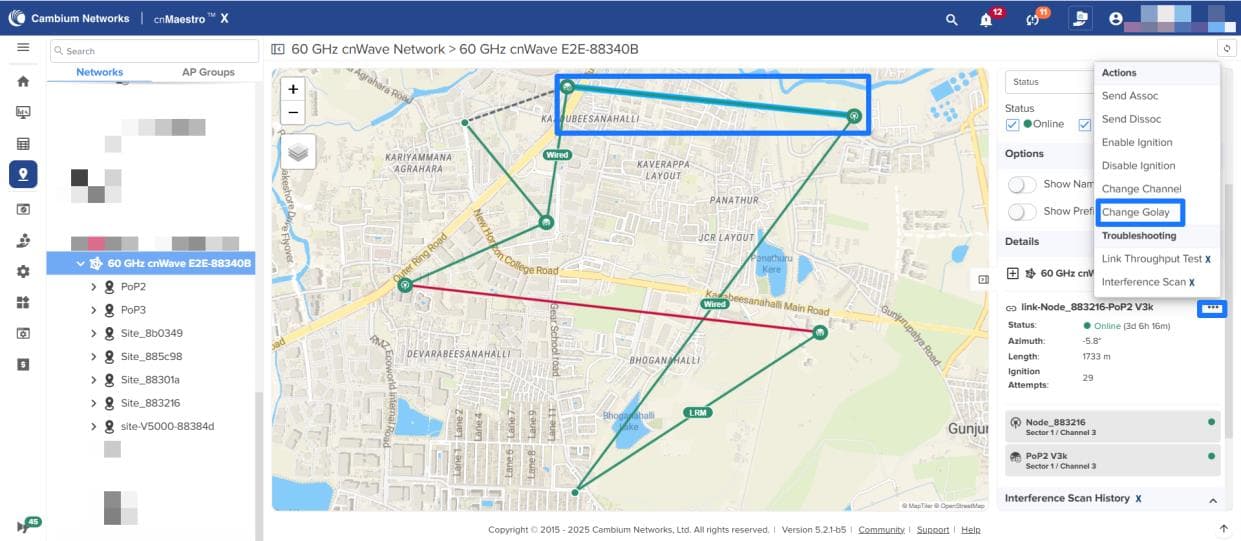
Starting with cnMaestro release 5.2.1, the Maps page now has the Change Channel and Change Golay options.
[cnWave 60GHz Change Channel/Golay Documentation](https://docs.cloud.cambiumnetworks.com/help/5.2.1/index.htm#UG_files/WiFi/60GHz%20cnWave.htm#Changing_Golay_channel_h3)
#### Change channel
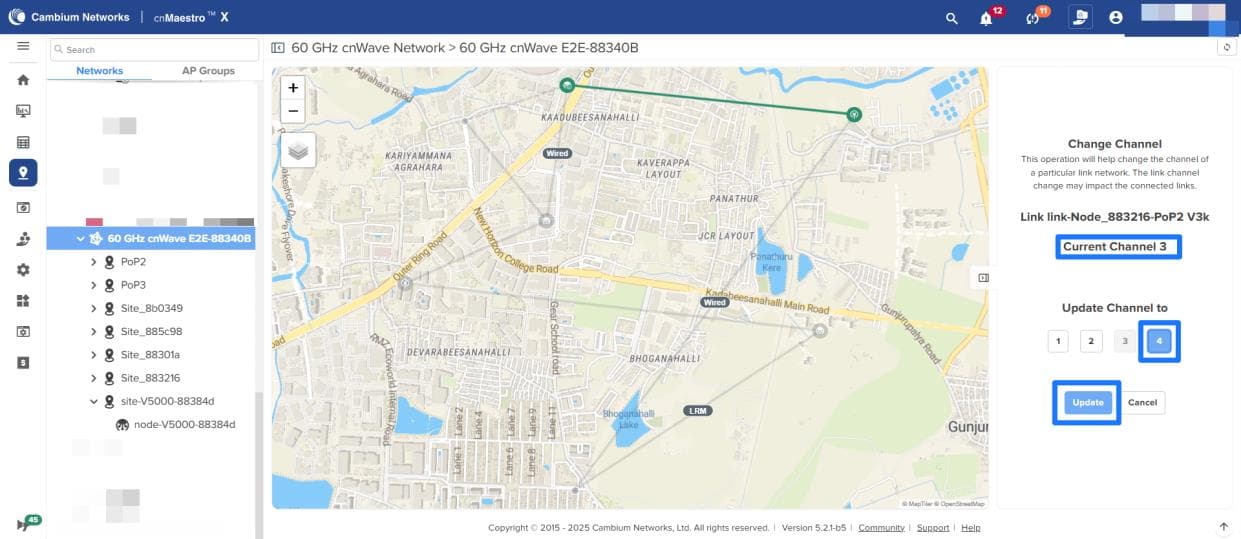
There may be an interference issue found when all the 60 GHz cnWave links in a particular sector have the same channel. In such a scenario, you can update or change the channel for all the links of a particular sector using the **Maps** page. To change channel, select the link that you desire to change the channel and select the **Change Channel** option from the link’s Actions menu
#### Change Golay
Using the **Maps** page in cnMaestro UI, you can change the Golay code for a particular cnWave link established between two nodes (not a sector) to avoid interference. To change the Golay, select the link that you desire to change the Golay and select the **Change Golay** option from the link’s Actions menu

### Last Resort Metric
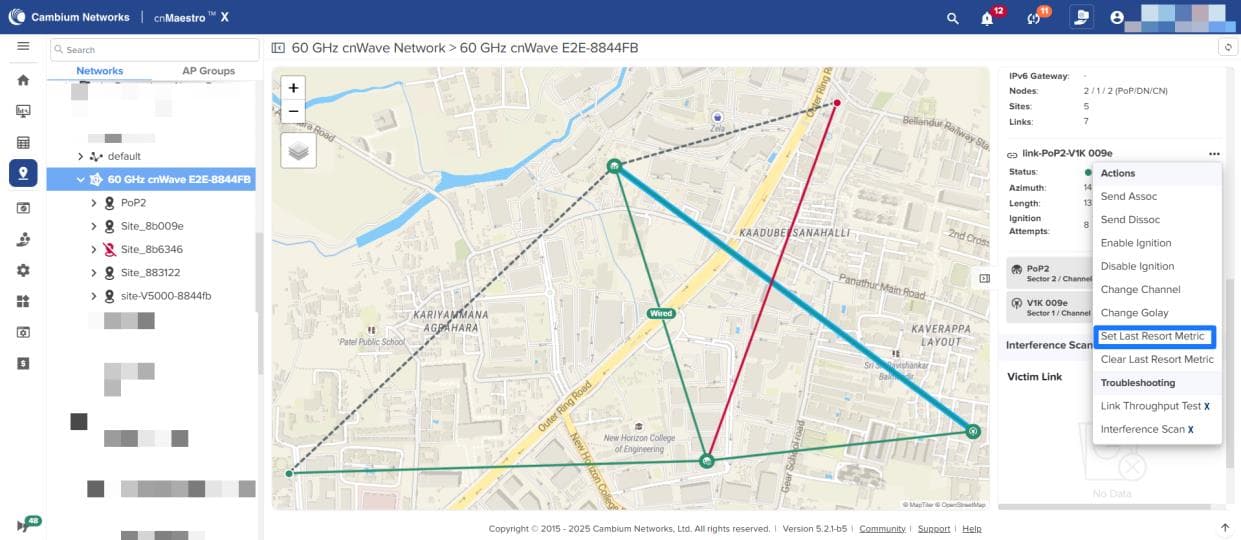
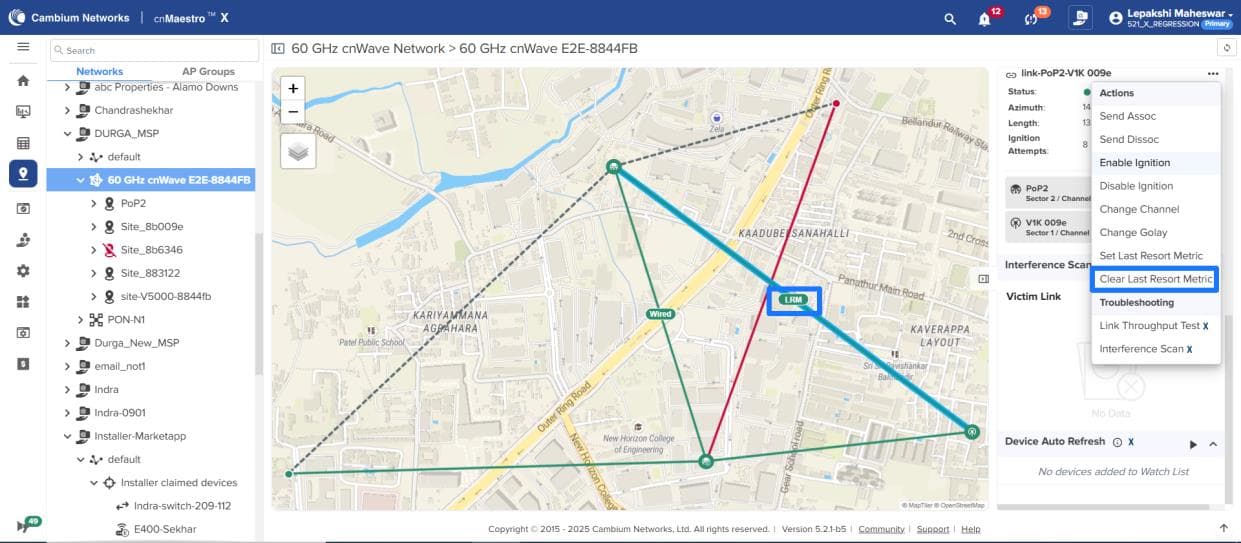
Starting with cnMaestro release 5.2.1, you can set an extremely high Open/R metric for the cnWave 60 GHz link using the **Maps** page. This metric is used as a last resort for routing traffic when all other paths are unavailable. To set the last resort metric, select the link that you desire to set the last resort metric for and select the **Set Last Resort Metric** option from the link’s Actions menu.

Similarly, select the Clear Last Resort Metric option from the link’s Actions menu to clear the LRM link’s last resort metric.
[Last Resort Metric Documentation](https://docs.cloud.cambiumnetworks.com/help/5.2.1/index.htm#UG_files/WiFi/60GHz%20cnWave.htm#Setting_LRM_h3)
**NOTE:** For the above feature, the E2E Controller must run version 1.6 or later.
## Fiber
[Fiber Documentation](https://docs.cloud.cambiumnetworks.com/help/5.2.1/index.htm#UG_files/Monitoring%20Your%20Network/Fiber%20OLT%20and%20ONT.htm)
### Reports support for PON devices
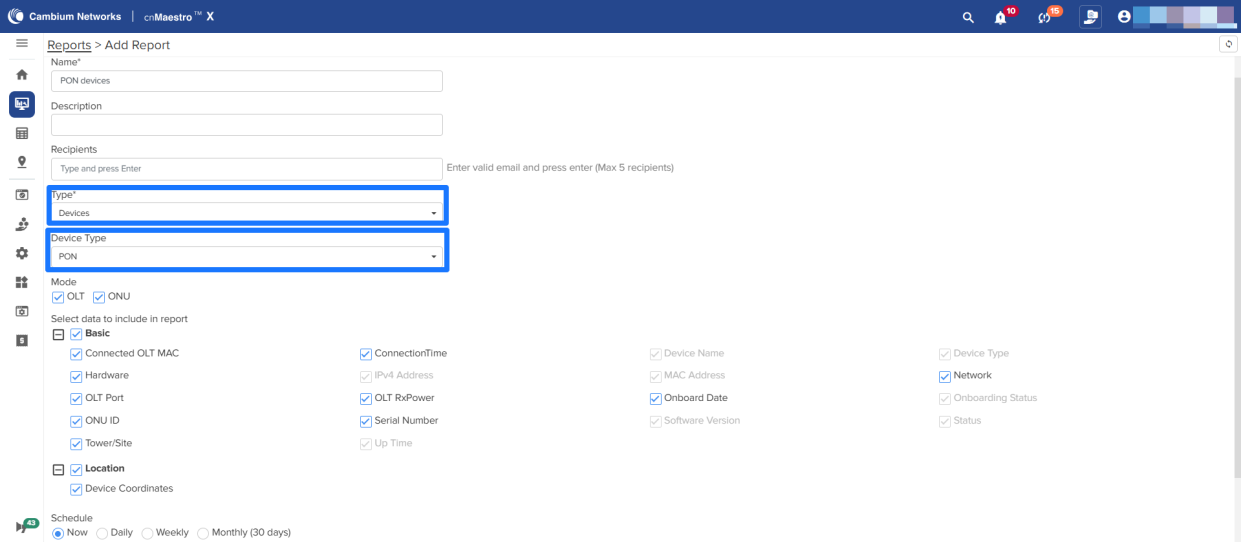
Starting with the cnMaestro release 5.2.1, reports support for PON devices has been added. To add reports, navigate to **Reports → Add New Data Reports → Type** as Devices and select Device Type as PON
[Reports Documentation](https://docs.cloud.cambiumnetworks.com/help/5.2.1/index.htm#UG_files/Generating%20Reports/Generating_Reports.htm)
### Export Option for OLTs, ONUs and Ports
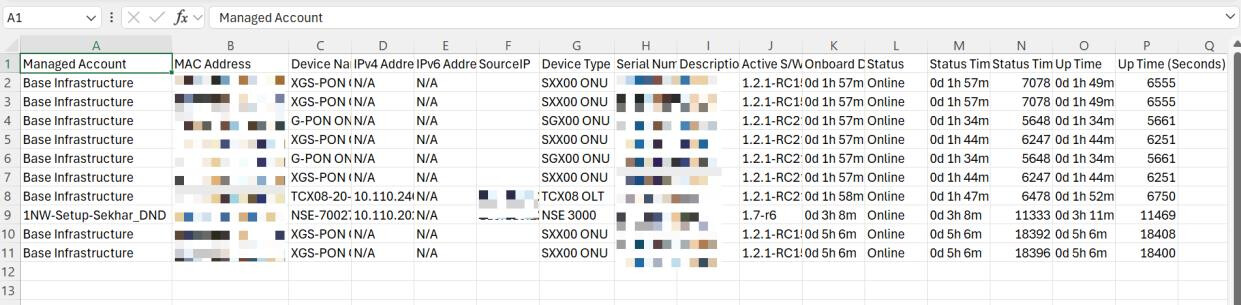
Starting with cnMaestro release 5.2.1, PON devices will be exported/added in the downloaded CSV file when exporting from the Inventory page.
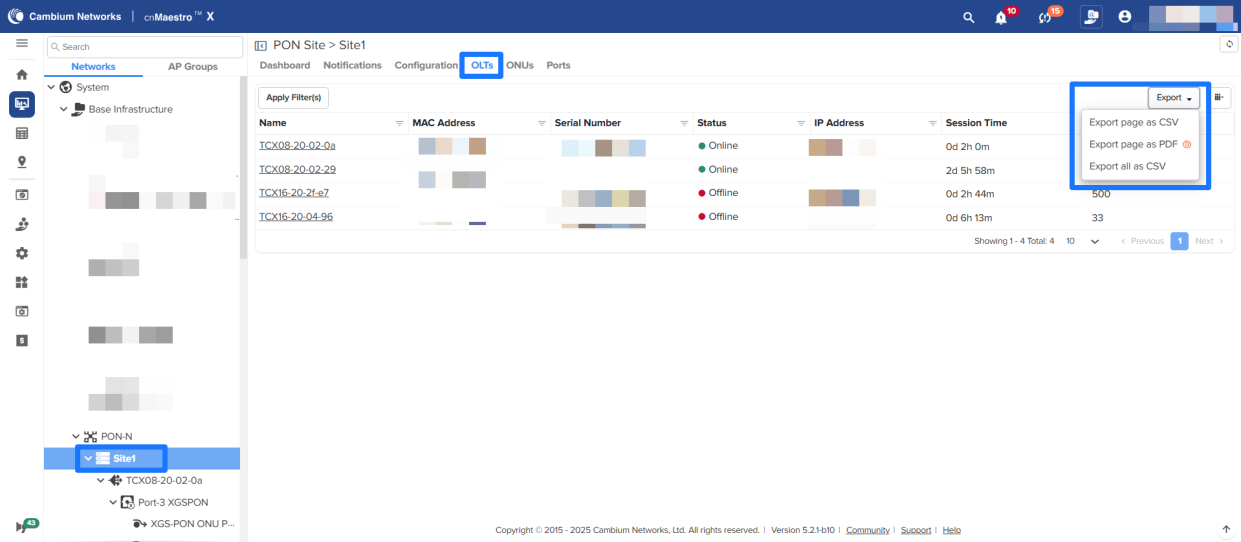
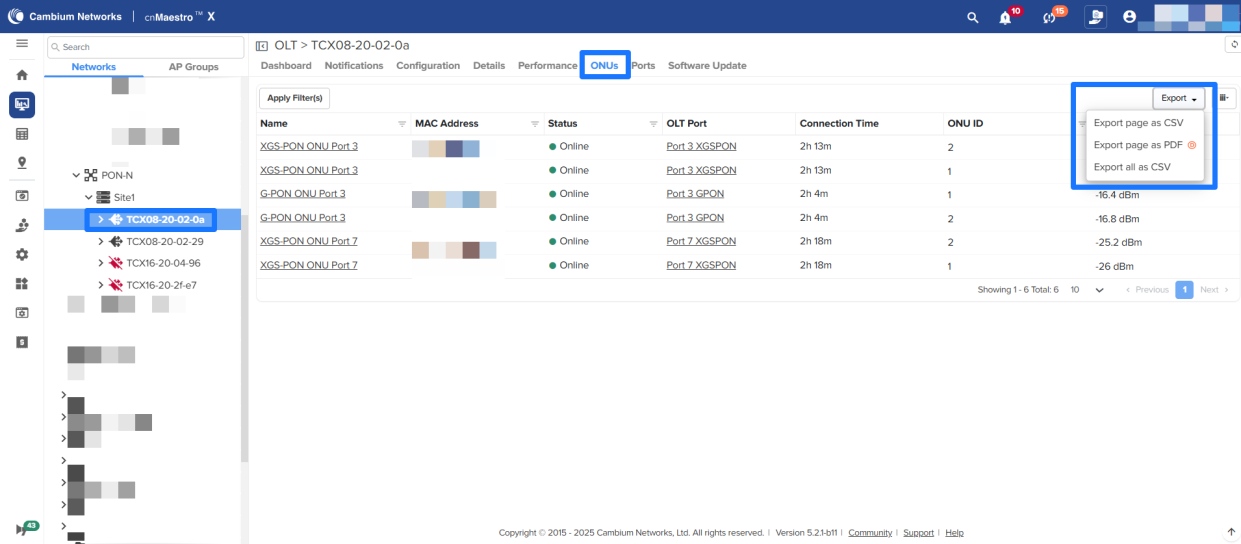
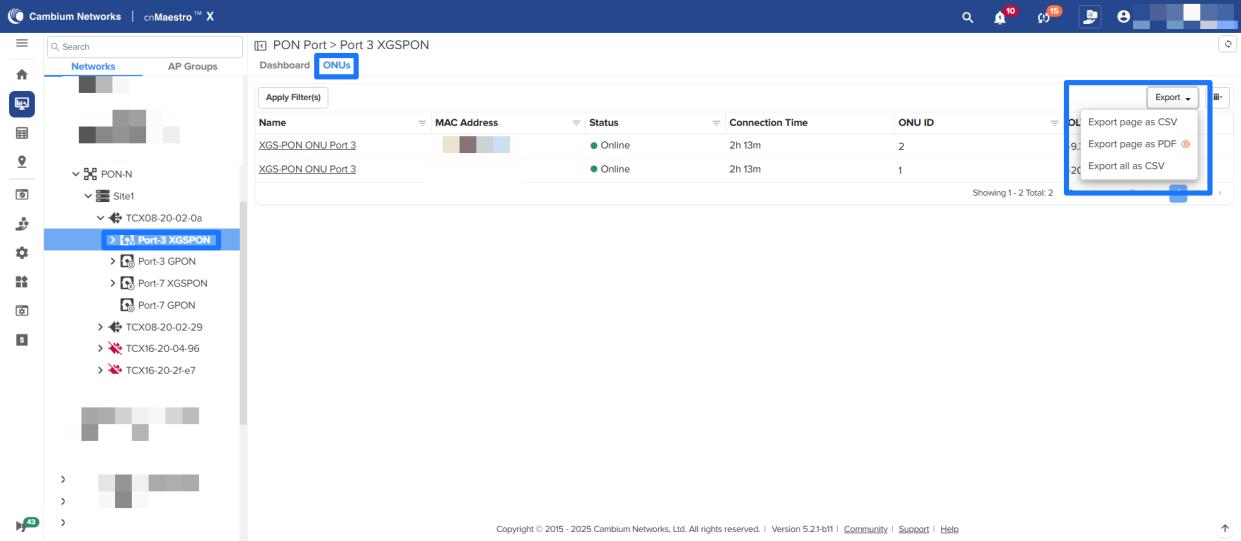
Starting with cnMaestro release 5.2.1, the Export option is added for OLTs, ONUs, and Ports at PON Site, OLT, and Port levels.
To export ONUs and Ports from the PON site, navigate to **PON Network → PON site → ONUs/Ports**.
To export ONUs and Ports from OLT, navigate to **PON Network → PON site → OLT → ONUs**.
To export ONUs from Ports, navigate to **PON Network → PON site → ONT → ONUs → Ports**.
## Overdraft Subscription Support
The cnMaestro Overdraft Subscription feature allows customers to onboard devices even before purchasing a subscription. It automatically creates a 30-day temporary license for devices without available subscription slots.
**Benefits:**
- Faster Onboarding: Devices can be deployed without delays, avoiding project bottlenecks.
- Operational Flexibility: Ideal for large MSPs where hardware and software are procured separately.
- Error Reduction: Reduces BoM mismatches during deployments and simplifies subscription planning.
**Best Practices:**
- Deploy Quickly: Aim to deploy within 15 days and purchase and activate subscriptions within another 15.
- BoM Generation: Use the CSV export and configurator to accurately calculate and order needed slots.
- Monitor Alerts: Stay responsive to overdraft alerts to prevent unmanaged devices.
- Activate Promptly: Complete purchase and activation within the 30-day window to maintain service continuity.
When a device is onboarded with an overdraft, a banner is displayed under the **Managed Subscriptions \> Subscriptions** summary page, as shown in the figure below. In the overdraft credit banner, click **Show Overdraft Devices** to view the list of devices in overdraft.
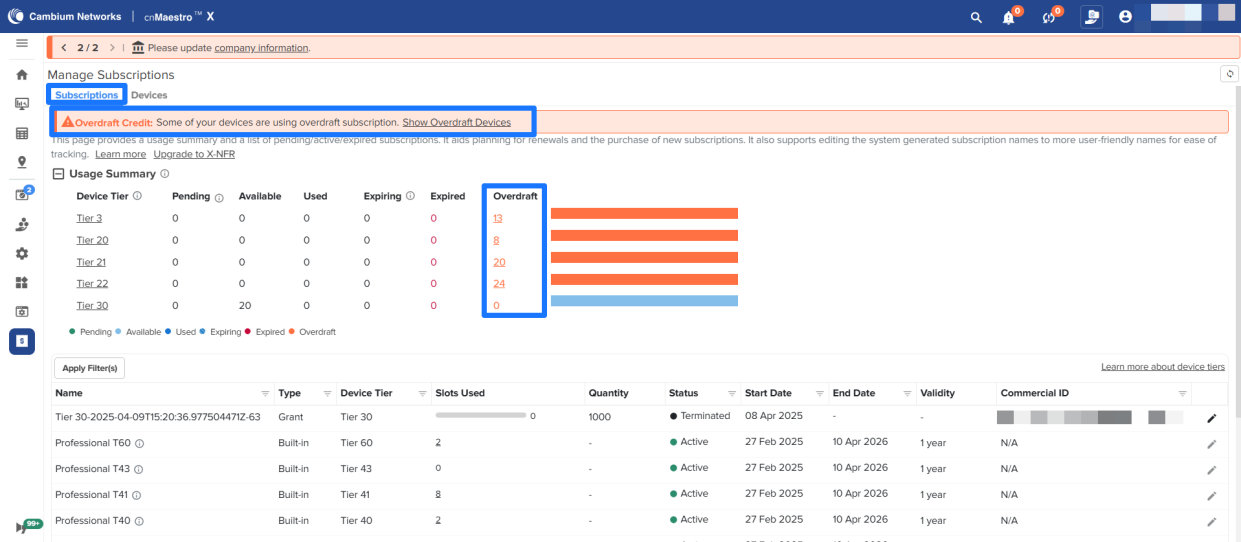
The Devices page displays the **Overdraft Devices**.
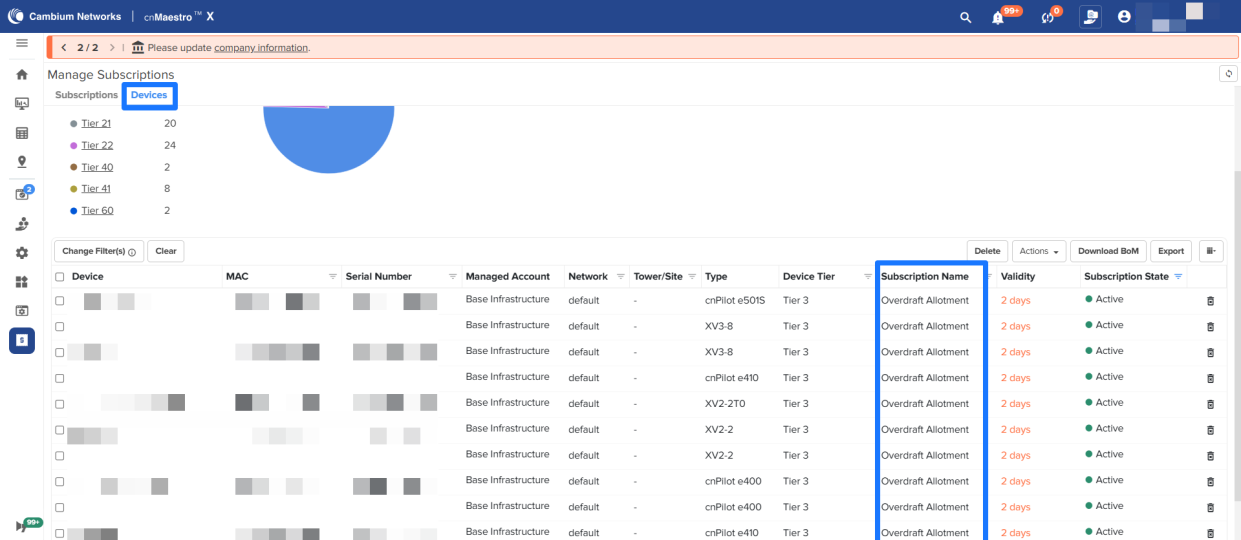
**NOTE:** Overdraft Subscriptions will be provided only in X accounts for all devices. In Essential accounts, Overdraft Subscriptions will be provided only for NSE devices.
[Overdraft Subscription Documentation](https://docs.cloud.cambiumnetworks.com/help/5.2.1/index.htm#UG_files/cnMaestro%20X/C_Manage%20Subscriptions.htm#Overdraf)
## Download BoM with Configurator
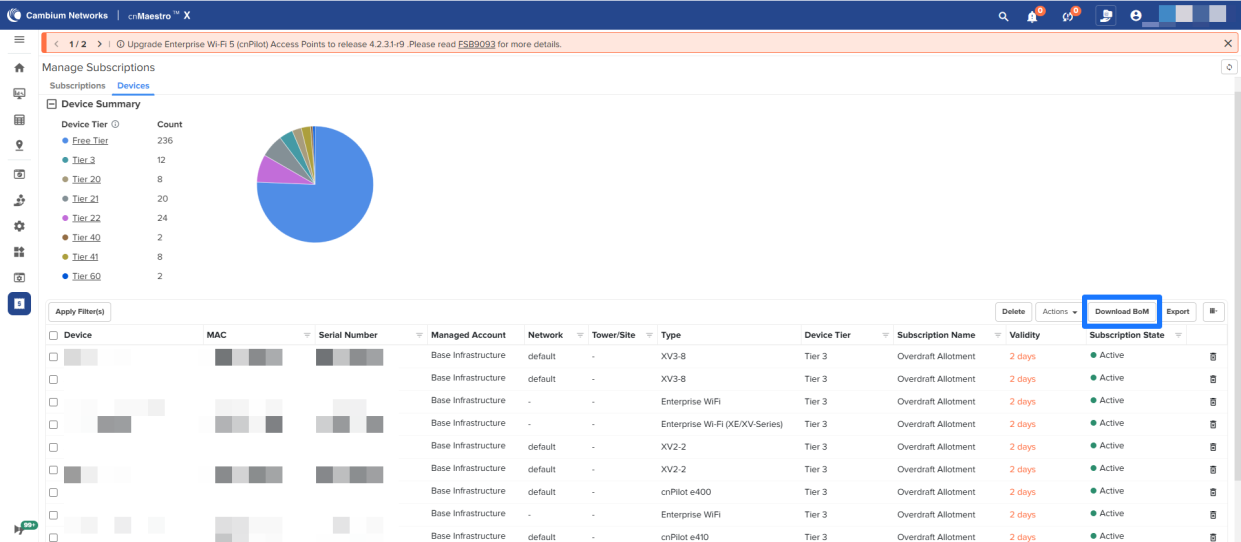
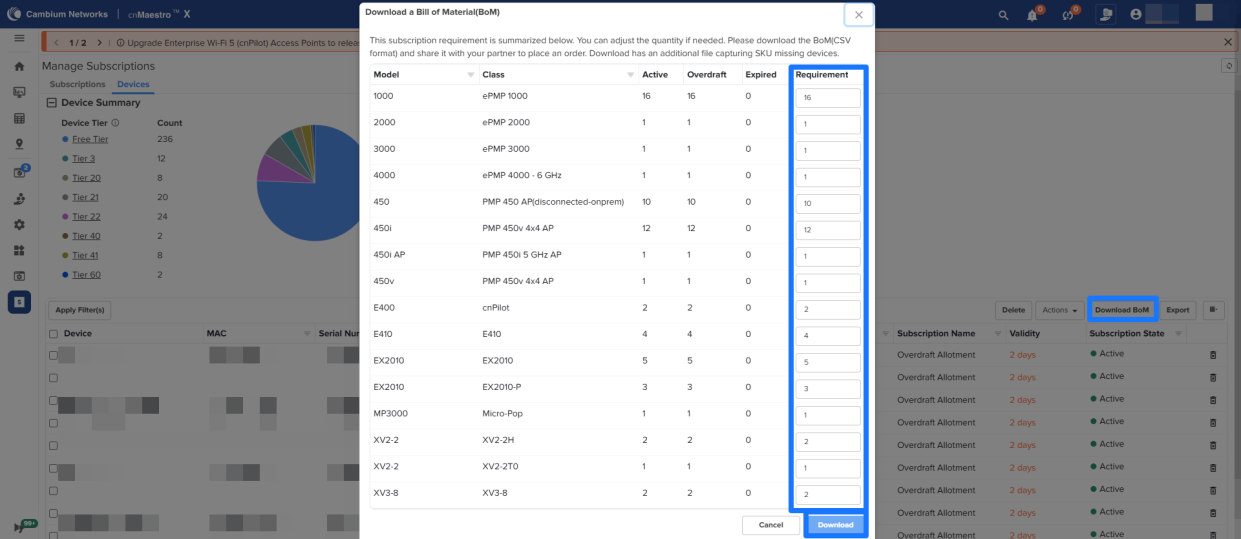
Download BoM feature allows users to generate a summary of the required subscriptions for an account to upgrade. The downloaded file can be shared with a partner or distributor to purchase the necessary subscriptions.
Navigate to **Manage Subscriptions → Devices** and click on **Download BoM**.
[BoM Documentation](https://docs.cloud.cambiumnetworks.com/help/5.2.1/index.htm#UG_files/cnMaestro%20X/C_Manage%20Subscriptions.htm#Download)
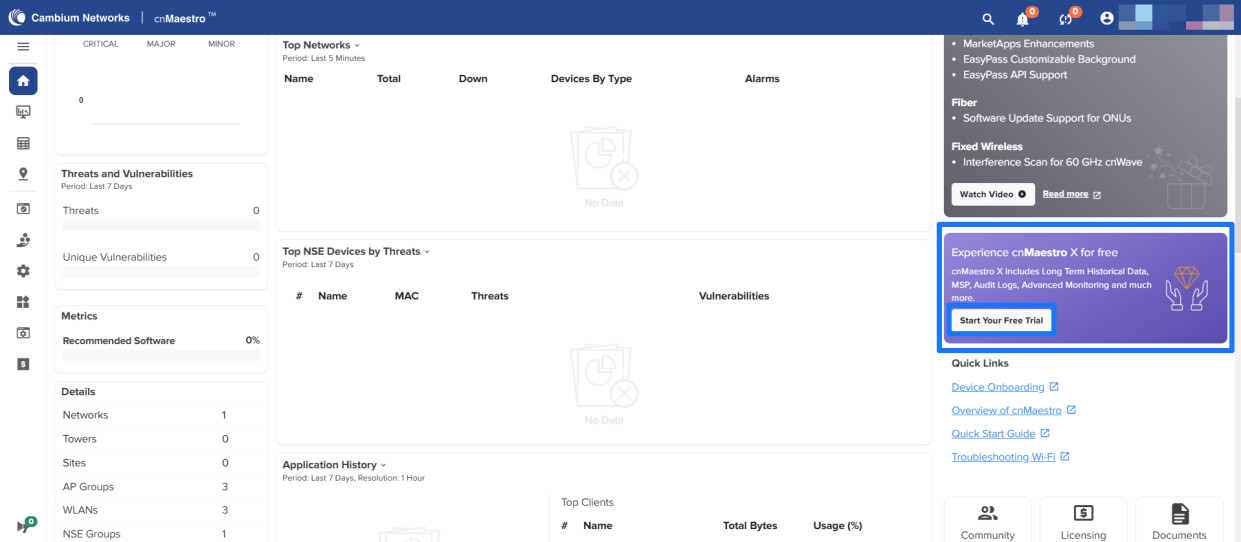
## Self-managed X Trial
If X-Trial was never activated in an account, users can now upgrade such accounts to X-Trial to explore X features without waiting for approval from Cambium or reaching the support team. Click **Start Your Free Trial** on the Home page to activate the standard X-Trial.
## Miscellaneous Enhancements
### Multi-Invite Support for Users
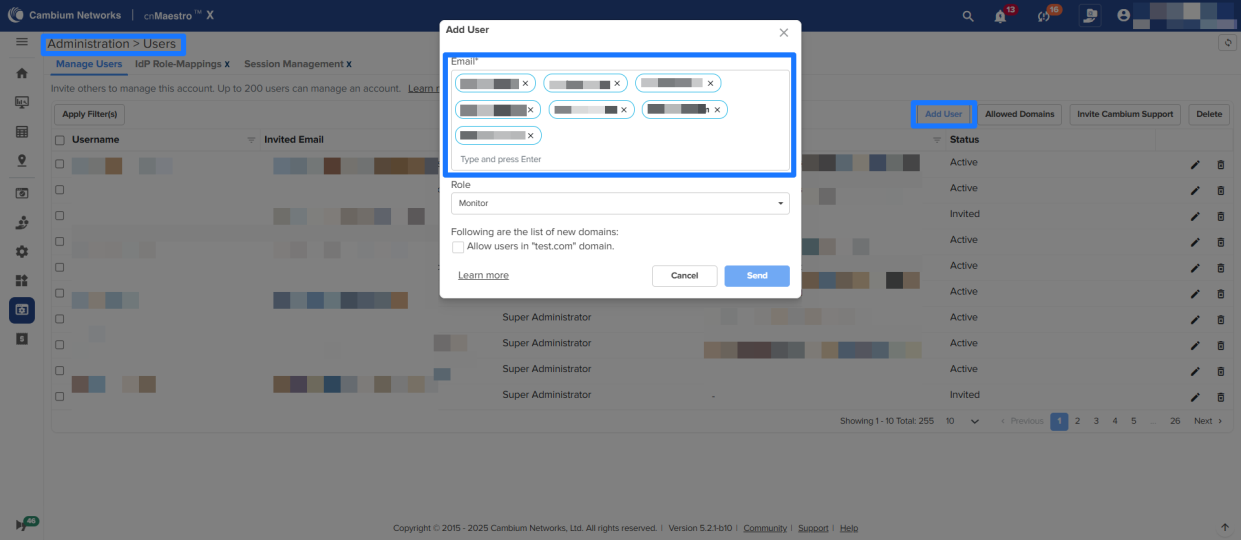
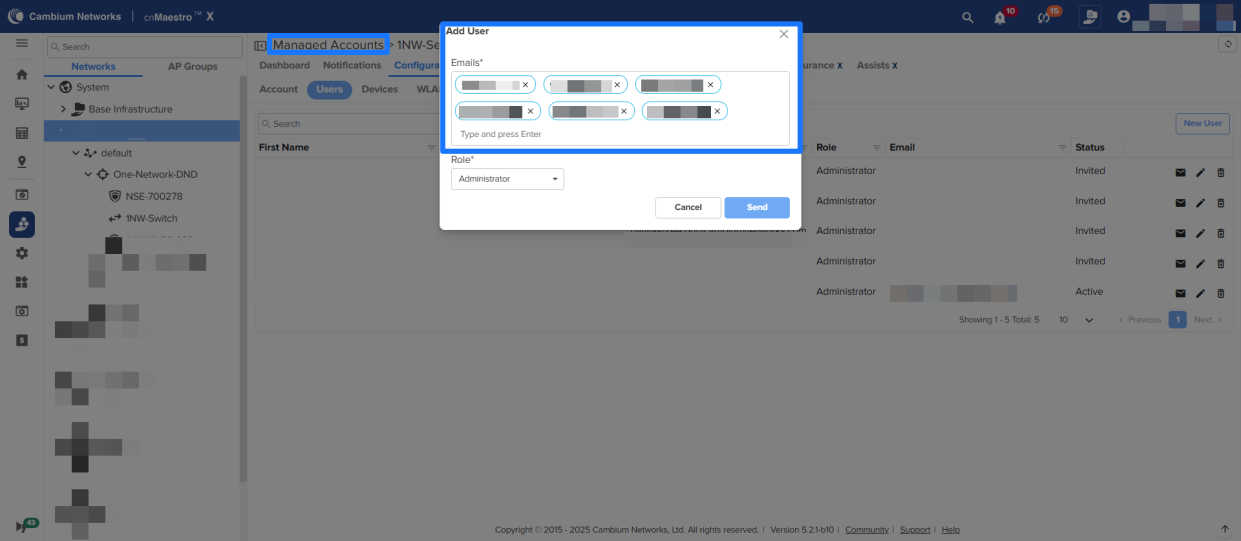
Super admin users can invite a maximum of 20 users simultaneously by entering their email IDs under **Administration → Users → Manage Users** and **Managed Services → Managed Accounts → Users**.
### Renamed Analytics to Assurance
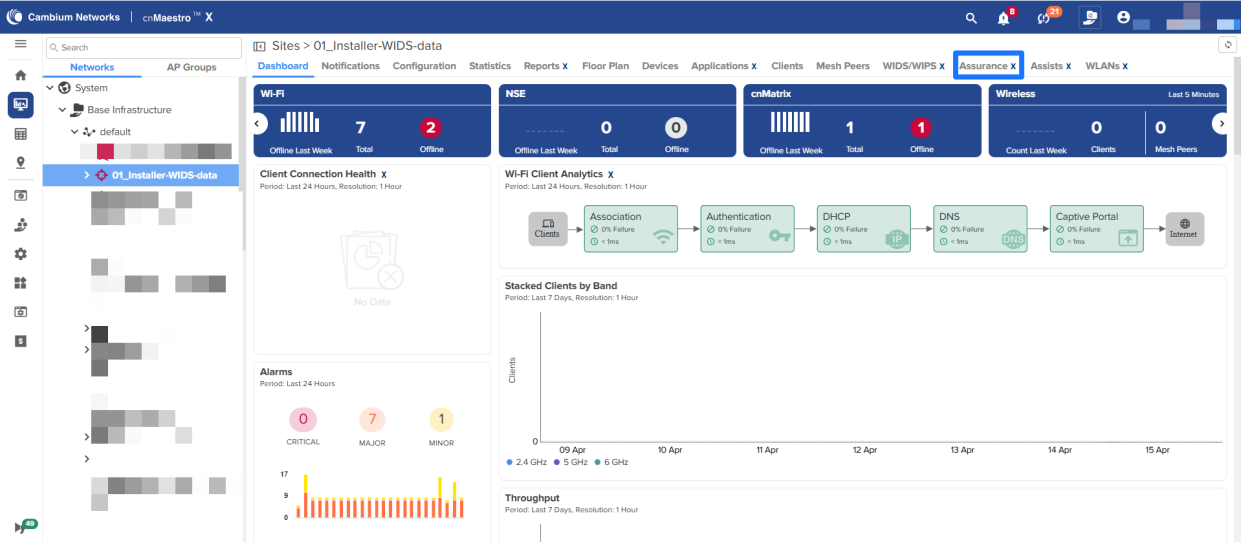
In System, MSP, Site pages Analytics is renamed to Assurance.
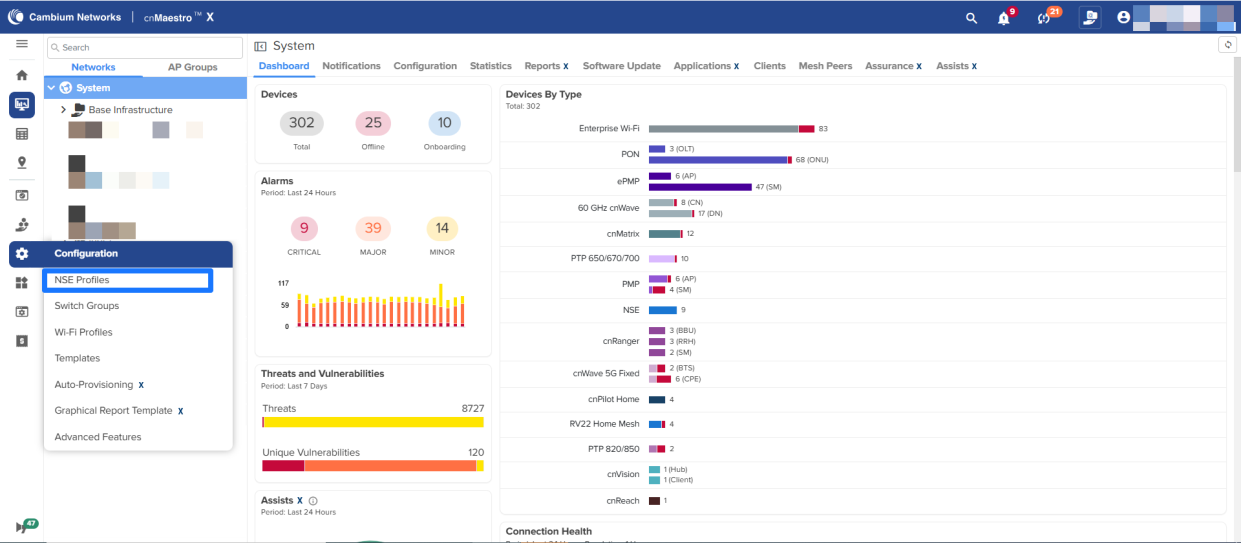
### NSE Groups renamed as NSE Profiles under Configuration
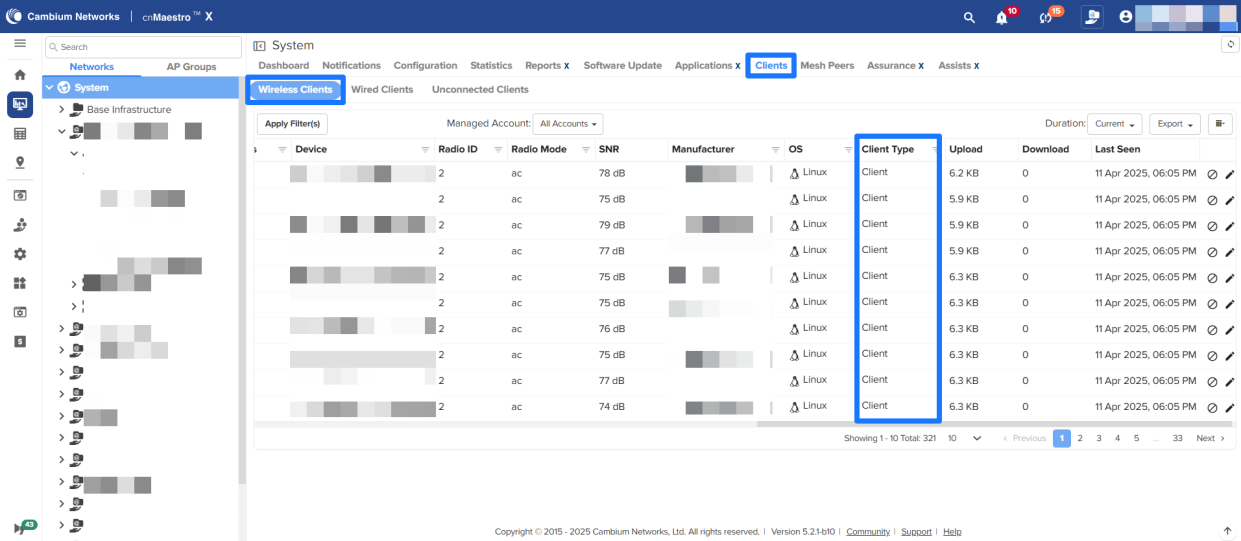
### Deprecation of the Client Type column on the Clients page
The Client Type column on the Clients page is deprecated and will be removed in a future release.
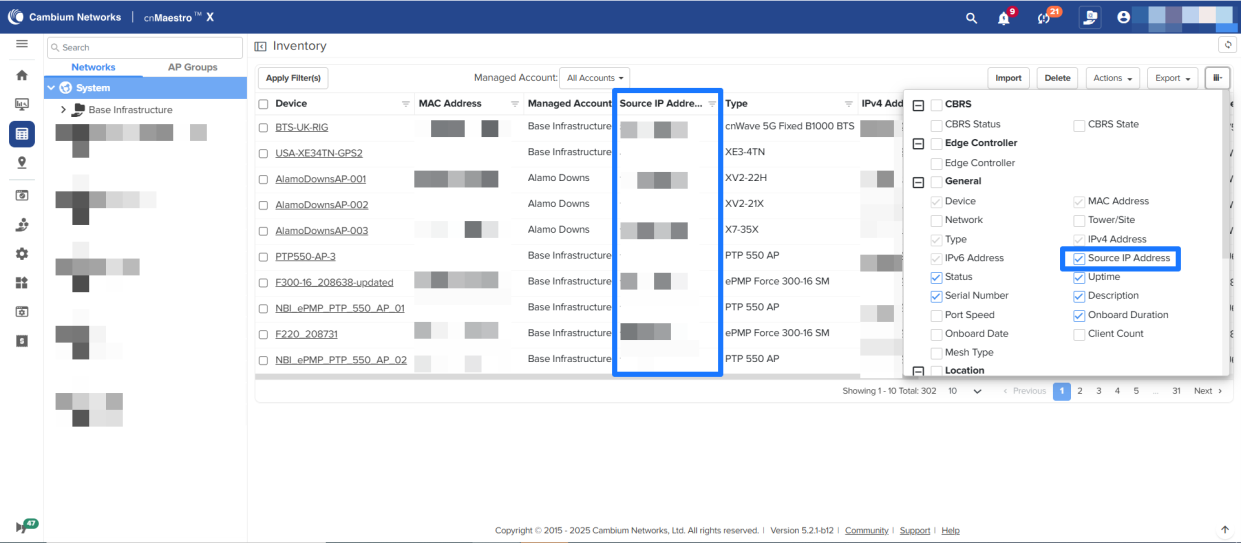
### Source IP Address added to the Inventory and Reports Page
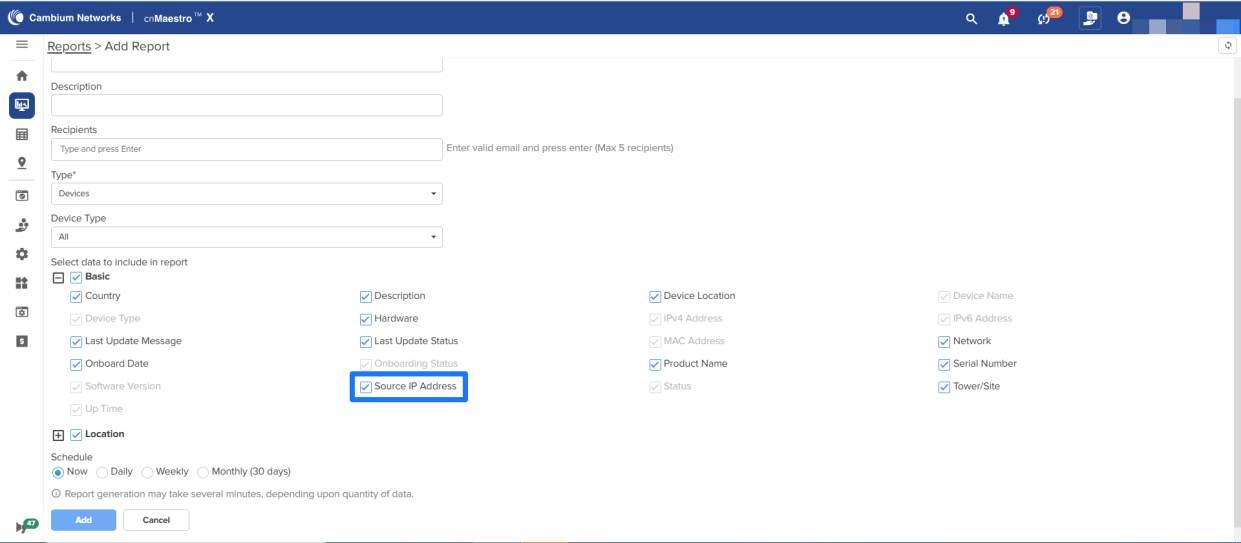
Added the Source IP Address column in the Inventory page and added an option in Device Reports. This field can be used to filter devices that belong to a site, as the public source IP is likely to be the same for all devices behind a NAT at a site. Some MSPs prefer to claim all devices together in a staging site, and after the devices come online, use the source IP to filter and move them to the desired target site.
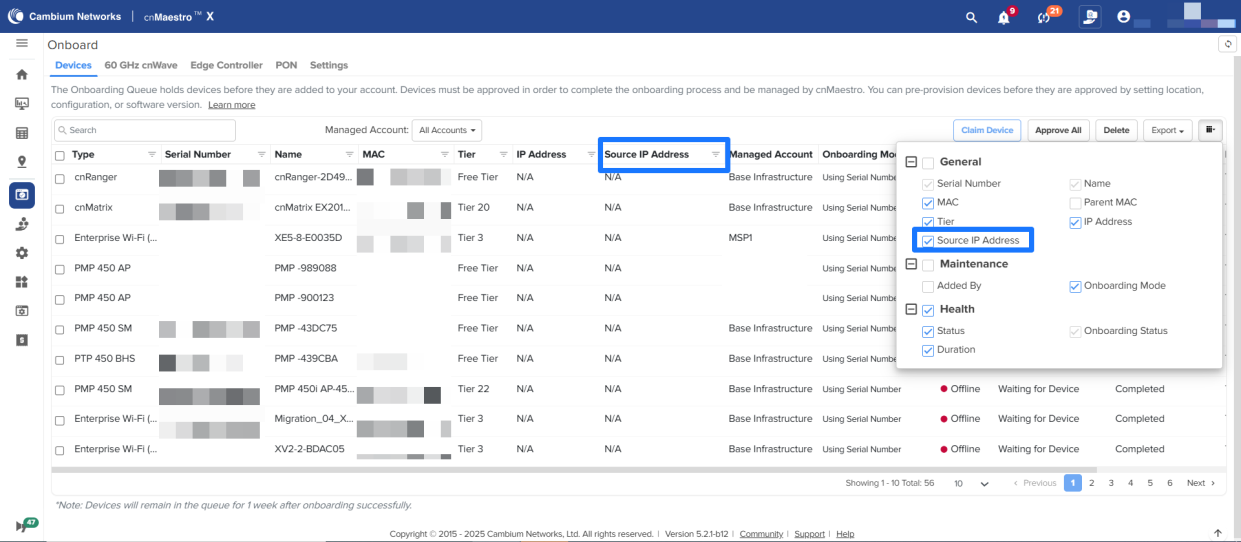
The ‘Source IP’ column is renamed to ‘Source IP Address’ on the Onboarding Page.
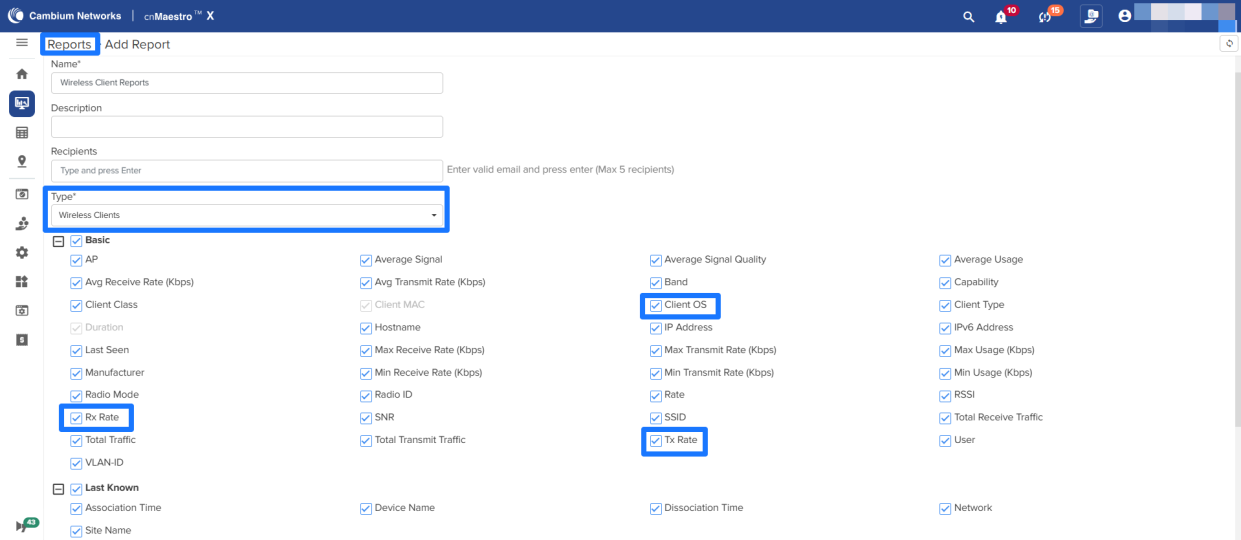
### Added Client OS, Tx and Rx rates options in Wireless Clients Reports
When generating Wireless Clients reports, new options, Client OS, Tx, and Rx rates are added.
## API Updates :cnmx:
A number of APIs have been updated or deprecated in the 5.2.1 release. For the details, please see the full release notes at [https://support.cambiumnetworks.com/files/cnmaestrocloud/](https://support.cambiumnetworks.com/files/cnmaestrocloud/).
## Significant Fixes
The following issues have been fixed:
| Id | Details |
| --- | --- |
| **CNSSNG-29431** | Rest API Support for fetching client historic data |
| **CNSSNG-36031** | cnMaestro-X Cloud: Sponsored Guest clients not working correctly |
| **CNSSNG-37850** | RV22 home mesh is missing in the Automatically Update Device Software |
| **CNSSNG-38365** | Sponsor Guest Settings should have “Sponsored Email Addresses” instead of Domains. |
| **CNSSNG-41193** | In the Notification page, RV22 should be listed under ignore notifications. |
| **CNSSNG-41645** | The previously attached profile is automatically pushed to cnMatrix when it is moved across Base Infra and the managed account. |
| **CNSSNG-43083** | The wrong mapping in the reports for the last known AP name to site name mapping. |
| **CNSSNG-43699** | AP blocks the STA that is allowed in the MAC Authentication. |
| **CNSSNG-44098** | Device Type mismatch in the Subscription page and the Inventory list |
| **CNSSNG-44929** | cnMaestro Essentials (Cloud): EasyPass Voucher Export to PDF not working |
| **CNSSNG-45311** | Loading site pages is slow with 100+ APs |
| **CNSSNG-45484** | Under the NSE security table, the vulnerability table is empty; however, the client table displays vulnerability. |
## Known Issues
The following issues exist:
- **CNSSNG-11299** : AP Regulatory Channel list support check needed for checking valid channels.
- **CNSSNG-11389** : Microsoft Edge Browser does not support system OVA file upgrade.
**Workaround** : Use the Google Chrome browser
- **CNSSNG-12812** : cnPilot R-series dual radio devices (r-201P, r-195W) AP Group country code/SSID configured from overrides getting applied only to the 2.4 GHz radio.
- **CNSSNG-14030** : CBRS race condition: SM “stuck” in cnMaestro during reparenting if import and start occur as SMs arrive in the onboarding queue.
**Workaround** : To avoid this issue, follow the suggested SM reparenting procedures listed in the latest version of the Cambium CBRS standalone procedures document.
- **CNSSNG-14518** : Device Type selection needs to be provided at the Site and AP Group for Report generation.
- **CNSSNG-15356** : If a device has a weak serial number in a non-CBRS build, and the sector is imported first, the device will not contact cnMaestro.
- **CNSSNG-15432** : Deleting a device in Base Infrastructure and claiming it immediately to another Managed Account returns a Device Registration Failed message.
- **CNSSNG-15595** : cnMatrix Hostname falls back to old Hostname if the template is pushed for the first time (if a Switch Group already exists).
- **CNSSNG-15656** : Duplicate entries observed in the 802.11ax Clients Report.
- **CNSSNG-16197** : CBSDID search will not work when the device was synced from a tool without obtaining a grant first.
**Workaround** : Perform a CBSDID search from domain proxy view on Cloud to obtain mac address, then perform MAC address search on tool to find the device.
- **CNSSNG-18856** : cnVision Client is not shown under the hub.
**Workaround** : Reboot the Client
- **CNSSNG-18923** After migration Reports Job page is empty due to cached data.
**Workaround** : Clear Cache and Cookies after migration.
- **CNSSNG-18927** : The configuration push from the Onboarding page is getting a device timeout error in the ePMP 1000 Hotspot device.
- **CNSSNG-19264** : The unmanaged expired device approve button is not disabled.
- **CNSSNG-19275** : Issues related to offline alarms of expired devices.
- **CNSSNG-20508** : The last Super Administrator deletion should show a proper error message.
- **CNSSNG-20605** : User-Defined Overrides (Advanced) should be handled from Switch Groups \> Switches \> Actions \> Configuration tab.
- **CNSSNG-20745** : AP Count is -1 in Anchor when deregistering the device from Anchor.
- **CNSSNG-20820** : After a server upgrade, the device throws an error [Invalid CBSD ID and Grant ID], even though the Domain Proxy shows the device is registered.
- **CNSSNG-21068** : Not able to deregister or delete the SM when PMAC mismatched (SM reported a different PMAC).
**Workaround** : Reinitialize the SM from inside the sector of the AP, not by directly searching for the SM in the tool; then deregister and delete the device.
- **CNSSNG-21264** : Auto refresh does not work when Site/Tower/Device details are updated in the Network level map.
- **CNSSNG-21271** : SM status is missing in the AP details on the map.
- **CNSSNG-21345** : RF Statistics related information should not be available in reports for the XV type device.
- **CNSSNG-21396** : Issues related to cnMatrix onboarding overrides.
- **CNSSNG-23732** : Min Data Rate and Multicast Data Rate configuration push always sets the default for both bands.
- **CNSSNG-24529** : Multi-floor issue with Firefox browser.
- **CNSSNG-24823** : Device overrides and config apply will not work after Migration from 3.1.0 to 3.1.1 due to the cache.
- **CNSSNG-25150** : AOS device Configuration Job times out if the Device is in DHCP.
- **CNSSNG-25238** : AOS device WebSocket does not disconnect for an X account downgraded to Pure ESS after Retention expired.
- **CNSSNG-25758** : Able to see cnPilot R-series AP Groups in Enterprise View.
- **CNSSNG-26188** : Error on deleting the NSE device from the inventory page.
- **CNSSNG-26911** : The NSE configuration page should use the Management IP as a clickable link, not the WAN Address.
- **CNSSNG-28140** : Graph alignment issues when the menu bar is expanded.
- **CNSSNG-28151** : The total device count and count displayed in the Recommended Software metrics do not match.
- **CNSSNG-28282** : Scheduled Reports for the Expired device are completed.
- **CNSSNG-28326** : AP Groups/Sites/Towers list all types of devices while generating reports.
- **CNSSNG-28544** : While moving from one managed account to another, PTP device details are not updated properly.
- **CNSSNG-30040** : Change Bulk Edit and Import labels.
- **CNSSNG-30142** : Some of the time ranges are missing for NSE performance graphs.
- **CNSSNG-30691** : Should not allow configuration of duplicate subnets in the remote subnet and the local subnet.
- **CNSSNG-30696** : Changes are required if the IKE version 1 is selected.
- **CNSSNG-30927** : Modify the remote subnet and local subnet fields under IPsec to have the option to enter the subnet in list form.
- **CNSSNG-31006** : If the site contains NSE, cnMatrix, and Wi-Fi AP, the devices are not sorted correctly.
- **CNSSNG-31029** : For the responder role, the Site-to-Site VPN tunnel, the remote address field is not present.
- **CNSSNG-31131** : Navigation is broken when accessed from the Threats bar graph in System and Home in Enterprise View.
- **CNSSNG-31613** : Reporting layer memory usage.
- **CNSSNG-31626** : Device type is blank for NSE in System Level reports.
- **CNSSNG-32313** : The wired client list is empty when navigated back from a client.
- **CNSSNG-33660** : The template should have a scroll bar.
- **CNSSNG-33861** : Completed reports should be transferred to the Completed Column immediately when the jobs are complete.
- **CNSSNG-33908** : PMP performance reports have some fields missing.
- **CNSSNG-34624** : Exports are failing with “user session is expired” even when the session is alive.
- **CNSSNG-36483** : Application and Vulnerability tabs are missing for the wireless clients when NSE is offline.
- **CNSSNG-36717** : Assist is not showing any report for CPE until manual support.
- **CNSSNG-36723** : Enabling the Show Interfering Sectors should not display all the towers under the network.
- **CNSSNG-36782** : Home sites are not listed while moving devices from the inventory page.
- **CNSSNG-36849** : The Chile time zone is missing.
- **CNSSNG-36850** : Issue with the Device going out of sync with the PPPoE connection.
- **CNSSNG-38801** : Device not moving to the correct site/SM when changing subscriber.
- **CNSSNG-39026** : The remaining time is wrong for End of Day (Midnight) and End of Week (Saturday) for the session duration.
- **CNSSNG-39617** : Packet capture features are not working.
- **CNSSNG-39687** : Device limit exceeded page is not shown when the MAX client count is reached with Microsoft Azure + GA.
- **CNSSNG-40814** : Port 6 should be shown as HA in the dashboard port status.
- **CNSSNG-41241** : No HA-related details are captured in Audit Logs.
- **CNSSNG-41503** : Unable to see “POWER BOOTLOOP detected” event.
- **CNSSNG-41600** : HA State goes to fault when no clients are connected.
- **CNSSNG-41725** : When clicking on the count of Alarms in the tools, navigating to Notification\>Alarms, but the filter is not applied based on the severity.
- **CNSSNG-41787** : Spare device showing duplicate vulnerability data at the system level.
- **CNSSNG-41870** : Reboot from the tree menu displays an error: “Failed to send Reboot command to device(s)” for PTP8xx devices.
- **CNSSNG-44249** : Observed ‘undefined’ string for a few job IDs, managed account update, etc.
- **CNSSNG-44249** : The user should not be allowed to delete a VLAN when it is tagged to an Auto VPN Group.
- **CNSSNG-44564** : Handling config sync failures in Auto VPN config push
- **CNSSNG-44623** : Operator User in both Main and MSP should be able to view the Auto VPN Config and Dashboards, as well as the NSE Groups.
- **CNSSNG-44747** : Error messages need to be modified for the change channel operation of the offline link.
- **CNSSNG-44756** : The backup link is not included in the group channel of a sector, even though it is in the same sector.
- **CNSSNG-44758** : “Previous CH req in progress” error is seen when the change channel operation is done from maps with an offline link included in the group
- **CNSSNG-44989** : The Site to site VPN checkbox should be disabled for old customers if they have not enabled it earlier.
- **CNSSNG-45045** : Error when trying to use ping6 for AP under \> Tools \> Network Connectivity
- **CNSSNG-45062** : Error “Given link Name is not in any group” is seen when trying to change channel for the CN offline link.
- **CNSSNG-45063** : Error “Incompatible assigned channel for link” is seen when trying to change the channel of the DN-DN offline link.
- **CNSSNG-45070** : LRM symbol is not getting cleared in Maps if we undo the last resort metric config from Node\>Config\>Advanced tab
- **CNSSNG-45079** : LRM symbol is not getting cleared in Maps if we set false for the last resort metric config from the DN Node\>Config\>Advanced tab
- **CNSSNG-45087** : cnMaestro shows IoT Device Identification in Security mode, even if the device is not reporting any stats
- **CNSSNG-45116** : Channel Number is showing ‘0’ in node\>dashboard channel widget if we change the channel when the Backup controller is active
- **CNSSNG-45119** : Channel number is not updated to the new channel when the Primary controller comes back to active state, if we change the channel from Maps when the Backup controller is active.
- **CNSSNG-45149** : Golay config is set to Auto configuration when we change Golay from Maps.
- **CNSSNG-45367** : The administration tab is not working correctly in Security Mode.
- **CNSSNG-45803** : Changing the ‘Time Range’ from NSE Site level \> Applications does not update the dashboard results when the Network with special characters.
- **CNSSNG-45808** : When 1 hub and 2 spokes are added, only 1 spoke to the hub tunnel is configured in the Auto Vpn Dashboard.
- **CNSSNG-45845** : Multi-user invite getting error and wrong messages.
- **CNSSNG-45894** : When changing the ‘Theme and Style’, the page property parameters are getting reset.
- **CNSSNG-45948** : The upgrade / Downgrade button should be enabled if only Tier-30 subscriptions are available.
- **CNSSNG-45998** : Mesh Recovery Enable option is always true from the device override.
- **CNSSNG-46051** : When two devices are added as a hub and use the same NSE groups, both devices get a role as a responder
- **CNSSNG-46066** : The location parameter is missing in the devices GET API response for cnMatrix under overrides.
---
### Author:  [@Simon\_King](https://community.cambiumnetworks.com/u/Simon_King)
#### Post date: [May 30, 2025, 10:23am UTC](https://community.cambiumnetworks.com/t/cnmaestro-5-2-1-cloud-release-notes/105539/2 "2025-05-30T10:23:29Z")