# cnMaestro 5.2.4 (Cloud) Release Notes
**URL:** https://community.cambiumnetworks.com/t/cnmaestro-5-2-4-cloud-release-notes/107173
**Category:** cnMaestro
**Tags:** release-notes
**Created:** [September 22, 2025, 3:14pm UTC](https://community.cambiumnetworks.com/t/cnmaestro-5-2-4-cloud-release-notes/107173 "2025-09-22T15:14:52Z")
**Posts on this page:** 9
**Page:** 1
### Author:  [@Atul\_Kumar1](https://community.cambiumnetworks.com/u/Atul_Kumar1)
#### Post date: [September 22, 2025, 3:14pm UTC](https://community.cambiumnetworks.com/t/cnmaestro-5-2-4-cloud-release-notes/107173/1 "2025-09-22T15:14:52Z")
The cnMaestro 5.2.4 release is packed with powerful new features designed to make your network faster, smarter, and easier to manage. The release introduces integration with Starlink devices via NSE. Additionally, this release brings support for new cnMatrix models EX3030RM-P and EX3052RM-P, a consolidated out-of-sync view, Wi-Fi AFC (XV3-4TN outdoor deployments only), device hostname bulk import/export, PMP Multiple Component Carrier, EasyPass onboarding APIs, cnMatrix tech-dump, and PON bulk rename.
[ ](https://www.youtube.com/watch?v=c-YSn9ryUdQ)
**Important:** Web Browser Restart your browser or clear the browser cache with a hard reload if you have UI problems after the 5.2.4 update.
**Important:** Enterprise Wi-Fi AP Version Update to the Enterprise Wi-Fi AP 6.6.1 or later if you plan to use MarketApps.
## Starlink Satellite Internet Integration
cnMaestro supports monitoring **Starlink Satellite Internet devices**.
To add a Starlink device:
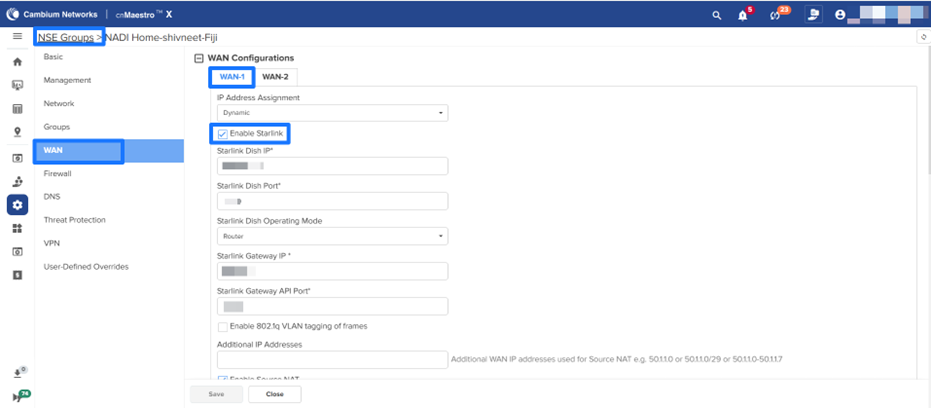
1. Ensure the **“Enable Starlink”** option is enabled in **NSE Group → WAN**.
2. Configure the **Starlink Dish IP address** correctly.
3. Verify that an **NSE device** is operating on the network to establish communication with the Starlink device.
### Starlink Device Monitoring:
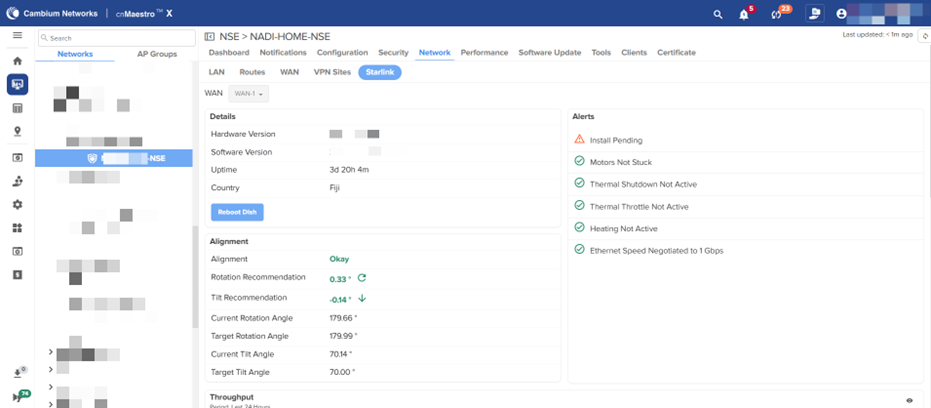
Navigate to **NSE \> Network \> Starlink** to monitor Starlink device information, Alignment, and Alerts. Additionally, it is possible to reboot Starlink devices from cnMaestro.
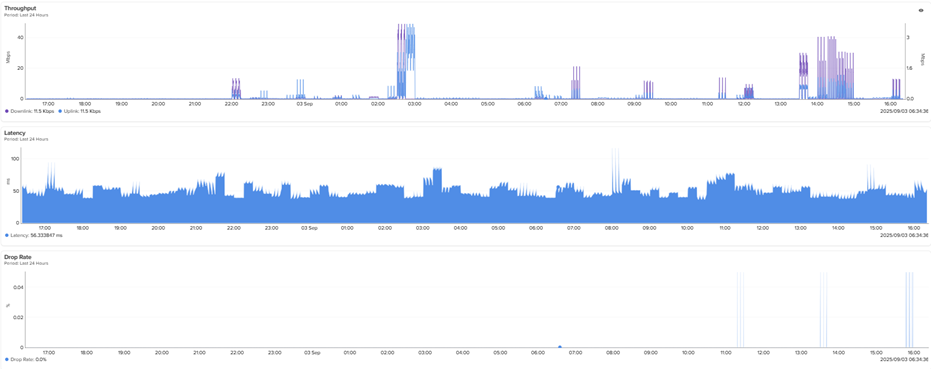
View Starlink WAN performance through charts for:
- **Throughput**
- **Latency**
- **Drop rate**
## Support for New cnMatrix Multi-GigE Switches (Early Access)
Added support for the new cnMatrix multi-GigE switch models below:
**EX3030RM-P**
**EX3052RM-P**
## Webhooks Support :cnmx:
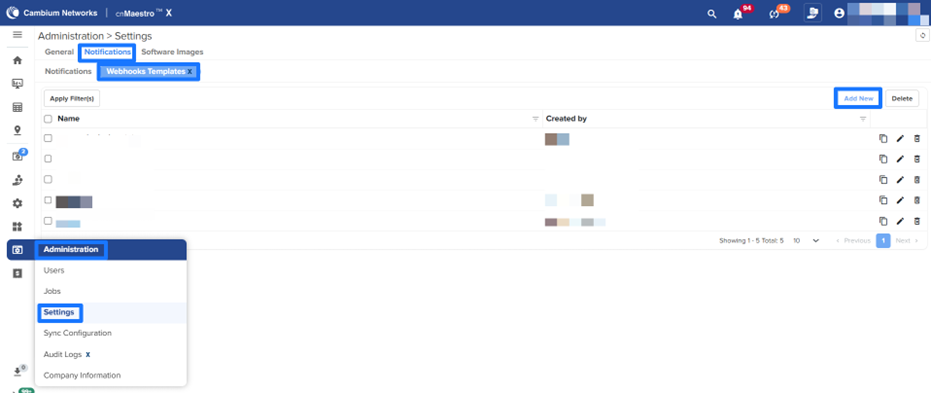
Added Webhooks support, enabling real-time alarm notifications to be sent to a configured third-party URL or application via HTTPS POST requests. Users must first configure a Webhooks template and then set up notifications to be delivered to the Webhooks URL or application.
**Configuring Webhook Template**
To configure the Webhook template, navigate to **Administration** \> **Settings \> Notifications** \> **Webhooks Templates X** and click **Add New**
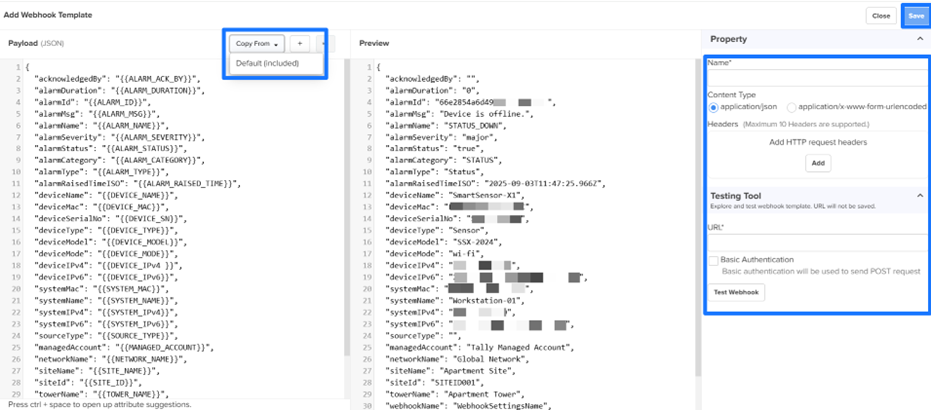
Provide the Webhooks payload template in JSON format in the left window. From the Copy From dropdown list, select Default (Included). The Payload window populates the default JSON payload format. Users can add additional variables by clicking the add attributes (+) icon. The Preview window on the right displays a sample payload output with example values.
Enter the Property related parameters.
**Configuring the Notifications**
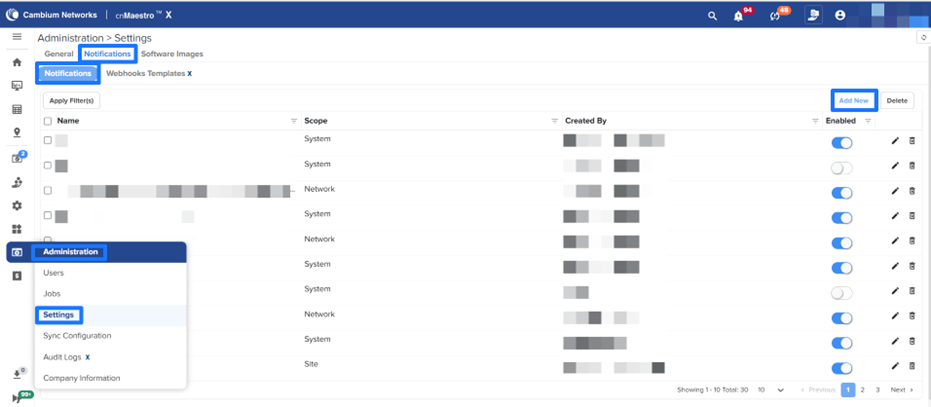
The Notifications feature allows Admin and Super Admin users to configure how cnMaestro sends alert notifications to users.
To configure the Notifications, navigate to **Administration** \> **Settings \> Notifications** \> **Notifications** and click **Add New.**
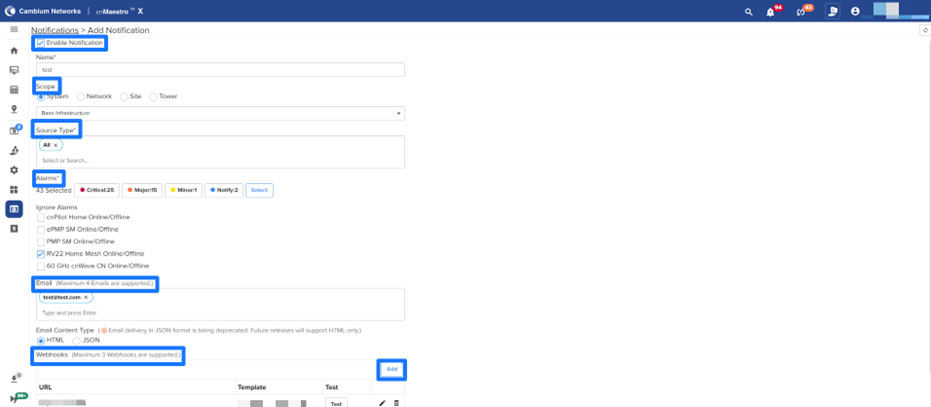
Ensure that the **Enable Notification** option is enabled and provide the necessary parameters as per the requirements.
## Bulk Rename Configuration improvement
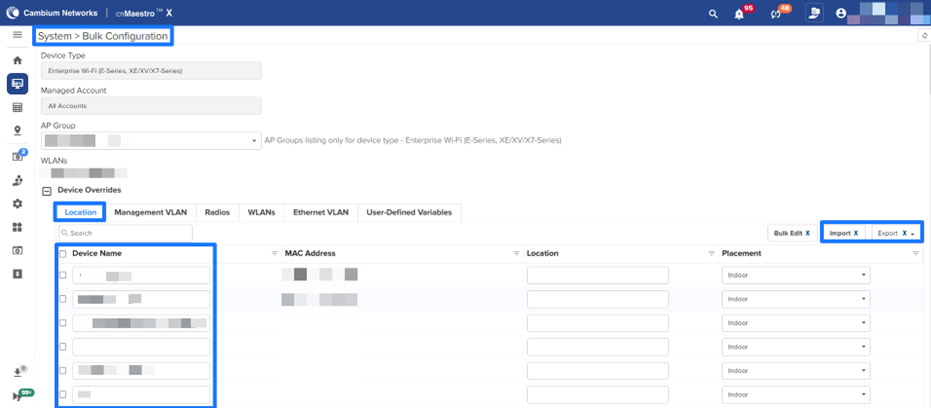
Enterprise Access point Device names can now be updated in bulk using two methods:
- **Direct Edit:** Modify device names directly in the **Device Name** column under the **Location** tab.
- **CSV Import/Export:** Export device details to a CSV file, update the device names, and then re-import the modified CSV file.
## Device Out of Sync Visibility at the Site Level
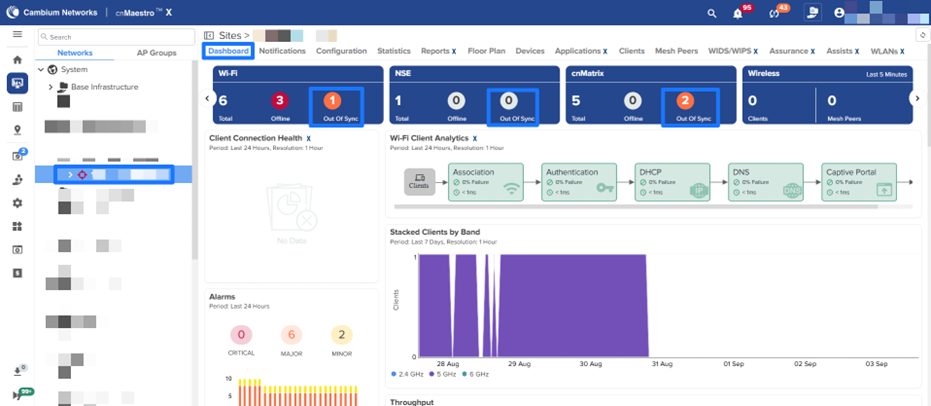
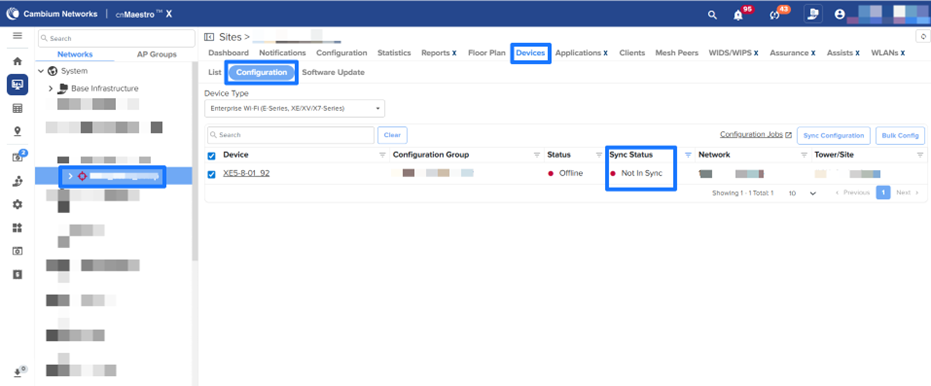
A new KPI has been added to the Site Dashboard that displays the number of enterprise devices currently out of sync. By clicking on the widget, users will be redirected to **Site \> Devices \> Configuration** , with the appropriate filter automatically applied.
## NSE 3000 Features/Enhancements
**Enhanced WAN Monitoring**
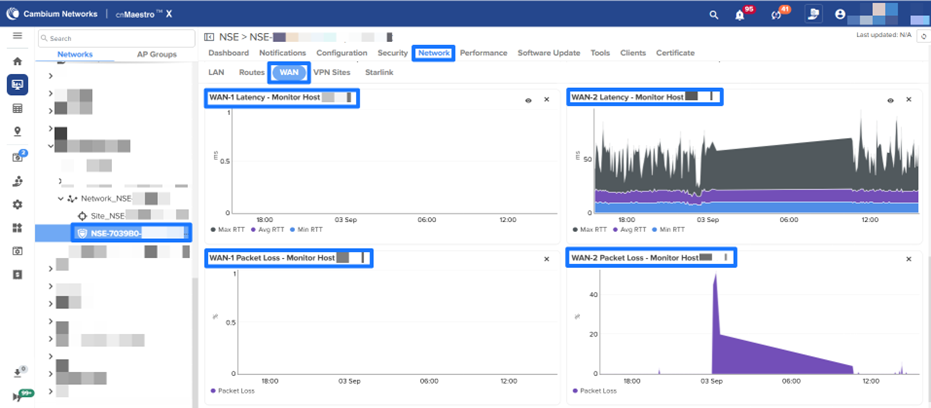
WAN monitoring has been improved to provide deeper visibility into network health. In addition to **speed** and **throughput** , users can now view charts for:
- **Latency**
- **Packet Loss**
To access these charts, navigate to **NSE \> Network \> WAN.**
## Multiple Component Carriers Support in PMP 450v
cnMaestro now supports displaying **Multiple Component Carriers** for the PMP 450v platform across various dashboards and views.
The **AP and SM** can use multiple component carriers simultaneously. The **4×4 PMP 450v** supports up to **four component carriers** , each up to **40 MHz wide** , providing flexibility to adapt to available spectrum in different coverage areas. The 450v is available in both a **4×4 Access Point (AP)** and a **4×4 Subscriber Module (SM)**. These radios support multiple carriers (two 2×2 carriers), enabling placement of four component carriers.
For a detailed explanation of the difference between **Carriers** and **Component Carriers** , refer to **Chapter 1: Configuring Radio Parameters** in the _PMP/PTP 450 Series Configuration Guide_.
**Note:** This enhancement is supported by the PMP 450v devices running version **24.2** and above.
**Enhancements include:**
- **PMP 450v 4×4 AP**
- **PMP 450v 4×4 SM / PMP 450v 2×2 SM**
- **Additional Views**
## Bulk Device Rename support for PON ONUs
Added support for bulk renaming ONU device names, either selectively or all at once, using the Rename option. **Bulk rename** is available at the following levels:
- **Port**
- **OLT**
- **Site**
**ONU Rename**
- Navigate to **Monitor and Manage \> PON \> OLT \> ONUs tab** and select **Rename**.
- Download the **CSV file** , update the device names as required, and then upload the modified file. Click on **Rename**.
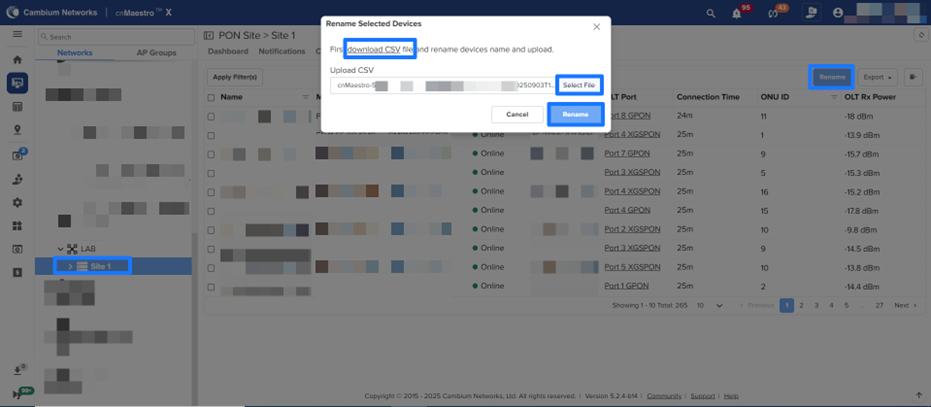
NOTE: This feature is supported only for ONUs and OLTs running firmware version 1.3
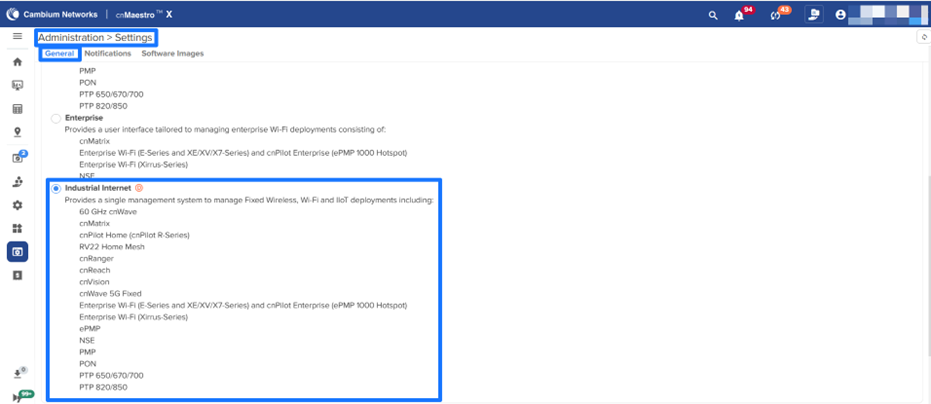
### Deprecation Notice for Account View - Industrial Internet
The **Industrial Internet** Account View in cnMaestro is now deprecated.
## Miscellaneous Enhancements
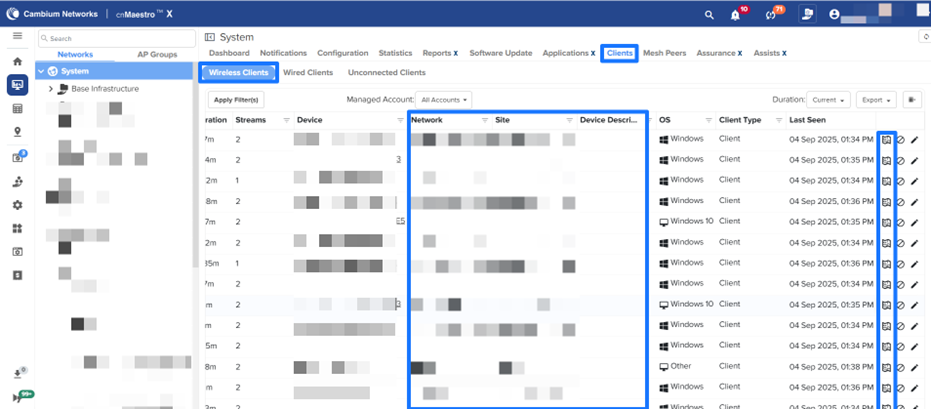
**Enhancements in Client Grid Page**
Added new columns to the Client Grid page for enhanced context and improved visibility in client management.
- **AP Description**
- **Network**
- **Site**
- **Floor Plan Link to View the connected device in Floor Plan.**
**Site Dashboard KPI Change**
The **Offline Last Week** graph has been removed from the Site Dashboard KPI widget for Wi-Fi, cnMatrix, and NSE devices.
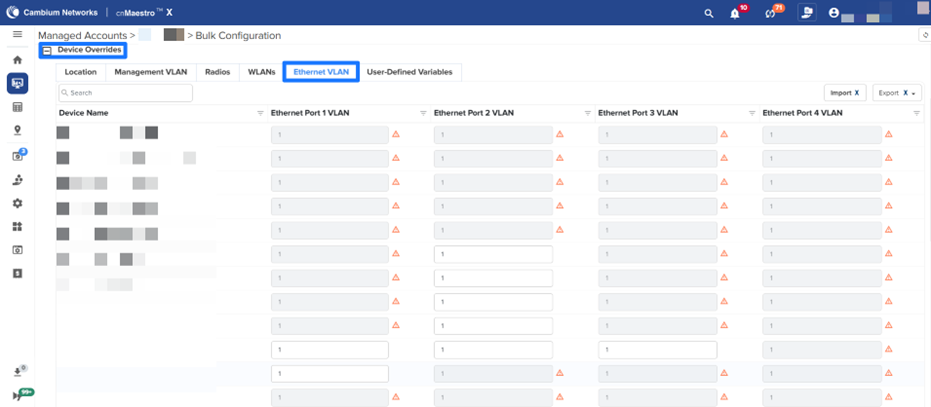
**Ethernet VLAN Configuration for Wi-Fi 6 & 7 APs in Bulk Configuration**
Added Ethernet VLAN configuration under Device Overrides for bulk configuration of Wi-Fi 6 and Wi-Fi 7 APs running version 7.1.1 or later. The management port is read-only, while VLANs for non-management ports can be viewed and dynamically overridden per AP model.
**Note** : This tab won’t be visible for APs having only one Ethernet port.
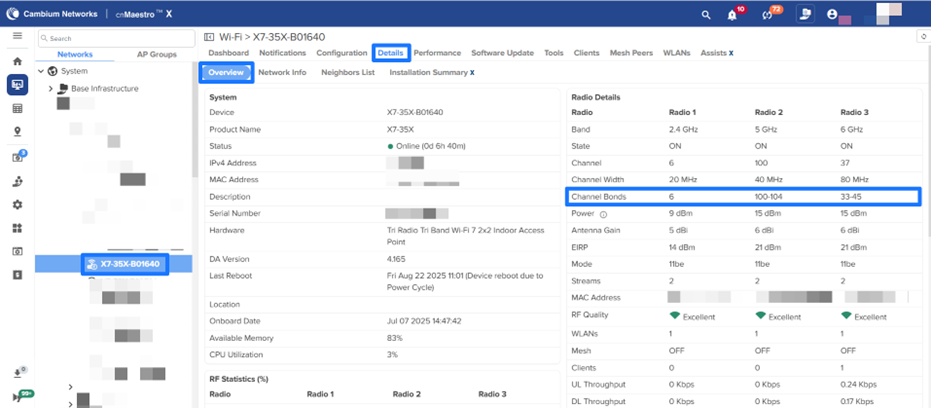
**Channel bonds in the Device details page**
Channel bonding details have been added to the **Device Details \> Overview** page, available for XV, XE, and X7 models.
**cnMatrix Device Configuration Page Update**
The **Sync Config** hyperlink has been removed when a cnMatrix device goes out of sync. Users must now use the **Apply Configuration** option from the device configuration page. The **‘Sync Configuration’** link has been removed for out-of-sync cnMatrix devices. Users should now use **'Apply Configuration** ’ on the device configuration page.
## API Updates :cnmx:
#### Deprecated APIs
| Request Method | Path | Deprecated In | Sunset In | Replacement | Details |
| --- | --- | --- | --- | --- | --- |
| Guest Access API | | | | | |
| GET | /portals | 5.2.0 | 6.1.0 | /api/v2/easypass | The Guest Access Portal feature has been deprecated, and as a result, the associated RESTful APIs have also been deprecated. |
| GET | /portals/{portalName} | 5.2.0 | 6.1.0 | /api/v2/easypass/{portalName} | |
| GET | /portals/{portalName}/events | 5.2.0 | 6.1.0 | /api/v2/easypass/{portalName}/sessions/login\_events | |
| PUT | /portals/{portalName}/whitelist | 5.2.0 | 6.1.0 | /api/v2/easypass/{portalName}/configuration/allowed\_domains | |
| GET | /portals/{portalName}/voucher\_plans | 5.2.0 | 6.1.0 | /api/v2/easypass/{portalName}/voucher\_plans | |
| GET | /portals/{portalName}/vouchers/{voucherPlan} | 5.2.0 | 6.1.0 | /api/v2/easypass/{portalName}/voucher\_plans/{voucherPlan}/vouchers | |
| POST | /portals/{portalName}/vouchers/{voucherPlan}/generate | 5.2.0 | 6.1.0 | /api/v2/easypass/{portalName}/voucher\_plans/{voucherPlan}/vouchers/generate | � |
**Deprecated Fields**
| Request Method | Path | Field Name | Deprecated In | Sunset In | Replacement | Details |
| --- | --- | --- | --- | --- | --- | --- |
| AP Groups | | | | | | |
| GET | /wifi\_enterprise/ap\_groups | auto\_rf\_channel\_selection\_mode | 5.2.1 | 6.1.0 | N/A | These fields are no longer relevant for Auto RF configuration. |
| | | | | | | |
| GET | /wifi\_enterprise/ap\_groups | channel\_utilization\_threshold | 5.2.1 | 6.1.0 | N/A | |
| POST | /wifi\_enterprise/ap\_groups | auto\_rf\_channel\_selection\_mode | 5.2.1 | 6.1.0 | N/A | This field is no longer relevant for Auto RF configuration. |
| | | | | | | |
| PUT | /wifi\_enterprise/ap\_groups/{ap\_group\_name} | auto\_rf\_channel\_selection\_mode | 5.2.1 | 6.1.0 | N/A | |
| Wi-Fi Enterprise | | | | | | |
| GET | /devices/clients | ap\_mac | 5.0.0 | 6.0.0 | device\_mac | The ap\_mac field is deprecated and replaced with a new generic term, device\_mac, to accommodate other non-Wi-Fi device types, such as NSE. For a similar reason, the rx\_bytes and tx\_bytes fields have also been taken out of the radio property of an AP device. |
| GET | /devices/wired\_clients | ap\_mac | 5.0.0 | 6.0.0 | device\_mac | The ap\_mac field is deprecated and replaced with a new generic term, device\_mac, to accommodate other non-Wi-Fi device types, such as NSE. |
| GET | /devices/clients/summary | rate | 5.2.1 | 6.1.0 | tx\_rate | For consistency, the rate field has been deprecated and replaced with a new field, tx\_rate, alongside the introduction of a corresponding rx\_rate field. |
| GET | /devices/clients/summary | client\_type | 5.2.1 | 6.1.0 | os | The client\_type field was capturing the OS information, which was incorrect. So replaced it with a new field os. |
**Update Notice for Existing APIs**
| Request Method | Path | Details |
| --- | --- | --- |
| Device | | |
| GET | /api/v2/devices | Added new property ‘is\_pop’ for 60 GHz cnWave devices. |
| Access Control Policy | | |
| GET | /api/v2/wifi\_enterprise/access\_control | Added support to filter by acp\_type |
| Sites | | |
| GET | /api/v2/networks/{network\_id}/sites | Added support to filter by type and it’s applicable for wireless sites (home |
| NSE Groups | | |
| POST | /api/v2/nse/nse\_groups | Added support for Starlink configuration (starlink\_enable, starlink\_dish\_ip, starlink\_dish\_port, starlink\_dish\_mode, starlink\_dish\_grpc\_reflection\_ip, starlink\_dish\_grpc\_reflection\_port) under WAN interfaces and device\_identity under VLANs for NSE Groups. |
| PUT | /api/v2/nse/nse\_groups/{nse\_group\_name} | Added support for Starlink configuration (starlink\_enable, starlink\_dish\_ip, starlink\_dish\_port, starlink\_dish\_mode, starlink\_dish\_grpc\_reflection\_ip, starlink\_dish\_grpc\_reflection\_port) under WAN interfaces and device\_identity under VLANs for NSE Groups. |
| GET | /api/v2/nse/nse\_groups | Added support for Starlink configuration (starlink\_enable, starlink\_dish\_ip, starlink\_dish\_port, starlink\_dish\_mode, starlink\_dish\_grpc\_reflection\_ip, starlink\_dish\_grpc\_reflection\_port) under WAN interfaces and device\_identity under VLANs for NSE Groups. |
| GET | /api/v2/nse/nse\_groups/{nse\_group\_name} | Added support for Starlink configuration (starlink\_enable, starlink\_dish\_ip, starlink\_dish\_port, starlink\_dish\_mode, starlink\_dish\_grpc\_reflection\_ip, starlink\_dish\_grpc\_reflection\_port) under WAN interfaces and device\_identity under VLANs for NSE groups. |
| API Error Responses | | |
| POST, PUT | Applicable for all API endpoints | API error responses now include an ‘allSchemaErrors’ field that provides detailed information about all schema validation failures, based on the underlying JSON Schema validator (AJV). |
#### New APIs
| Request Method | Path | Details |
| --- | --- | --- |
| 60 GHz cnWave Remote Commands | | |
| GET | /api/v2/cnwave60/devices/{mac}/remote\_command/list\_commands | Added support to list supported remote commands for a cnWave60 device. Returns available commands based on device model and software version. |
| GET | /api/v2/cnwave60/devices/{mac}/remote\_command | Added support to get remote command execution results for a 60 GHz cnWave device. Returns command status and output. |
| POST | /api/v2/cnwave60/devices/{mac}/remote\_command | Added support to execute a remote command on a 60 GHz cnWave device. Supports commands like Show Interfaces, Show Routes, Show OpenR Adjacencies, and more. |
| EasyPass Onboarding Users | | |
| GET | /api/v2/easypass/{portalName}/onboarding/users | Added support to retrieve a list of onboarding portal users with optional filters for limit and offset. |
| POST | /api/v2/easypass/{portalName}/onboarding/users | Added support to create a new onboarding user with username, user\_id, email, group, device limits, and expiration settings. |
| PUT | /api/v2/easypass/{portalName}/onboarding/users/{id} | Added support to update existing onboarding user details, including username, email, group, passphrase, device limits, and expiration settings. |
| PUT | /api/v2/easypass/{portalName}/onboarding/users/action | Added support for extend, email, reset, and delete actions on onboarding users. |
## Supported Cambium Products
cnMaestro supports the following Cambium Networks products. The software versions are the **minimum required** to use cnMaestro (not the recommended versions).
| Family | Model | Version |
| --- | --- | --- |
| 60 GHz cnWave | V1000 | 1.0 |
| | V2000 | 1.2.2-beta3 |
| | V3000 | 1.0 |
| | V5000 | 1.0 |
| cnMatrix | EX2000/EX1000 | 2.0.4-r1 |
| | EX3000 | 5.0.1 |
| | EX3024-F | 6.0-r2 |
| cnPilot Home | | |
| | cnPilot R200, R200P | 4.4.2-R2 |
| | cnPilot R201, R201P | 4.4.2-R2 |
| | cnPilot R190V, R190W | 4.4.2-R2 |
| | cnPilot R195P | 4.5.2 |
| | cnPilot R195W | 4.7 |
| cnRanger | Sierra 800 | 1.0.1.0-r1 |
| | Tyndall 101 | 1.0.1.0-r1 |
| | Tyndall 201 | 2.0.0.0-r1 |
| cnReach | N500 | 5.2.17e |
| cnVision | Hub 360r, FLEXr | 4.6 |
| | Client Micro, Mini, Maxr | 4.6 |
| cnWave 5G Fixed | B1000 (BTS) | 2.0 |
| | C100 (CPE) | 2.0 |
| Edge Controller | N/A | 1.0.0 |
| Enterprise Wi-Fi | cnPilot e400/e500 | 2.5.2-r3 |
| | cnPilot e410/e430w/e600 | 3.5.2-R4 |
| | cnPilot e501S/e502S | 3.2.1-r6 |
| | cnPilot e700 | 3.8 |
| | cnPilot e425/e505 | 4.0-r17 |
| | cnPilot e510 | 3.11.4-r9 |
| | XE3-4 | 6.4 |
| | XE3-4TN | 6.5.1 |
| | XE5-8 | 6.4.1-r15 |
| | XV2-2X | 6.1 |
| | XV2-2T0 | 6.4 |
| | XV2-2T1 | 6.4.1-r15 |
| | XV2-21X | 6.5 |
| | XV2-22H | 6.5 |
| | XV2-23T | 6.5 |
| | XV3-8 | 6.0 |
| | X7-35X | 7.0-b14 |
| | X7-53X | 7.1.1 |
| | X7-55X | 7.1.1 |
| ePMP 1000 Hotspot | ePMP 1000 Hotspot | 2.5.2-r3 |
| ePMP | ePMP 1000, Force 180/200 | 2.6.2 |
| | ePMP 2000 | 3.0.1 |
| | ePMP Elevate XM/XW | 3.2 |
| | ePMP Force 190 | 3.5 |
| | ePMP Force 300 | 4.1 |
| | ePMP PTP 550 | 4.1.1 |
| | ePMP Force 130 5 GHz | 4.3.2 |
| | ePMP 3000L | 4.3.2 |
| | ePMP Elevate SXGLITE5, LHG5 | 4.3.2.1 |
| | ePMP Force 130 2.4 GHz | 4.4 |
| | ePMP Force 300-19, 19R, 13 | 4.4 |
| | ePMP 3000 | 4.4.1 |
| | ePMP PTP 550 E | 4.4.2 |
| | ePMP MP 3000 | 4.5 |
| | ePMP Force 300-13L | 4.5.2 |
| | ePMP Force 300-13LC, 22L, 25L | 4.6 |
| | ePMP Force 200L | 4.7.0 |
| | ePMP 4000, Force 400 GPS, 400 CSM, 425 | 5.1.0 |
| | ePMP 4600, ePMP4600L, ePMP Force 4600C, ePMP Force 4525, ePMP Force 4500, ePMP Force 4625 | 5.4.0 |
| NSE | NSE 3000 | 1.2-b5 |
| PMP | PMP 450i, PMP 450, PMP 450m, PMP 430 SM | 22.1.2 |
| | PTP 450, and PTP 450i | 22.1.2 |
| | MicroPoP Omni/Sector | 22.1.2 |
| | PMP 450v | 23.0 |
| PON | TCX16 - 16 port OLT | 1.1.0 |
| | TCX08 - 8 port OLT | |
| | SGX00 - Indoor GPON ONT | |
| | SXX00 - Indoor XGSPON ONT | |
| | SGT00 - Outdoor GPON ONT | |
| | SXT00 - Outdoor XGSPON ONT | |
| PTP | PTP 650 | 01-47 |
| | PTP 670 (650 Emulation) | 01-47 |
| | PTP 670, PTP 700 | 02-67 |
| PTP 820/850 | PTP 820C, 820E, 820F, 820G, 820S | 11.9 |
| | PTP 850C, 850E | 11.9 |
| RV22 Home Mesh | RV22 Home Mesh | 1.0 |
| Xirrus (Enterprise Wi-Fi) | XA4-240 | 8.7.0 |
| | XD2-230 | 8.7.0 |
| | XD2-240 | 8.7.0 |
| | XD4-130 | 8.7.0 |
| | XH2-120 | 8.7.0 |
| | XH2-240 | 8.7.0 |
| | XR-620 | 8.7.0 |
| | XR-630 | 8.7.0 |
| | XR-2226 | 8.7.0 |
| | XR-2236 | 8.7.0 |
| | XR-2247 | 8.7.0 |
| | XR-2426 | 8.7.0 |
| | XR-2436 | 8.7.0 |
| | XR-2447 | 8.7.0 |
| | XR-4426 | 8.7.0 |
| | XR-4436 | 8.7.0 |
| | XR-4447 | 8.7.0 |
**Supported Browsers**
cnMaestro supports the following browsers:
| Platform | Browser | Version |
| --- | --- | --- |
| Linux | Firefox | 45 and above |
| | Chrome | 49 and above |
| MacOS | Safari | 9 and above |
| MS Windows | Microsoft Edge | 44.17763.1.0 |
| | Firefox | 45 and above |
| | Chrome | 49 and above |
## Significant Fixes
The following issues have been fixed:
| ID | Details |
| --- | --- |
| CNSSNG-48275 | SSID name with space with Azure login not working |
| CNSSNG-47977 | The statistics page does not display when a switch group contains 23 or more switches. |
| CNSSNG-47975 | When user adds a new management VLAN, default VLAN management state should get disabled. |
| CNSSNG-47919 | Importing ePSK user list, users cannot connect |
| CNSSNG-47779 | Continue with Email button is greyed out. |
| CNSSNG-47701 | Incorrect utilization Value Returned by GET /devices/{mac}/statistics |
| CNSSNG-47549 | GHH - CnMaestro API support for EasyPass Onboarding creating users |
| CNSSNG-47221 | cnMaestro Cloud: Scheduled Upgrade Starts Immediately Instead of Default Scheduled Time in Software Images Tab |
| CNSSNG-47148 | ‘Subscriber not found’ error observed when attempting to change the owner email from the super-admin account for a RV22 subscriber created under a specific MSP. |
| CNSSNG-47066 | cnMaestro switch port Hierarchy issue from Switch Group |
| CNSSNG-46744 | cnMaestro Cloud: MSP End User Account Incorrectly Shows Software Images Setting Under Jobs |
| CNSSNG-46707 | LACP configuration on AP group reverting |
| CNSSNG-45845 | Multi-user invites getting errors and wrong messages. |
| CNSSNG-45079 | LRM symbol is not getting cleared in Maps if we set false for the last resort metric config from the DN Node\>Config\>Advanced tab |
| CNSSNG-45070 | LRM symbol is not getting cleared in Maps if we undo the last resort metric config from Node\>Config\>Advanced tab |
| CNSSNG-43580 | Same port should be allowed for different protocols in outbound filter rules and table headers should be changed to Source port and Destination Port |
| CNSSNG-36957 | IPv4 to be included as a column for node statistics page of E2E |
| CNSSNG-32313 | The wired client list is empty when navigated back from a client. |
| CNSSNG-31626 | Device type is blank for NSE in System Level reports. |
| CNSSNG-31131 | Navigation is broken when accessed from the Threats bar graph in System and Home in Enterprise View. |
| CNSSNG-27435 | NBI API: Schema error can be misleading |
## Known Issues
This section lists the known issues in the cnMaestro releases:
_\* Reported in Release 5.2.4_
| ID | Details |
| --- | --- |
| CNSSNG-48394\* | UPSK: Cloning WLAN mapped to EasyPass onboarding is giving error error while fetching data. |
| CNSSNG-48159\* | ‘Component Carrier Properties’ are not included in the exported report from PMP AP level \> SMs tab \> Export |
| CNSSNG-47878\* | In column selector, ‘The Component Carrier Properties’ section is displayed even when no Component Carrier check box is selected. |
| CNSSNG-47877\* | Inconsistent Component Carrier sequence across cnMaestro. |
| CNSSNG-47773\* | Remove unsupported alarms in Enterprise view account |
| CNSSNG-46593\* | Unsupported alarms are displaying for devices for cnMatrix, Wi-Fi AP and PON |
| CNSSNG-47207 | Switch Group rename causes cnMatrix devices to go Not In Sync |
| CNSSNG-46883 | Switch group push with Daylight Saving Time is failing with error |
| CNSSNG-46051 | When two devices are added as a hub and use the same NSE groups, both devices get a role as a responder |
| CNSSNG-45998 | Mesh Recovery Enable option is always true from the device override. |
| CNSSNG-45894 | When changing the ‘Theme and Style’, the page property parameters are getting reset. |
| CNSSNG-45803 | Changing the ‘Time Range’ from NSE Site level \> Applications does not update the dashboard results when the Network with special characters. |
| CNSSNG-45149 | Golay config is set to Auto configuration when we change Golay from Maps. |
| CNSSNG-45119 | Channel number is not updated to the new channel when the Primary controller comes back to active state, if we change the channel from Maps when the Backup controller is active. |
| CNSSNG-45116 | Channel Number is showing ‘0’ in node\>dashboard channel widget if we change the channel when the Backup controller is active |
| CNSSNG-45087 | cnMaestro shows IoT Device Identification in Security mode, even if the device is not reporting any stats |
| CNSSNG-45063 | Error Incompatible assigned channel for link is seen when trying to change the channel of the DN-DN offline link. |
| CNSSNG-45062 | Error Given link Name is not in any group is seen when trying to change channel for the CN offline link. |
| CNSSNG-44989 | The Site to site VPN checkbox should be disabled for old customers if they have not enabled it earlier. |
| CNSSNG-44758 | Previous CH req in progress error is seen when the change channel operation is done from maps with an offline link included in the group |
| CNSSNG-44756 | The backup link is not included in the group channel of a sector, even though it is in the same sector. |
| CNSSNG-44747 | Error messages need to be modified for the change channel operation of the offline link. |
| CNSSNG-44623 | Operator User in both Main and MSP should be able to view the Auto VPN Config and Dashboards, as well as the NSE Groups. |
| CNSSNG-44564 | Handling config sync failures in Auto VPN config push |
| CNSSNG-44176 | ePSK functionality is not retained when a WLAN is cloned |
| CNSSNG-41870 | Reboot from the tree menu displays an error: Failed to send Reboot command to device(s) for PTP8xx devices. |
| CNSSNG-41787 | Spare device showing duplicate vulnerability data at the system level. |
| CNSSNG-41725 | When clicking on the count of Alarms in the tools, navigating to Notification\>Alarms, but the filter is not applied based on the severity. |
| CNSSNG-41600 | HA State goes to fault when no clients are connected. |
| CNSSNG-41503 | Unable to see POWER BOOTLOOP detected event. |
| CNSSNG-40814 | Port 6 should be shown as HA in the dashboard port status. |
| CNSSNG-39026 | The remaining time is wrong for End of Day (Midnight) and End of Week (Saturday) for the session duration. |
| CNSSNG-38801 | Device not moving to the correct site/SM when changing subscriber. |
| CNSSNG-36850 | Issue with the Device going out of sync with the PPPoE connection. |
| CNSSNG-36849 | The Chile time zone is missing. |
| CNSSNG-36782 | Home sites are not listed while moving devices from the inventory page. |
| CNSSNG-36723 | Enabling the Show Interfering Sectors should not display all the towers under the network. |
| CNSSNG-36483 | Application and Vulnerability tabs are missing for the wireless clients when NSE is offline. |
| CNSSNG-33861 | Completed reports should be transferred to the Completed Column immediately when the jobs are complete. |
| CNSSNG-33660 | The template should have a scroll bar. |
| CNSSNG-31613 | Reporting layer memory usage. |
| CNSSNG-31029 | For the responder role, the Site-to-Site VPN tunnel, the remote address field is not present. |
| CNSSNG-31006 | If the site contains NSE, cnMatrix, and Wi-Fi AP, the devices are not sorted correctly. |
| CNSSNG-30927 | Modify the remote subnet and local subnet fields under IPsec to have the option to enter the subnet in list form. |
| CNSSNG-30696 | Changes are required if the IKE version 1 is selected. |
| CNSSNG-30691 | Should not allow configuration of duplicate subnets in the remote subnet and the local subnet. |
| CNSSNG-28326 | AP Groups/Sites/Towers list all types of devices while generating reports. |
| CNSSNG-28282 | Scheduled Reports for the Expired device are completed. |
| CNSSNG-28151 | The total device count and count displayed in the Recommended Software metrics do not match. |
| CNSSNG-26911 | The NSE configuration page should use the Management IP as a clickable link, not the WAN Address. |
| CNSSNG-26188 | Error on deleting the NSE device from the inventory page. |
| CNSSNG-25758 | Able to see cnPilot R-series AP Groups in Enterprise View. |
| CNSSNG-25238 | AOS device WebSocket does not disconnect for an X account downgraded to Pure ESS after Retention expired. |
| CNSSNG-25150 | AOS device Configuration Job times out if the Device is in DHCP. |
| CNSSNG-24529 | Multi-floor issue with Firefox browser. |
| CNSSNG-21396 | Issues related to cnMatrix onboarding overrides. |
| CNSSNG-21271 | SM status is missing in the AP details on the map. |
| CNSSNG-21264 | Auto refresh does not work when Site/Tower/Device details are updated in the Network level map. |
| CNSSNG-20745 | AP Count is -1 in Anchor when deregistering the device from Anchor. |
| CNSSNG-19275 | Issues related to offline alarms of expired devices. |
| CNSSNG-19264 | The unmanaged expired device approve button is not disabled. |
| CNSSNG-18923 | After migration Reports Job page is empty due to cached data. Workaround: Clear Cache and Cookies after migration. |
| CNSSNG-16197 | CBSDID search will not work when the device was synced from a tool without obtaining a grant first. Workaround: Perform a CBSDID search from domain proxy view on Cloud to obtain mac address, then perform MAC address search on tool to find the device. |
| CNSSNG-15595 | cnMatrix Hostname falls back to old Hostname if the template is pushed for the first time (if a Switch Group already exists). |
| CNSSNG-15356 | If a device has a weak serial number in a non-CBRS build, and the sector is imported first, the device will not contact cnMaestro. |
| CNSSNG-14030 | CBRS race condition: SM “stuck” in cnMaestro during reparenting if import and start occur as SMs arrive in the onboarding queue. Workaround: To avoid this issue, follow the suggested SM reparenting procedures listed in the latest version of the Cambium CBRS standalone procedures document. |
| CNSSNG-12812 | cnPilot R-series dual radio devices (r-201P, r-195W) AP Group country code/SSID configured from overrides getting applied only to the 2.4 GHz radio. |
| CNSSNG-11389 | Microsoft Edge Browser does not support system OVA file upgrade. Workaround: Use Google Chrome browser |
| CNSSNG-11299 | AP Regulatory Channel list support check needed for checking valid channels. |
## Where to Get Help
There are several places to get help with cnMaestro.
• **[Cambium Community](https://community.cambiumnetworks.com/)**: The cnMaestro Forum provides the best place to ask questions and get up-to-date information.
• **[Cambium Support](https://www.cambiumnetworks.com/support/)**: The Cambium Support team is available 24/7 to answer questions and resolve issues.
---
### Author:  [@Atul\_Kumar1](https://community.cambiumnetworks.com/u/Atul_Kumar1)
#### Post date: [September 24, 2025, 2:32pm UTC](https://community.cambiumnetworks.com/t/cnmaestro-5-2-4-cloud-release-notes/107173/6 "2025-09-24T14:32:36Z")
---
### Author:  [@Trendal\_Toews](https://community.cambiumnetworks.com/u/Trendal_Toews)
#### Post date: [September 28, 2025, 9:28pm UTC](https://community.cambiumnetworks.com/t/cnmaestro-5-2-4-cloud-release-notes/107173/7 "2025-09-28T21:28:15Z")
Where do I find device backup files in cnMaestro?
---
### Author:  [@Lepakshi\_Maheswar\_Ra](https://community.cambiumnetworks.com/u/Lepakshi_Maheswar_Ra)
#### Post date: [September 29, 2025, 9:41am UTC](https://community.cambiumnetworks.com/t/cnmaestro-5-2-4-cloud-release-notes/107173/8 "2025-09-29T09:41:50Z")
Hi @Trendal_Toews ,
Hope you are doing good.
Device configuration backup is **supported only in the On-Premises version** for the following device types:
- Fixed Wireless: PMP, ePMP, cnVision, and cnWave 5G Fixed
- cnReach
In the **Cloud version** , while direct backup functionality is not available, you can still manually download the device configuration. To do this:
1. Navigate to the **Device \> Configuration** section.
2. Click on **View Device Configuration**.
3. Download the configuration by clicking on **Download**
---
### Author:  [@cperalta](https://community.cambiumnetworks.com/u/cperalta)
#### Post date: [October 6, 2025, 4:00pm UTC](https://community.cambiumnetworks.com/t/cnmaestro-5-2-4-cloud-release-notes/107173/9 "2025-10-06T16:00:29Z")
For some reason I don’t receive notification when my device is back online.
---
### Author:  [@Alun\_Haines](https://community.cambiumnetworks.com/u/Alun_Haines)
#### Post date: [October 20, 2025, 12:55pm UTC](https://community.cambiumnetworks.com/t/cnmaestro-5-2-4-cloud-release-notes/107173/10 "2025-10-20T12:55:40Z")
Just a few pieces of feedback regarding this latest update:
- The cnMaestro Notifications only send messages that something has gone down. Previously, it would also send a message that the issue has been cleared, this was a useful notification to see that an issue was resolved and it would be great if this can be reinstated.
- The ability to change the Access Port override on an AP (In my case, needing to set an Access VLAN on ETH3 of an XV2-22H) has been completely removed from the device settings on the cnMaestro page. The only way to access it now is to enter a device override which resets the previously configured settings on that port meaning once I recover this setting I need to manually set the VLAN Override on every AP at the site one by one. This is a useful feature for multi-tenant spaces and would appreciate it if the option can be restored to the settings page.
---
### Author:  [@CAM\_TSK](https://community.cambiumnetworks.com/u/CAM_TSK)
#### Post date: [October 27, 2025, 7:22am UTC](https://community.cambiumnetworks.com/t/cnmaestro-5-2-4-cloud-release-notes/107173/11 "2025-10-27T07:22:27Z")
@Alun_Haines
The **Ethernet configuration for XV2-22H devices** from the **Device Dashboard** is supported starting with **cnMaestro release 5.2.4** and **AP software release 7.1**.
Could you please confirm the **software versions** of your cnMaestro and AP?
Earlier cnMaestro versions do **not support this functionality**. As a workaround, you can use **USER-DEFINED-OVERRIDES** with a **MACRO** to configure Ethernet settings.
---
### Author:  [@Alun\_Haines](https://community.cambiumnetworks.com/u/Alun_Haines)
#### Post date: [November 20, 2025, 10:37am UTC](https://community.cambiumnetworks.com/t/cnmaestro-5-2-4-cloud-release-notes/107173/12 "2025-11-20T10:37:07Z")
Thank you for your reply.
I can assure you that on the XV2-22H this functionality was there as default and did not require the override to be used as this was how the APs were configured before the update.
Kind Regards
---
### Author:  [@system](https://community.cambiumnetworks.com/u/system)
#### Post date: [February 18, 2026, 10:37am UTC](https://community.cambiumnetworks.com/t/cnmaestro-5-2-4-cloud-release-notes/107173/13 "2026-02-18T10:37:10Z")
This topic was automatically closed 90 days after the last reply. New replies are no longer allowed.