# cnMedusa |Software: CANOPY 16.1 AP | VLAN configuration required for customers
**URL:** https://community.cambiumnetworks.com/t/cnmedusa-software-canopy-16-1-ap-vlan-configuration-required-for-customers/64816
**Category:** PMP
**Created:** [January 2, 2020, 2:21pm UTC](https://community.cambiumnetworks.com/t/cnmedusa-software-canopy-16-1-ap-vlan-configuration-required-for-customers/64816 "2020-01-02T14:21:08Z")
**Posts on this page:** 3
**Page:** 1
### Author:  [@KashifKhan83](https://community.cambiumnetworks.com/u/KashifKhan83)
#### Post date: [January 2, 2020, 2:21pm UTC](https://community.cambiumnetworks.com/t/cnmedusa-software-canopy-16-1-ap-vlan-configuration-required-for-customers/64816/1 "2020-01-02T14:21:08Z")
Hi Community Members,
I've just deployed cnMedusa at one of our office location and establish wireless connectivity initially with 1 SM. Currently I feel that may be there is some VLAN configuration issue because I'm unable to receive the ping response from customer end connectivity IP pool while management IP pool is pingable. I've configured 2 VLANs in cnMedusa, first for management (VLAN=101) and second for data (VLAN=102).
Kindly share standard VLAN configuration examples to cross check with our current VLAN configurations. Further I've also attached current active VLAN configuration snap for your reference.
Waiting your swift responses.
BR,
Kashif Khan,
Cell# +923018273347
- [cnMedusa AP & SM VLAN Active Configuration.jpg](https://d1okf4ta8xniw3.cloudfront.net/original/2X/f/fc117a25dc093e761532bd0bccff70421a8f2376.jpeg) (135 KB)
---
### Author:  [@Chris\_Fikert](https://community.cambiumnetworks.com/u/Chris_Fikert)
#### Post date: [January 2, 2020, 10:17pm UTC](https://community.cambiumnetworks.com/t/cnmedusa-software-canopy-16-1-ap-vlan-configuration-required-for-customers/64816/2 "2020-01-02T22:17:44Z")
Hi Kashif Khan, please see these posts for information about VLAN setup:
[http://community.cambiumnetworks.com/t5/PMP-Getting-Started/VLAN-Engineering-and-Design/m-p/39292/highlight/true#M46](https://community.cambiumnetworks.com/t/vlan-engineering-and-design/40008)
[http://community.cambiumnetworks.com/t5/PMP-Best-Practices-and-Examples/How-to-configure-PMP450-VLAN-tagging/m-p/51009/highlight/true#M19](https://community.cambiumnetworks.com/t/how-to-configure-pmp450-vlan-tagging/44247)
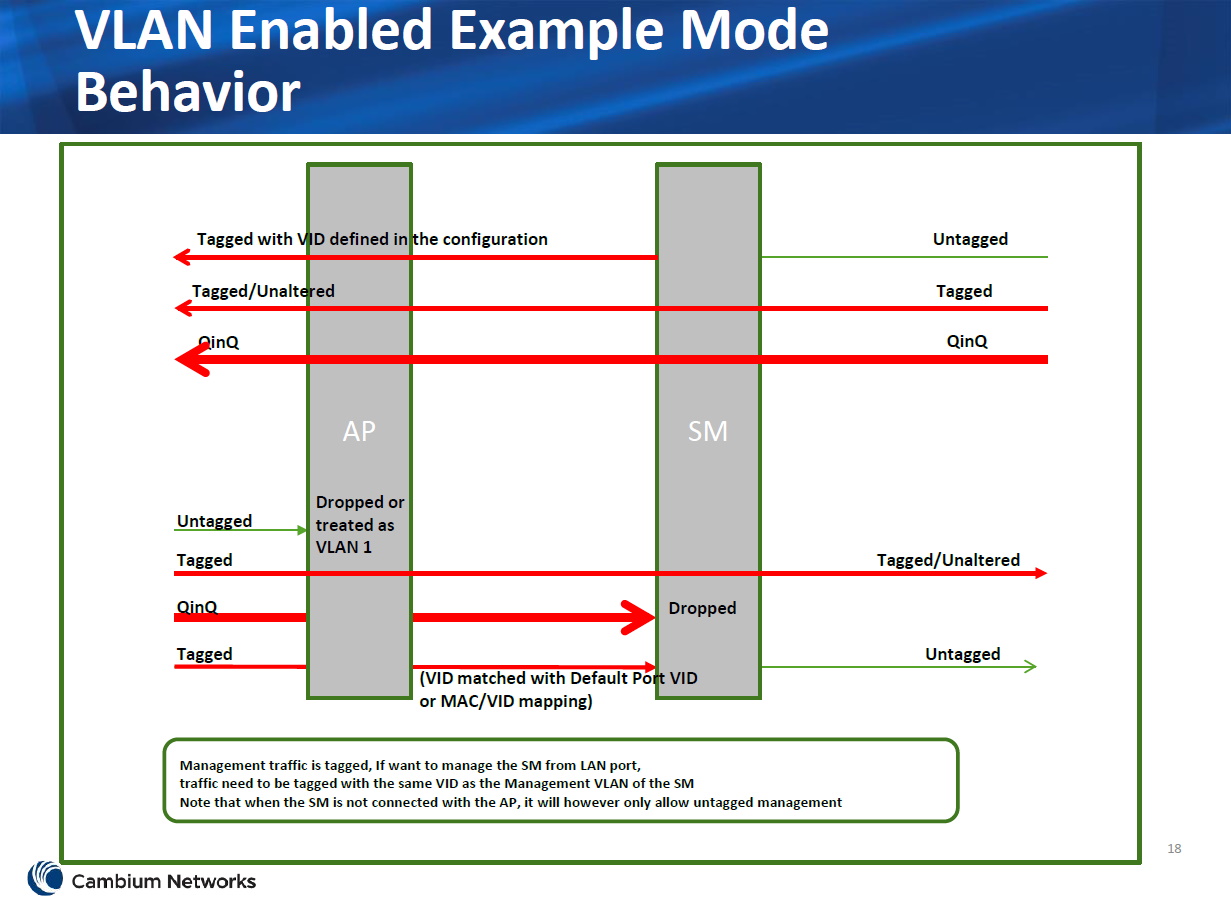
If I understand correctly, you can't ping devices on VLAN102. I think you need to set the SM default port VID (not provider VID) to 102. More information is available in the User Guide, page 74 and planning guide, page 172.
---
### Author:  [@Chris\_Fikert](https://community.cambiumnetworks.com/u/Chris_Fikert)
#### Post date: [January 2, 2020, 10:21pm UTC](https://community.cambiumnetworks.com/t/cnmedusa-software-canopy-16-1-ap-vlan-configuration-required-for-customers/64816/3 "2020-01-02T22:21:53Z")
This picture may help with the logic/flow.