# cnPilot guest wifi isolation
**URL:** https://community.cambiumnetworks.com/t/cnpilot-guest-wifi-isolation/82627
**Category:** Enterprise Wi-Fi Networks
**Created:** [November 24, 2021, 4:48pm UTC](https://community.cambiumnetworks.com/t/cnpilot-guest-wifi-isolation/82627 "2021-11-24T16:48:26Z")
**Posts on this page:** 11
**Page:** 1
### Author:  [@zoltanjuhasz](https://community.cambiumnetworks.com/u/zoltanjuhasz)
#### Post date: [November 24, 2021, 4:48pm UTC](https://community.cambiumnetworks.com/t/cnpilot-guest-wifi-isolation/82627/1 "2021-11-24T16:48:27Z")
Hi!
Is it possible to set Layer 2 isolation in AP?
Do connected clients not discover each other with software like Fing or Wifiman?
For other products it is possible to disable MAC forwarding, for Ruckus MAC whitelist, for Mikrotik disable default forwarding, or for Zyxel enable layer 2 isolation.
Thank you!
---
### Author:  [@maxwire](https://community.cambiumnetworks.com/u/maxwire)
#### Post date: [November 24, 2021, 5:30pm UTC](https://community.cambiumnetworks.com/t/cnpilot-guest-wifi-isolation/82627/2 "2021-11-24T17:30:33Z")
There is isolation in cnpilot home
You can do pretty much anything you want in cnpilot enterprise
---
### Author:  [@zoltanjuhasz](https://community.cambiumnetworks.com/u/zoltanjuhasz)
#### Post date: [November 24, 2021, 7:04pm UTC](https://community.cambiumnetworks.com/t/cnpilot-guest-wifi-isolation/82627/3 "2021-11-24T19:04:07Z")
Can you show me how I can do this setup?
I would be grateful
---
### Author:  [@DaveClelland](https://community.cambiumnetworks.com/u/DaveClelland)
#### Post date: [November 24, 2021, 8:58pm UTC](https://community.cambiumnetworks.com/t/cnpilot-guest-wifi-isolation/82627/4 "2021-11-24T20:58:37Z")
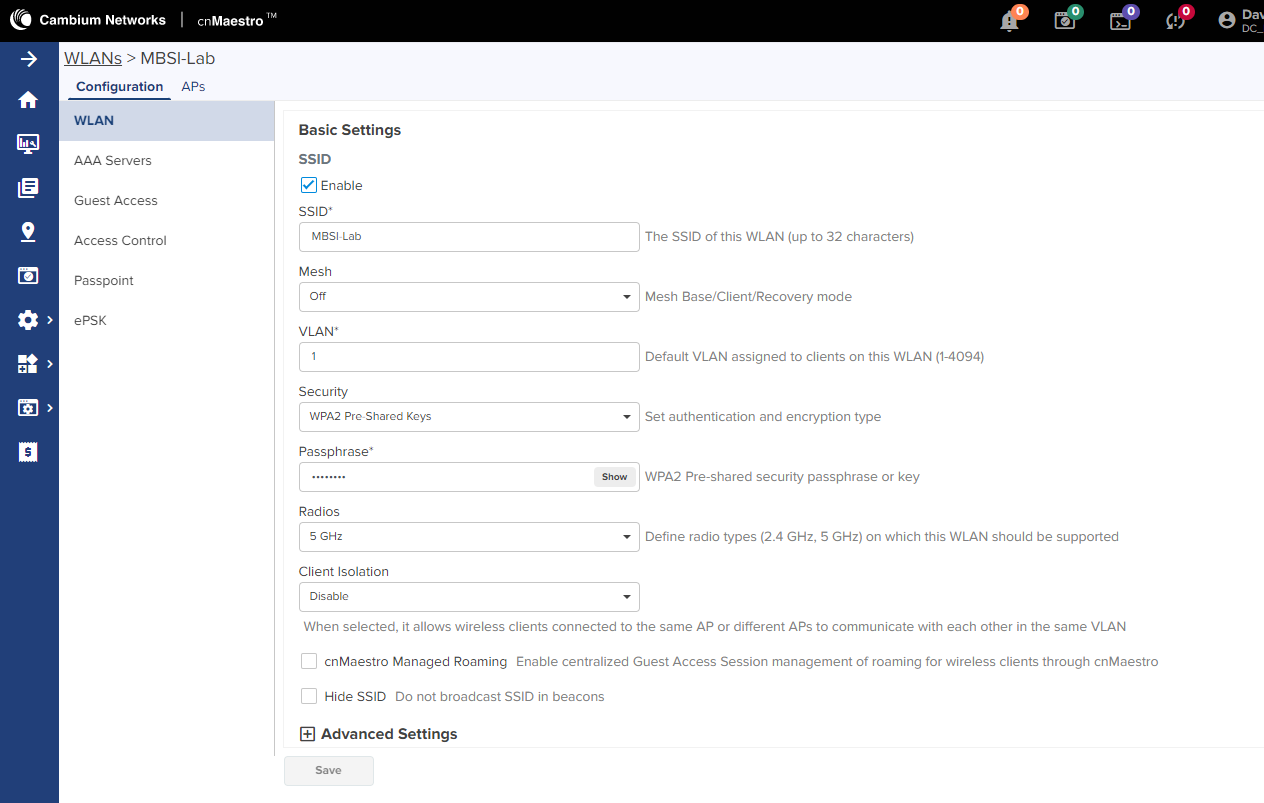
Its called Client isolation in the WLAN. Disable means that clients can learn each other, Enable means that clients can only see the default gateway, so no client to client communications in the Wifi network.
---
### Author:  [@zoltanjuhasz](https://community.cambiumnetworks.com/u/zoltanjuhasz)
#### Post date: [November 24, 2021, 9:10pm UTC](https://community.cambiumnetworks.com/t/cnpilot-guest-wifi-isolation/82627/5 "2021-11-24T21:10:25Z")
I have made this setting, here is my config:

The guest vlan works perfectly, they only reach what I allow on the network, ping does not work between them.
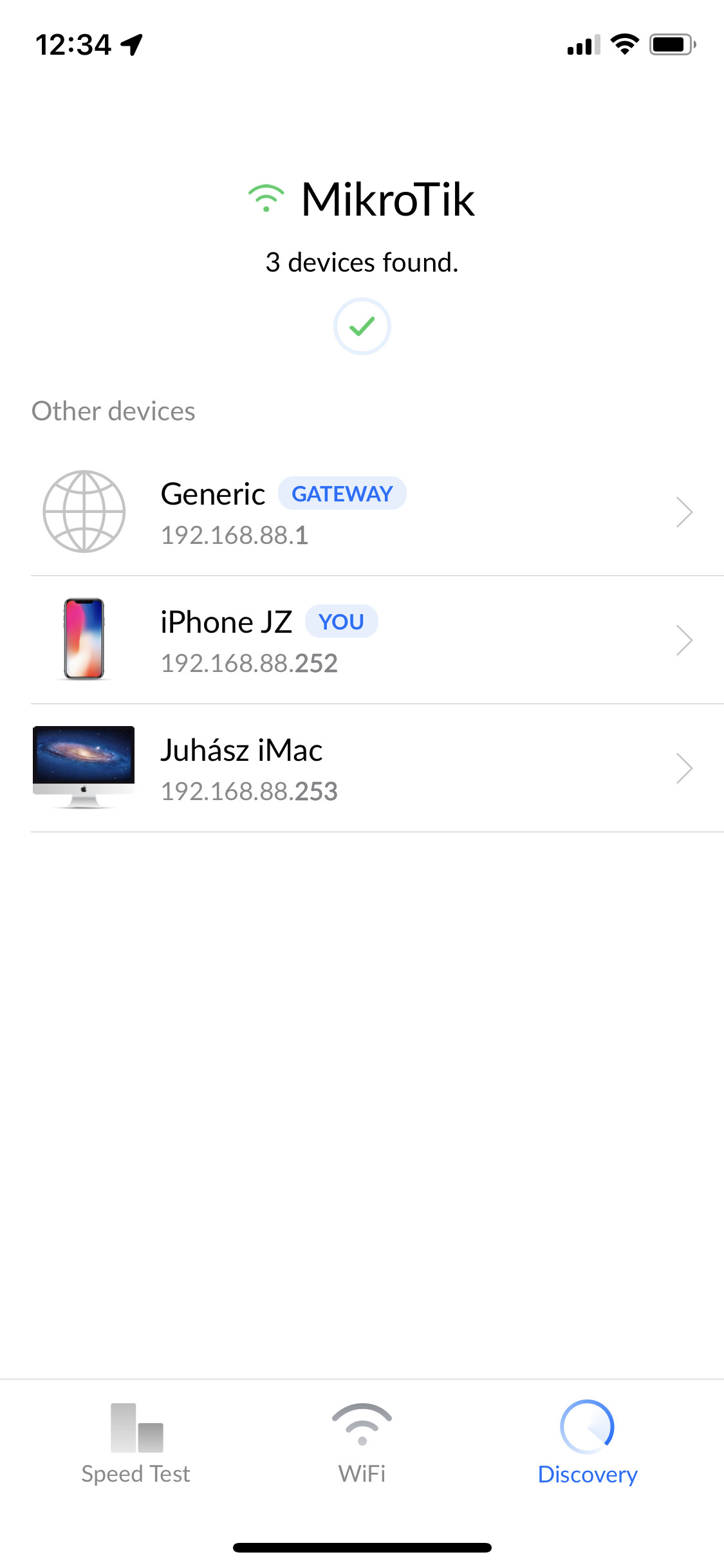
But the discovery software (mobile app) Wifiman and Fing can see other clients on the network.

Discovery works

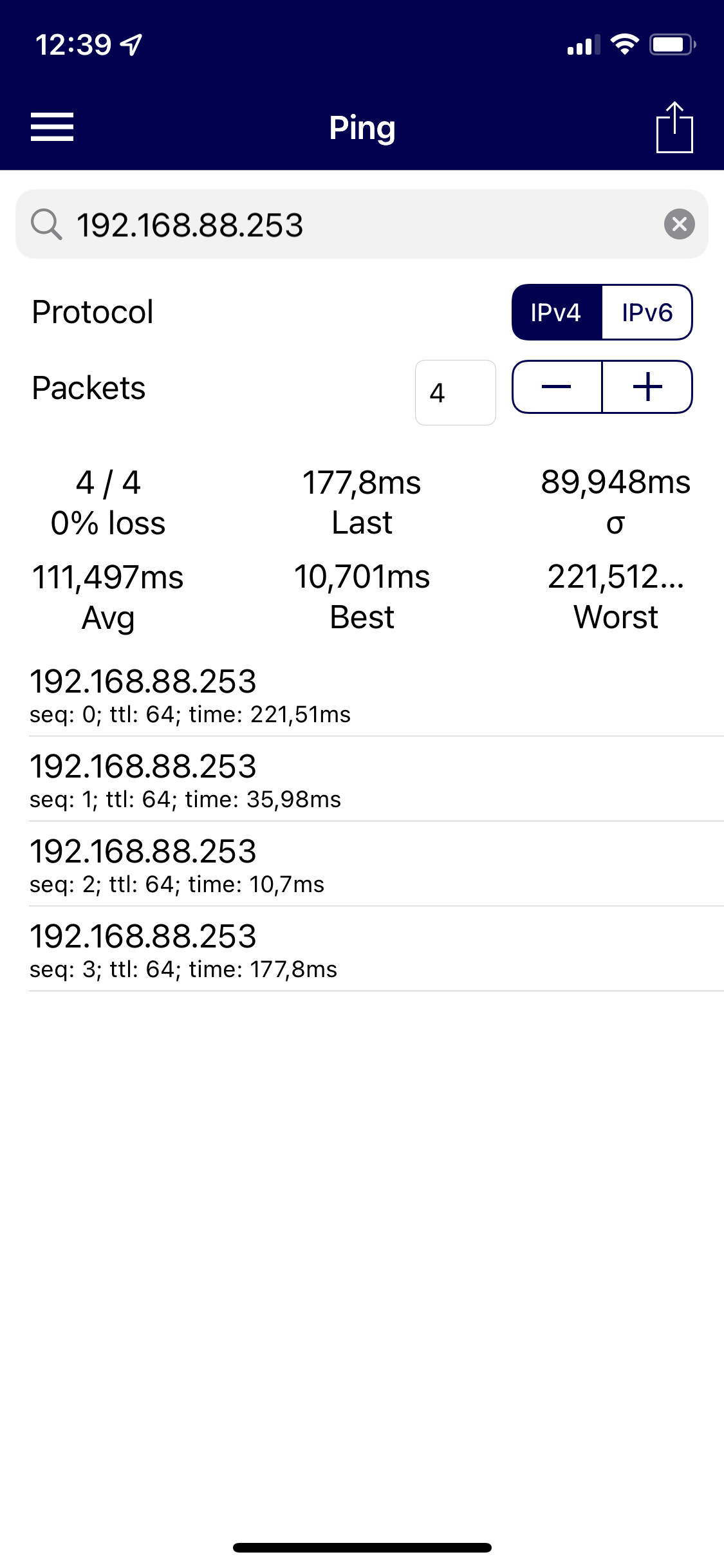
Ping doesnt work.
---
### Author:  [@DaveClelland](https://community.cambiumnetworks.com/u/DaveClelland)
#### Post date: [November 24, 2021, 11:47pm UTC](https://community.cambiumnetworks.com/t/cnpilot-guest-wifi-isolation/82627/6 "2021-11-24T23:47:31Z")
That is what you should expect. The way wifi works is that every client and AP need to see each other so that the contention mechanism works…otherwise, RF collisions would hurt capacity. But not being able to communicate between clients is expected.
---
### Author:  [@zoltanjuhasz](https://community.cambiumnetworks.com/u/zoltanjuhasz)
#### Post date: [November 25, 2021, 11:53am UTC](https://community.cambiumnetworks.com/t/cnpilot-guest-wifi-isolation/82627/7 "2021-11-25T11:53:47Z")
Mikrotik simple wifi settings, ping and device discover works:
If I uncheked the Default Forward, ping and device discover not working annymore.


It shows the discovery app I’m alone, but that’s not true.
The question is, is it possible with the cnPilot AP?
---
### Author:  [@CAM\_TSK](https://community.cambiumnetworks.com/u/CAM_TSK)
#### Post date: [November 25, 2021, 3:49pm UTC](https://community.cambiumnetworks.com/t/cnpilot-guest-wifi-isolation/82627/8 "2021-11-25T15:49:25Z")
@zoltanjuhasz
If neighbor device discovery mechanism is either using Multicast or broadcast packets, yes you will still see the neighbors but you cannot pass any traffic between clients.
However, with client isolation enabled, do enable drop multicast and this will help reduce neighbour devices. Please follow steps below:
> [@Isolating devices Casting devices (Chromecast / Apple TV / Android TV Box) on the WLAN](https://community.cambiumnetworks.com/t/isolating-devices-casting-devices-chromecast-apple-tv-android-tv-box-on-the-wlan/63167):
>
> Scenario: In Hotel / School Environment Guests connect Multiple Apple TVs, Chromecast, Android TV Box to the WLAN. This will make network vulnerable where anyone can cast screens / videos / pictures to any casting devices. Protocol used by Casting devices is Multicast DNS (mDNS) to discover and cast from the client devices. Procedure: Configure the WLAN as follows: Enable Network Wide client isolation \>\> Client Isolation : Network Wide Static Add Gateway MAC and DHCP server MAC to the clien…
---
### Author:  [@zoltanjuhasz](https://community.cambiumnetworks.com/u/zoltanjuhasz)
#### Post date: [November 26, 2021, 9:26am UTC](https://community.cambiumnetworks.com/t/cnpilot-guest-wifi-isolation/82627/9 "2021-11-26T09:26:16Z")
Thank you for your efforts, it seems we are on the right track, but it did not bring the desired result.
Here is the Zyxel solution:

Zyxel Knowledge Base Article: [How to isolate guest wifi from accessing main resource on NAP series?](https://kb.zyxel.com/KB/searchArticle!gwsViewDetail.action?articleOid=016264&lang=EN)
It is working very well.
Found an older post by firefly from Cambium.
> [@Installation best practice: use ACLs to filter unneeded multicast and broadcast](https://community.cambiumnetworks.com/t/installation-best-practice-use-acls-to-filter-unneeded-multicast-and-broadcast/48185):
>
> Broadcast and Multicast packets are transmitted typically at slower data rates that take up more airtime. They are also typically buffered up on the AP for clients that are in a power-save sleep mode, and transmitted only at DTIM (periodic beacon intervals), which can cause issues related to queuing. While many broadcast and multicast packets are important for normal network operation as well as specific applications on the client (video streaming etc), depending on your network and application…
I think this is the solution:
| Rule | Description |
| --- | --- |
| `acl deny mac 17 any ff:ff:ff:ff:ff:ff out` | deny L2 broadcast packets going on air |
| `acl permit mac 24 any any any` | allow all other packets in both the directions |
but something is missing, because this rule blocks communication between clients, but it also blocks the Internet connection.
Where did I make a mistake with the setting?
---
### Author:  [@CAM\_TSK](https://community.cambiumnetworks.com/u/CAM_TSK)
#### Post date: [November 26, 2021, 11:32am UTC](https://community.cambiumnetworks.com/t/cnpilot-guest-wifi-isolation/82627/10 "2021-11-26T11:32:26Z")
Please apply below rules in WLAN profile in addition to Client Isolation and Drop multicast:
| Rule | Description |
| --- | --- |
| `acl permit proto 5 tcp any any any any any` | **Allow all TCP connections in both the direction** |
| `acl permit proto 6 udp any 68 and 67 in ` | **Allow incoming DHCP discover packets** |
| `acl permit proto 7 udp any 67 any any out ` | **Allow DHCP offer packet in WLAN out bound direction** |
| `acl deny proto 8 udp any 137 any any any ` | **Block Windows NetBios packets in both the direction** |
| `acl deny proto 9 udp any 138 any any any ` | **Block Windows NetBios packets in both the direction** |
| `acl deny ip 10 any 224.0.0.0/240.0.0.0 in` | **Block all incoming multicast packets** |
| `acl deny proto 11 udp any 68 any 67 out ` | **Block DHCP Discover going on air** |
| `acl deny mac 12 any 11:11:11:11:11:11 out` | **Block Cambium AP Multicast packet going on air** |
| `acl deny mac 13 any ff:ff:ff:ff:ff:ff out ` | **Block ARP packets going on air** |
| `acl permit ip 14 any any any ` | **Allow all other IP packets in both the direction** |
---
### Author:  [@zoltanjuhasz](https://community.cambiumnetworks.com/u/zoltanjuhasz)
#### Post date: [November 26, 2021, 2:59pm UTC](https://community.cambiumnetworks.com/t/cnpilot-guest-wifi-isolation/82627/11 "2021-11-26T14:59:31Z")
Thanks for the help!
Now it works as I want, the discovery software shows that I am alone.
I analysed the traffic with the wire shark and disabling the broadcast packets solved the problem.
It works perfectly with the correct ACL rules.