# DHCP Server via CNMaestro for CNMatrix
**URL:** https://community.cambiumnetworks.com/t/dhcp-server-via-cnmaestro-for-cnmatrix/89705
**Category:** cnMatrix
**Created:** [November 25, 2022, 12:40pm UTC](https://community.cambiumnetworks.com/t/dhcp-server-via-cnmaestro-for-cnmatrix/89705 "2022-11-25T12:40:21Z")
**Posts on this page:** 9
**Page:** 1
### Author:  [@MarkusSavics](https://community.cambiumnetworks.com/u/MarkusSavics)
#### Post date: [November 25, 2022, 12:40pm UTC](https://community.cambiumnetworks.com/t/dhcp-server-via-cnmaestro-for-cnmatrix/89705/1 "2022-11-25T12:40:21Z")
Hi,
How can I configure 2 DHCP servers on a CNMatrix Swicth via CNMaestro. At the moment it has been programmed directly via the WEB interface. So the Swicth appears in CN Maestro as not in sync. If you then mentally press sync, the DHCP server is gone. I read here that you can do this using user-defined overrides in CNMaestro. How does it work ?
---
### Author:  [@hatt\_mc](https://community.cambiumnetworks.com/u/hatt_mc)
#### Post date: [November 25, 2022, 1:34pm UTC](https://community.cambiumnetworks.com/t/dhcp-server-via-cnmaestro-for-cnmatrix/89705/2 "2022-11-25T13:34:19Z")
Have you set the ip helper address on the router interface? Needs to point towards the DHCP server if you have set the router as the default gateway.
I’m still studying for the ICND2 so someone correct me if I’m wrong
---
### Author:  [@MarkusSavics](https://community.cambiumnetworks.com/u/MarkusSavics)
#### Post date: [November 25, 2022, 1:44pm UTC](https://community.cambiumnetworks.com/t/dhcp-server-via-cnmaestro-for-cnmatrix/89705/3 "2022-11-25T13:44:06Z")
The two DHCP servers work if I configure them directly via the web interface of the switch. But I would like to configure this remotely with CNMaestro. Unfortunately, there is no way to configure the DHCP server in CNMaestro
---
### Author:  [@TamN](https://community.cambiumnetworks.com/u/TamN)
#### Post date: [November 26, 2022, 2:29pm UTC](https://community.cambiumnetworks.com/t/dhcp-server-via-cnmaestro-for-cnmatrix/89705/4 "2022-11-26T14:29:26Z")
Hello, current cnMaestro does not have GUI configuration for DHCP server, but that can be done with CLI commands in the user-defined overrides in the switch group. Keep in mind that the CLI commands in the user-defined overrides in the switch group apply to all the switches in the switch group, which may not be what you want for dhcp server. You can apply the configuration to individual switch in the switch group as well. Here’s is the example of configuring dhcp server in the switch group:
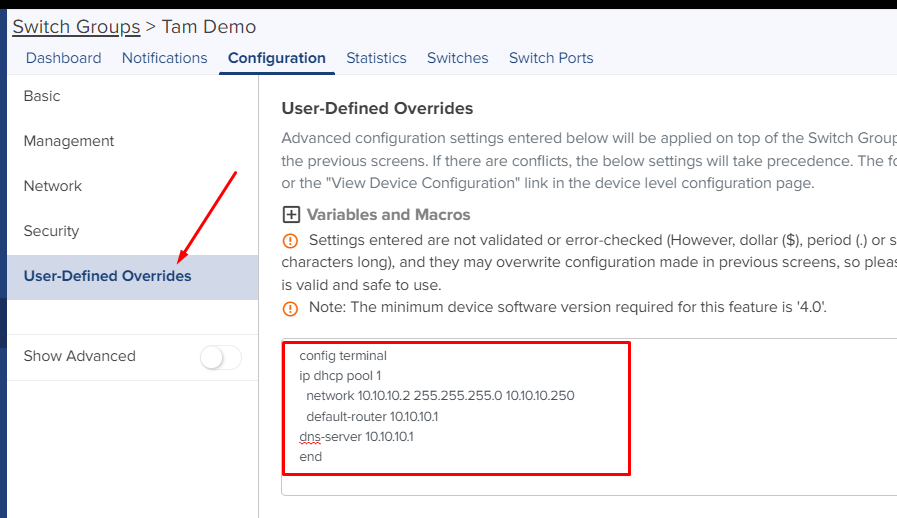
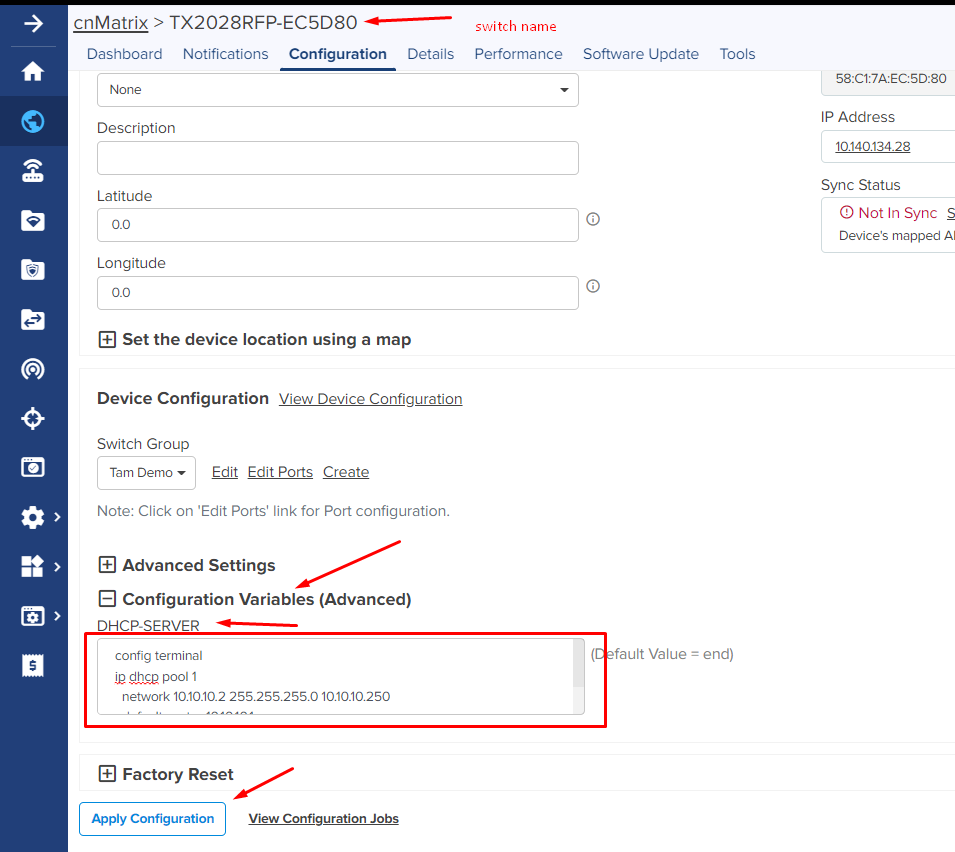
Here’s an example of configuring dhcp server for a particular switch in the switch group:
In the Switch Group’s User-Defined Overrides, enter

Note: You can replace the “DHCP-SERVER” to any name. It is used to identify the configuration variables in the switch configuration below.
Navigate to the Configuration of the switch in the Switch Group that you want to enable DHCP server service, and enter the following commands in the Configuration Variables box under DHCP-SERVER.
config terminal
ip dhcp pool 1
network 10.10.10.2 255.255.255.0 10.10.10.250
default-router 10.10.10.1
dns-server 10.10.10.1
end
---
### Author:  [@MarkusSavics](https://community.cambiumnetworks.com/u/MarkusSavics)
#### Post date: [November 26, 2022, 4:52pm UTC](https://community.cambiumnetworks.com/t/dhcp-server-via-cnmaestro-for-cnmatrix/89705/5 "2022-11-26T16:52:40Z")
Hi,
thanks for your help.
If I have 2 dhcp Server, is the commands ok:
config terminal
ip dhcp pool 10 “Gast”
network 10.10.10.10 255.255.255.0 10.10.10.200
default-router 10.10.10.1
dns-server 8.8.8.8 4.2.2.2
ip dhcp pool 30 “Mitarbeiter”
network 192.168.30.30 255.255.255.0 192.168.30.200
default-router 192.168.30.1
dns-server 8.8.8.8 4.2.2.2
end
---
### Author:  [@TamN](https://community.cambiumnetworks.com/u/TamN)
#### Post date: [November 26, 2022, 6:03pm UTC](https://community.cambiumnetworks.com/t/dhcp-server-via-cnmaestro-for-cnmatrix/89705/6 "2022-11-26T18:03:01Z")
Hi, you need to add ‘exit’ command in between each dhcp pool to exit the dhcp-config mode as shown:
config terminal
ip dhcp pool 10 “Gast”
network 10.10.10.10 255.255.255.0 10.10.10.200
default-router 10.10.10.1
dns-server 8.8.8.8 4.2.2.2
exit
ip dhcp pool 30 “Mitarbeiter”
network 192.168.30.30 255.255.255.0 192.168.30.200
default-router 192.168.30.1
dns-server 8.8.8.8 4.2.2.2
end
---
### Author:  [@MarkusSavics](https://community.cambiumnetworks.com/u/MarkusSavics)
#### Post date: [November 28, 2022, 5:59am UTC](https://community.cambiumnetworks.com/t/dhcp-server-via-cnmaestro-for-cnmatrix/89705/7 "2022-11-28T05:59:49Z")
Thanks. I will test this.
---
### Author:  [@MarkusSavics](https://community.cambiumnetworks.com/u/MarkusSavics)
#### Post date: [December 8, 2022, 8:30am UTC](https://community.cambiumnetworks.com/t/dhcp-server-via-cnmaestro-for-cnmatrix/89705/8 "2022-12-08T08:30:37Z")
Thank you,
Now It Works.
---
### Author:  [@MarkusSavics](https://community.cambiumnetworks.com/u/MarkusSavics)
#### Post date: [September 30, 2026, 3:14pm UTC](https://community.cambiumnetworks.com/t/dhcp-server-via-cnmaestro-for-cnmatrix/89705/10 "2026-09-30T15:14:08Z")
Hi,
now i have swicth form CNMaestro Cloud to the OnPremise CNMaestro.
Now i have the Problem, that the DHCP Server on the switch is not aktive over the ONPremise.
I have wrote in the Switch Profile in User.Definieded Overrides:
${Serverraum=end}
and in the Swicth in **Configuration Variables (Advanced)**
under the Text Serverraum
config terminal
ip dhcp pool 10
network 10.10.10.10 255.255.255.0 10.10.10.200
default-router 10.10.10.1
dns-server 8.8.8.8 4.2.2.2
exit
ip dhcp pool 30
network 192.168.30.30 255.255.255.0 192.168.30.200
default-router 192.168.30.1
dns-server 8.8.8.8 4.2.2.2
end
but the DHCP Server is not enabled