# How to configure port forwarding on cnPilot R-series
**URL:** https://community.cambiumnetworks.com/t/how-to-configure-port-forwarding-on-cnpilot-r-series/86574
**Category:** Residential Wi-Fi
**Created:** [June 16, 2022, 5:44pm UTC](https://community.cambiumnetworks.com/t/how-to-configure-port-forwarding-on-cnpilot-r-series/86574 "2022-06-16T17:44:54Z")
**Posts on this page:** 9
**Page:** 1
### Author:  [@Emenyu\_Jimmy](https://community.cambiumnetworks.com/u/Emenyu_Jimmy)
#### Post date: [June 16, 2022, 5:44pm UTC](https://community.cambiumnetworks.com/t/how-to-configure-port-forwarding-on-cnpilot-r-series/86574/1 "2022-06-16T17:44:54Z")
I am informed the last posting was about 5yrs ago, I dont seem to get a way around port fowarding on this Cambium router, i have a web based System running on port xxxx of a computer with ip y:y:y:y and i want it accessible outside but i cant seem to get a way around it.
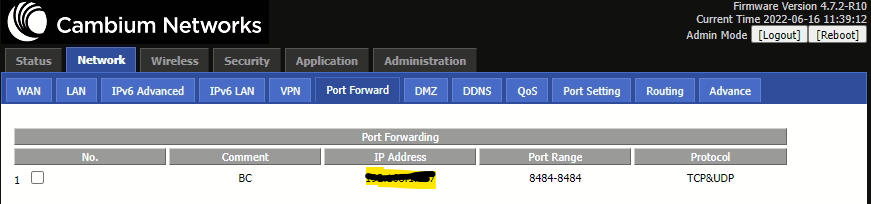
---
### Author:  [@telecomunicazio](https://community.cambiumnetworks.com/u/telecomunicazio)
#### Post date: [June 17, 2022, 7:27pm UTC](https://community.cambiumnetworks.com/t/how-to-configure-port-forwarding-on-cnpilot-r-series/86574/2 "2022-06-17T19:27:39Z")
Never seen an image of cnPilot software.
Well. Same software used by Flyingvoice products. Really interesting…
---
### Author:  [@Kumari\_Smriti](https://community.cambiumnetworks.com/u/Kumari_Smriti)
#### Post date: [June 20, 2022, 11:51am UTC](https://community.cambiumnetworks.com/t/how-to-configure-port-forwarding-on-cnpilot-r-series/86574/3 "2022-06-20T11:51:56Z")
Hi @Emenyu_Jimmy,
Please find below the steps to configure the port forwarding rule:
Navigate to Network-\>Port Forward.
Add LAN host {Destination-192.168.11.185} IP address.
Port number/range and protocol.
Try connecting to the router’s WAN IP + port.
Traffic will be forwarded to the destination LAN host.
Please find below an example of the port-forwarding rule.

**NOTE** : Source IP address was introduced to limit the access to the specific host.
Regards,
Smriti
---
### Author:  [@Julio\_Araujo1](https://community.cambiumnetworks.com/u/Julio_Araujo1)
#### Post date: [October 5, 2022, 12:02am UTC](https://community.cambiumnetworks.com/t/how-to-configure-port-forwarding-on-cnpilot-r-series/86574/4 "2022-10-05T00:02:01Z")
Hi,
I tried to use this service and now it looks like is not working, but I don’t if it worked before as I didn’t find anything with a practical example.
The post above is just showing where to make the configuration, it is not showing it working.
Do you have some test?
Thank you so much.
---
### Author:  [@Jaiprakash\_G](https://community.cambiumnetworks.com/u/Jaiprakash_G)
#### Post date: [October 5, 2022, 10:17am UTC](https://community.cambiumnetworks.com/t/how-to-configure-port-forwarding-on-cnpilot-r-series/86574/5 "2022-10-05T10:17:30Z")
@Julio_Araujo1
Are you only looking for a test case to check if this works or not ?
Or do you need help in setting up port-forwarding to access a LAN host from WAN ?
Please share the scenario which did not work for you.
---
### Author:  [@Julio\_Araujo1](https://community.cambiumnetworks.com/u/Julio_Araujo1)
#### Post date: [October 13, 2022, 2:10am UTC](https://community.cambiumnetworks.com/t/how-to-configure-port-forwarding-on-cnpilot-r-series/86574/6 "2022-10-13T02:10:42Z")
Yes, I’m traying to set that and I’m not getting, I will share the configuration I did soon.
Thanks,
---
### Author:  [@Julio\_Araujo1](https://community.cambiumnetworks.com/u/Julio_Araujo1)
#### Post date: [October 13, 2022, 3:51am UTC](https://community.cambiumnetworks.com/t/how-to-configure-port-forwarding-on-cnpilot-r-series/86574/7 "2022-10-13T03:51:02Z")
When I try to access [https://xx.x.x.x:80](https://xx.x.x.x:80) or x.x.x.x:443. I can see the radio portal but when I try with a different port x.x.x.x:4000 this does not work.

---
### Author:  [@Julio\_Araujo1](https://community.cambiumnetworks.com/u/Julio_Araujo1)
#### Post date: [October 19, 2022, 2:42am UTC](https://community.cambiumnetworks.com/t/how-to-configure-port-forwarding-on-cnpilot-r-series/86574/8 "2022-10-19T02:42:00Z")
Hi all,
We tested setting in this way below and now it is working.

---
### Author:  [@steveschuh](https://community.cambiumnetworks.com/u/steveschuh)
#### Post date: [April 3, 2025, 8:34pm UTC](https://community.cambiumnetworks.com/t/how-to-configure-port-forwarding-on-cnpilot-r-series/86574/9 "2025-04-03T20:34:10Z")
I know this is an old post but I have a couple of questions. What is the difference between the top half of the Port Forward and the bottom half that says Virtual Servers and which should I use and when. The other question is how to use the Src IP field. Is that for security so only a request from that IP gets access. Does leaving it blank let anybody in?