# R195P Routers going offline with cnMaestro
**URL:** https://community.cambiumnetworks.com/t/r195p-routers-going-offline-with-cnmaestro/108433
**Category:** cnMaestro
**Created:** [May 22, 2026, 6:03pm UTC](https://community.cambiumnetworks.com/t/r195p-routers-going-offline-with-cnmaestro/108433 "2026-05-22T18:03:23Z")
**Posts on this page:** 5
**Page:** 1
### Author:  [@steveschuh](https://community.cambiumnetworks.com/u/steveschuh)
#### Post date: [May 22, 2026, 6:03pm UTC](https://community.cambiumnetworks.com/t/r195p-routers-going-offline-with-cnmaestro/108433/1 "2026-05-22T18:03:24Z")
I have two sites using R195P routers. This is a critical application as we are carrying audio to a radio transmitter through these routers. They are going offline every so often. Sometimes a couple of times a day and then they stay up for a few days. I have a ticket on this but I’m not getting anywhere as I’m being told the router is not getting through to the cnMaestro server. The logs show pong not returned from so many pings to the server. The problem is that even though the routers are online and carrying data they seem to be rebooting and then they are totally offline until the reboot is over. I have seen this message in the notifications in cnMaestro.:
rebootReason.DEV\_PING\_TIMEOUT
I have seen this reason too:
Device CLI initiated reboot
I have a ticket on this and I am just being told that the router is losing the ability to reach [cloud.cambiumnetworks.com](http://cloud.cambiumnetworks.com) That is one problem, but the reboots are what is really causing me the headache as our radio station goes off the air during the reboot. I don’t see any settings regarding a watchdog timer in the router menu that I can turn off. Why the router is losing touch with cnMaestro is another question. These are both set as static with our ISP. Does anybody have any ideas on how I can get this fixed? I suppose I could set them to not use cnMaestro but I really like to be able to see them
This is what tech support has told me on my ticket, but it hasn’t helped me figure out what to do next. Here is the word from my ticket:
Hi Steve Schuh,
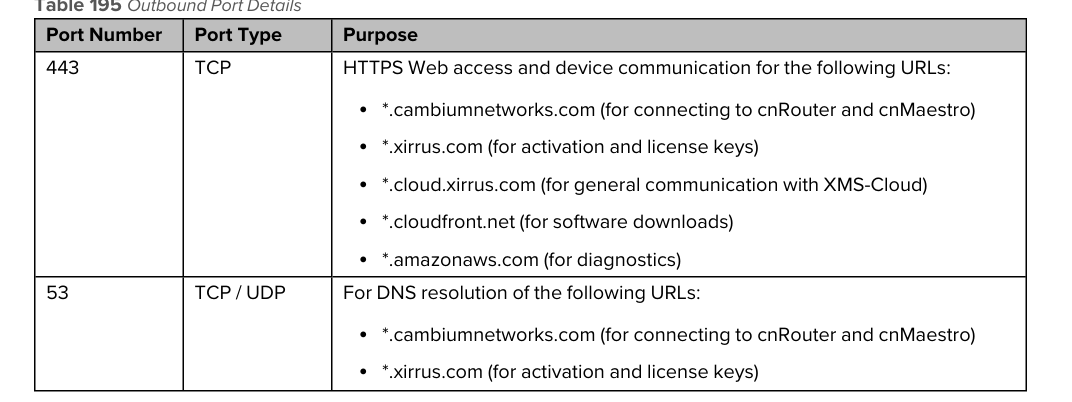
The problem is below, the router can’t reach the [cloud.cambiumnetworks.com](http://cloud.cambiumnetworks.com), please make sure you have firewall rules/internet that are allowed to reach the Cambium cloud.
/var/log/device-agent.log
2026-05-21 00:39:57 27359:Attempting (re)connection in 5 seconds
2026-05-21 00:40:05 27359:da\_use\_IPV6\_preferred 0
2026-05-21 00:40:05 27359:Resolved [cloud.cambiumnetworks.com](http://cloud.cambiumnetworks.com) to IPv4 address
2026-05-21 00:40:05 27359:connect() success
2026-05-21 00:40:05 27359:Connected socket 8 IP [140.190.22.114]
2026-05-21 00:40:05 27359:CheckConnection: [us-e1-s1-cmjbcvncy6.cloud.cambiumnetworks.com](http://us-e1-s1-cmjbcvncy6.cloud.cambiumnetworks.com) is available
2026-05-21 00:40:32 27359:NTPEnabled 1
2026-05-21 00:40:32 27359:handle\_cns\_msg: MSG\_REGISTER\_SUCCESS received
2026-05-21 06:53:30 27359:Not received PONG for the last ping (1)
2026-05-21 06:53:54 27359:Not received PONG for the last ping (2)
2026-05-21 07:21:52 27359:Not received PONG for the last ping (1)
2026-05-21 07:22:15 27359:Not received PONG for the last ping (2)
2026-05-21 07:30:08 27359:Not received PONG for the last ping (1)
2026-05-21 07:30:24 27359:Not received PONG for the last ping (2)
2026-05-21 07:39:02 27359:Not received PONG for the last ping (1)
/var/log/lws.log
2026-05-21 00:40:05:LWS: CAMBIUM: \>\>\>\>\> AWAITING\_TIMEOUT 30
**Device management through cambium cloud: Network port requirement:**
Thanks for any ideas.
Steve
---
### Author:  [@Eric\_Ozrelic](https://community.cambiumnetworks.com/u/Eric_Ozrelic)
#### Post date: [May 22, 2026, 7:27pm UTC](https://community.cambiumnetworks.com/t/r195p-routers-going-offline-with-cnmaestro/108433/2 "2026-05-22T19:27:01Z")
If this is a critical application as you mention, I’d avoid using any of Cambium’s R series wifi routers.
---
### Author:  [@steveschuh](https://community.cambiumnetworks.com/u/steveschuh)
#### Post date: [May 27, 2026, 2:43pm UTC](https://community.cambiumnetworks.com/t/r195p-routers-going-offline-with-cnmaestro/108433/3 "2026-05-27T14:43:05Z")
I have had excellent results using these routers for this application for many years. They have the features I need. I use extensive port forwarding to get inside the network to equipment that I need to control. The security is good if you take the time to commission them properly. I like the cnMaestro management and alerts if there are problems. My question is about a watchdog reboot function that doesn’t seem to be documented. If these routers loose contact with cnMaaestro they are rebooting. If there is no way to turn this off, then I will probably not be able to use cnMaestro. This might be caused by some DNS issues with this particular ISP. I have many at other sites that never go down.
---
### Author:  [@Eric\_Ozrelic](https://community.cambiumnetworks.com/u/Eric_Ozrelic)
#### Post date: [May 27, 2026, 8:47pm UTC](https://community.cambiumnetworks.com/t/r195p-routers-going-offline-with-cnmaestro/108433/4 "2026-05-27T20:47:33Z")
There’s a reason why these routers were EOL’d back in 2025, and haven’t received a firmware update since fall of 2023. I guess my point is that if you’re expecting some sort of support for the unit or update to the firmware to resolve these issues, it’s not going to happen.
---
### Author:  [@system](https://community.cambiumnetworks.com/u/system)
#### Post date: [August 25, 2026, 8:47pm UTC](https://community.cambiumnetworks.com/t/r195p-routers-going-offline-with-cnmaestro/108433/5 "2026-08-25T20:47:47Z")
This topic was automatically closed 90 days after the last reply. New replies are no longer allowed.