# Using RADIUS Server with PMP 450
**URL:** https://community.cambiumnetworks.com/t/using-radius-server-with-pmp-450/44708
**Category:** PMP
**Tags:** knowledge-base
**Created:** [March 23, 2016, 2:46pm UTC](https://community.cambiumnetworks.com/t/using-radius-server-with-pmp-450/44708 "2016-03-23T14:46:01Z")
**Posts on this page:** 2
**Page:** 1
### Author:  [@Chitrang](https://community.cambiumnetworks.com/u/Chitrang)
#### Post date: [March 23, 2016, 2:46pm UTC](https://community.cambiumnetworks.com/t/using-radius-server-with-pmp-450/44708/1 "2016-03-23T14:46:01Z")
This post explains what all can be done with RADIUS server in PMP subsystem.RADIUS can be used to authenticate SM, management users and apply configuration on the Canopy radios.
**Supported RADIUS servers**
Following RADIUS servers are supported by Canopy software.
- freeradius
- ARADIAL
- Microsoft NPS (Software Release 13.4 onward), setup guide [here](https://community.cambiumnetworks.com/t/pmp-13-4-microsoft-radius-support-feature-brief/40466).
- Cisco ACS (Software Release 13.4.1 onward), setup guide [here](https://community.cambiumnetworks.com/t/cisco-acs-radius-server-support/43382).
**Configuring SM for Authentication**
If authentication is set to **RADIUS AAA,** every SM will be registered to AP only after RADIUS authentication is successful.
**Config to be done on AP**

- Enable RADIUS AAA from Security
- Authentication Server IP and sharedsecret.A maximum of 3 RADIUS server can be configured to use.This can provide load balancing or fallback mechanism in case other serverrs are unreachable. Check **Session Status List** , **Configuration ** tab to find which SM is authenticated by which RADIUS server.

**Configuration to be done on SM**

- Select EAP method to be used, we support **PEAP-MSCHAPv2 , TTLS-MSCHAPv2, TTLS-PAP, EAP-MSCHPAv2**
- Enter username, password , this has to be same what is configured in RADIUS users database (for example users.conf file if you are using freeradius)
- Configure the security certificate. Note that Canopy radio verifies certificate sent from RADIUS server , so make sure it is configured same as on both SM and AP.
**Tip:** Authentication mode is governed by AP.Any SM (except a SM that itself has been configured to require RADIUS authentication by enabling Enforce Authentication as described below) is allowed to register to the AP.Its advisablle to keep SM setting as disabled.
**Tip:**
Their can be argument on why one has to touch each and every SM to get it authenticated, which can be a tiring job.
Following approach can be used.
- If **AP** is configured for **RADIUS AAA** authentication , out-of-box SM without any configuration will try to do RADIUS auth and may not be successful for various reason like default certificate or default username/password didnt match. In this case one can optionally Enable this configuration to bypass authentication for ICC SM. Under **Configuration-\> Security -\> Authnetication Server Settings -\> Disable Authentication for SM connected via ICC** , set this to **Enable**.
- Now out-of-box SM (which are ICC enabled) can onboard with AP. After this SM will tries to go for Zero touch configuration and get configuration file download URL from DHCP option 66. Note: This requires a DHCP server with option 66 enabled and set to value of download url like tftp or ftp.To make option 66 URL generic and work for all SM's keep it something like this **tftp://mycompany.com/ ,** SM will automatically append mac address and will actually fetch **tftp://mycompany.com/0a0b0c0d0e0f.cfg**
- SM will fetch configuration file using the download URL. Now in FTP/TFTP server , a per SM configuration file can be created. Configuration file name should be of format **0a0b0c0d0e0f.cfg.** In this configuration file you can set desired color code, radio parameters, RADIUS authentication credentials.
So once configuration is applied and SM reboot, it will go for RADIUA Auth and get authenticated sucessfully.
**Web User Authentication**
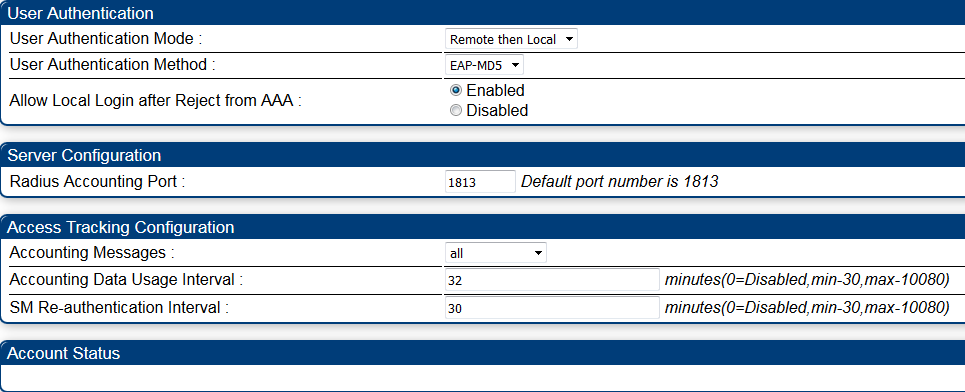
RADIUS server can be used to authentication management users.
To use this feature, enable Authentication Mode to be **Remote or Remote then Local** on AP or SM.
Presently **EAP-MD5** is the only EAP method we support, so make sure the same is available on your RADIUS server. In future software release we will be supporting more stronger authentication methods.
You can optionally configured 'Allow Local Login after Reject from AAA' to be **Enabled,** this will make sure you have acess in case RADIUS server is down.
Note: If RADIUS server is unreachable authentication will fallback to Local regardless of configuration.
Note: Cambium VSA **Cambium-Canopy-UserLevel** must be present in RADIUS server user configuration otherwise the authentication will fail. This VSA can be set to following valid values TECH(1), INSTALL (2), ADMIN (3).
Additionally administrator can add another VSA which control **Cambium-Canopy-UserMode ,** which control whether the radio user will be Read-Only (1) or Read-Write(0). By default logged users will be Read-Write mode.
**Accounting**
Accounting messages can be enabled for RADIUS authenticated SM and users.We support two type of accounting
**dataUsage:** This is per SM based and can be enabled on **AP** only. Accounting messages will be sent periodic based on configuration of **Accounting Interval** _(0=Disabled,min-30,max-10080)._
_A sample Accounting message will look like_
_ User-Name = "anonymous" [**outer identity see Tip section on how to get SM inner identitiy username]**
NAS-Port = 2
NAS-Port-Type = Wireless-Other
NAS-IP-Address = 10.110.61.2
Calling-Station-Id = "0A-0B-0C-0D-0E-0F"
Acct-Authentic = RADIUS
Connect-Info = "65000/65000/8X/2X"
Acct-Session-Id = "0a0b0c0d0e0f10000020A-0B-0C-0D-0E-0F"
Acct-Input-Octets = 44571
Acct-Output-Octets = 18925
Acct-Input-Packets = 378
Acct-Output-Packets = 122
Acct-Input-Gigawords = 0
Acct-Output-Gigawords = 0
Acct-Session-Time = 5760
Acct-Status-Type = Interim-Update [Other status type are **Start/Stop/NAS-Reboot/Device-Reboot]**_
Tip:
As you see above **username** contains outer identity , if you configure your RADIUS server to copy **inner tunnel** attributes to outer tunnel , in that case this username will be SM inner-identity username.
**deviceAccess:** This Accounting message is when a user logged in to web management interface and RADIUS is enabled.These message will be only sent for login or logoff.
This configuration can be enabled for both AP and SM.It helps keep track of who is logging to management interface of Canopy radios.
**Framed IP**
For SM authentication, once it is authenticated by RADIUS server VSA can be set to configured management interface **LAN 1** network configuiration parameters.
Note: IP address, netmask and gateway all must be present together for network setting to take affect on SM.
Framed-IP-Address = 10.110.61.69,
Framed-IP-Netmask = 255.255.255.0,
Cambium-Canopy-Gateway = 10.110.61.254, **This is Cambium Vendor VSA , Please refer dictionary file for details.**
**SM QoS parameters**
Following VSA can be to configure the SM Link
Cambium-Canopy-LPULCIR #Low Priority uplink CIR
Cambium-Canopy-LPDLCIR #Low Priority downlink CIR
Cambium-Canopy-HPULCIR #High Priority uplink CIR
Cambium-Canopy-HPDLCIR #High Priority downlink CIR
Cambium-Canopy-HPENABLE #High Priority Enable
Cambium-Canopy-ULBR #Uplink Bit Rate/Sustained Uplink Rate
Cambium-Canopy-ULBL #Uplink Bit Limit/Uplink Burst Allocation
Cambium-Canopy-DLBR #Downlink Bit Rate/Sustained Downlink Rate
Cambium-Canopy-DLBL #Downlink Bit Limit/Downlink Burst Allocation
Cambium-Canopy-BCASTMIR #Broadcast Traffic Maximum Information Rate
Cambium-Canopy-ULMB #Max Burst Uplink Rate
Cambium-Canopy-DLMB #Max Burst Downlink Rate
Cambium-Canopy-BCASTMIRUNITS #Broadcast Traffic Maximum Information Rate in PPS Units (max 65535)
**VLAN**
SM Vlan settings can be pushed from RADIUS server too, these following VSA helps in doing that.
Cambium-Canopy-VLLEARNEN #VLAN Learning Enable
Cambium-Canopy-VLFRAMES #VLAN Frames Types allowed - all/Tag/Untagged
Cambium-Canopy-VLIDSET #VLAN Membership (1-4094)
Cambium-Canopy-VLAGETO #VLAN Age Timeout
Cambium-Canopy-VLIGVID #VLAN Ingress VLAN ID
Cambium-Canopy-VLMGVID #VLAN Management VLAN ID
**Config File Import Export**
For ease of installation and use , all the SM confoguration can be packed into a confoguration file and its placed under a ftp or tftp server. URL of the file can be stated in these VSA. After SM comes into SM , if this VSA is present, SM will try to fetch the configuration file and apply to SM.
Cambium-Canopy-ConfigFileImportUrl #Config File Import URL
Cambium-Canopy-ConfigFileExportUrl #Config File Export URL
**Change of Authorization and Disconect Message**
Canopy software support RFC 3576 which basically allows adimistrators to control configuration parameters in the SM while it is in session.This feature has to be enabled **Configuration -\> Security** of **AP** under before using it.
**Change of Authorization**
This allows an administrator to control these configuration parameters in the SM while it is in session.A typical use case could be changing the QOS parameters after a certain amount of bandwidth usage by an SM.
**Disconnect Message:**
To disconnect a registered SM from AP, adimistator can now send a Disconnect message containing following parameters , on CoA port from RADIUS server to AP.
Event-Timestamp=1445935920
User-Name=0a-00-3e-ab-cd-ef [Mac address of registered SM]
Refer this[page](https://community.cambiumnetworks.com/t/pmp-13-4-radius-change-of-authorization-feature-brief/40269 "RADIUS CoA and Diconnect Message") for more details.
---
### Author:  [@Simon\_King](https://community.cambiumnetworks.com/u/Simon_King)
#### Post date: [May 24, 2021, 3:28pm UTC](https://community.cambiumnetworks.com/t/using-radius-server-with-pmp-450/44708/2 "2021-05-24T15:28:22Z")
A post was split to a new topic: [Is anything other than EAP-MD5 supported with Radius?](https://community.cambiumnetworks.com/t/is-anything-other-than-eap-md5-supported-with-radius/78717)