4600L/4625 short clean link performance issues at 160mhz

Hello all,

I have a clean 0.6km link I am using for testing a 4625L with a RFE Horn and and 4625 and am noticing my download speeds are very similar on 80mhz and 160mhz.

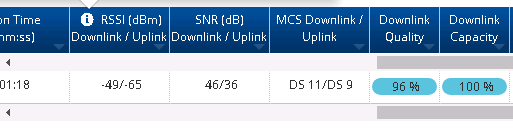
I am running TDD mode 75/25, very clean and connection, no interference, MCS is DS11 in both directions at all times downlink is (-46 RSSI, SNR of 50) and I am the only client.

I get 500-600Mbps download in 160Mhz channel size and have actually seen just over 600Mbps with a 80Mhz channel size.

Not interested in running WLR mode but that hits 800Mbps+ which is maxing out that particular towers upload limits.

There have been some comments about 160Mhz not being ready for use with TDD yet… If that is the case, How long before I can see closer to 940Mbps…??

Any feedback would be helpful.

Thank you

Trying updating to 5.10.4, and try using ePTP mode.

Eric,

Thank you for the quick reply.

I am planning to connect more clients and am already running 5.10.4, sorry I was not clear about that in my first post.

I do hope Cambium is still working on optimizing 80mhz and 160mhz channel sizes for TDD PtMP. On 40mhz I can easily get almost 400Mbps down, but at 80mhz I usually only see around 600Mbps to a single SM in PtMP TDD 75/25 mode. So double the channel size for only 50% more bandwidth. I know a wider channel will get more noise and will not translate to a 100% increase in performance, but I guess I would expect at least an 70-80% increase over 40mhz.

It could be an issue with the 4625 SM’s processing power as the AP seems to get closer to Cambium’s estimates when doing multi-SM link tests even without MU-MIMO.

This is well below Cambium’s own estimates via the ePMP Capacity Planning Tool which shows 80mhz should be near 800Mbps or more.

ePMP 4k - 80mhz performance bottleneck - Products / ePMP - Cambium Community

Ah.. thanks for the information here.

Kind of disappointing, but good to know before I invest a bunch of money into a platform that doesn’t work properly!

I wouldn’t say it does not work properly. There are just some improvements they can still make at larger channel sizes.

I am using it for Ptmp and happy with the performance, but realize it can still be better.

Well I suppose the 40/80mhz performance is Good/acceptable, but the 160Mhz (Which is why I’m buying) should be advertised as available in a future release.

1 Like

When we run F4625’s in 80MHz ePTP mode (for point to point), we can usually get around 800mbps out of them in low latency mode… so they’d probably do closer to 1gbps (maximum of their ethernet interface) in high capacity mode.

Eric, ePTP is for Point to Point links only isn’t it?

Derek

Yes, ePTP is just for point to point. I only mention it as an example of the radios being capable of pushing near 1gbps.

Hi Eric they are talking about Ptmp. For PtP IT works really good

1 Like

The problem is not the Cambium ePMP 4600 radio, it’s the RF Elements antenna.

You need 41 dB SNR to achieve 4K-QAM (MCS 13). With the ePMP Force 4600c radio, this results in 2 Gbps real TCP throughput. IsoHorns customers are achieving this in both directions at 10 km (6 miles) as verified with MikroTik bandwidth tests.

A 50 dB SNR is more than you need, so you should lower the output power. Power amplifiers are non-linear, which means they distort the signal. Higher output power results in greater non-linear distortion. Excess output power also generates additional heat, which can cause the radio to perform poorly and potentially freeze or reboot. Below is a cheat sheet from Ubiquiti that shows the recommended output power for different modulation rates.

  • 12x = 4096-QAM = MCS 13
  • 10x = 1024-QAM = MCS 11
  • 8x = 256-QAM = MCS 9

Here is a another helpful cheat sheet from Ubiquiti that shows you need more received signal sensitivity as you increase channel width and to achieve higher modulation rates.

RF Elements advertises their 5 GHz antennas as “compatible with 6 GHz” but this is not accurate.

The 5 GHz RF Elements TwistPorts are not tuned for 6 GHz. This not only results in poor performance, but can also permanently damage your radio. A percentage of the signal power is reflected by the antenna back at the radio. This is called VSWR. If you have an antenna that is not tuned well for the frequency that you are operating at, then it will reflect more signal back at the radio, creating more heat and damaging components. High output power also exacerbates VSWR problems.

It is important to check the VSWR values of your antennas to ensure they are acceptable within the frequency range in which you intend to operate. If an antenna vendor does not disclose the maximum VSWR value in the datasheet, do not purchase it.

I hope this helps!

Its a 6ghz RFE Horn on the 4600L…

MCS 11 (which I get) should give me somewhere around 900mbps but I barely see 600Mbps…

The 80mhz channel size seems to slightly out perform the 160mhz channel…

The 4625 is also only capable of MCS11 as well…

I just switched from 80 to 160mhz on a link to grab the below snippet showing 46 on the downstream snr.

This is PtMP configuration so lowering power is not an option in the real world, however just for fun a dropped the link to 15db power from 20, now have mcs9 instead of 11 and see the same roughly 500-600mbps downstream (so no difference.)

Not so sure this downstream issue with solid mcs11 is an antenna issue…Don’t forget WLR mode is hitting that 800mbps+ (tower limitation)

I have seen and mentioned this before. When running TDD as you increase channel size the individual SMs do not see a linear bandwidth increase. Meaning at 40mhz you can get close to 88% of the estimated bandwidth (ePMP Capacity Planning Tool) on DL and 91% on UL. Moving to 80mhz and I usually see at best 73% DL but still greater than 92% UL.

Now from the AP side if I run link tests to multiple 4625SMs I can get the AP DL to put out numbers much closer to the ones Cambium lists on the Planning tool. My guess is that the TDD overhead on the SMs limit individual performance at higher channel sizes, but the AP has the processing power to push more as seen when doing Link Tests to multiple SMs at the same time.

ePMP 4k - 80mhz performance bottleneck - Products / ePMP - Cambium Community

Is this a limitation of the processor on the 4625/4525 SM being not able to really take full advantage of the larger channels above 40mhz? Meaning that the larger channel sizes will mainly show their benefit in more capacity for the AP and not necessarily in higher speeds for the SM?

It seems that might be the case as I did a Dual SM 20s link test using two CPEs with similar stats (MCS11 DL/MCS9UL) and I got a combined total of 777DL and 139UL. Using the planning tool with 2 SM it showed I should get a total AP capacity of 765DL and 151UL. That means when doing dual SMs I was getting 101% of max DL and 92% of max UL.

4625SM better at MCS9 vs MCS11? - Products / ePMP - Cambium Community

This is also interesting. This performance ‘increase’ only seems to affect single SM link tests. If I do a dual SM link the AP gets more performance at MCS11 than it does at MCS9 but single SM link tests are better at MCS9 vs MCS11.

You gotta be careful with RF Elements because the frequency ranges of their wideband horns and dishes are determined primarily by the TwistPort Adapter. The TwistPort Adapter is the actual antenna. It is the part that converts the electrical signal to radio waves. The horns and the dishes just focus and shape the beams and calling them wideband 6 GHz is misleading because the TwistPorts are band specific. If you buy a “wideband 6 GHz” RFE dish or horn and use a 5 GHz TwistPort Adapter, then it will be a 5 GHz antenna. A lot of customers do this because there are supply shortages of actual 6 GHz adapters, and because RF Elements misrepresents the frequency ranges on their datasheets.

RF Elements antennas have the worst port isolation in the industry. RF Elements’ port isolation is so bad that they don’t disclose their port isolation values on their datasheets. In a MIMO system, this means that the vertical and horizontal signals leak and interfere with each other. The radio can think that it has a better SNR than it actually does and estimate an MCS rate that is too aggressive. Check for retransmissions and also check how many frames are sent at each MCS rate.

You’re oversimplifying things in a way that leads to bad conclusions.

The TwistPort is a feed, not “the antenna.” The horn or dish is what defines the radiation pattern, gain, and polarization behavior. Treating the adapter as the antenna and everything else as just a beam shaper isn’t how antenna systems work.

Using a 5 GHz feed on a wideband horn limiting you to 5 GHz isn’t misrepresentation — that’s how every reflector antenna works. The system bandwidth is always set by the narrowest component, and that’s basic RF, not a vendor trick.

Saying RF Elements has the “worst port isolation in the industry” without data doesn’t make it true. Plenty of vendors don’t publish isolation numbers, and lack of a datasheet value doesn’t imply catastrophic performance.

And poor isolation doesn’t fool radios into picking invalid MCS rates. Modern radios adapt based on actual decode performance — retries, EVM, PER. If isolation were that bad, throughput would fall on its face. It wouldn’t magically look better than it is.

In the real world, bad alignment and polarization skew cause far more MIMO pain than small feed isolation differences ever do.

Not a small difference. The reason RF Elements antennas can’t achieve good throughput with modern radios like the Cambium ePMP 4500/4600 and Ubiquiti LTU, even though they seem to have high modulation rates, is because RF Elements antennas have insufficient port isolation. This is why RF Elements antennas struggle to break 500 Mbps at any distance, while IsoHorns 0.9m dishes do 2 Gbps real TCP throughput up to 20 km.

There is no legitimate reason for RF Elements to omit port isolation from their datasheets. If they had good port isolation, they would highlight it. Actually it does indicate they have terrible port isolation, which they do. No surprise.

Why would any WISP purchase a dual polarity antenna that doesn’t disclose the port isolation?

What other antenna vendor omits port isolation? I am a WISP antenna vendor and I’ve looked at almost every competitive WISP antenna sheet. Only RF Elements omits port isolation. RF Elements also uses averaged values or best case values to compare with their competitors’ worst case values. If RF Elements made good antennas, they wouldn’t do this.

I’ve measured the port isolation of the RF Elements TwistPort Adapters and it is not exaggerating to say they are the worst in the WISP industry. RFE’s port isolation is so bad that even if they used their best-case number compared to every other vendor’s worst-case numbers, RF Elements would still be the worst antennas in the WISP industry when it comes to port isolation. It’s that bad.

RF Elements says that the dish reflectors and horns determine the frequency range, while advertising a wide frequency range on the dish reflectors and horns that don’t match the TwistPort Adapters. This is unprofessional and sets customers up to fail.

If this was the case, wouldn’t this apply to operating in WLR mode as well? I only see the slower speeds in TDD mode.

1 Like

ePMP TDD and WLR likely use different logic and algorithms to determine the modulate rates and TDD is probably more aggressively trying to achieve those higher modulation rates. Check for retransmissions and how many frames are being delivered at each modulation rate.

So I ran some tests and noticed the CPU usage on the 4625 was very high during these bandwidth tests so I ordered a 4600C for testing…

While both at DS11 in an 80mhz channel the 4600c connected to the same 4600L as the 4625 saw around 830mbps max, where as the 4625 maxed out at about 650-700Mbps with UDP traffic.

The 4600C hit just under 900Mbps on a 160mhz channel but I don’t have CPU usage data yet for it so not sure if its CPU is maxed or if its some sort of efficiency issue. Either way 160Mhz channels don’t seem to useful at this time in PTMP…

Hopefully the 4616 is available soon to test with as the above results are not particularly exciting based on the radio price points…

*note spectrum used is very clean.