LINKPlanner is being rebranded as Airspan LINKPlanner.
- All the features you know and love about LINKPlanner continue in Airspan LINKPlanner.
- LINKPlanner continues to be available at no cost to Airspan customers.
- Your existing username carries over (you may be asked to reset your password)
- Significant new enhancements are being made to Airspan LINKPlanner, including a major performance improvement coming in a couple of months that will dramatically speed up the re-calculation of new projects (from minutes to seconds).
The new address will be lp.airspan.com. It’s not available just yet, but we’ll announce here when it becomes available. The move is planned for the end of October 2026. We will update this post with specifics before anything changes.
Act now: download projects with unsupported products
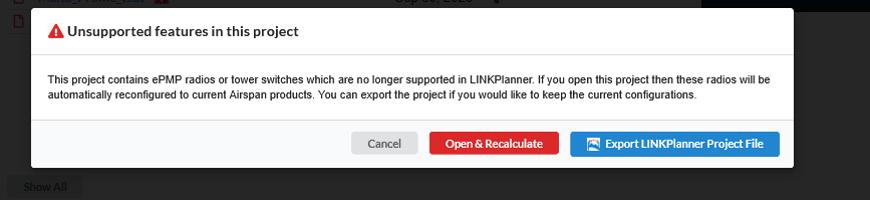
ePMP, PTP 550 and Tower Switches are not supported in Airspan LINKPlanner. If you want to keep these projects as they are today, download them as soon as possible. You will also have the option to convert those projects over to Airspan products.
Upcoming Changes
- New home: Airspan LINKPlanner moves to a new address, lp.airspan.com, though not on-line yet. The move is planned for the end of October 2026.
- Branding: LINKPlanner, reports and BOMs move to Airspan branding.
- Profiles: Updated profile and viewshed data may give slightly different profiles. Only minor differences are expected.
- Airspan products only: LINKPlanner will support PMP/PTP 450, PTP 670, PTP 700, PTP 820/850, cnWave and cnReach.
- Tower switches: You can now choose “Power from switch” in the BOM for all products which support this option. The BOM will reflect the parts that are required when powering the equipment from a switch, but you will need to source the switch separately. You are no longer restricted to TX1000/TX2000 switches.
- Not supported: ePMP, PTP 550 and tower switches, along with ePMP antennas, the link to the BOM Estimator and other enterprise functionality.
Projects that contain unsupported products are tagged with a warning symbol in your project list. When you open one, you can choose Export LINKPlanner Project File to keep your current configuration, or Open & Recalculate to continue in Airspan LINKPlanner using Airspan products. After the move and rebranding, projects with unsupported products will remain available for download for a limited time. We will communicate the end date later.

What’s next
We will post the specifics here before the changes happen. For ePMP planning tools, contact Cambium Networks support. For other questions, email linkplanner@airspan.com.