cnMaestro 5.2.2 introduces major enhancements across EasyPass, PON, and RV22—featuring third-party captive portal integration in Essentials, enhanced voucher controls for operators, expanded ONU management, RV22 IoT SSID support, port forwarding capabilities, and more.
Important: Web Browser
Restart your browser or clear the browser cache with a hard reload if you have UI problems after the 5.2.2 update.
Important: Enterprise Wi-Fi AP Version
Update to the Enterprise Wi-Fi AP 6.6.1 or later if you plan to use MarketApps.
MarketApps MDU App Enhancements 
MarketApps is an advanced service within cnMaestro designed to enhance network management through tailored applications. It offers specialized tools that empower Managed Service Providers (MSPs) to deliver greater value to their customers and end users by addressing their specific needs and challenges.
MarketApps has two apps for the Multi-Dwelling Unit (MDU) market – “Managed Wi-Fi” and “Self-Service Personal Wi-Fi”. These applications simplify the management of Wi-Fi services for property managers, residents, and service providers by featuring an intuitive and streamlined workflow.
Enhancements added in 5.2.2 release
-
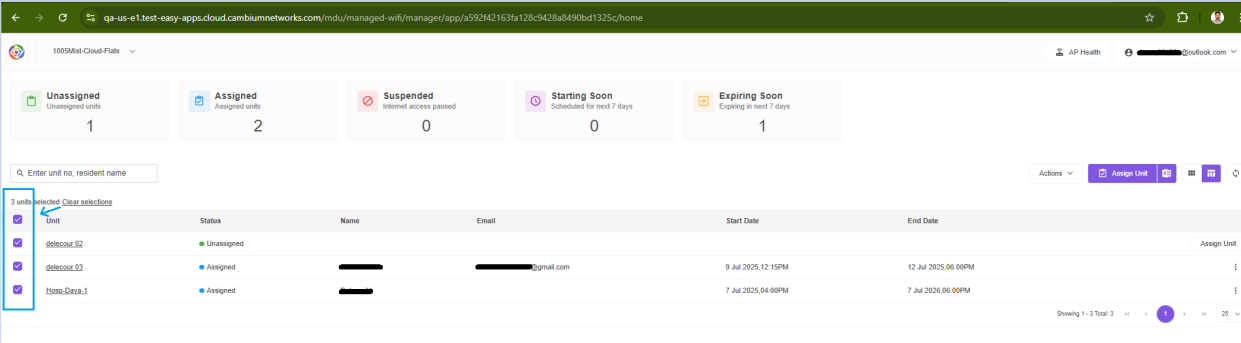
Bulk select Unit in the Manager portal
The user can select all units using the Bulk select checkbox located to the left of the table view, as shown in the figure below. Once selected, the Action tab displays bulk operation options such as Send Portal Link, Resume, Suspend, and Terminate. This tab streamlines the process of managing multiple units at a time. -
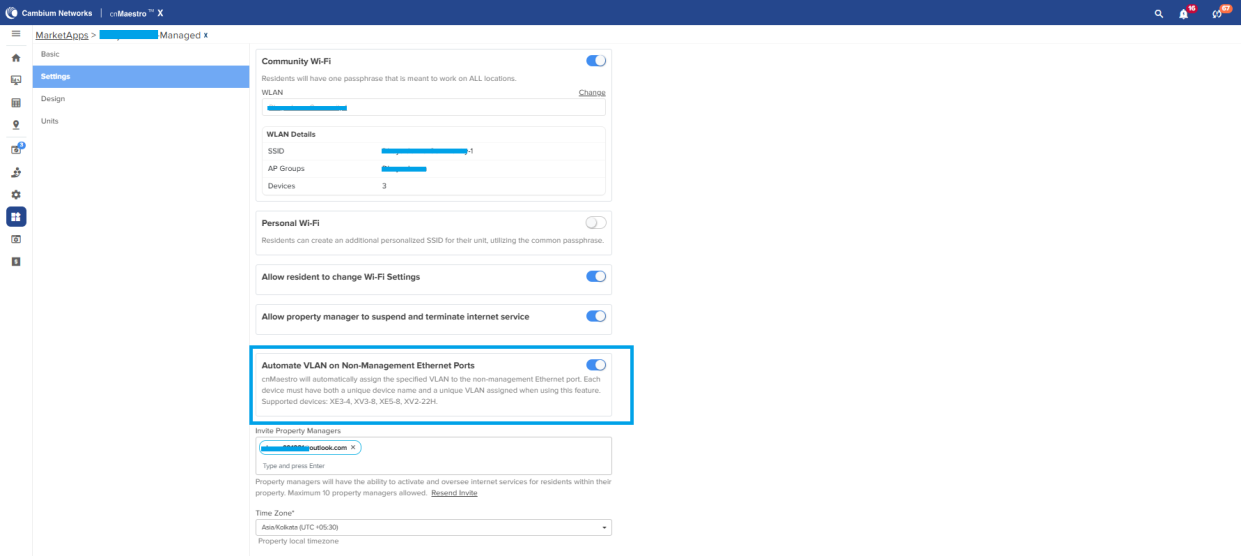
Automate VLAN Assignment on the Non-Management Ethernet port
cnMaestro will automatically assign the specified Market app VLAN to the non-management Ethernet port. Each unit entry must have both a unique device name and a unique VLAN assigned when using this feature. Supported devices: XE3-4, XV3-8, XE5-8, XV2-22H. -
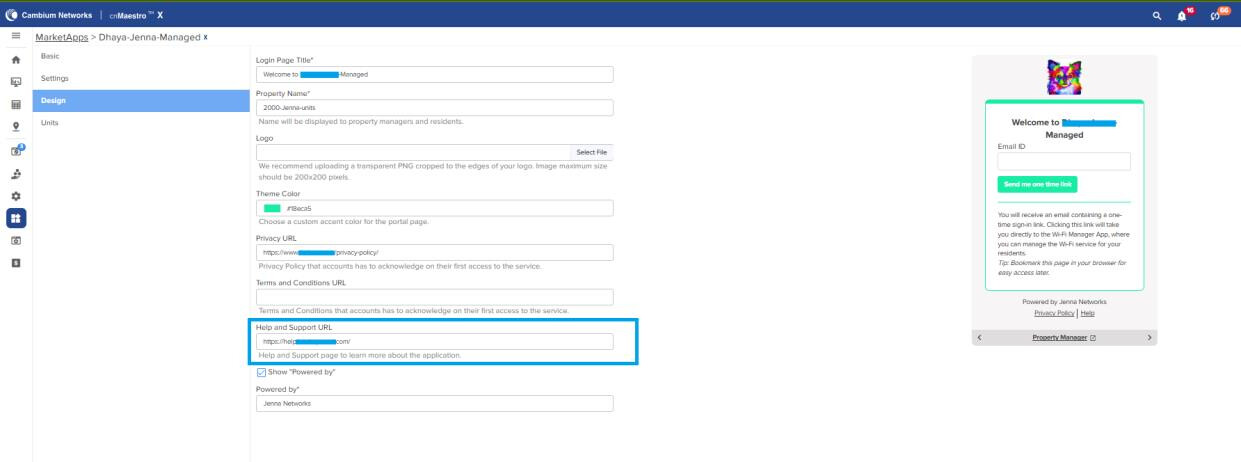
Help Documentation URL in the Footer
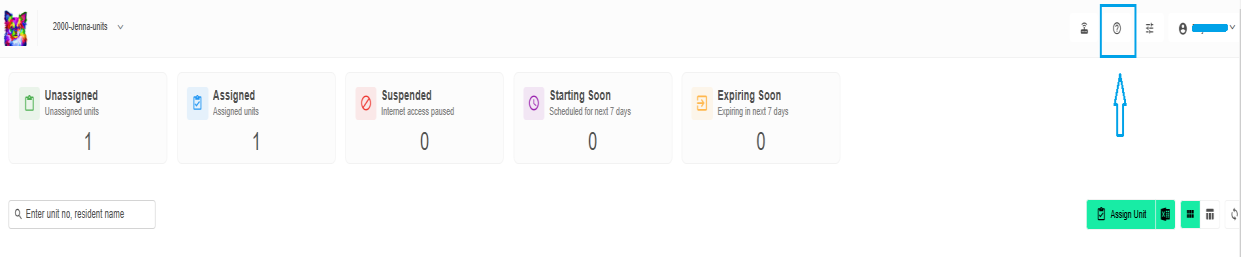
A dedicated Help & Support link has been introduced on the Design page, offering direct access to documentation, FAQs, and support resources. This improvement is visible in the following areas:- Email Authentication Page: Help link added to the footer for both Managed Wi-Fi and Self Service Personal Wi-Fi.
- Manager Portal (Managed Wi-Fi): Help link added as an icon in the header.
- Resident Portal (Self Service Personal Wi-Fi): Help link added in the footer.
-
Help option in Manager portal
-
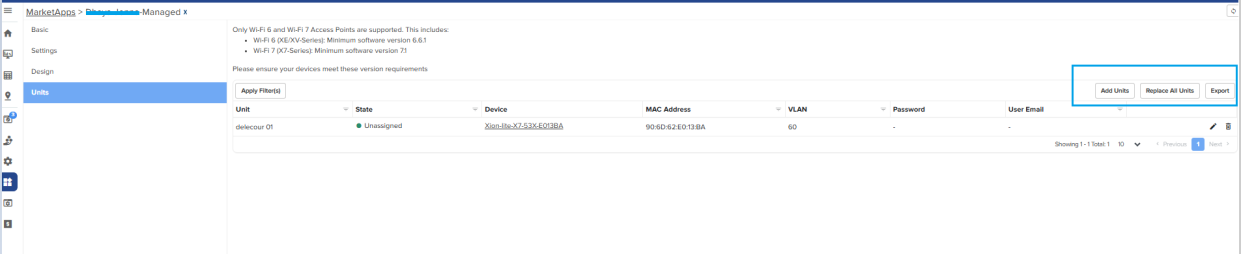
New design flow for Import units
Improved workflow of unit upload in Market apps, to prevent customers from accidentally uploading a CSV that might overwrite all existing units. -
Add units
MSP Admin can upload a .csv file to append new AP units. The units mentioned in the CSV file will be added to the MDU units. This function will not update or delete any existing units. -
Replace units
The replace unit function will replace the entire existing MDUs with the list given by the user and remove anything which is not present in the new list.
External Captive Portal Integration Support in Essentials
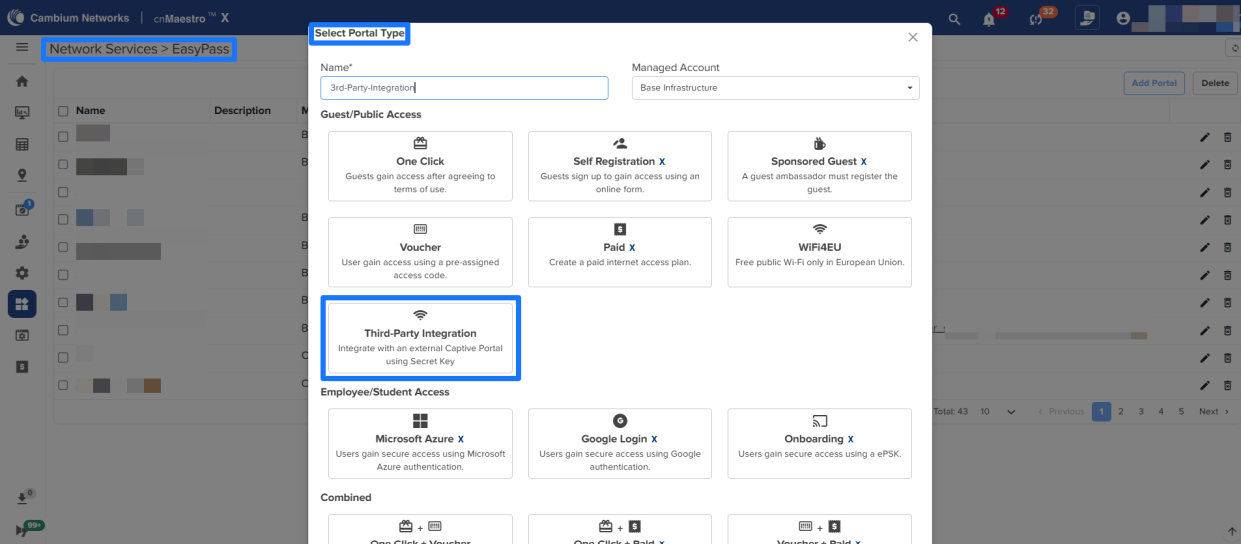
To support third-party captive portal vendors, the new EasyPass portal type, Third-Party Integration is introduced where partners can connect their external captive portals to Cambium Access Points (APs) by posting login and logout requests directly to cnMaestro.
To enable secure and region-specific communication, each EasyPass Third-Party Integration portal provides a unique base URL (which may differ by account and region) and a secret key for authentication. These credentials allow your application to securely interact with the captive portal integration APIs. Currently, two API endpoints are available:
- Login: Allows an external captive portal to authenticate a user and grant network access through a Cambium AP.
- Logout: Allows the external captive portal to log out a user from the network.
NOTE: The external captive portal integration APIs available on cnMaestro Essentials will function in the same way in cnMaestro X also. All other APIs continue to require a cnMaestro X subscription.
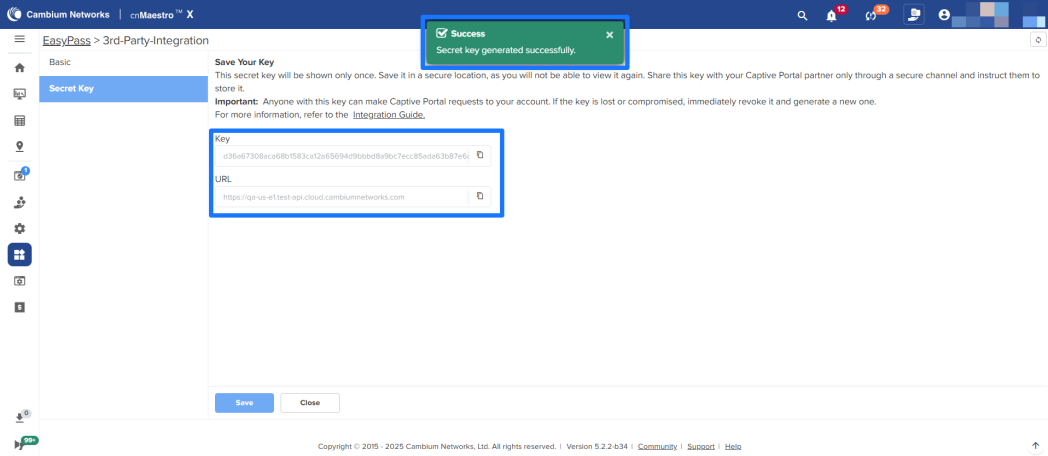
Creating Secret Key
- Navigate to Network Services → EasyPass and click Add Portal.
- Select Third-Party Integration as the portal type and click Save and Continue.
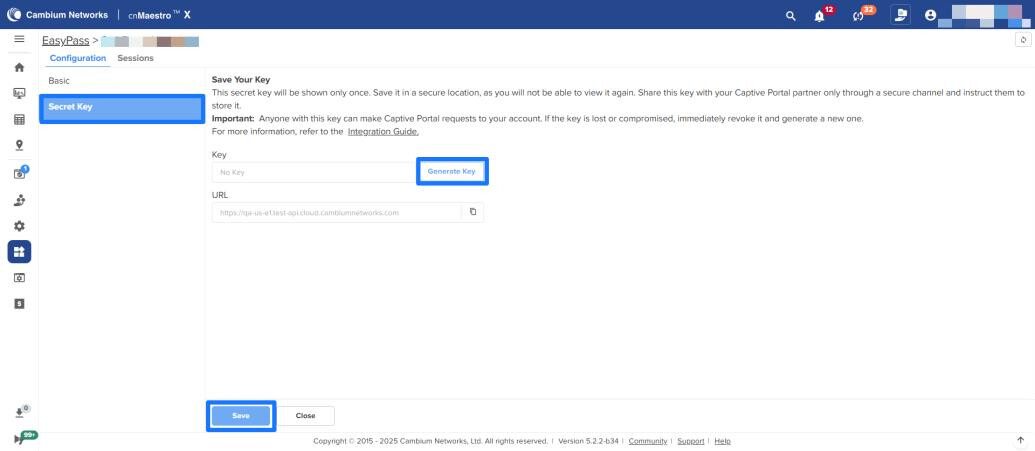
- Inside the portal, select the Secret Key tab.
- Copy the base URL from the URL field. The URL for API requests is always visible on this page and is unique to your portal and region.
- To generate the secret key, click Generate Key and click Save.
- Communicate the secret key and Base URL to your external captive portal partner in a secure way
NOTE: This secret key will be displayed only once. Please save it in a secure location, as it cannot be viewed again. Share it with your Captive Portal partner only via a secure channel and advise them to store it safely.
Anyone with this key can make Captive Portal requests to your account. If the key is lost or compromised, immediately revoke it and generate a new one.
Revoking and Generating the Secret Key
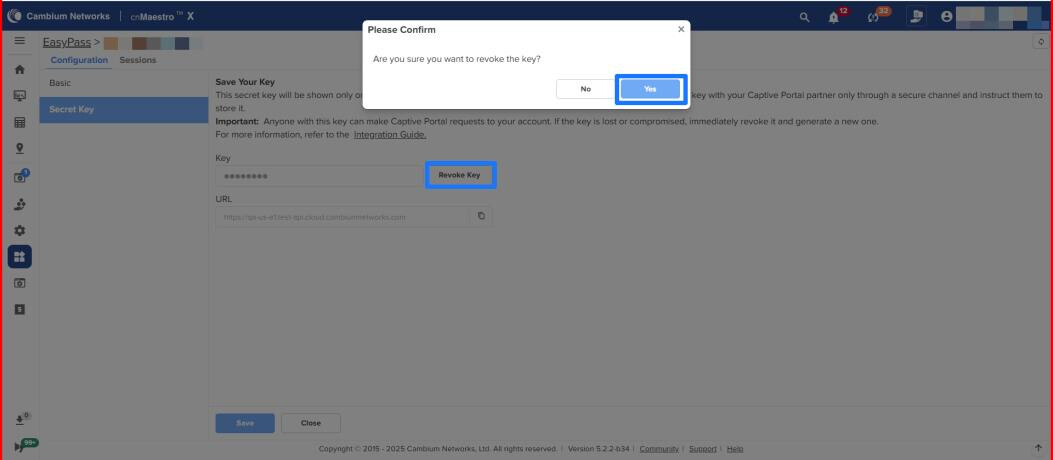
If you believe that your secret key is compromised or has been misplaced, you can revoke the existing key and generate a new key. To revoke and generate a new key:
- On the Secret Key page, first click Revoke Key to revoke the existing key.
- Click Generate Key to generate a new secret key.
- Copy and store the new secret key.
Operator Support to Manage Vouchers
An operator can perform the following tasks: add or generate vouchers, delete vouchers, delete expired vouchers, export vouchers, and view or modify session/user-level configurations (for example, disconnect users).
EasyPass/Onboarding Portal: Device and Bandwidth Limit
EasyPass portals now allow administrators to update device count and bandwidth limits per user, providing greater control over guest access. This enhancement helps manage network usage more efficiently.

Wired Client for Enterprise Wi-Fi Access Points
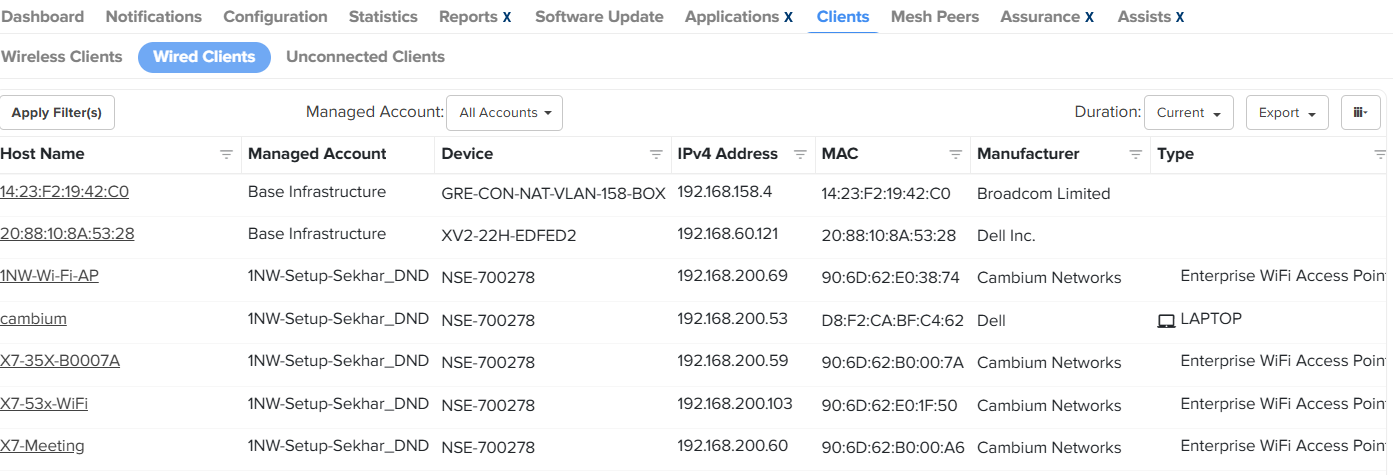
Starting with cnMaestro release 5.2.2, Monitor and Manage → Clients → Wired Clients tab will also display wired clients connected to Wi-Fi 6 access points.
WLAN & VLAN Concentrator mode
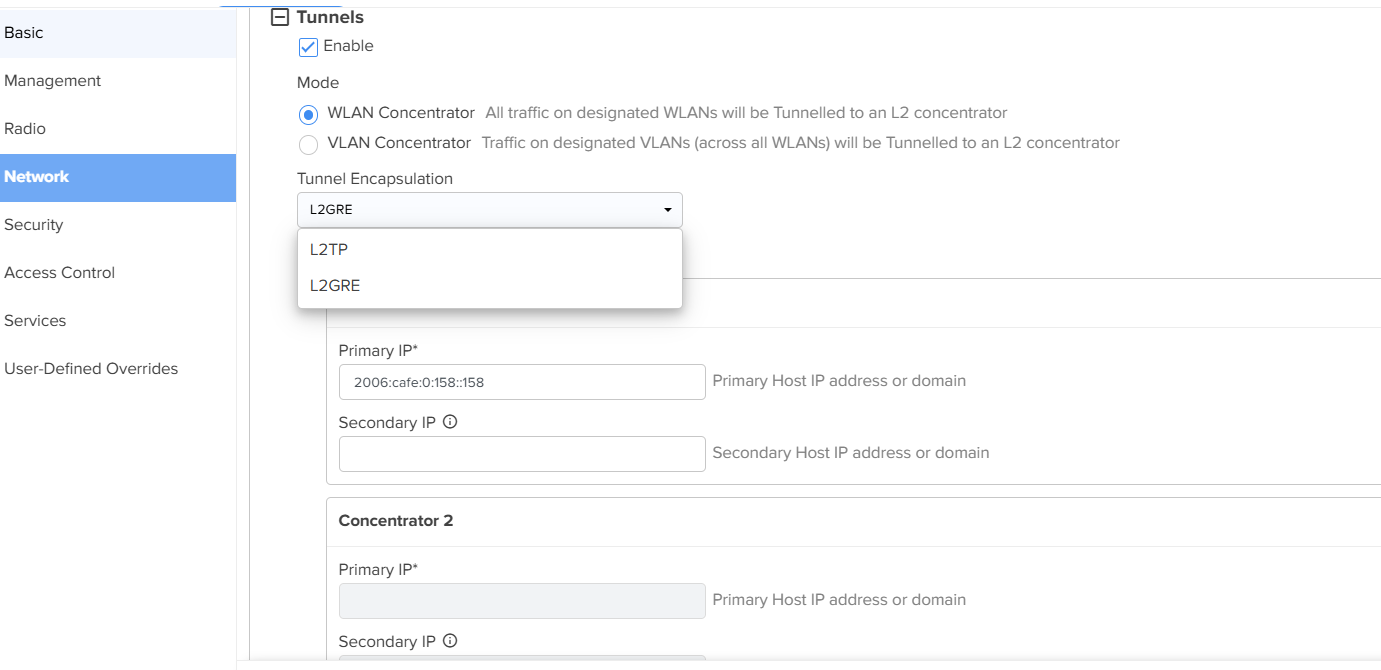
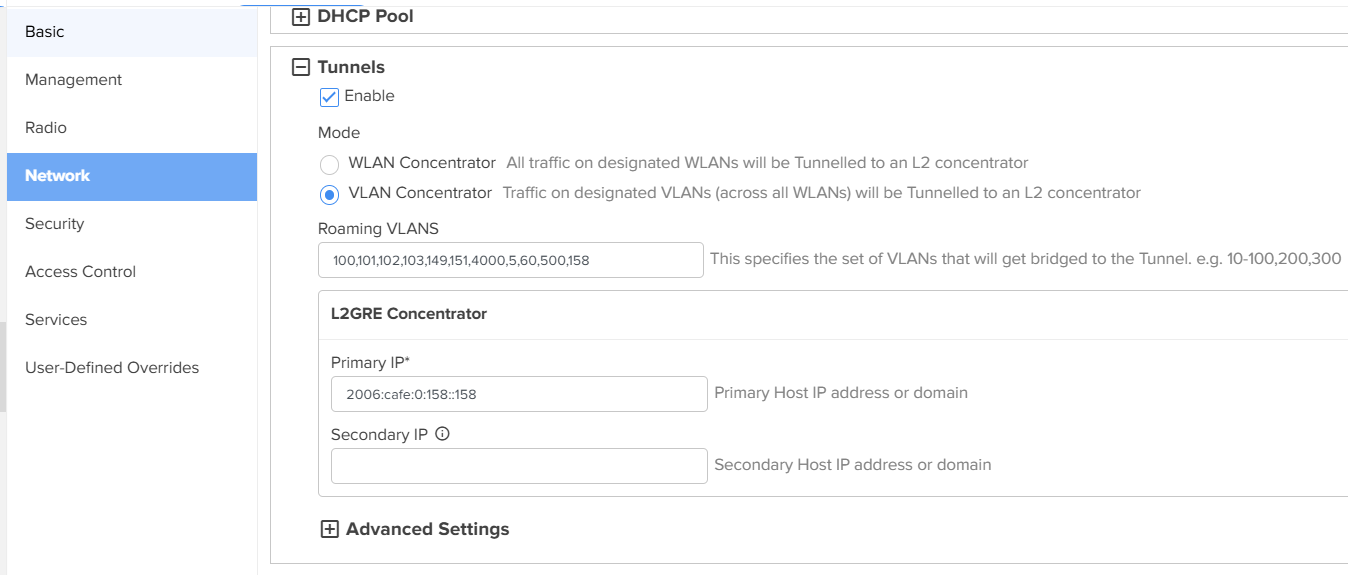
The cnMaestro 5.2.2 release introduces WLAN Concentrator and VLAN Concentrator, with support for the L2TP tunneling protocol for WLAN Concentrator and the L2GRE tunneling protocol for both WLAN Concentrator & VLAN Concentrator. The WLAN Concentrator tunnels all traffic from designated WLANs to an L2 concentrator, while the VLAN Concentrator tunnels traffic from designated VLANs (across all WLANs) to an L2 concentrator.
VLAN Concentrator mode is currently in the pilot phase with selected customers and will be generally available in an upcoming release. The WLAN concentrator mode continues to be supported exactly as before, except that the UI has been extended to support multiple modes.
6 GHz Capable for Enterprise Wireless Access Points
cnMaestro 5.2.2 introduces 6 GHz capability statistics for wireless clients under the Clients page. These statistics are now available at the System, Network, Site, and Access Point levels.

RV22 Features
Below are the four new features added for the RV22 (Home Mesh Router), which are supported by devices running software version 1.2.0 or later.
Port Forwarding
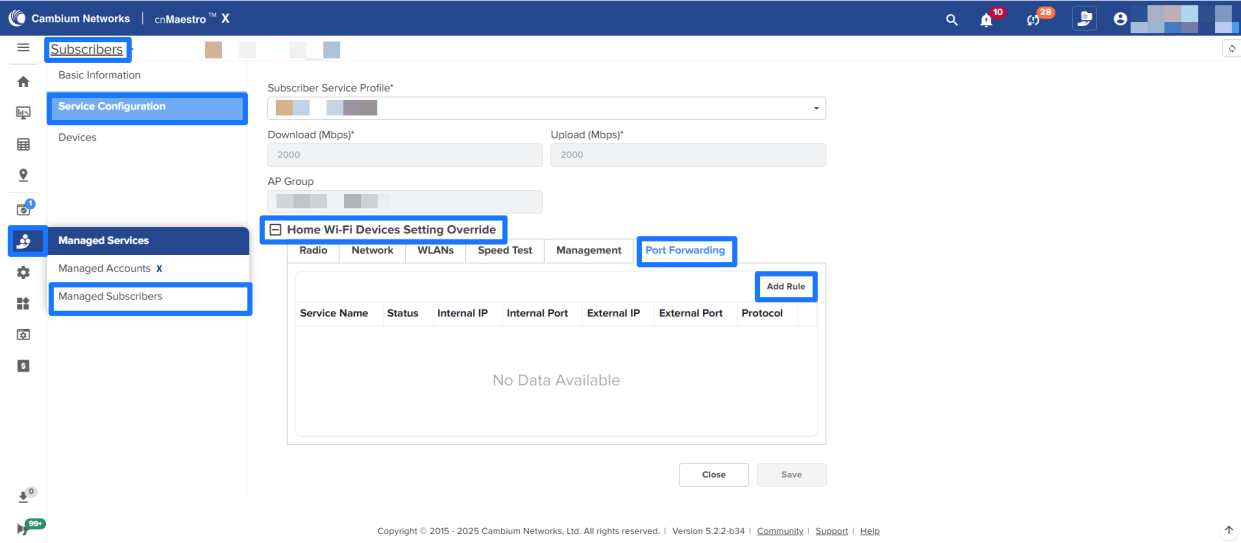
Allows you to make external devices access services hosted on internal network devices (for example, web servers and game servers) by routing traffic through the router to the configured internal IP and port.
Port forwarding rules can be configured from Subscribers → Service Configuration → Home WiFi Devices Setting Override and RV22 → Configuration → Advanced Settings sections.

Ping to WAN port
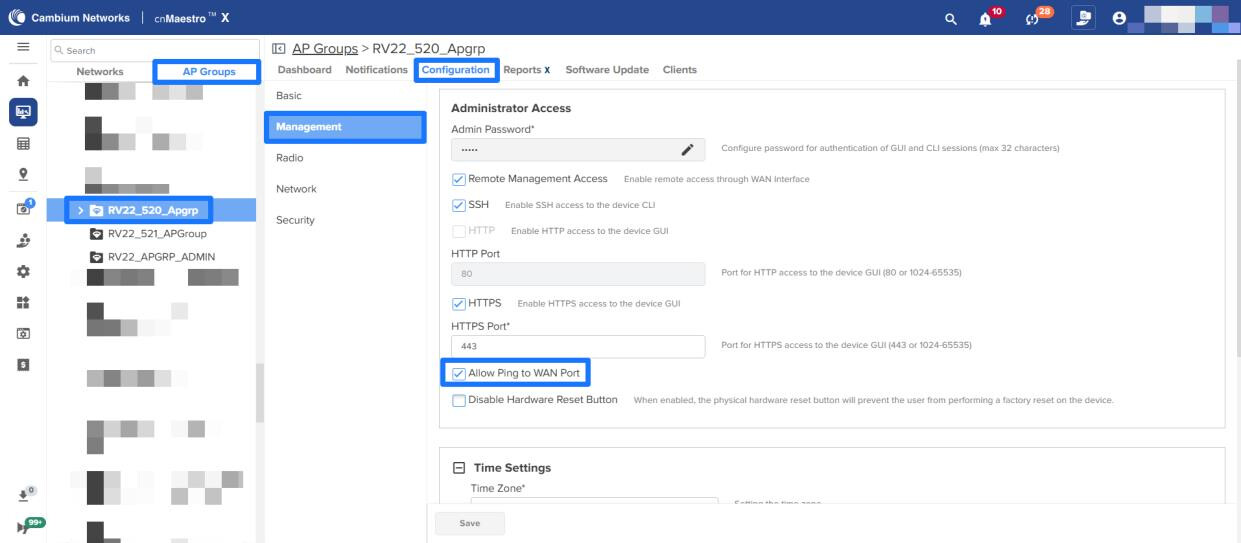
A new option has been added to the AP Groups to allow WAN Port pinging. This option can be enabled/disabled under AP Groups → Configuration → Management section.
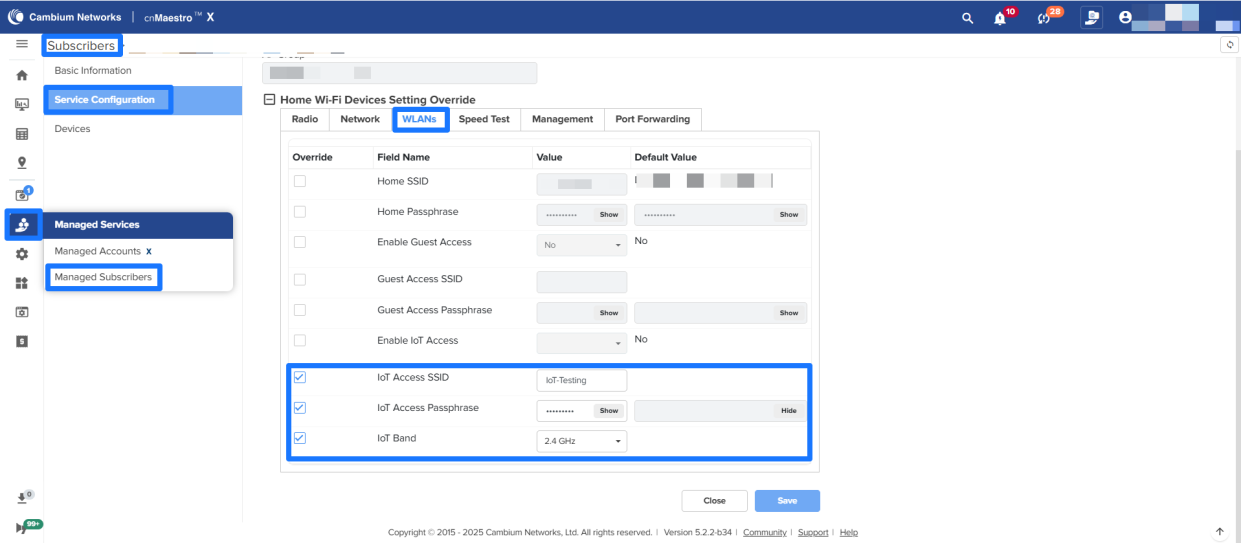
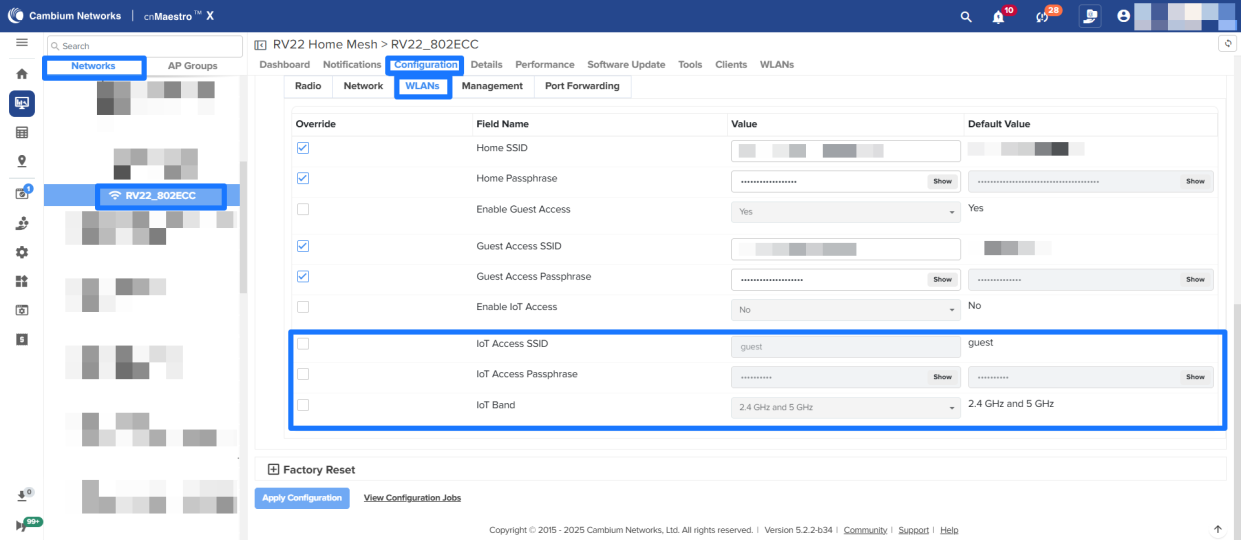
Dedicated IoT SSID
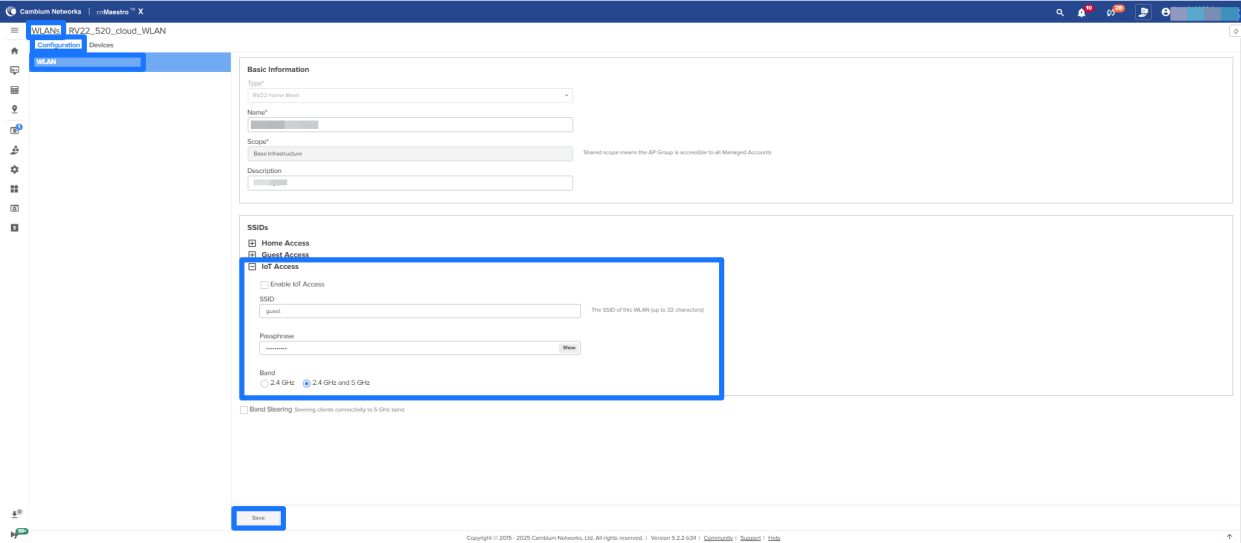
In addition to Home and Guest Access SSIDs, a third SSID configuration is added for IoT devices, typically for fixed-location devices such as smart bulbs, thermostats, TVs, etc. It ensures stable connectivity and isolates IoT traffic from other traffic.
IoT SSID can be configured from WiFi Profiles > WLANs → Configuration → SSIDs, Subscribers → Service Configuration → Home WiFi Devices Setting Override → WLANs and RV22 → Configuration → Advanced Settings
Operator Support to Create Home Subscriber and Manage Home Sites
-
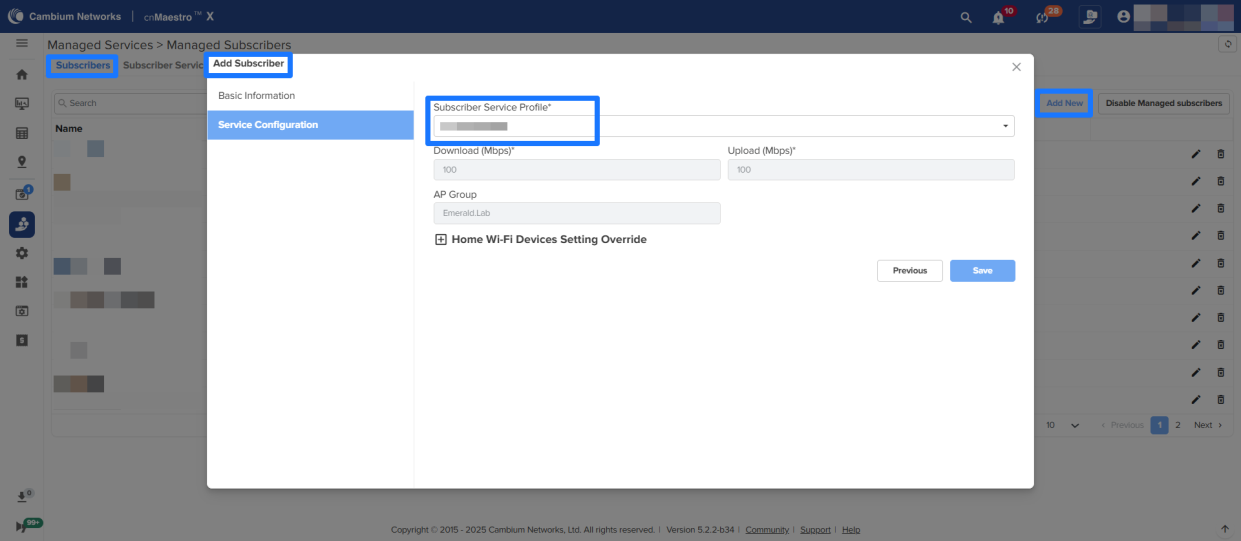
The Operator user can create a Home Subscriber using existing Subscriber App Branding and Subscriber Service Profiles.
-
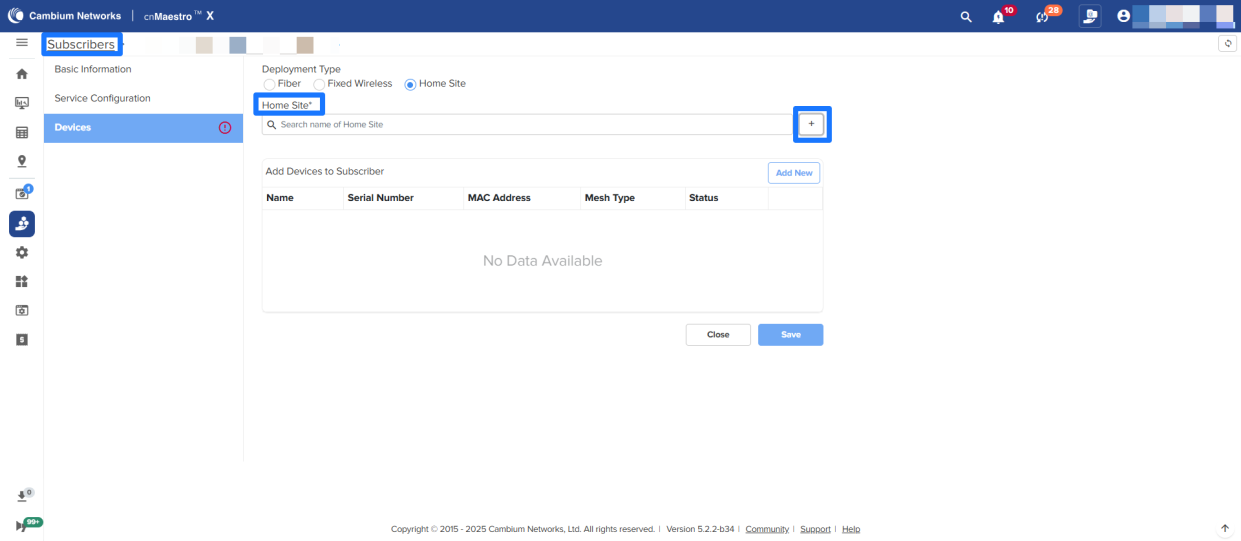
The Operator user can create Home Sites from the Subscribers page and delete them from the Networks tree.
-
The Operator user can edit the Home Site configuration.
NSE 3000 Features/Enhancements
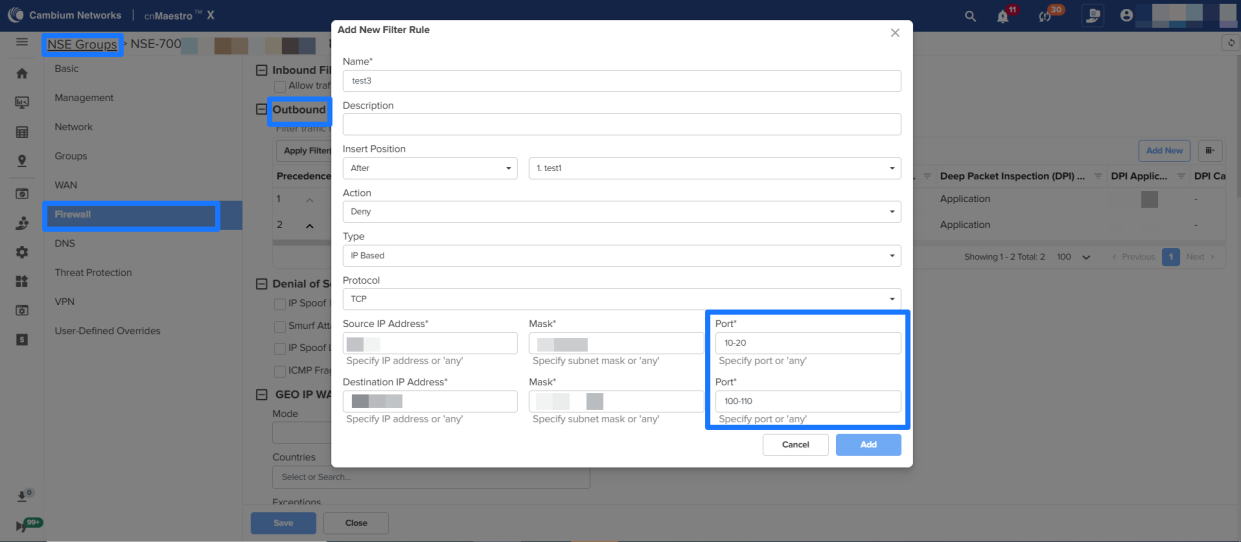
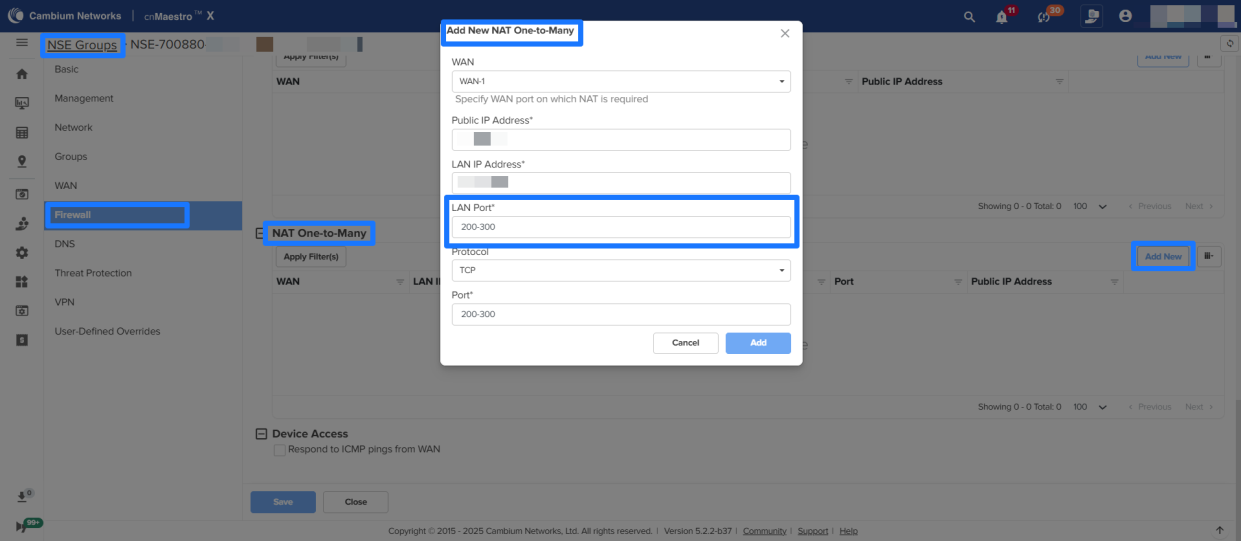
Range of Ports for Firewall Outbound Filter rules and NAT One-To-Many in NSE Groups
In NSE Groups, Port ranges can be configured for Firewall Outbound Filter rules and NAT One-To-Many.
Device fingerprinting option per Network basis
The Enable/Disable option for Device fingerprinting/identification is added per Network in NSE groups. To enable/disable this option, navigate to NSE Profiles → NSE groups → Network → VLANs section.
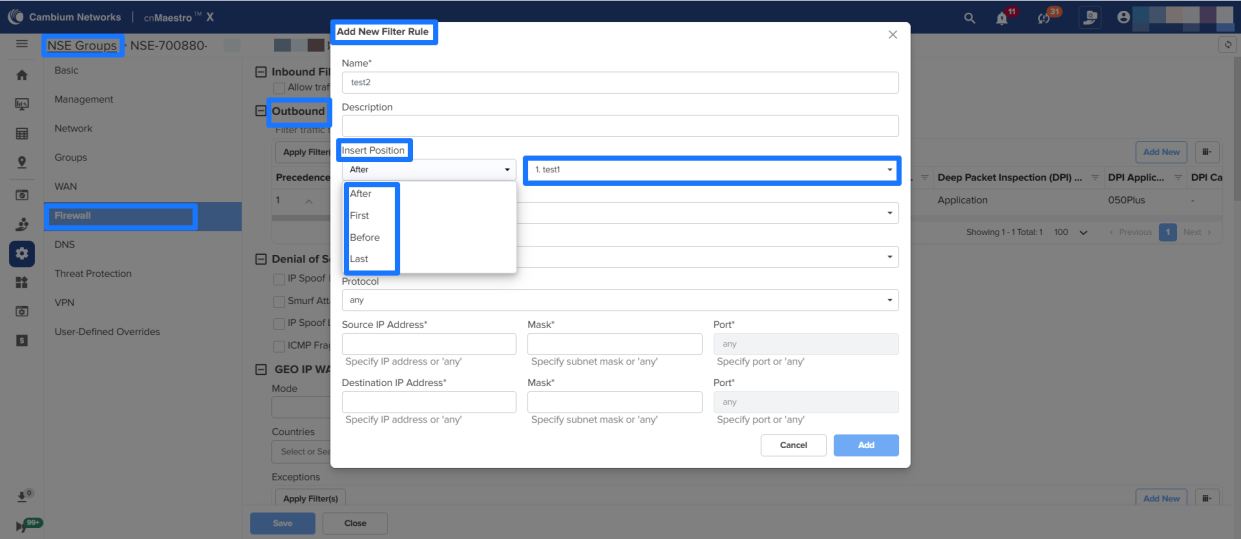
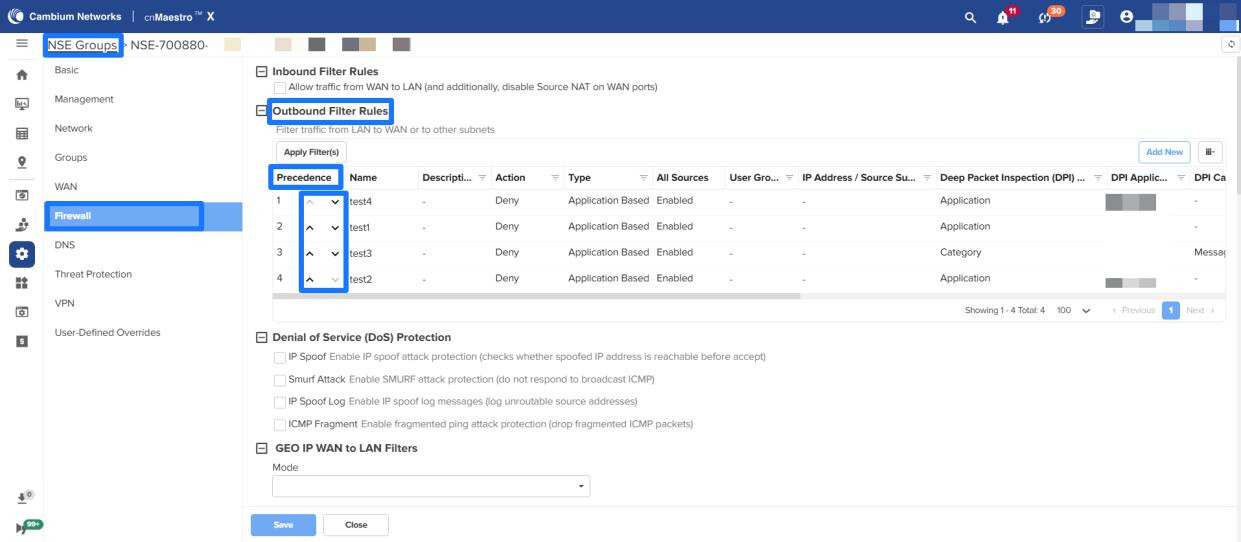
Precedence improvements in NSE groups
-
Insert Position field is added for the below WAN and Firewall configuration of NSE Groups, which can place the rules/policies at the configured precedence.
- WAN > Source NAT rules, Traffic shaping, Failover Policy
- Firewall > Outbound filter rules
-
Added Move Up/Down options under Precedence column to change the order of rules/policies.
60 GHz cnWave Features/Enhancements
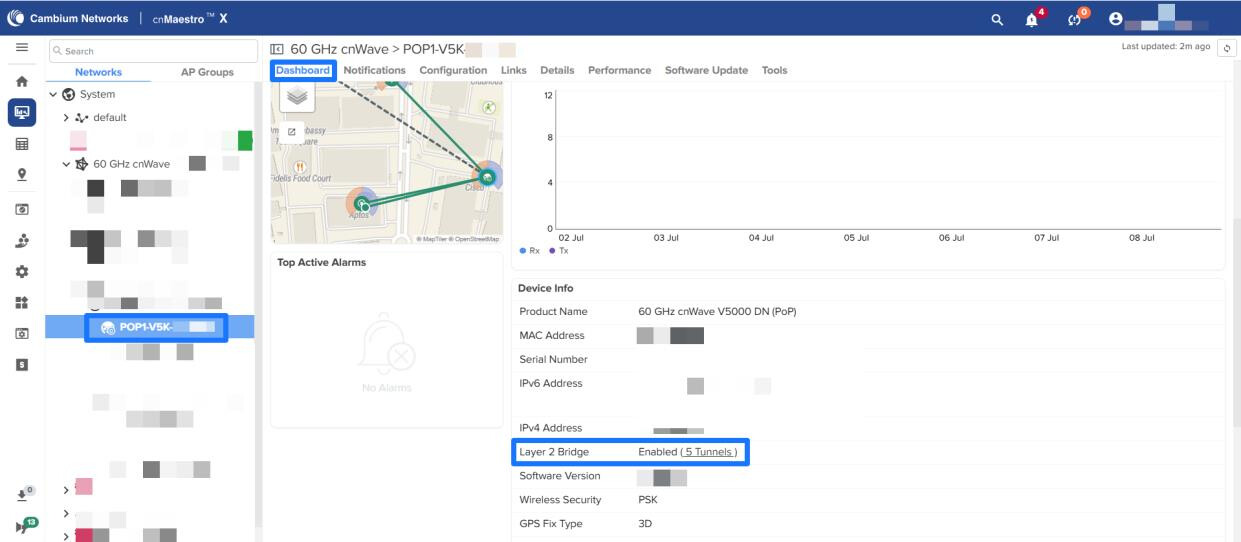
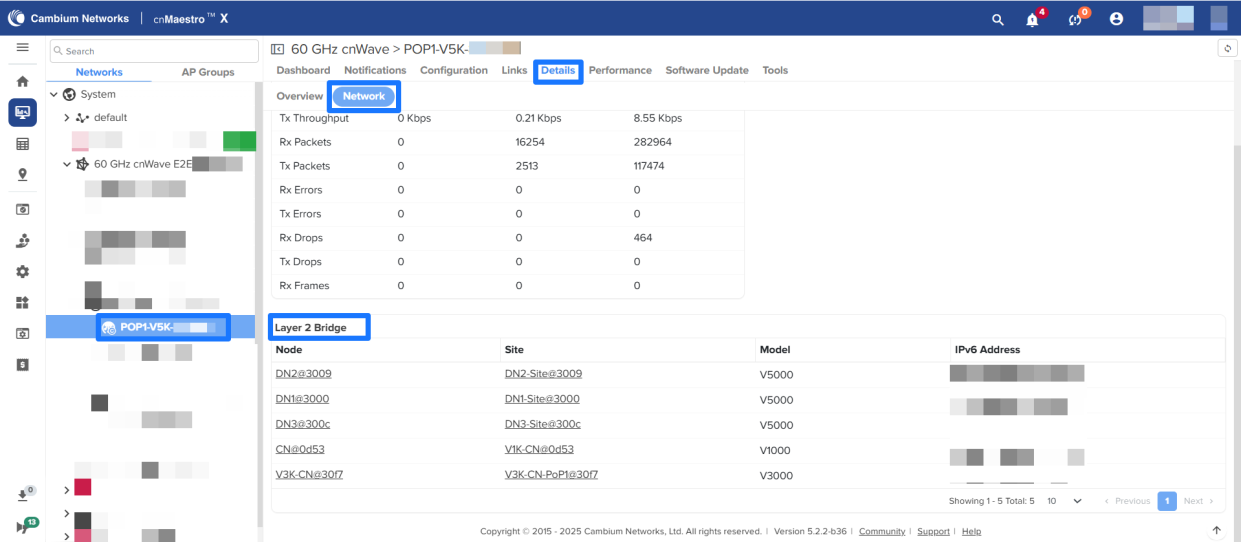
New widget for Layer 2 Bridge tunnels in the Details page
Users can now view Layer 2 Bridge tunnel details by clicking on a tunnel, which redirects to the Details → Network tab displaying the relevant information.
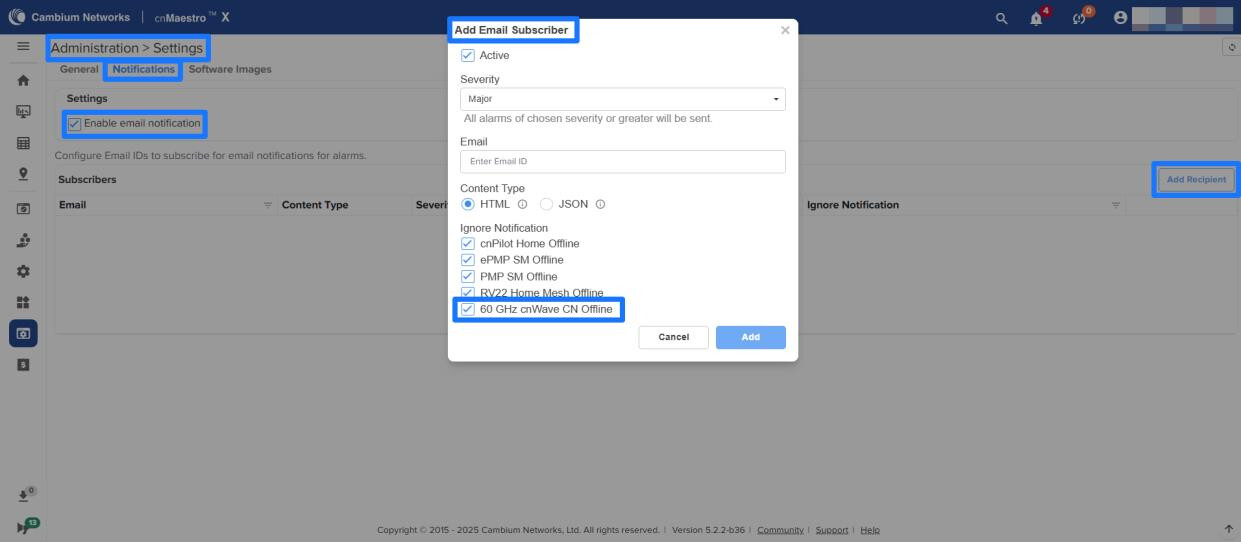
Ignore 60 GHz cnWave CNs offline in email notifications
Introduced an option in email notification settings to ignore offline alerts for 60 GHz cnWave Client Nodes (CNs).
Device Rename support for PON ONUs
Starting with cnMaestro Release 5.2.2, users can now rename ONUs. This feature is supported with OLTs running software version 1.3.0 or later.
Export All as CSV Option in Grids is made job-based
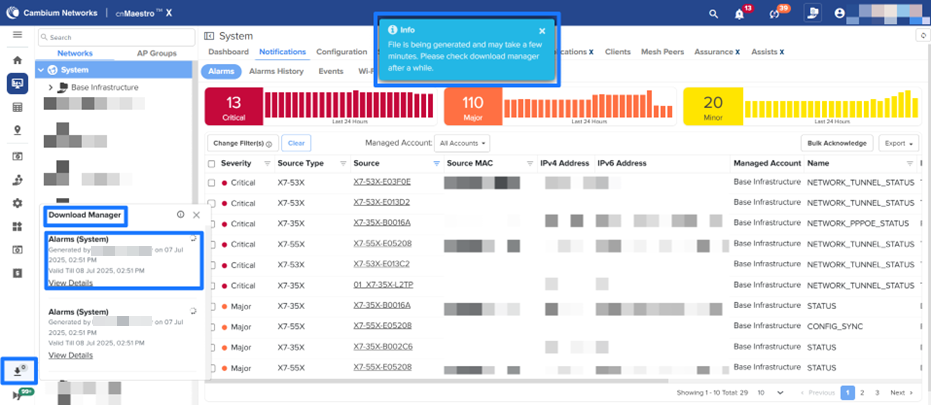
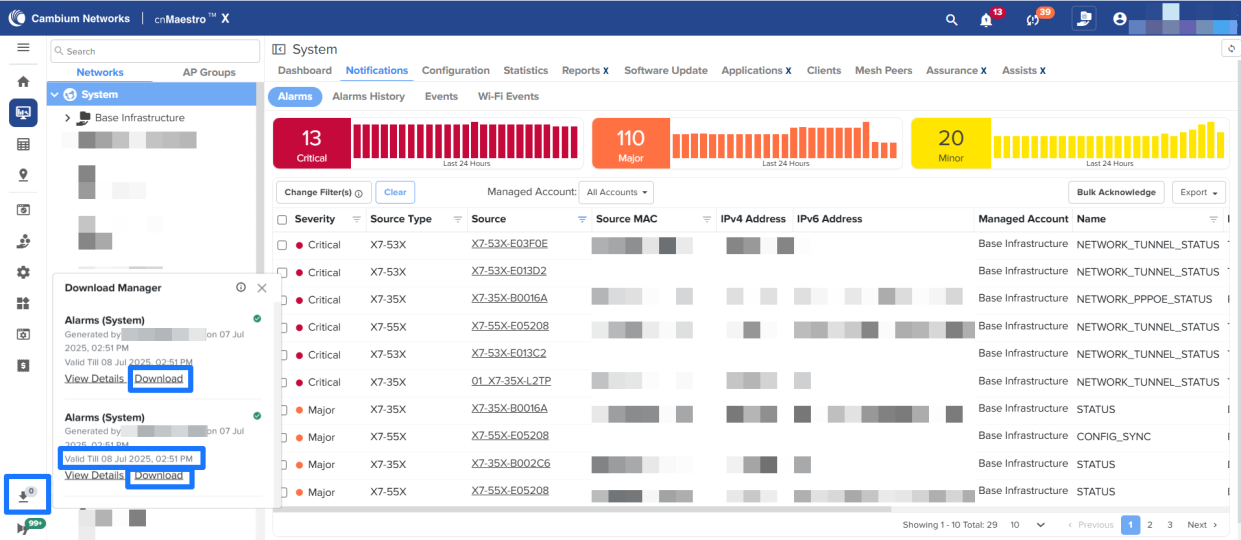
The Export All as CSV option enables users to download all records displayed in data grids — including any filtered results — as a CSV file. A new menu, Download Manager, has been added to track the progress of CSV file generation.
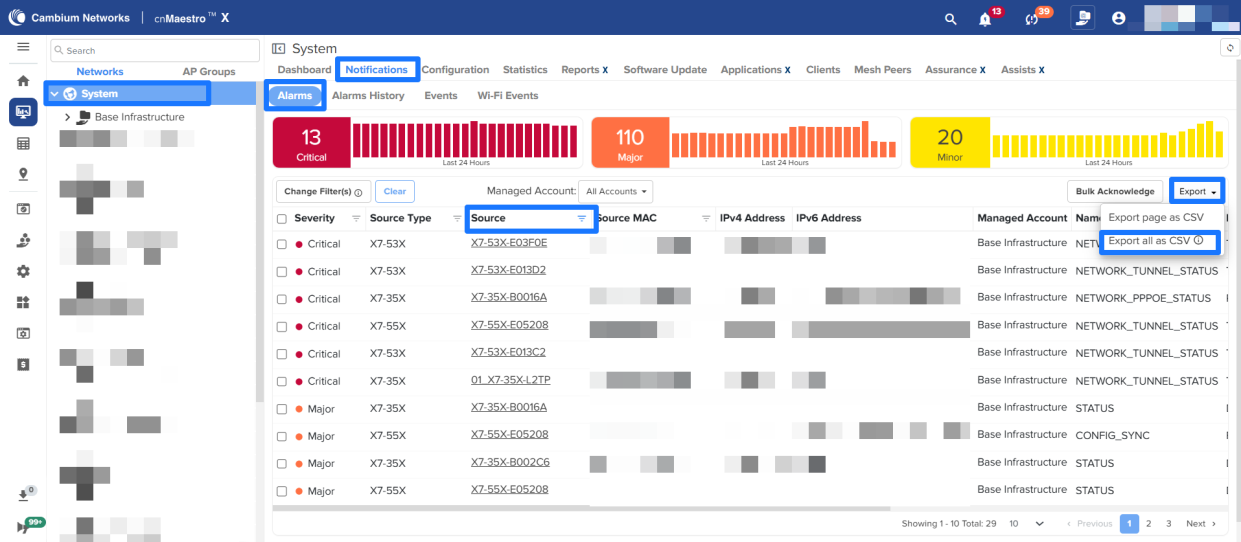
For example, to export and download all the Alarms data in the CSV format:
-
Navigate to System → Notifications → Alarms. You can either download the complete dataset or a specific subset of filtered data.
-
From the Export dropdown list, select Export all as CSV.
-
Click the Download Manager icon on the left navigation pane. The Download Manager now displays the status of CSV file exports with clear progress indicators. Exported files remain available for download for 24 hours. To download a file, click the Download link in the Download Manager once it becomes available.
Status Types
- File successfully generated — The CSV file is ready for download.
- File generation in progress — The export process is ongoing.
- File generation failed — The export could not be completed. Click Details for more information.
NOTE: The Export All as CSV option supports up to 50,000 records at a time in cnMaestro X and 20,000 in Essentials, except for the Inventory and Clients tables, which have no such limit.
API Updates
A number of APIs have been updated and/or deprecated. Please see the full release notes on the download site for the details.
Supported Cambium Products
cnMaestro supports the following Cambium Networks products. The software versions are the minimum required to use cnMaestro (not the recommended versions).
| Family | Model | Version |
|---|---|---|
| 60 GHz cnWave | ||
| V1000 | 1.0 | |
| V2000 | 1.2.2-beta3 | |
| V3000 | 1.0 | |
| V5000 | 1.0 | |
| cnMatrix | ||
| EX2000/EX1000 | 2.0.4-r1 | |
| EX3000 | 5.0.1 | |
| EX3024-F | 6.0-r2 | |
| cnPilot Home | ||
| cnPilot R200, R200P | 4.4.2-R2 | |
| cnPilot R201, R201P | 4.4.2-R2 | |
| cnPilot R190V, R190W | 4.4.2-R2 | |
| cnPilot R195P | 4.5.2 | |
| cnPilot R195W | 4.7 | |
| cnRanger | ||
| Sierra 800 | 1.0.1.0-r1 | |
| Tyndall 101 | 1.0.1.0-r1 | |
| Tyndall 201 | 2.0.0.0-r1 | |
| cnReach | ||
| N500 | 5.2.17e | |
| cnVision | ||
| Hub 360r, FLEXr | 4.6 | |
| Client Micro, Mini, Maxr | 4.6 | |
| cnWave 5G Fixed | ||
| B1000 (BTS) | 2.0 | |
| C100 (CPE) | 2.0 | |
| Edge Controller | ||
| N/A | 1.0.0 | |
| Enterprise Wi-Fi | ||
| cnPilot e400/e500 | 2.5.2-r3 | |
| cnPilot e410/e430w/e600 | 3.5.2-R4 | |
| cnPilot e501S/e502S | 3.2.1-r6 | |
| cnPilot e700 | 3.8 | |
| cnPilot e425/e505 | 4.0-r17 | |
| cnPilot e510 | 3.11.4-r9 | |
| XE3-4 | 6.4 | |
| XE3-4TN | 6.5.1 | |
| XE5-8 | 6.4.1-r15 | |
| XV2-2X | 6.1 | |
| XV2-2T0 | 6.4 | |
| XV2-2T1 | 6.4.1-r15 | |
| XV2-21X | 6.5 | |
| XV2-22H | 6.5 | |
| XV2-23T | 6.5 | |
| XV3-8 | 6.0 | |
| X7-35X | 7.0-b14 | |
| X7-53X | 7.1.1 | |
| X7-55X | 7.1.1 | |
| ePMP 1000 Hotspot | ||
| ePMP 1000 Hotspot | 2.5.2-r3 | |
| ePMP | ||
| ePMP 1000, Force 180/200 | 2.6.2 | |
| ePMP 2000 | 3.0.1 | |
| ePMP Elevate XM/XW | 3.2 | |
| ePMP Force 190 | 3.5 | |
| ePMP Force 300 | 4.1 | |
| ePMP PTP 550 | 4.1.1 | |
| ePMP Force 130 5 GHz | 4.3.2 | |
| ePMP 3000L | 4.3.2 | |
| ePMP Elevate SXGLITE5, LHG5 | 4.3.2.1 | |
| ePMP Force 130 2.4 GHz | 4.4 | |
| ePMP Force 300-19, 19R, 13 | 4.4 | |
| ePMP 3000 | 4.4.1 | |
| ePMP PTP 550 E | 4.4.2 | |
| ePMP MP 3000 | 4.5 | |
| ePMP Force 300-13L | 4.5.2 | |
| ePMP Force 300-13LC, 22L, 25L | 4.6 | |
| ePMP Force 200L | 4.7.0 | |
| ePMP 4000, Force 400 GPS, 400 CSM, 425 | 5.1.0 | |
| ePMP 4600, ePMP4600L, ePMP Force 4600C, ePMP Force 4525, ePMP Force 4500, ePMP Force 4625 | 5.4.0 | |
| NSE | ||
| NSE 3000 | 1.2-b5 | |
| PMP | ||
| PMP 450i, PMP 450, PMP 450m, PMP 430 SM | 22.1.2 | |
| PTP 450, and PTP 450i | 22.1.2 | |
| MicroPoP Omni/Sector | 22.1.2 | |
| PMP 450v | 23.0 | |
| PON | ||
| TCX16 - 16 port OLT | 1.1.0 | |
| TCX08 - 8 port OLT | ||
| SGX00 - Indoor GPON ONT | ||
| SXX00 - Indoor XGSPON ONT | ||
| SGT00 - Outdoor GPON ONT | ||
| SXT00 - Outdoor XGSPON ONT | ||
| PTP | ||
| PTP 650 | 01-47 | |
| PTP 670 (650 Emulation) | 01-47 | |
| PTP 670, PTP 700 | 02-67 | |
| PTP 820/850 | ||
| PTP 820C, 820E, 820F, 820G, 820S | 11.9 | |
| PTP 850C, 850E | 11.9 | |
| RV22 Home Mesh | ||
| RV22 Home Mesh | 1.0 | |
| Xirrus (Enterprise Wi-Fi) | ||
| XA4-240 | 8.7.0 | |
| XD2-230 | 8.7.0 | |
| XD2-240 | 8.7.0 | |
| XD4-130 | 8.7.0 | |
| XH2-120 | 8.7.0 | |
| XH2-240 | 8.7.0 | |
| XR-620 | 8.7.0 | |
| XR-630 | 8.7.0 | |
| XR-2226 | 8.7.0 | |
| XR-2236 | 8.7.0 | |
| XR-2247 | 8.7.0 | |
| XR-2426 | 8.7.0 | |
| XR-2436 | 8.7.0 | |
| XR-2447 | 8.7.0 | |
| XR-4426 | 8.7.0 | |
| XR-4436 | 8.7.0 | |
| XR-4447 | 8.7.0 |
Supported Browsers
cnMaestro supports the following browsers:
| Platform | Browser | Version |
|---|---|---|
| Linux | Firefox | 45 and above |
| Chrome | 49 and above | |
| MacOS | Safari | 9 and above |
| MS Windows | Microsoft Edge | 44.17763.1.0 |
| Firefox | 45 and above | |
| Chrome | 49 and above |
Significant Fixes
The following issues have been fixed:
| ID | Details |
|---|---|
| CNSSNG-47109 | In the Inventory page, the Time range is showing for only 30 days to schedule a reboot |
| CNSSNG-46736 | PayPal payment completed but didn’t receive a voucher code and the transaction is not showing up in the ‘Paid Transactions’ column |
| CNSSNG-46704 | The ‘Managed Devices’ Auto Software Upgrade is not working. |
| CNSSNG-45808 | When 1 hub and 2 spokes are added only 1 spoke to hub tunnel shows as configuring in Auto Vpn Dashboard |
| CNSSNG-45664 | API returning empty data for MSP request. |
| CNSSNG-45663 | Bring XSRF cookie under secure and HTTP-only flags. |
| CNSSNG-45526 | URL cache doesn’t consider user role. |
| CNSSNG-45311 | Site pages are loading slowly with 100+ APs. |
| CNSSNG-45310 | Browser memory consumption. |
| CNSSNG-44929 | cnMaestro Essentials (Cloud): EasyPass Voucher Export to PDF not working. |
| CNSSNG-44433 | Prompt that device will reboot when changing the name or coordinates via Maestro. |
| CNSSNG-44249 | Observed ‘undefined’ string for few job ids, managed account update etc. |
| CNSSNG-43305 | Getting error “Unable to fetch membership details” when trying to edit a subscriber. |
| CNSSNG-41241 | No HA related details are captured in Audit Logs |
| CNSSNG-41193 | RV22 should be listed under ignore notifications on the Notifications page. |
| CNSSNG-40085 | Failed to create mcid while XMSC migration. |
| CNSSNG-39687 | Azure: Device limit exceeded page is not shown when MAX client count is reached with Microsoft Azure + GA |
| CNSSNG-37706 | RV22 AP group config or override needed to enable/disable ping to WAN interface. |
Known Issues
This section lists the known issues in cnMaestro release 5.2.2:
*Reported in Release 5.2.2
| ID | Details |
|---|---|
| CNSSNG-47207* | Switch Group rename causes cnMatrix devices to go Not In Sync |
| CNSSNG-47148* | ‘Subscriber not found’ error observed when attempting to change the owner email from the super-admin account for a RV22 subscriber created under a specific MSP. |
| CNSSNG-46883* | Switch group push with Daylight Saving Time is failing with error |
| CNSSNG-46051 | When two devices are added as a hub and use the same NSE groups, both devices get a role as a responder |
| CNSSNG-45998 | Mesh Recovery Enable option is always true from the device override. |
| CNSSNG-45894 | When changing the ‘Theme and Style’, the page property parameters are getting reset. |
| CNSSNG-45845 | Multi-user invites getting errors and wrong messages. |
| CNSSNG-45803 | Changing the ‘Time Range’ from NSE Site level > Applications does not update the dashboard results when the Network with special characters. |
| CNSSNG-45149 | Golay config is set to Auto configuration when we change Golay from Maps. |
| CNSSNG-45119 | Channel number is not updated to the new channel when the Primary controller comes back to active state, if we change the channel from Maps when the Backup controller is active. |
| CNSSNG-45116 | Channel Number is showing ‘0’ in node>dashboard channel widget if we change the channel when the Backup controller is active |
| CNSSNG-45087 | cnMaestro shows IoT Device Identification in Security mode, even if the device is not reporting any stats |
| CNSSNG-45079 | LRM symbol is not getting cleared in Maps if we set false for the last resort metric config from the DN Node>Config>Advanced tab |
| CNSSNG-45070 | LRM symbol is not getting cleared in Maps if we undo the last resort metric config from Node>Config>Advanced tab |
| CNSSNG-45063 | Error “Incompatible assigned channel for link” is seen when trying to change the channel of the DN-DN offline link. |
| CNSSNG-45062 | Error “Given link Name is not in any group” is seen when trying to change channel for the CN offline link. |
| CNSSNG-45045 | Error when trying to use ping6 for AP under > Tools > Network Connectivity |
| CNSSNG-44989 | The Site to site VPN checkbox should be disabled for old customers if they have not enabled it earlier. |
| CNSSNG-44758 | “Previous CH req in progress” error is seen when the change channel operation is done from maps with an offline link included in the group |
| CNSSNG-44756 | The backup link is not included in the group channel of a sector, even though it is in the same sector. |
| CNSSNG-44747 | Error messages need to be modified for the change channel operation of the offline link. |
| CNSSNG-44623 | Operator User in both Main and MSP should be able to view the Auto VPN Config and Dashboards, as well as the NSE Groups. |
| CNSSNG-44564 | Handling config sync failures in Auto VPN config push |
| CNSSNG-41870 | Reboot from the tree menu displays an error: “Failed to send Reboot command to device(s)” for PTP8xx devices. |
| CNSSNG-41787 | Spare device showing duplicate vulnerability data at the system level. |
| CNSSNG-41725 | When clicking on the count of Alarms in the tools, navigating to Notification>Alarms, but the filter is not applied based on the severity. |
| CNSSNG-41600 | HA State goes to fault when no clients are connected. |
| CNSSNG-41503 | Unable to see “POWER BOOTLOOP detected” event. |
| CNSSNG-40814 | Port 6 should be shown as HA in the dashboard port status. |
| CNSSNG-39026 | The remaining time is wrong for End of Day (Midnight) and End of Week (Saturday) for the session duration. |
| CNSSNG-38801 | Device not moving to the correct site/SM when changing subscriber. |
| CNSSNG-36850 | Issue with the Device going out of sync with the PPPoE connection. |
| CNSSNG-36849 | The Chile time zone is missing. |
| CNSSNG-36782 | Home sites are not listed while moving devices from the inventory page. |
| CNSSNG-36723 | Enabling the Show Interfering Sectors should not display all the towers under the network. |
| CNSSNG-36717 | Assist is not showing any report for CPE until manual support. |
| CNSSNG-36483 | Application and Vulnerability tabs are missing for the wireless clients when NSE is offline. |
| CNSSNG-34624 | Exports are failing with “user session is expired” even when the session is alive. |
| CNSSNG-33908 | PMP performance reports have some fields missing. |
| CNSSNG-33861 | Completed reports should be transferred to the Completed Column immediately when the jobs are complete. |
| CNSSNG-33660 | The template should have a scroll bar. |
| CNSSNG-32313 | The wired client list is empty when navigated back from a client. |
| CNSSNG-31626 | Device type is blank for NSE in System Level reports. |
| CNSSNG-31613 | Reporting layer memory usage. |
| CNSSNG-31131 | Navigation is broken when accessed from the Threats bar graph in System and Home in Enterprise View. |
| CNSSNG-31029 | For the responder role, the Site-to-Site VPN tunnel, the remote address field is not present. |
| CNSSNG-31006 | If the site contains NSE, cnMatrix, and Wi-Fi AP, the devices are not sorted correctly. |
| CNSSNG-30927 | Modify the remote subnet and local subnet fields under IPsec to have the option to enter the subnet in list form. |
| CNSSNG-30696 | Changes are required if the IKE version 1 is selected. |
| CNSSNG-30691 | Should not allow configuration of duplicate subnets in the remote subnet and the local subnet. |
| CNSSNG-30142 | Some of the time ranges are missing for NSE performance graphs. |
| CNSSNG-30040 | Change Bulk Edit and Import labels. |
| CNSSNG-28544 | While moving from one managed account to another, PTP device details are not updated properly. |
| CNSSNG-28326 | AP Groups/Sites/Towers list all types of devices while generating reports. |
| CNSSNG-28282 | Scheduled Reports for the Expired device are completed. |
| CNSSNG-28151 | The total device count and count displayed in the Recommended Software metrics do not match. |
| CNSSNG-28140 | Graph alignment issues when the menu bar is expanded. |
| CNSSNG-26911 | The NSE configuration page should use the Management IP as a clickable link, not the WAN Address. |
| CNSSNG-26188 | Error on deleting the NSE device from the inventory page. |
| CNSSNG-25758 | Able to see cnPilot R-series AP Groups in Enterprise View. |
| CNSSNG-25238 | AOS device WebSocket does not disconnect for an X account downgraded to Pure ESS after Retention expired. |
| CNSSNG-25150 | AOS device Configuration Job times out if the Device is in DHCP. |
| CNSSNG-24823 | Device overrides and config apply will not work after Migration from 3.1.0 to 3.1.1 due to the cache. |
| CNSSNG-24529 | Multi-floor issue with Firefox browser. |
| CNSSNG-23732 | Min Data Rate and Multicast Data Rate configuration push always sets the default for both bands. |
| CNSSNG-21396 | Issues related to cnMatrix onboarding overrides. |
| CNSSNG-21345 | RF Statistics related information should not be available in reports for the XV type device. |
| CNSSNG-21271 | SM status is missing in the AP details on the map. |
| CNSSNG-21264 | Auto refresh does not work when Site/Tower/Device details are updated in the Network level map. |
| CNSSNG-21068 | Not able to deregister or delete the SM when PMAC is mismatched (SM reported a different PMAC). Workaround: Reinitialize the SM from inside the sector of the AP, not by directly searching for the SM in the tool; then deregister and delete the device. |
| CNSSNG-20820 | After a server upgrade, the device throws an error [Invalid CBSD ID and Grant ID], even though the Domain Proxy shows the device is registered. |
| CNSSNG-20745 | AP Count is -1 in Anchor when deregistering the device from Anchor. |
| CNSSNG-20605 | User-Defined Overrides (Advanced) should be handled from Switch Groups > Switches > Actions > Configuration tab. |
| CNSSNG-20508 | The last Super Administrator deletion should show a proper error message. |
| CNSSNG-19275 | Issues related to offline alarms of expired devices. |
| CNSSNG-19264 | The unmanaged expired device approve button is not disabled. |
| CNSSNG-18927 | The configuration push from the Onboarding page is getting a device timeout error in the ePMP 1000 Hotspot device. |
| CNSSNG-18923 | After migration Reports Job page is empty due to cached data. Workaround: Clear Cache and Cookies after migration. |
| CNSSNG-18856 | cnVision Client is not shown under the hub. Workaround: Reboot the Client |
| CNSSNG-16197 | CBSDID search will not work when the device was synced from a tool without obtaining a grant first. Workaround: Perform a CBSDID search from domain proxy view on Cloud to obtain mac address, then perform MAC address search on tool to find the device. |
| CNSSNG-15656 | Duplicate entries observed in the 802.11ax Clients Report. |
| CNSSNG-15595 | cnMatrix Hostname falls back to old Hostname if the template is pushed for the first time (if a Switch Group already exists). |
| CNSSNG-15432 | Deleting a device in Base Infrastructure and claiming it immediately to another Managed Account returns a Device Registration Failed message. |
| CNSSNG-15356 | If a device has a weak serial number in a non-CBRS build, and the sector is imported first, the device will not contact cnMaestro. |
| CNSSNG-14518 | Device Type selection needs to be provided at the Site and AP Group for Report generation. |
| CNSSNG-14030 | CBRS race condition: SM “stuck” in cnMaestro during reparenting if import and start occur as SMs arrive in the onboarding queue. Workaround: To avoid this issue, follow the suggested SM reparenting procedures listed in the latest version of the Cambium CBRS standalone procedures document. |
| CNSSNG-12812 | cnPilot R-series dual radio devices (r-201P, r-195W) AP Group country code/SSID configured from overrides getting applied only to the 2.4 GHz radio. |
| CNSSNG-11389 | Microsoft Edge Browser does not support system OVA file upgrade. Workaround: Use Google Chrome browser |
| CNSSNG-11299 | AP Regulatory Channel list support check needed for checking valid channels. |