The cnMaestro™ 5.2.5 release introduces support for the new NSE4000 security and SD-WAN solution, simplified Wi-Fi offload setup, two new MarketApps for Outdoor Hospitality and Senior Living deployments, an enhanced search capability, and much more.
Important: Web Browser Restart your browser or clear the browser cache with a hard reload if you have UI problems after the 5.2.5 update.
Important: Enterprise Wi-Fi AP Version Update to the Enterprise Wi-Fi AP 6.6.1 or later if you plan to use MarketApps.
NSE: New NSE4000 Platform Support
Overview
Support for the NSE4000 platform is available in cnMaestro version 5.2.5. This release introduces full software enablement for the NSE4000 platform (device firmware 2.0-r13), the latest addition to Cambium’s Network Security Edge (NSE) product family.
The NSE4000 extends Cambium’s secure edge portfolio by delivering significantly higher throughput and greater interface density, while retaining the same simplified, cloud-managed operational model.
Software Compatibility
Fully managed through cnMaestro Cloud, starting with version 5.2.5
Supports the full suite of NSE security policy engines, including advanced firewall, IPS, DNS filtering, and Geo-IP controls
SD-WAN capabilities consistent with the NSE3000, including traffic steering, application-aware routing, and dynamic path selection
NSE4000 supports up to 500 VLANs, enabling scalable segmentation for multi-tenant and enterprise environments
Configurable LAN/WAN interface roles, allowing:
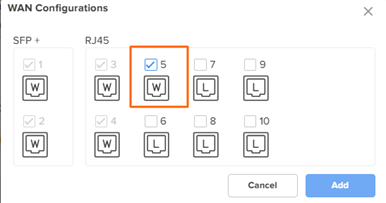
On the NSE4000, in addition to the two default WAN ports, up to 3 LAN ports can be converted to WAN, providing a total of 5 WAN interfaces.
On the NSE3000, in addition to the two default WAN ports, up to 2 LAN ports can be converted to WAN, providing a total of 4 WAN interfaces.
WAN ports can also be transitioned to LAN roles
This enhances deployment flexibility across diverse topologies and service environments.
Full compatibility with existing NSE zero-touch onboarding and centralized monitoring workflows.
Note:
With the introduction of the new NSE4000 hardware platform, when creating a new NSE Group in cnMaestro, the user must explicitly select whether the group is intended for an NSE4000 or NSE3000 device.
Existing NSE Groups cannot be directly attached to an NSE4000 device.
Enterprise Wi-Fi: Simplified Wi-Fi Offload Configuration
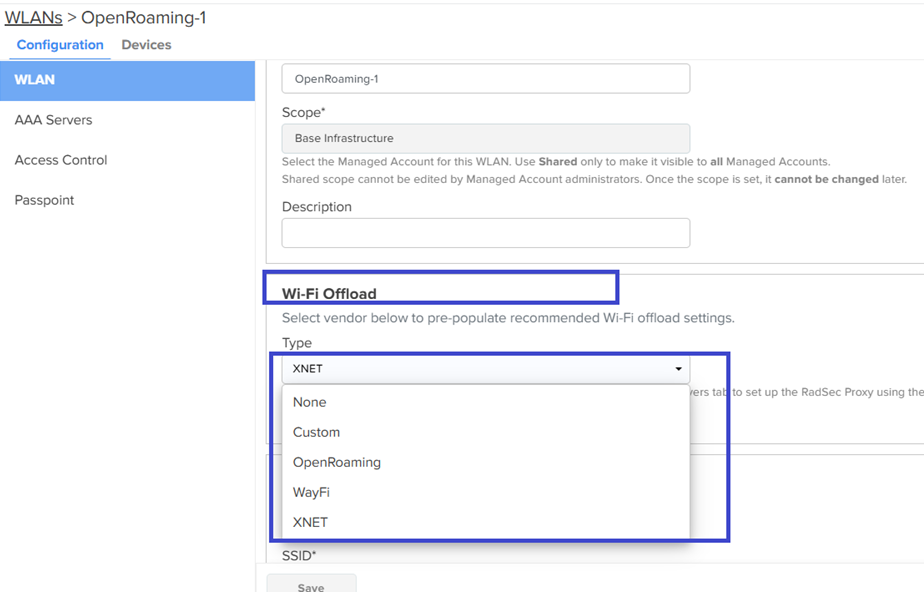
cnMaestro provides pre-populated recommended Wi-Fi offload settings. Wi-Fi offloading helps mobile network operators reduce congestion on cellular networks by shifting data traffic to Wi-Fi networks whenever possible.
Cambium Networks supports the following Wi-Fi offloading vendors:
-
OpenRoaming
-
WayFi
-
XNET
Use the Custom option if you want to configure a vendor that is not listed above. To configure Wi-Fi offloading, complete the following steps:
-
Select an appropriate vendor in the WLANs > Wi-Fi Offloading section.
-
Configure the required VLAN in the WLANs > Basic Settings section.
-
Configure the RADIUS security proxy details in the WLANs > AAA Servers section.
Review and, if required, modify the default Passpoint parameter values for the selected vendor under WLANs > Passpoint.
Note: For deployments where Passpoint was enabled prior to the 5.2.5 release, the Wi-Fi Offload type will be automatically set to Custom.
cnMatrix: Port Configuration by Switch Model (Beta)
This release introduces significant improvements to port-level configuration within Switch Profiles, enabling administrators to streamline switch provisioning and maintain consistent configurations across cnMatrix models using Port Templates and Port Mapping.
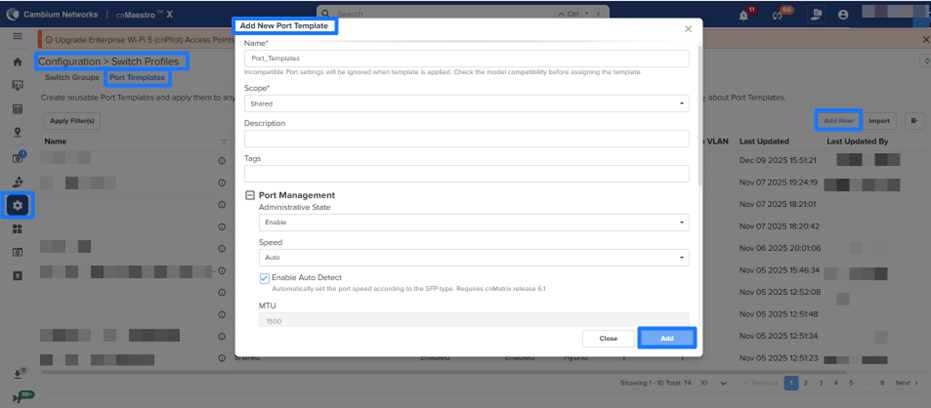
Port Templates
Port Templates allow administrators to create reusable, predefined port configurations and apply them to one or more ports within a Switch Group. When a template includes model-specific settings, the system automatically ignores unsupported parameters for switch models that do not support them.
Port Mapping
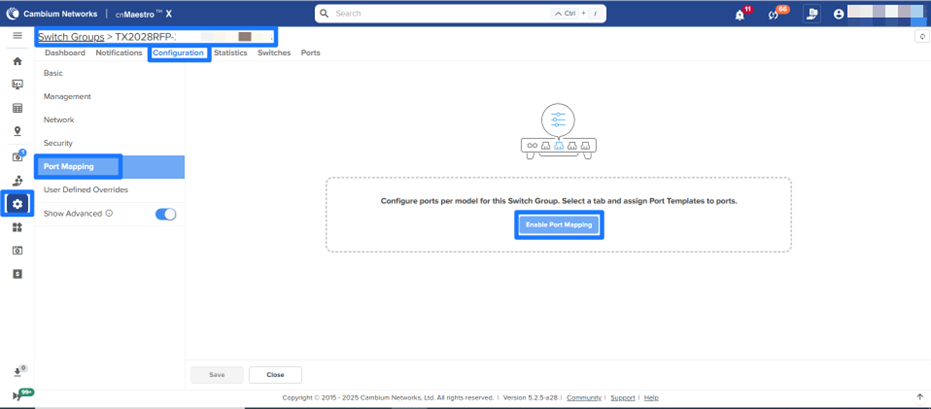
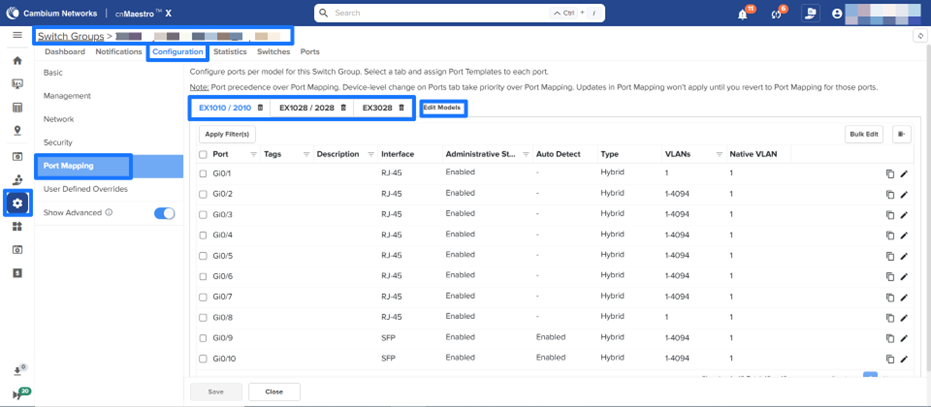
The new Port Mapping feature provides centralized management of port-level settings for different cnMatrix switch models within a Switch Group. Administrators can enable or disable Port Mapping per model and define consistent, model-specific configurations across large or distributed deployments.
Key Capabilities
-
Model-Based Configuration: Select supported cnMatrix models to activate Port Mapping and manage configurations per model.
-
Template Assignment: Apply Port Templates to individual ports for faster setup and uniform behavior.
-
Granular Port Control: Configure VLANs, PoE, STP, rate limits, 802.1X, ACLs, and other port attributes at a per-port level.
-
Bulk Management: Update multiple ports simultaneously to accelerate deployment and configuration changes.
-
Safe Defaults: Disabling Port Mapping returns ports to their default configuration, ensuring a consistent baseline.
These enhancements support zero-touch provisioning, reduce configuration time, and help standardize switch behavior across diverse cnMatrix models.
Behavior Notes
Ports can be configured per model by selecting the appropriate tab and assigning Port Templates to each port. Device-level changes made directly on the Ports tab take precedence over Port Mapping.
Note: This feature will be introduced as a beta in a 5.2.5 maintenance release, targeted for the end of January 2026.
MarketApps for Senior Living & Outdoor Hospitality X
MarketApps introduces two new apps that target Senior Living and Outdoor Hospitality facilities. MarketApps new apps empower front desk staff and Wi-Fi support staff to centrally administer Wi-Fi access across their properties. They can set up community-wide Wi-Fi networks and manage personal Wi-Fi networks for residents or guests.
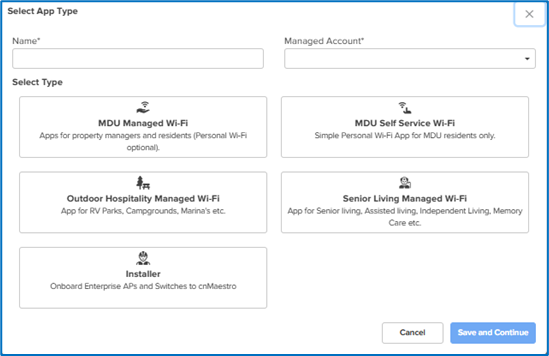
New MarketApps Configuration
The new apps can be found in Network Services > MarketApps > click Add New.
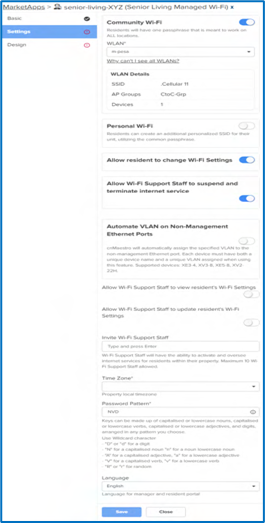
Senior Living Managed Wi-Fi
This MarketApp is built for residents and supports staff at senior care facilities by simplifying Wi-Fi management. The app allows support staff to view, manage, and print guest credentials. It also allows a self-service portal for residents to connect to the network using simple QR-based access.
Design tab
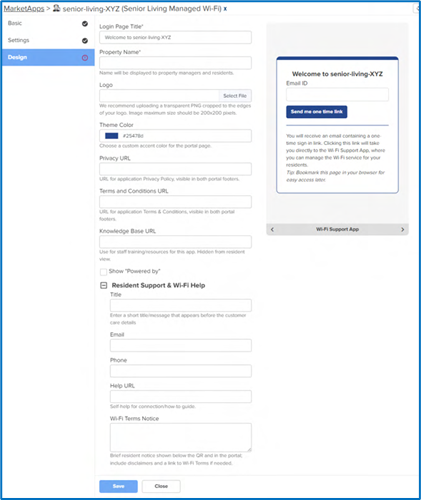
The Design tab in MarketApps allows you to customize the branding and appearance of the support and guest portals, ensuring a cohesive and professional user experience.
Outdoor Hospitality Managed Wi-Fi
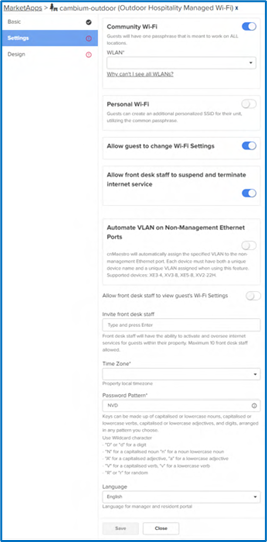
This MarketApp is built for RV parks, campgrounds, marinas, and other similar facilities to help set up guest Wi-Fi fast and frictionless. The app allows front desk teams to view, manage, and print guest credentials. It also allows a self-service portal for visitors to connect to the network using simple QR-based access.
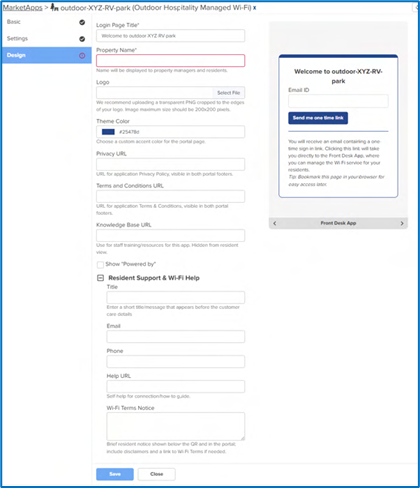
Design tab
The Design tab in Outdoor Hospitality MarketApps allows you to customize the branding and appearance of the front desk and resident portals, ensuring a cohesive and professional user experience.
Managing units in the Wi-Fi Support / Wi-Fi Front Desk Apps
Front desk staff—Applicable to Outdoor Hospitality Managed Wi-Fi app through the Wi-Fi Front Desk app
Wi-Fi support staff—Applicable to Senior Living Managed Wi-Fi app through the Wi-Fi Support app
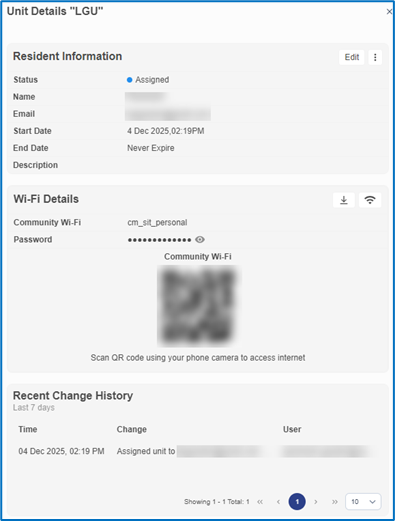
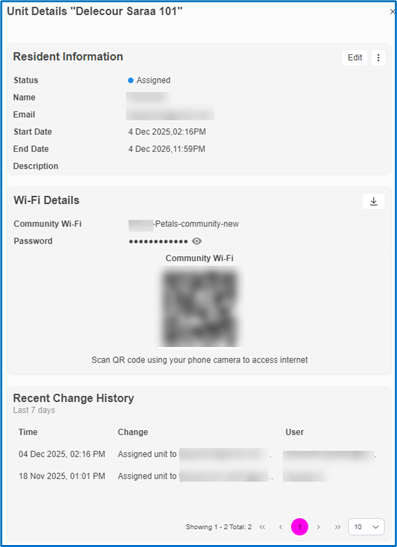
The Wi-Fi Front Desk App and Wi-Fi Support App display an additional Wi-Fi Details section. This section displays the Wi-Fi details assigned to the residents, along with the QR code.
Wi-Fi support staff (Senior Living—Wi-Fi Support App):
Front desk staff (Outdoor Hospitality—Wi-Fi Front Desk App):
PDF download for Wi-Fi details
The front desk and support staff can download these details in a PDF file by clicking the download ( ) icon.
The support information that appears in the PDF is the same configuration that the MSPs make in the Resident Support & Wi-Fi Help section in the Design tab of the cnMaestro MarketApps app.
Downloaded Sample PDF file
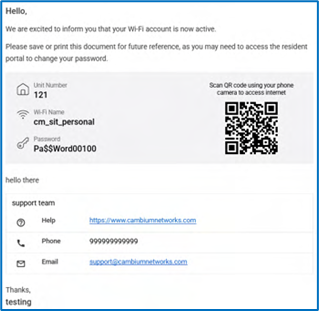
In addition to this, if the Allow Wi-Fi Support Staff to update resident’s Wi-Fi Settings is enabled in the Senior Living Managed Wi-Fi App, then the support staff can modify the Wi-Fi password by clicking the update Wi-Fi settings icon.
Platform: Enhanced Search
The new Enhanced Search Bar in cnMaestro streamlines navigation, troubleshooting, and system management through a unified, intelligent search experience.
This is designed to help find Devices, Clients, Sites, Pages & Features, and Community posts.
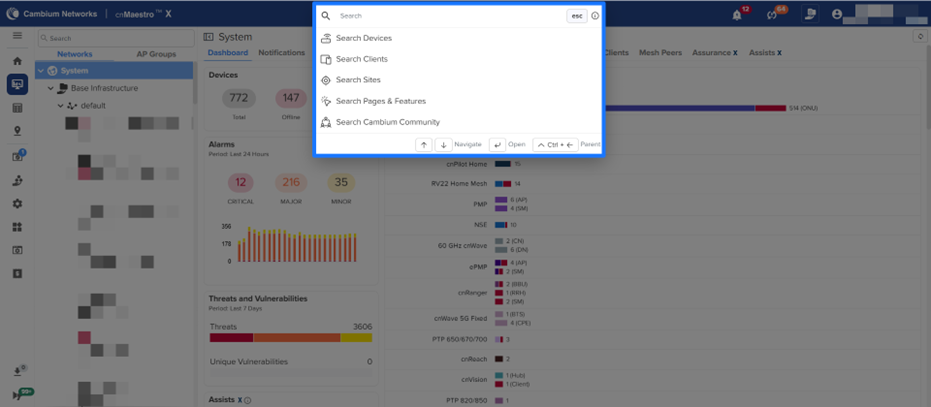
Also, Power Search option enables highly precise search queries across Networks, Towers, AP Groups, WLANs, etc. by using certain predefined prefixes as example below
Type network: and press Enter
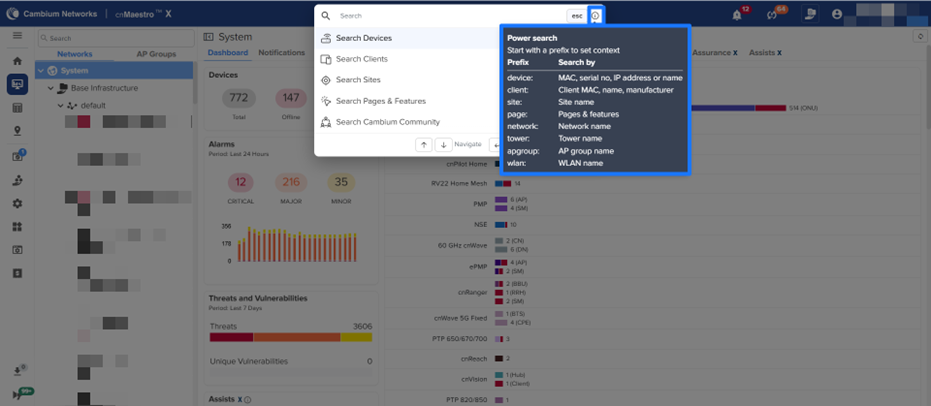
Note : Enhanced search is not supported for clients connected to NSE and will be supported in a future release.
Platform: Subscription Scoping X
In this release, Subscription Scopes introduce hierarchical control over subscription allocation, replacing the previous flat structure and enabling MSPs and large distributed enterprises to manage subscription pools with significantly greater precision. This enhancement ensures that subscriptions are consumed only within their assigned scopes, preventing cross-hierarchy overlaps and eliminating license leakage between tenants.
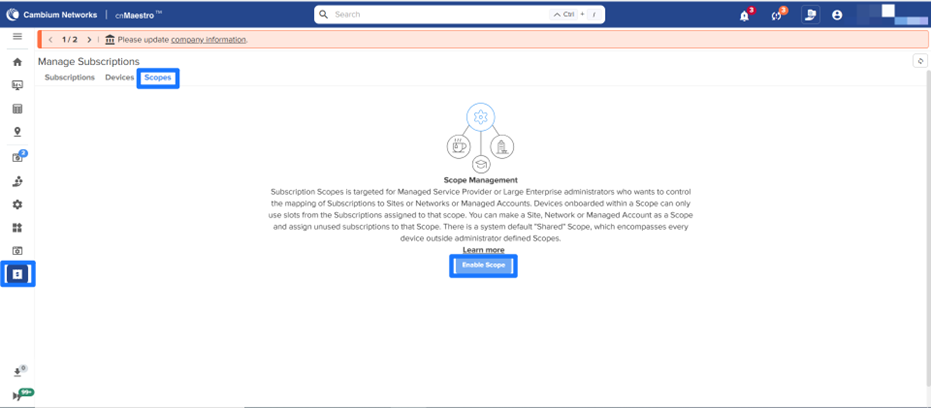
Subscriptions can be allocated at the Managed Account, Network, or Site levels. All subscriptions initially reside in a shared pool; after scoping is enabled, administrators can assign subscription pools to specific scopes. Devices that are onboarded within a scope can only use the subscriptions allocated to that scope.
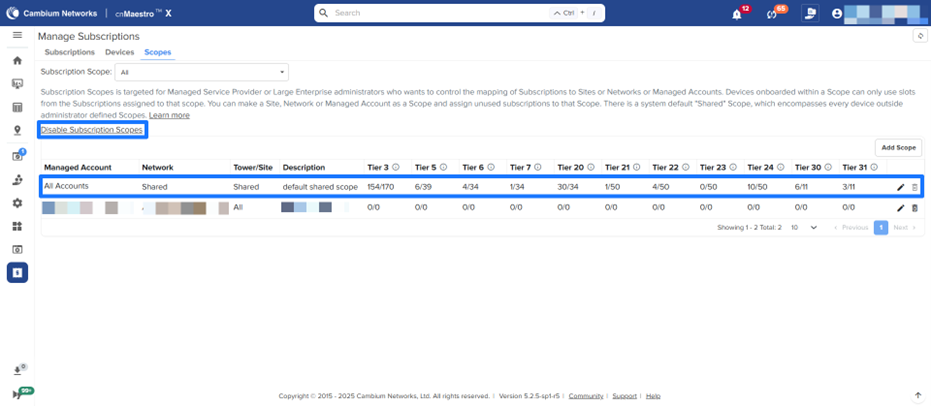
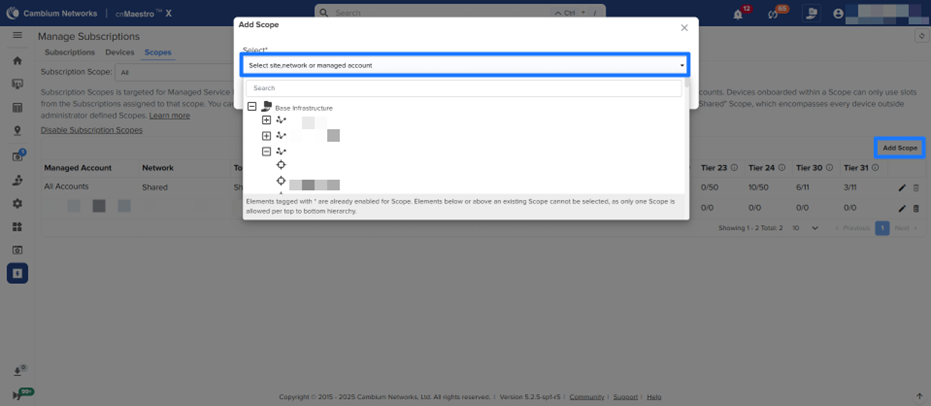
Each branch of the hierarchy supports only a single scope level. For example, enabling a Network-level scope prevents Site-level or Managed Account–level scopes from being created above or below that network.
When subscription pools are shared across multiple scopes, the system automatically splits them based on the number of devices present in each scope. Newly added subscriptions remain unassigned until explicitly linked to a scope.
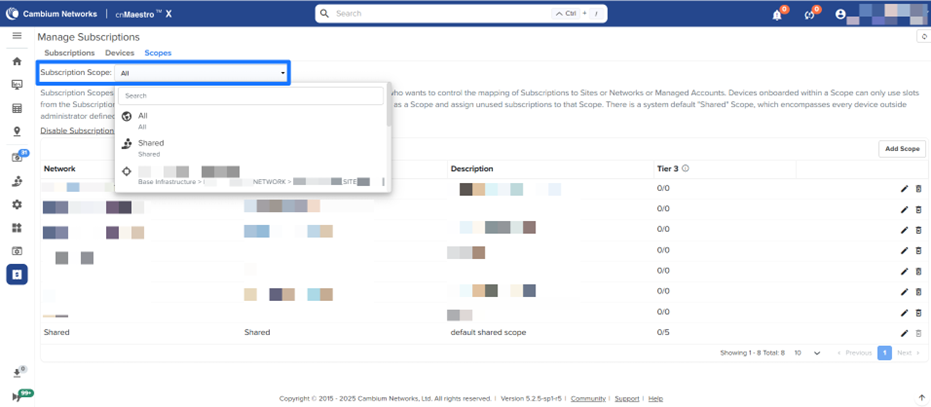
A new scope filter on the Manage Subscriptions page provides clear visibility into allocated subscriptions and the devices onboarded within each scope.
NSE Enhancements
Configurable LAN/WAN ports
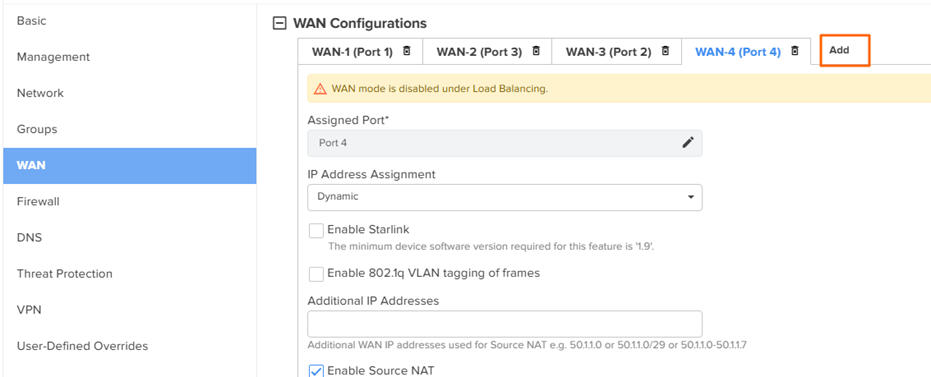
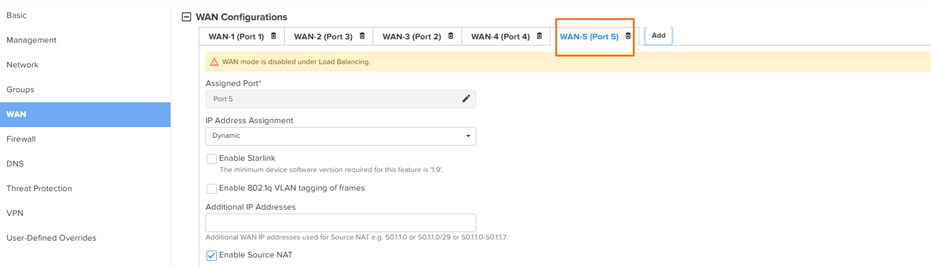
This feature allows users to create additional WAN ports. Interfaces can now be dynamically configured as a LAN or a WAN port
Navigate to NSE Group > WAN to add an additional WAN interface. Click the Add button to ADD a new WAN interface. On NSE4000, you can configure up to 5 WAN interfaces, and on NSE3000, up to 4 WAN interfaces.
Deleting the WAN interface will convert the port back to a LAN interface.
ERSPAN support
The Encapsulated Remote Switch Port Analyzer (ERSPAN) capability to export mirrored traffic to remote analyzers over IP. This feature enables centralized packet capture, intrusion analysis and troubleshooting across distributed sites without requiring a direct switch-level tap.
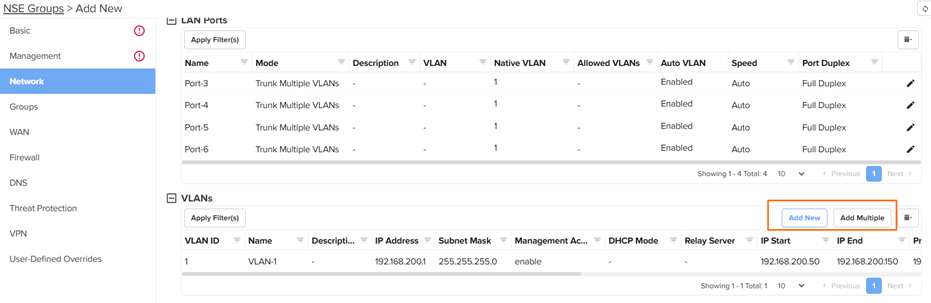
Navigate to NSE Group > Network to add an ERSPAN Session.
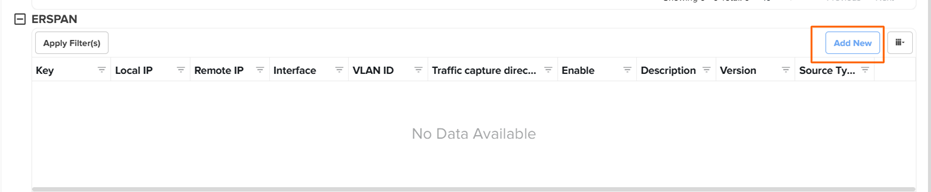
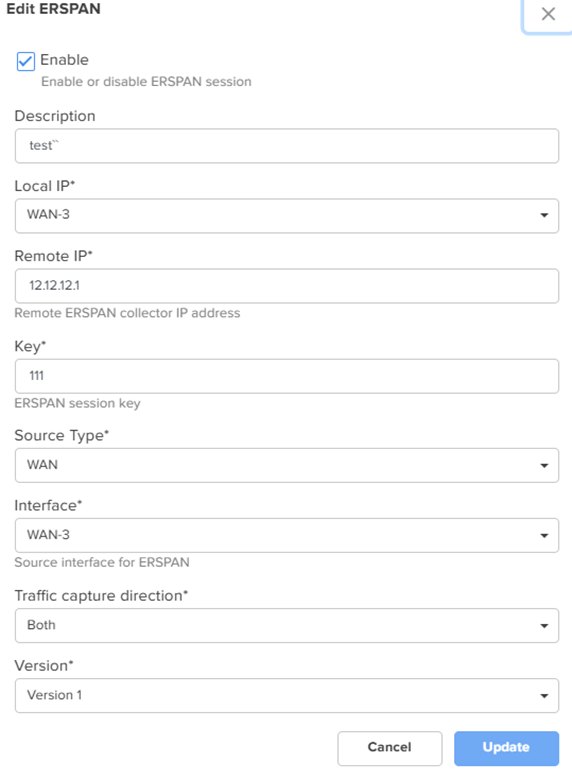
Maximum up to 4 sessions can be added. Make sure to set the Local_Ip, Remote_IP, Interface & source type to set the session.
Increased VLAN capacity
This Release supports up to 250 VLANs on NSE3000 and 500 VLANs on NSE4000
SNMPv2 support
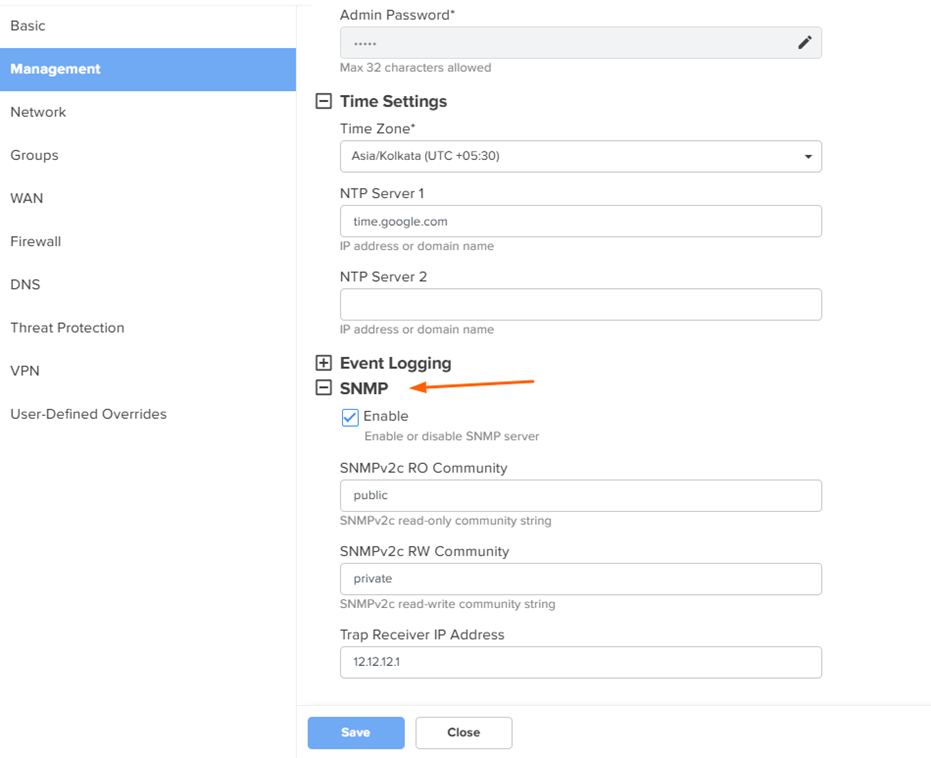
This release introduces SNMPv2 support for NSE devices, enabling network monitoring and trap-based alerting. Administrators can now track device health, interface statistics, and critical system events using SNMPv2.
The MIBS can be downloaded from Cambium support url
https://support.cambiumnetworks.com/files/nse_3000_4000/
WAN Monitoring tab changes
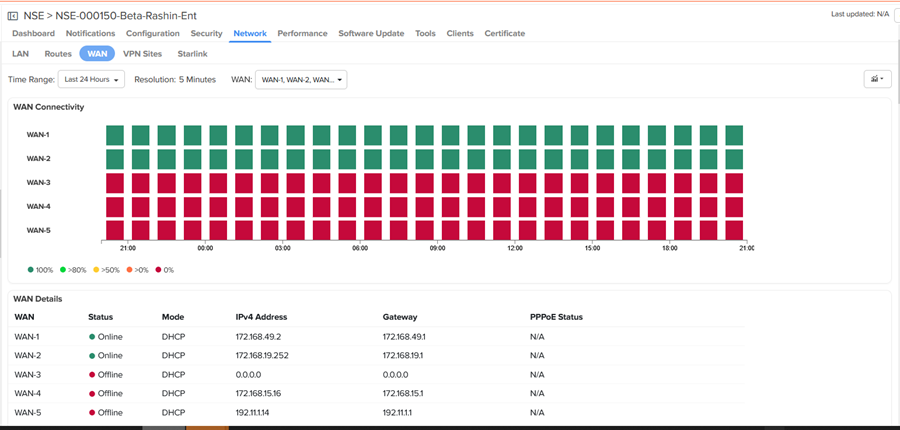
NSE WAN Monitoring now supports dynamic visualization and control for multiple WAN interfaces through an enhanced WAN Monitoring tab.
New WAN selector
The WAN Monitoring page introduces a multi-WAN selector that automatically lists all WAN interfaces configured on the NSE device, including additional WANs created via configurable LAN/WAN ports. Administrators can quickly switch or multi-select WAN interfaces to view the graphs like throughput, latency, speed test etc.
NSE Dashboard Changes
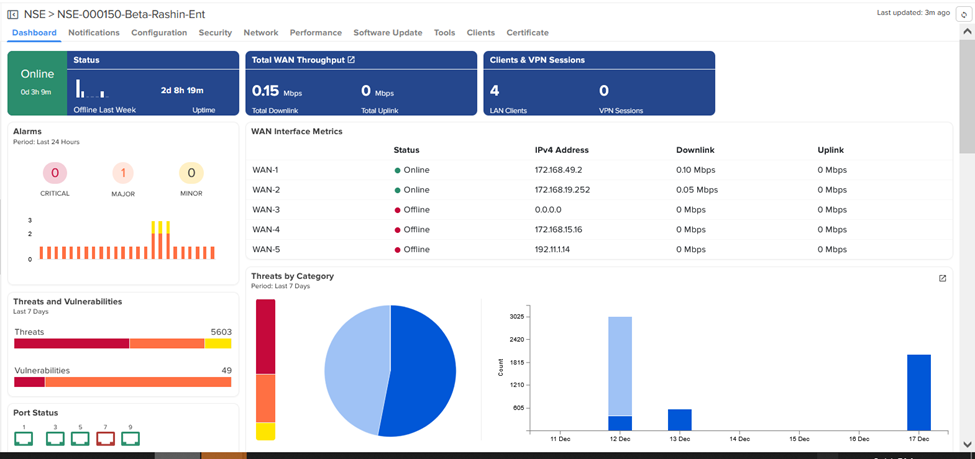
The NSE device dashboard has been enhanced to surface multiple WAN interfaces with richer status and performance visibility
New WAN Interface Metrics table
A new WAN Interface Metrics table lists each WAN (WAN1 to WAN4/5) with status, IPv4 address, and downlink/uplink rates, allowing quick comparison across all configured WAN’s.
Multi WAN sperate uplink and downlink throughput graphs
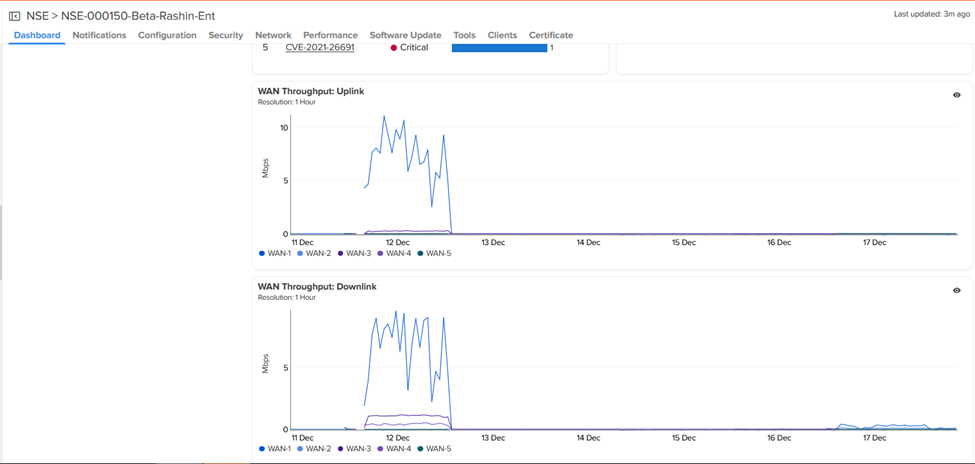
The throughput charts have been expanded from per WAN1/WAN2 graphs to unified WAN Throughput (Uplink/Downlink) separate graphs, plotting individual series for every WAN interface so users can monitor multi WAN utilization graphs directly from the dashboard.
PON: Techsupport Dumps and Remote Reboots
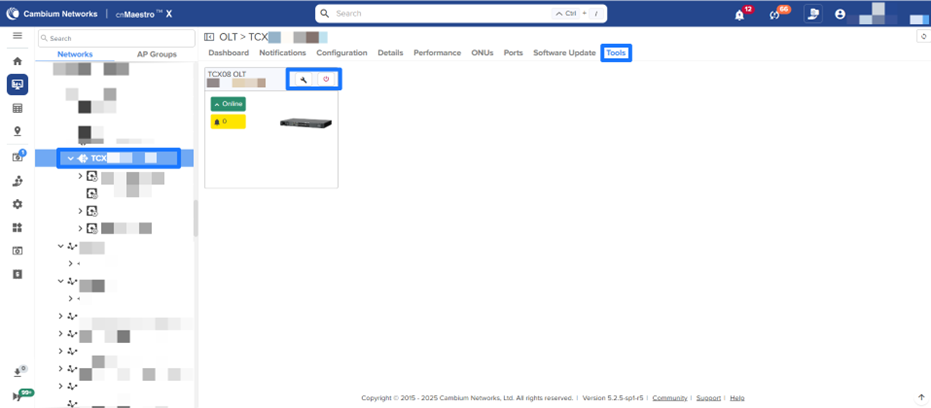
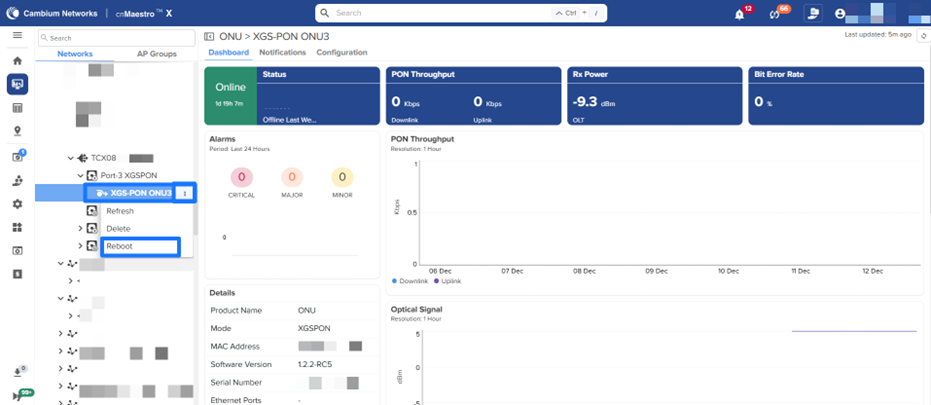
Reboot support has been added for both OLT and ONU devices and Download Tech Support file is now available for OLTs under Tools. This enhancement streamlines troubleshooting workflows and accelerates issue resolution for field teams managing large-scale fiber deployments.
Note: The OLT Download Tech Support file and ONU reboot are applicable only when the OLT software is upgraded to version 1.3.0 or higher.
Deprecation Notice for Configuration Groups under Managed Accounts
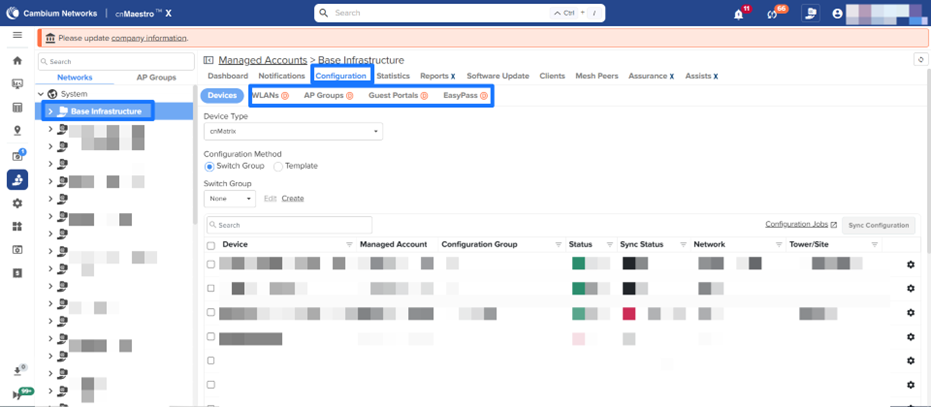
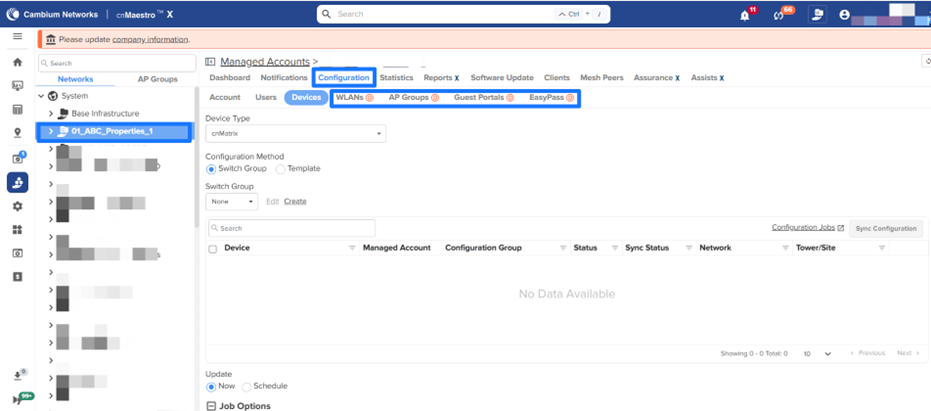
The redundant configuration group tabs—AP Groups, WLANs, Guest Portals, and EasyPass—under Managed Services > Managed Accounts > > Configuration are deprecated and will be removed in the upcoming 6.0 release.
To manage AP Groups and WLANs, navigate to Configuration > Wi-Fi Profiles.
To manage Guest Access and EasyPass portals, navigate to Configuration > Network Services.
Installer MarketApp – Support for AP Replacement
The Installer MarketApp now supports a streamlined workflow for replacing faulty APs or upgrading APs already deployed at a site.
Before replacing an AP using the Installer app, note that only Enterprise Wi-Fi APs are supported and users must have appropriate access to the target site. When a custom device name exists on the original AP, the replacement AP automatically inherits that name, while the old AP is renamed with a “-replaced” suffix. APs with default device names retain their own default naming after replacement. Any AP Group assignments and associated configurations from the original AP are automatically applied to the new AP. Additionally, if the previous AP was installed through the Installer app, installation parameters such as height, azimuth, and tilt are carried over to the replacement.
Details of the replaced AP can be viewed in the Installation Summary under the Replacement History section.

Miscellaneous Enhancements
Industrial Internet Account View Deprecation and cnReach Device Support Migration
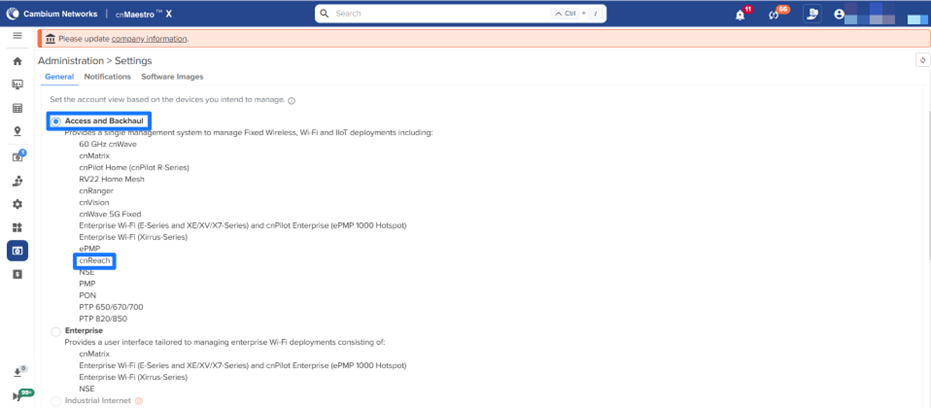
The Industrial Internet account view has been deprecated and will be removed in the upcoming 6.0 release. New accounts cannot be created using this view, and existing accounts cannot be switched to it.
To ensure continuity, cnReach device management has been migrated to the Access and Backhaul account view. This change eliminates the need for the Industrial Internet account view while maintaining full device management capabilities.

Switch Groups Enhancements
Switch Groups have been renamed Switch Profiles under the Configuration section. Within this updated structure, both Switch Groups and Port Templates are now organized under the Switch Profiles category.
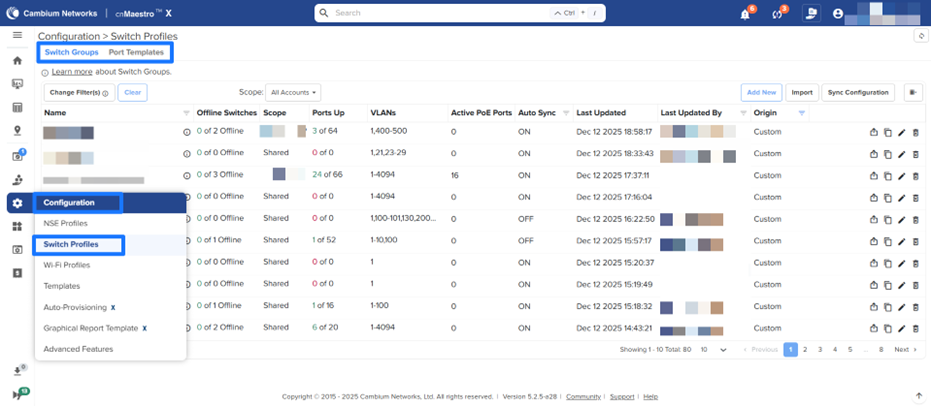
Note: Port Templates will be introduced as a beta in a 5.2.5 maintenance release, targeted for the end of January 2026.
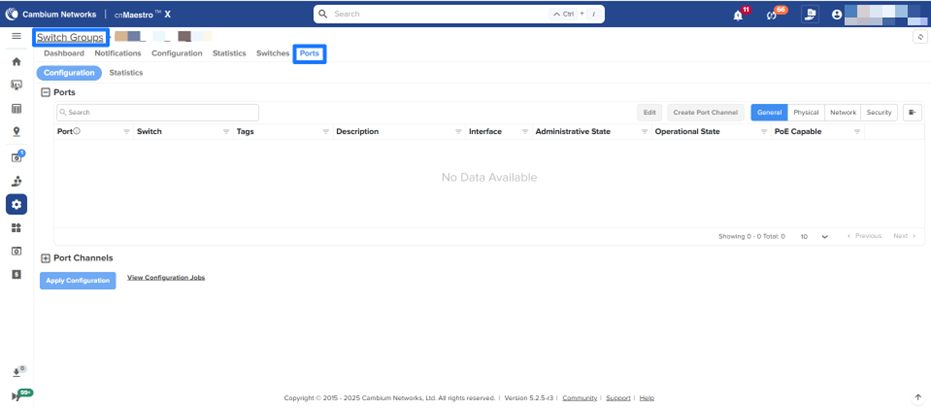
Switch Ports renamed to Ports under Switch Groups
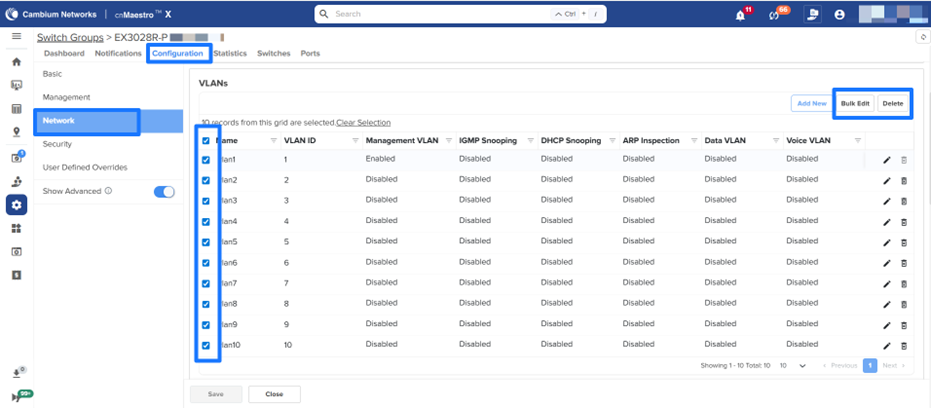
Bulk Edit and Delete options are added for VLAN section under Switch Groups > Configuration > Network
Added support for Energy-Efficient Ethernet configuration in Switch Groups: Within Switch Group > Configuration > Network, Energy-Efficient Ethernet (EEE) must be enabled at the Switch Group level for individual EEE port settings to take effect.
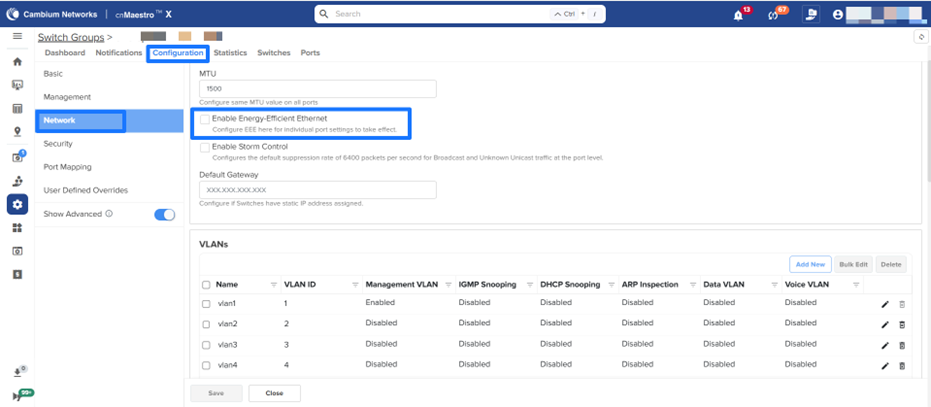

Note: This feature is supported on cnMatrix devices running software version 6.2.0 or later and will be available in the 5.2.5 maintenance release, targeted for the end of January 2026.
Storm Control Behavior Updates: This release defines consistent Storm Control behavior across Port Mapping and device-level port settings. When enabled, a default suppression rate of 6400 is applied to all ports unless explicitly overridden per port; when disabled, any Port Mapping–configured suppression rates are cleared, while device-level port overrides remain unchanged. Suppression rates configured directly at the port level always take precedence.
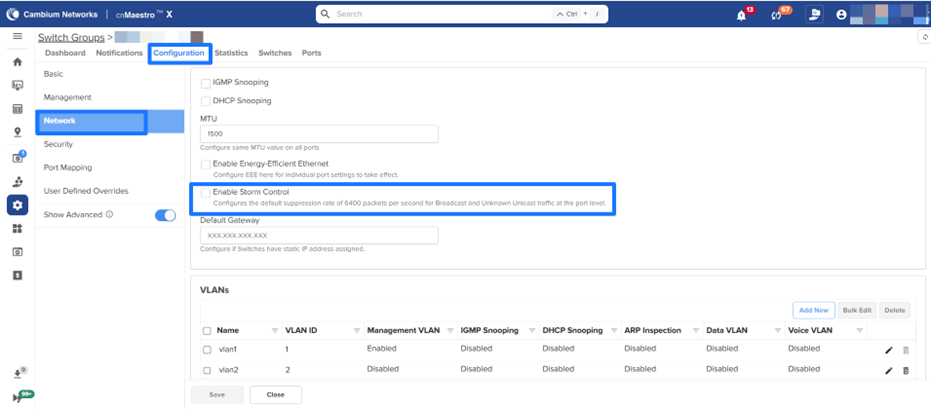
Note: This feature will be available in the 5.2.5 maintenance release, targeted for the end of January 2026.
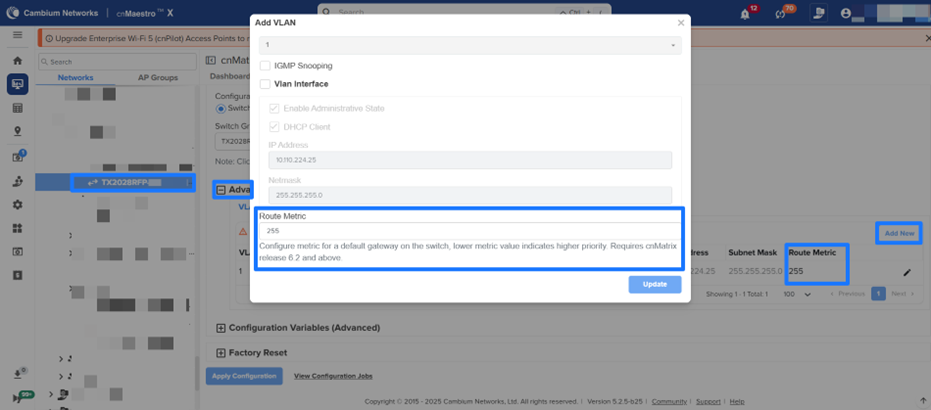
Default Gateway Metric Configuration: Administrators can now configure a metric for the default gateway on cnMatrix switches under Advanced Settings > VLAN, where a lower metric value indicates higher priority. This feature is supported on cnMatrix devices running software version 6.2.0 or later.
NSE Groups Enhancements
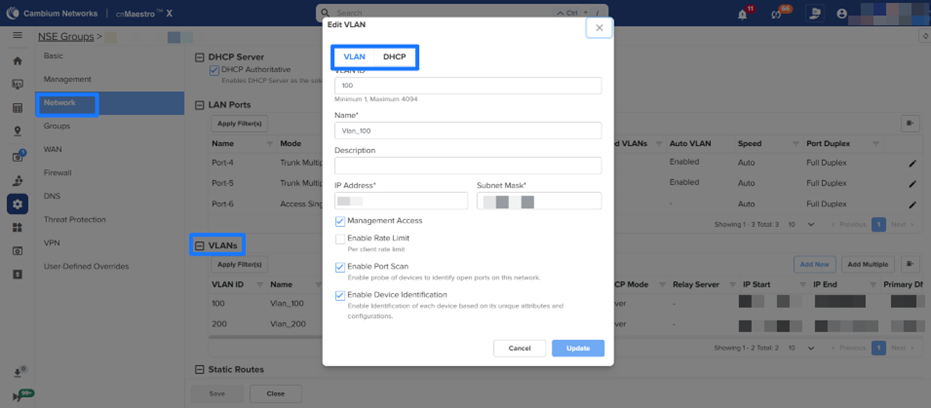
Separate VLAN and DHCP tabs have been added to the Add/Edit VLAN workflow in the NSE Groups > Network > VLANs section to improve configuration.
API Updates X
Deprecated APIs
| Request Method | Path | Deprecated In | Sunset In | Replacement | Details |
|---|---|---|---|---|---|
| PUT | /portals/{portalName}/whitelist | 5.2.0 | 6.1.0 | /api/v2/easypass/{portalName}/configuration/allowed_domains | |
| POST | /portals/{portalName}/vouchers/{voucherPlan}/generate | 5.2.0 | 6.1.0 | /api/v2/easypass/{portalName}/voucher_plans/{voucherPlan}/vouchers/generate | |
| Guest Access API | |||||
| GET | /portals | 5.2.0 | 6.1.0 | /api/v2/easypass | The Guest Access Portal feature has been deprecated, and as a result, the associated RESTful APIs have also been deprecated. |
| GET | /portals/{portalName} | 5.2.0 | 6.1.0 | /api/v2/easypass/{portalName} | |
| GET | /portals/{portalName}/events | 5.2.0 | 6.1.0 | /api/v2/easypass/{portalName}/sessions/login_events | |
| GET | /portals/{portalName}/voucher_plans | 5.2.0 | 6.1.0 | /api/v2/easypass/{portalName}/voucher_plans | |
| GET | /portals/{portalName}/vouchers/{voucherPlan} | 5.2.0 | 6.1.0 | /api/v2/easypass/{portalName}/voucher_plans/{voucherPlan}/vouchers |
Deprecated Fields
| Request Method | Path | Field Name | Deprecated in | Sunset In | Replacement | Details |
|---|---|---|---|---|---|---|
| AP Groups | ||||||
| GET | /wifi_enterprise/ap_groups | auto_rf_channel_selection_mode | 5.2.1 | 6.1.0 | N/A | These fields are no longer relevant for Auto RF configuration. |
| GET | /wifi_enterprise/ap_groups | channel_utilization_threshold | 5.2.1 | 6.1.0 | N/A | |
| POST | /wifi_enterprise/ap_groups | auto_rf_channel_selection_mode | 5.2.1 | 6.1.0 | N/A | This field is no longer relevant for Auto RF configuration. |
| PUT | /wifi_enterprise/ap_groups/{ap_group_name} | auto_rf_channel_selection_mode | 5.2.1 | 6.1.0 | N/A | |
| Wi-Fi Enterprise | ||||||
| GET | /devices/clients | ap_mac | 5.0.0 | 6.0.0 | device_mac | The ap_mac field is deprecated and replaced with a new generic term, device_mac, to accommodate other non-Wi-Fi device types, such as NSE. For a similar reason, the rx_bytes and tx_bytes fields have also been taken out of the radio property of an AP device. |
| GET | /devices/wired_clients | ap_mac | 5.0.0 | 6.0.0 | device_mac | The ap_mac field is deprecated and replaced with a new generic term, device_mac, to accommodate other non-Wi-Fi device types, such as NSE. |
| GET | /devices/clients/summary | rate | 5.2.1 | 6.1.0 | tx_rate | For consistency, the rate field has been deprecated and replaced with a new field, tx_rate, alongside the introduction of a corresponding rx_rate field. |
| GET | /devices/clients/summary | client_type | 5.2.1 | 6.1.0 | os | The client_type field was capturing the OS information, which was incorrect. So replaced it with a new field os. |
| Switch Groups | ||||||
| GET | /api/v2/cnmatrix/switch_groups_ports/{switch_group_name} | nid | 5.2.5 | 6.1.0 | network | Renamed the deprecated fields to relevant ones. |
| GET | /api/v2/cnmatrix/switch_groups_ports/{switch_group_name} | tid | 5.2.5 | 6.1.0 | tower | |
| GET | /api/v2/cnmatrix/switch_groups_ports/{switch_group_name} | mcid | 5.2.5 | 6.1.0 | managed_account | |
| GET | /api/v2/cnmatrix/switch_groups_ports/{switch_group_name} | eType | 5.2.5 | 6.1.0 | N/A | eType is redundant as the API endpoint is specific to cnMatrix itself. |
Update notice for existing APIs
| Request Method | Path | Details |
|---|---|---|
| Devices | ||
| POST | /api/v2/devices | Increased the maximum character limit for device names on PMP devices to 128 characters. |
| PUT | /api/v2/devices/{mac} | Increased the maximum character limit for device names on PMP devices to 128 characters. |
| POST | /api/v2/devices | Added support for azimuth, elevation, beam_width, height, height_unit for PMP and ePMP devices. |
| GET | /api/v2/devices | Added support for azimuth, elevation, beam_width, height, height_unit for PMP and ePMP devices. |
| PUT | /api/v2/devices/{mac} | Added support for azimuth, elevation, beam_width, height, height_unit for PMP and ePMP devices. |
| Switch Groups | ||
| POST | /api/v2/cnmatrix/switch_groups | Added support for setting shared scope for switch groups. Expected values: true/false. |
| GET | /api/v2/cnmatrix/switch_groups | Added support for getting shared scope for switch groups. Expected values: true/false. |