Cambium is pleased to announce the cnMaestro 6.0 cloud release
Key Features in cnMaestro 6.0.0
-
Enhanced Application Control: Upgraded application engine on NSE and enterprise Wi-Fi.
-
NSE Enhancements: DNS Filter Events, Firewall Counters, Virtual WAN, and IPS Threat Events
-
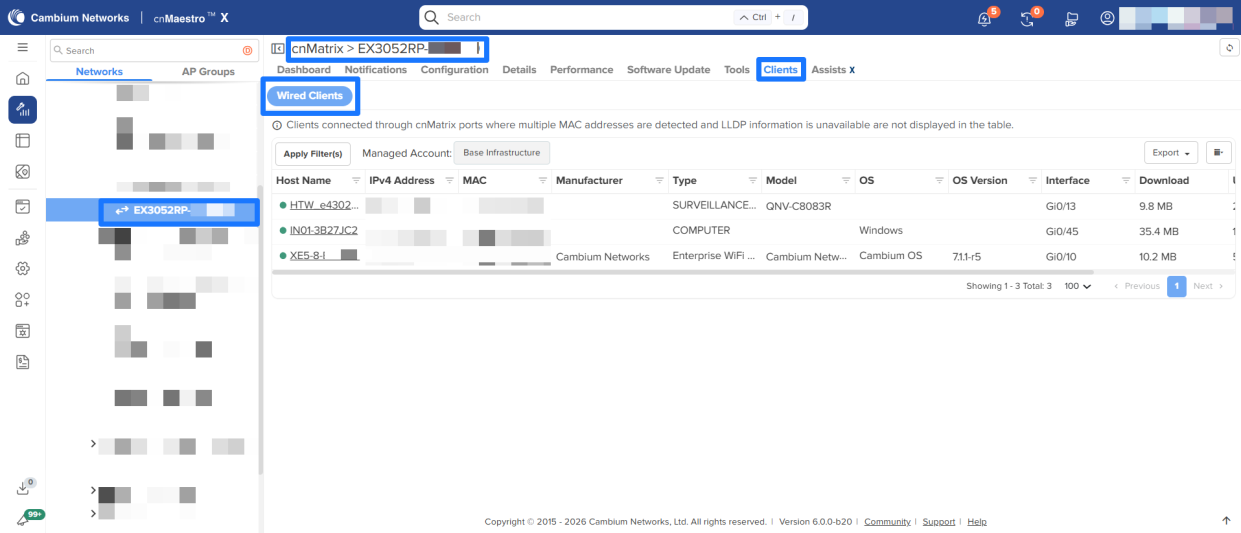
cnMatrix Wired Client Visibility: Enhanced visibility and reporting for wired clients.
-
cnMatrix Port Templates and Model based Port Configuration: Enhanced port level configuration functionality for cnMatrix switches.
-
Wi-Fi Offload Enhancements: Added support for Google Orion and Helium.
-
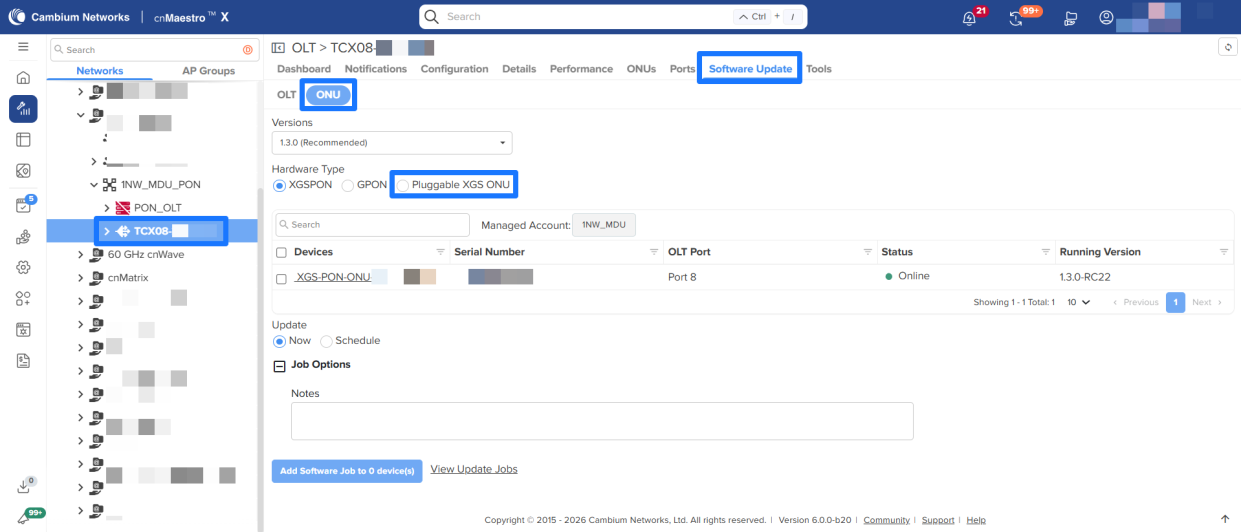
PON Updgrades: Software Upgrade Support for Pluggable XGS ONUs
-
MarketApps Enhancements: Export Installation Summary per Site; SSO for Installer App; Installer invite installers with expiry date
-
Extended Time Range for Site Dashboard: Increase from 7 to 30 days for select graphs.
-
EasyPass Generate and Export Vouchers: New options at the time of voucher generation.
-
And more…
For more details on this releases new features, see the announcement below, a link to a video demo of the key features, and a link to the full release notes.
What’s New video 6.0.0 (Quick demos):
Release Notes for 6.0.0: https://docs.cloud.cambiumnetworks.com/help/Whats_New/6.0.0/cloud/cnMaestro_6.0.0.pdf
User guide: https://docs.cloud.cambiumnetworks.com/help/6.0.0/index.htm#
Thank you,
cnMaestro Product Team
cnMaestro Cloud 6.0.0 Release
Enterprise Wi-Fi, NSE: Enhanced Application Control
This release upgrades the Deep Packet Inspection (DPI) engine used on Cambium NSE and Wi-Fi solutions for Application Visibility and Control. The upgraded engine utilizes an industry leading modern, advanced technology stack.
The updated DPI engine delivers improved application recognition accuracy, enhanced traffic classification, and better performance and scalability across Cambium enterprise Wi-Fi and/or NSE deployments. Customers will benefit from a much larger number of identified applications, stronger policy enforcement, and greater precision in analytics.
The updated DPI engine increases application recognition capacity to 5,000+ distinct applications, significantly expanding visibility compared to the legacy engine’s ~2,000 application support.
This enhancement maintains seamless DPI functionality while strengthening overall system performance and scalability across supported configurations.
Note: The new DPI engine is supported by Enterprise Wi-Fi APs running version 7.2 or later and on NSE devices running version 2.1 or later.
Important: Upgrade/Downgrade Impact to Access Control Policy (ACP)/ Firewall Configuration
For NSE
-
Downgrade (to versions below 2.1):
Downgrading may result in the loss of certain firewall configurations. After the downgrade, manually re-sync the configuration from the Device Configuration page to ensure proper firewall operation. -
Upgrade (to version 2.1 and above):
The configured NSE Groups may contain settings that are not applicable to the upgraded version. Review the NSE Group configuration after the upgrade.
For Enterprise Wi-Fi APs
- During upgrade (to version 7.2 and above) or downgrade (to versions below 7.2), the Access Control Policy (ACP) associated with the configured AP Groups or WLAN may include application-based rule configurations that are not supported by the selected version.
Review and update the associated ACP rules after the version change.
NSE Enhancements
DNS Filter Events
This release introduces a new DNS Filtering tab at the device level under the Security page.
This enhancement provides detailed visibility into DNS-based security events, including client IP address, blocked domain, blocked category, and the associated policy under which the action was enforced. The new view enables more efficient monitoring, improved troubleshooting, and clearer insight into DNS security policy enforcement at the device level.

Additional Fields under the IPS Threat Events
-
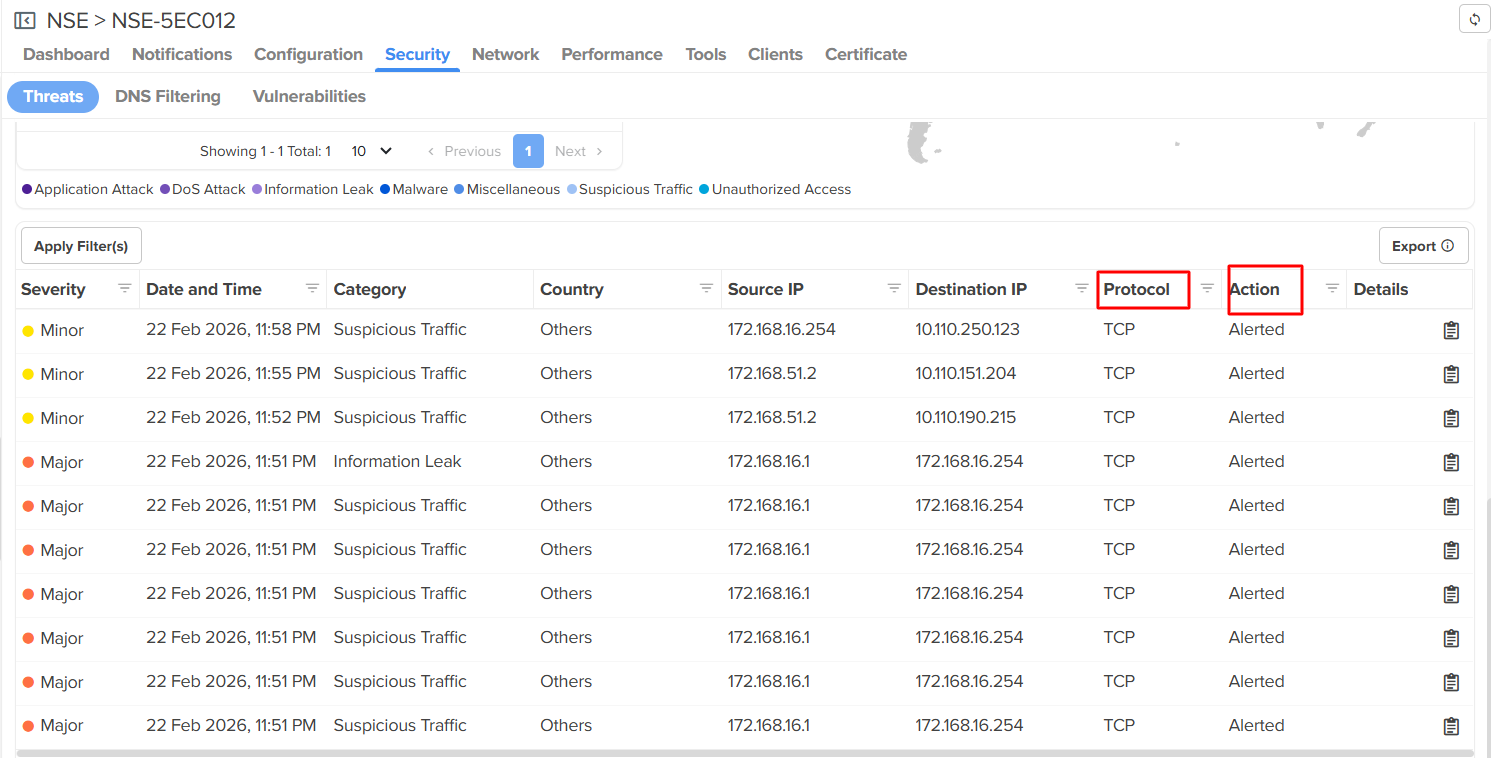
Under the Security > Threats page, two additional columns have been introduced to the table: Protocol and Action.
-
The Protocol column indicates whether the threat originated from a TCP, UDP or ICMP flow.
The Action column shows how the event was handled — Alerted (IDS in detection mode) or Dropped (IDS in protection mode).
Firewall Counters
-
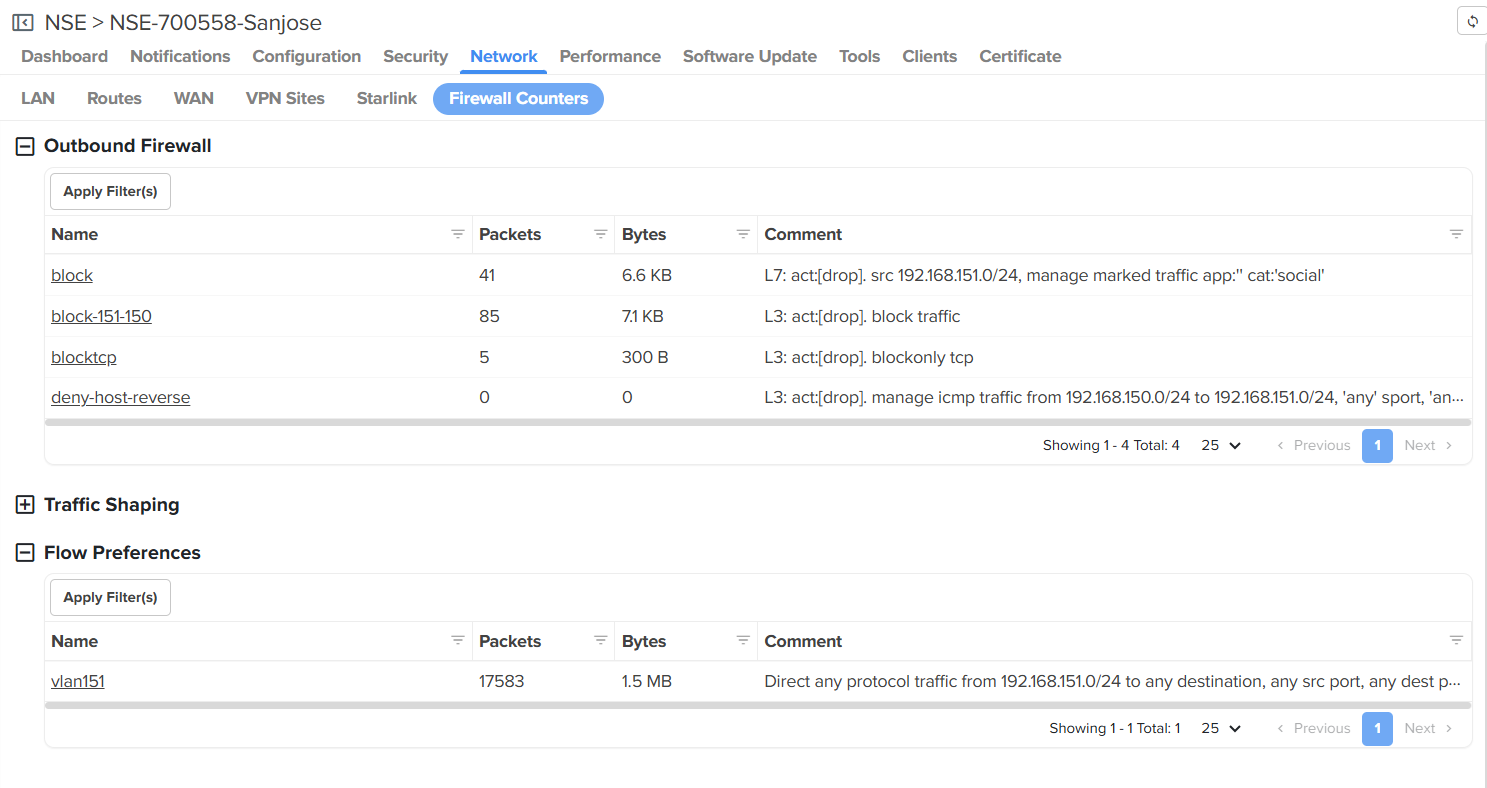
The Firewall Counters page provides visibility into firewall rule activity on the device. It displays rule hit counts in terms of packets and bytes for configured Outbound Firewall rules, Traffic Shaping rules, and Flow Preferences, helping administrators verify rule matches.
-
This page is particularly useful for confirming whether specific rules are being triggered.
Virtual WAN
-
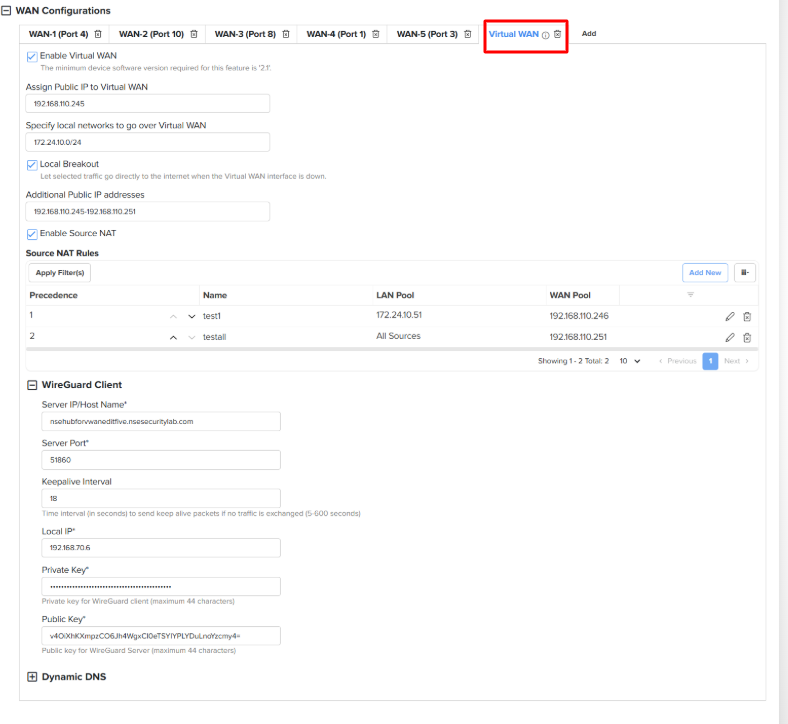
Virtual WAN is a new feature introduced in this release. It enables the creation of an additional WAN interface for forwarding user traffic.
-
The virtual interface establishes a WireGuard tunnel with a peer, and user traffic is routed through this secure tunnel.
-
All features available on the physical WAN interface such as assigning a public IP, Source NAT, Destination NAT and Dynamic DNS are also supported on Virtual WAN.
-
In addition, users can enable Local Breakout, which monitors the status of the Virtual WAN interface. If Virtual WAN goes down, traffic is automatically routed over the underlying connection.
-
We also allow a remote VPN WireGuard client to connect via the Virtual WAN interface.
Support for cnMatrix Wired Clients
cnMaestro now delivers enhanced visibility and reporting for wired clients connected directly to Ethernet ports on cnMatrix switches.
Wired clients are uniquely identified by their MAC address and include detailed attributes such as IP address, device category, operating system, and connection statistics. cnMaestro intelligently aggregates client information from multiple sources to deliver comprehensive, accurate client insights across the network. This feature improves network visibility, strengthens client-level monitoring, and enables administrators to better analyze and manage wired client devices across the network.
This enhancement also includes:
-
Accurate client identification using LLDP, DHCP snooping, and traffic analysis
-
Reporting of client properties, connection age, and port-level statistics
-
Support for advanced client insights such as device fingerprinting, application usage, and vulnerability information (when NSE is present in the same network)
NOTE: For cnMatrix switches, wired client information is available only for currently connected clients; historical data is not supported.
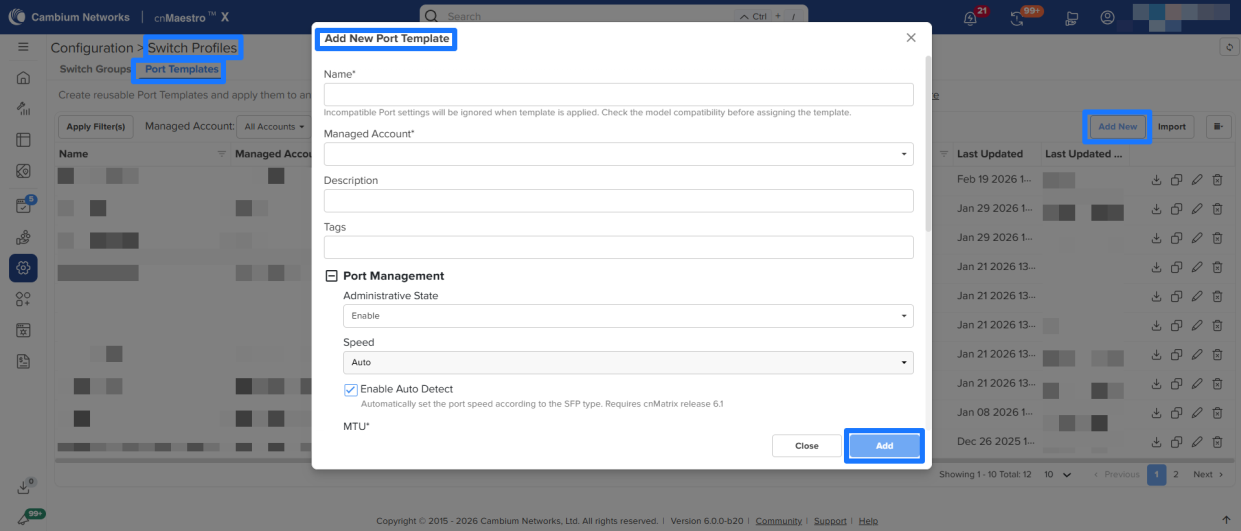
cnMatrix: Port Templates and Model based Port Configuration
Port Templates
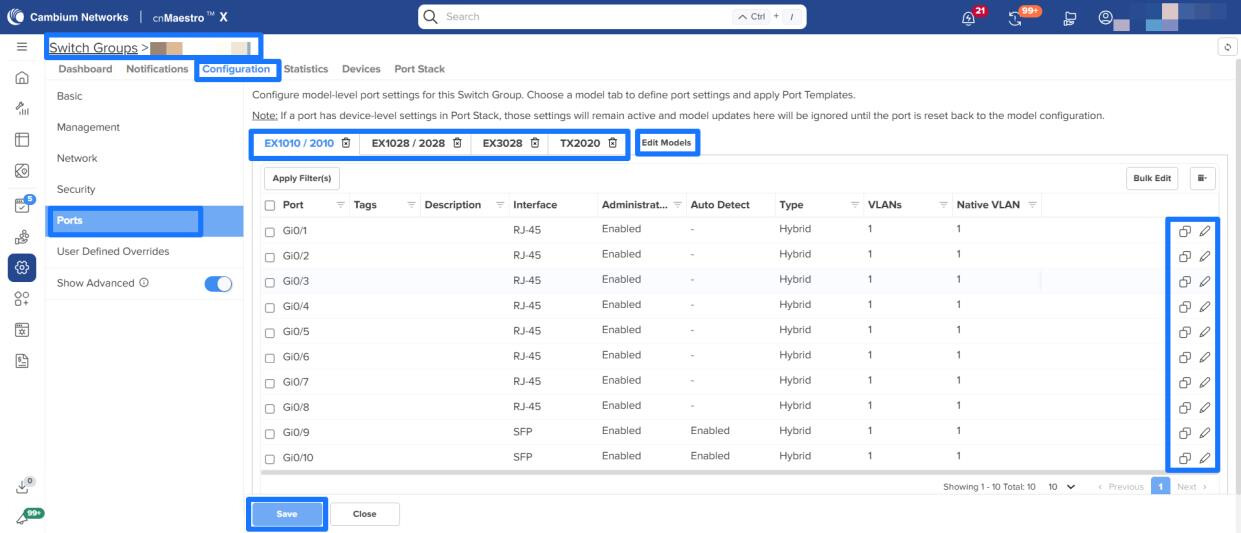
Port Templates allow administrators to create reusable, predefined port configurations and apply them to one or more ports within a Switch Group. When a template includes model-specific settings, the system automatically ignores unsupported parameters for switch models that do not support them.
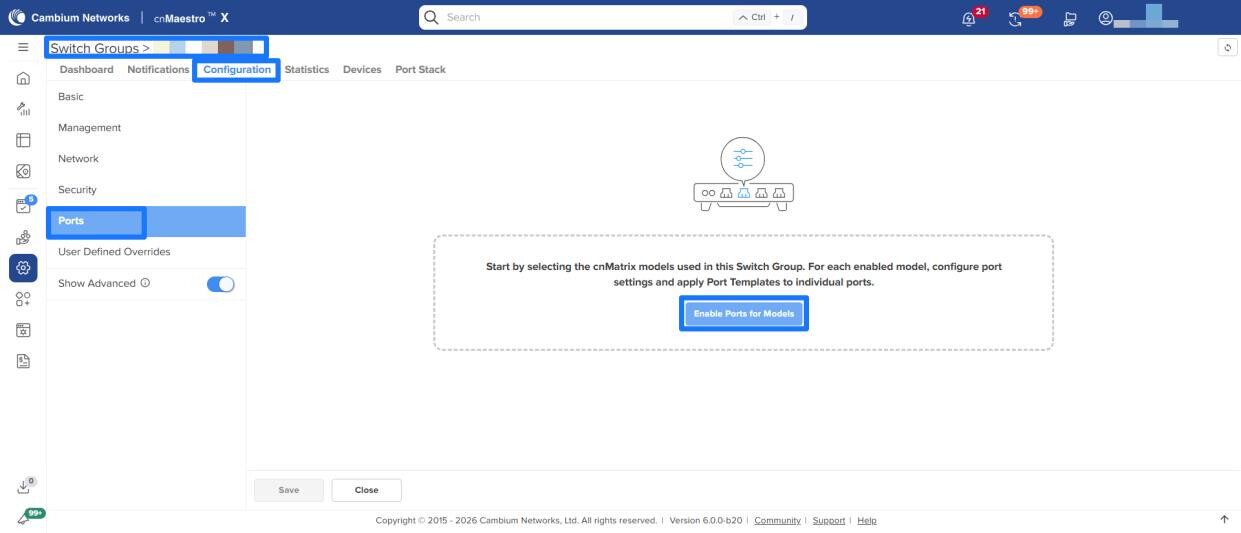
Model based Port Configuration
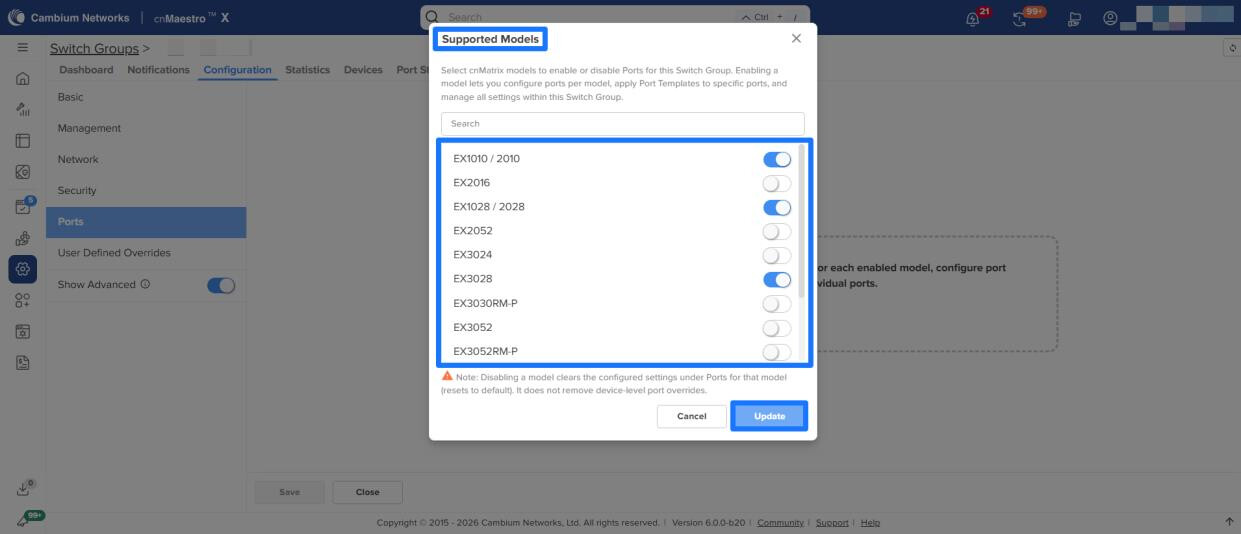
The new Ports Configuration feature provides centralized management of port-level settings for different cnMatrix switch models within a Switch Group. Administrators can enable or disable Ports Configuration by model and define consistent, model-specific configurations across large or distributed deployments.
-
Key Capabilities
-
Model-Based Configuration: Select supported cnMatrix models to activate Ports and manage configurations per model.
-
Template Assignment: Apply Port Templates to individual ports for faster setup and uniform behavior.
-
Granular Port Control: Configure VLANs, PoE, STP, rate limits, 802.1X, ACLs, and other port attributes at a per-port level.
-
Bulk Management: Update multiple ports simultaneously to accelerate deployment and configuration changes.
-
Safe Defaults: Disabling Port Mapping returns ports to their default configuration, ensuring a consistent baseline.
-
These enhancements support zero-touch provisioning, reduce configuration time, and help standardize switch behavior across diverse cnMatrix models.
-
-
Behavior Notes: Ports can be configured per model by selecting the appropriate switch model tab and assigning Port Templates to each port. Device-level changes made directly on the Ports tab take precedence over Port Configuration.
PON: Software Upgrade Support for Pluggable XGS ONUs
cnMaestro now supports software upgrades for Pluggable XGS ONU devices. Administrators can initiate and manage firmware upgrades, ensuring devices run the latest supported version of software.
MarketApps Enhancements
Important: Enterprise Wi-Fi AP Version
Update to the Enterprise Wi-Fi AP 6.6.1 or later if you plan to use MarketApps.
Export Installation Summary per Site
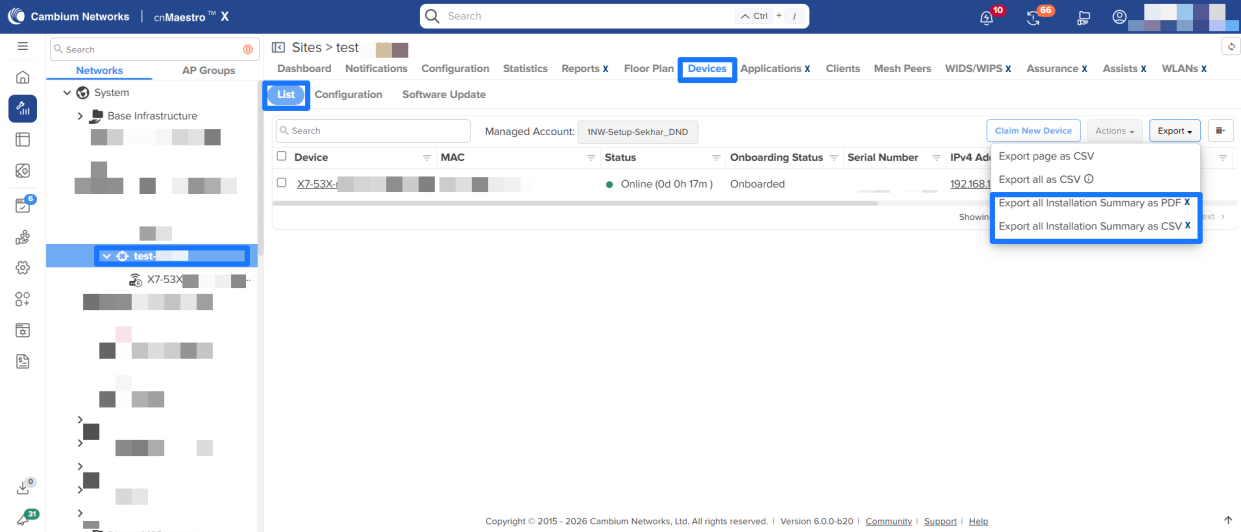
cnMaestro now supports exporting Installation Summary reports at the Site level. Users can export installation summaries for all devices within a selected Site in PDF or CSV format directly from Devices > List > Export.
This enhancement streamlines reporting workflows and enables more efficient analysis and sharing of installation details.
Single Sign In Support for Installer App
cnMaestro Admins can now navigate directly from cnMaestro to the Installer App and edit permitted installation-related fields as needed. This enhancement improves operational flexibility and reduces workflow friction.

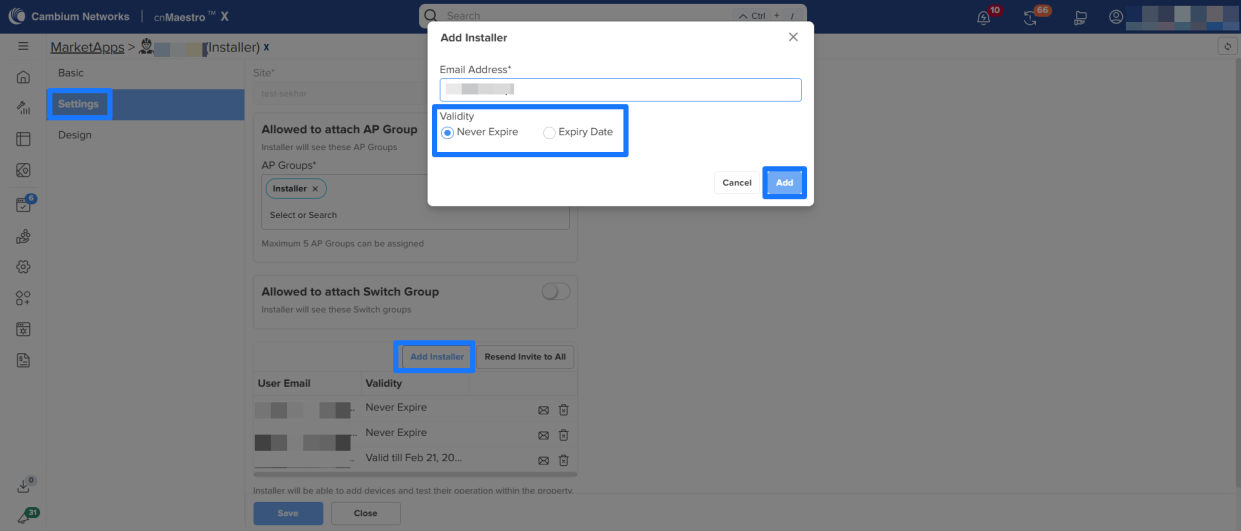
Allow MSP admin to invite an installer with an expiry date
A new expiry date field is introduced while inviting Installer users. Administrators can now define a validity period during user invitation. Once the specified expiry date is reached, the Installer user account will be automatically deleted from the system.
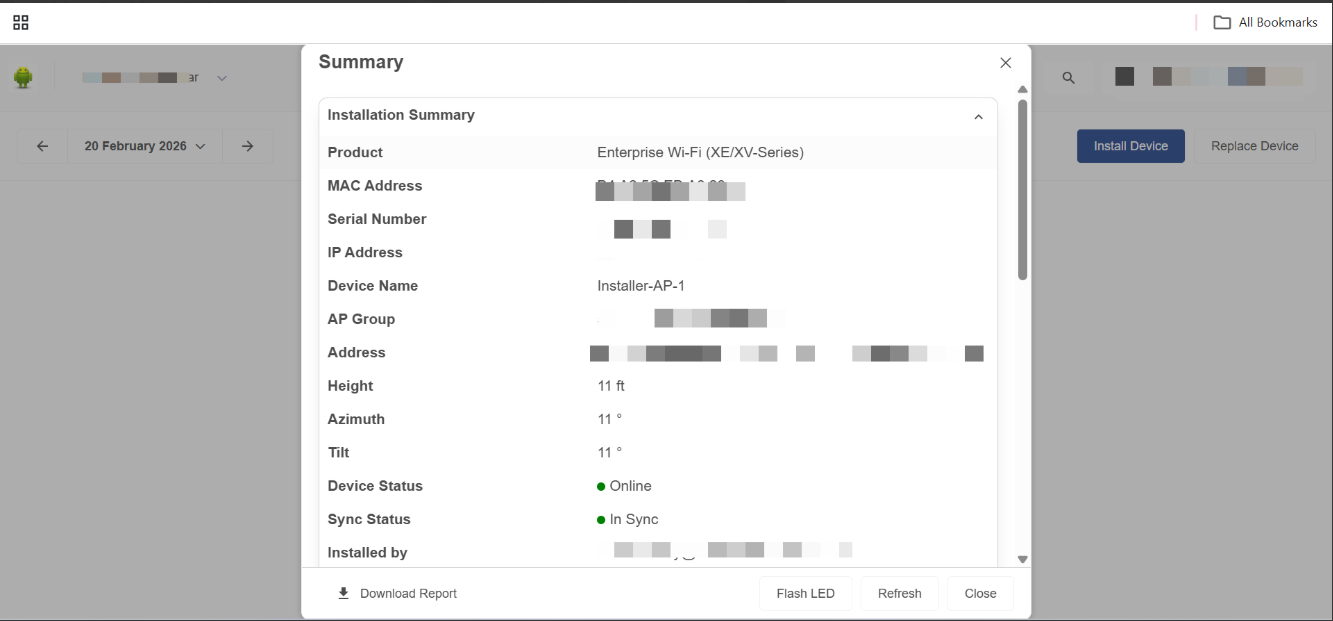
Installer App – Installation Summary Popup Enhanced for Desktop View
The Installation Summary pop-up in the Installer App has been enhanced to provide an optimized desktop viewing experience, improving usability and readability on larger screens.
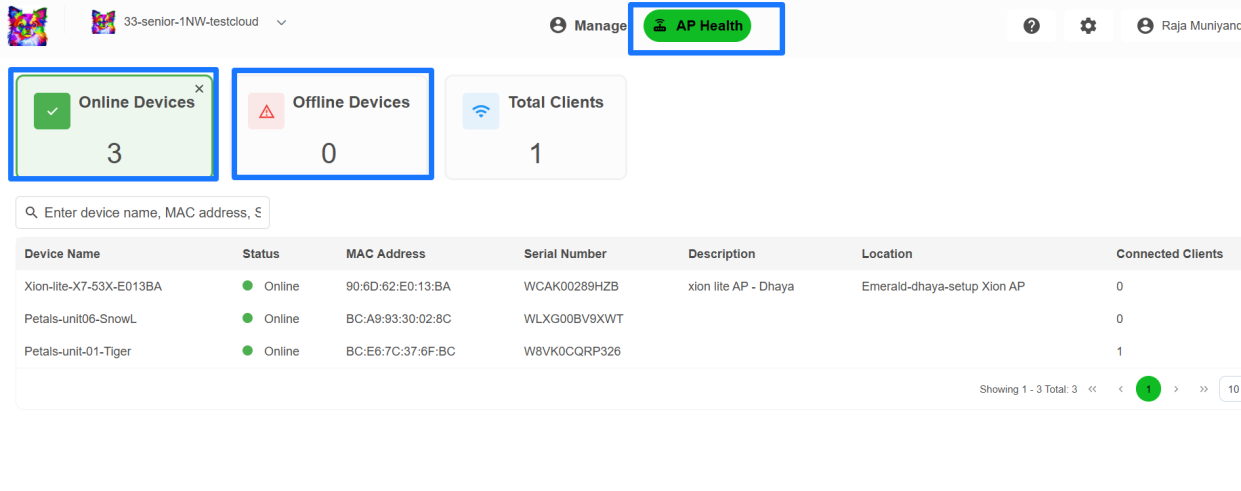
Online/Offline filter for AP Health in MarketApps
Added support for Online/Offline filter in AP Health under the manager portal.
Miscellaneous Enhancements
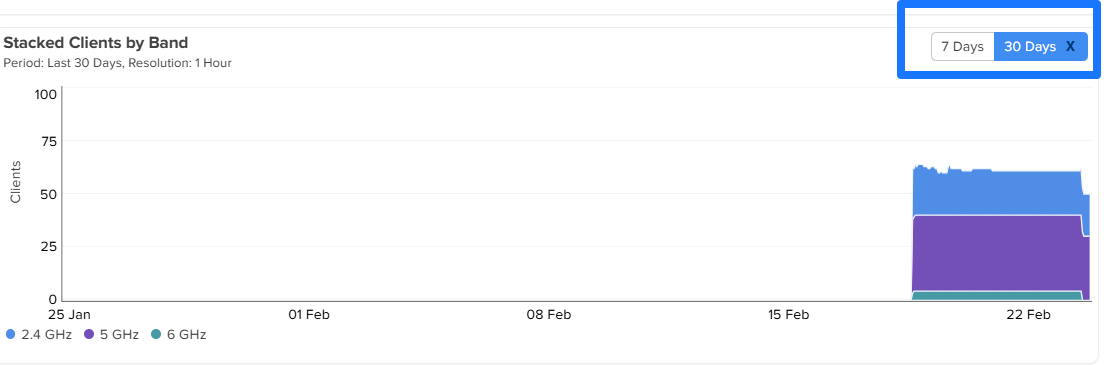
Extended Time Range Support for Site Dashboard Metrics
The Site Dashboard now supports an expanded time range of up to 30 days (previously 7 days) for the Clients Stacked by Band and Throughput widgets. This enhancement provides improved historical visibility and enables more comprehensive performance analysis at the site level.
Wi-Fi Offload Enhancement
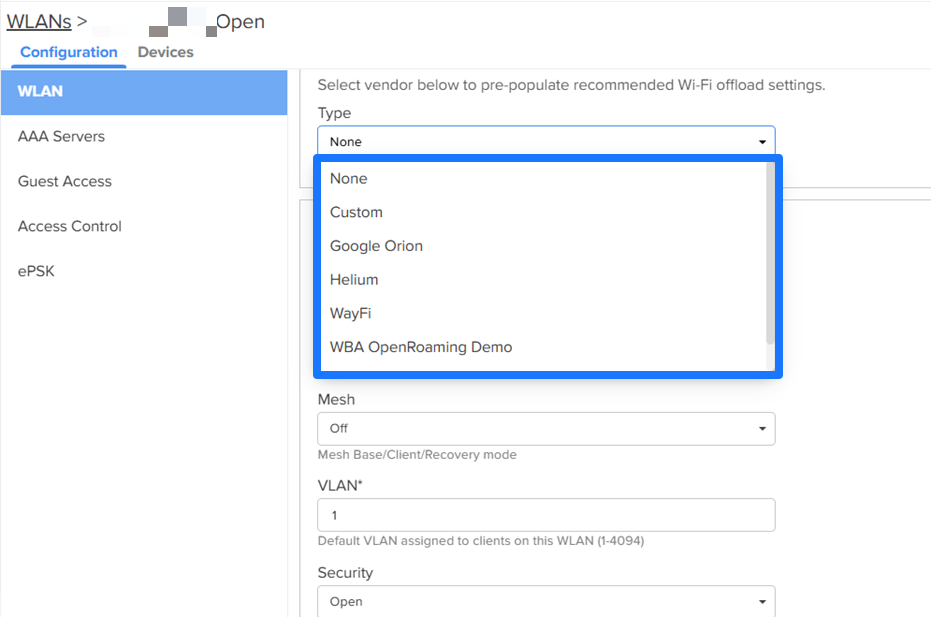
Added support for new Wi-Fi offload vendors, including Google Orion and Helium.
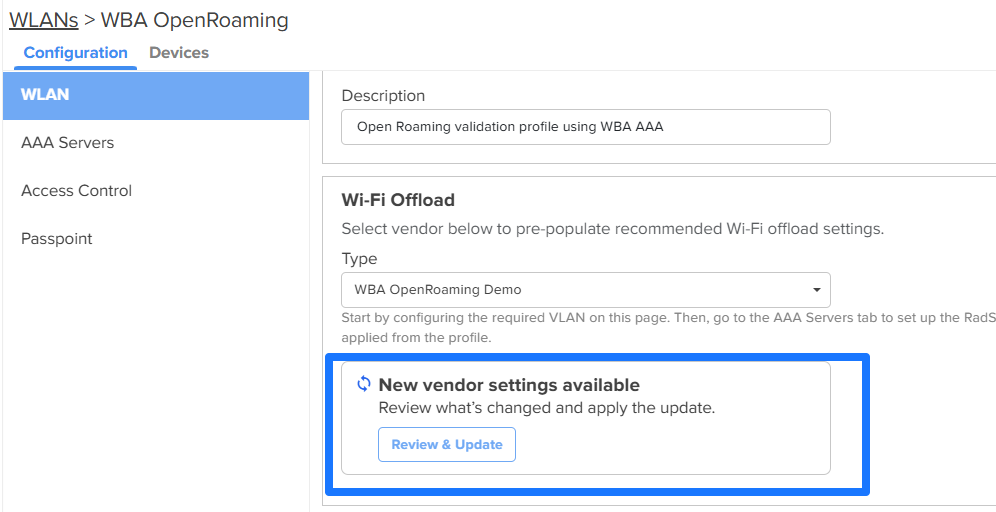
Additionally, when a configuration update is made to a Wi-Fi offload vendor in the backend, a trigger is generated to notify the system. Upon receiving the trigger, the system identifies WLANs associated with the updated offload vendor. Users can then review and apply the latest configuration as needed.
This enhancement improves configuration accuracy and ensures the timely synchronization of Wi-Fi offload settings.
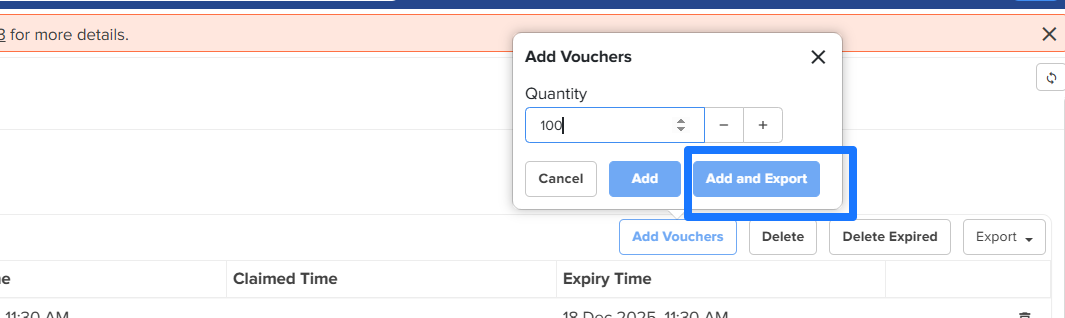
Generate and Export Vouchers
This option allows Users to “Generate and Export” Vouchers at the time of voucher generation.
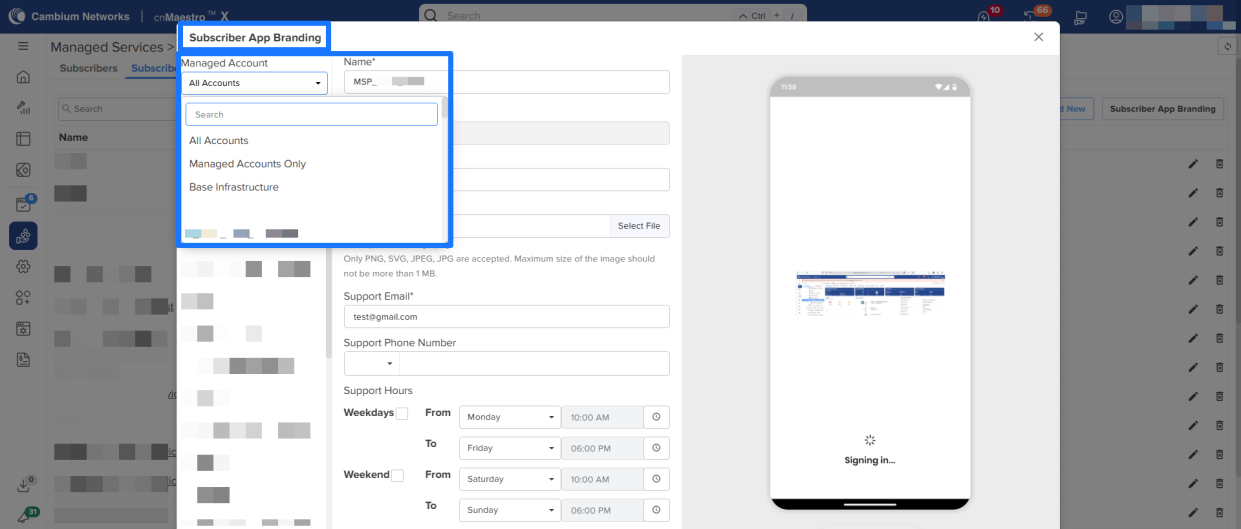
Managed Account Selection Support for Managed Subscribers (RV22)
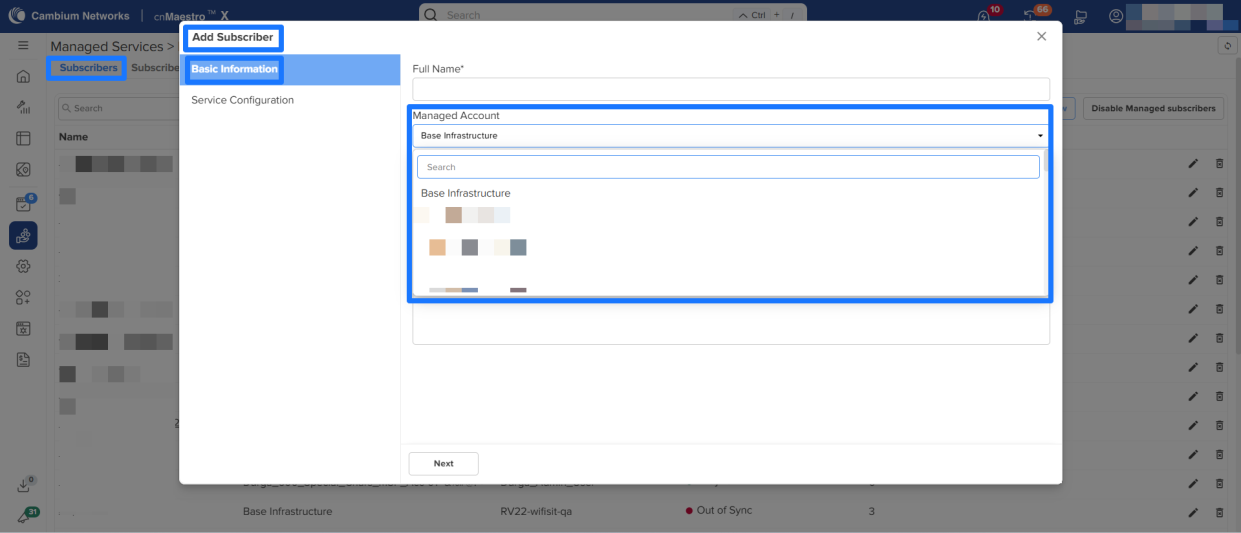
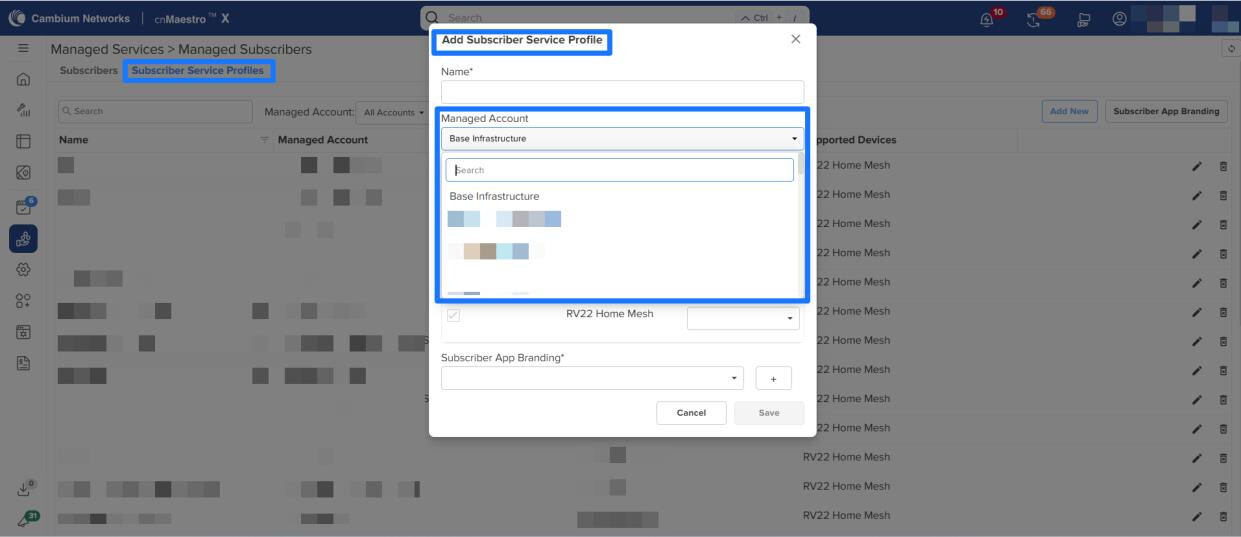
Managed Account selection is now enabled for Managed Subscribers on RV22 devices. Administrators can select the appropriate Managed Account while managing Subscribers, Subscriber Profiles, and Branding configurations using a dropdown available on both listing and detail pages. Added Managed Account dropdown in the following screens:
-
Subscriber Listing and Details
-
Subscriber Profile Listing and Details
-
Branding Listing and Details
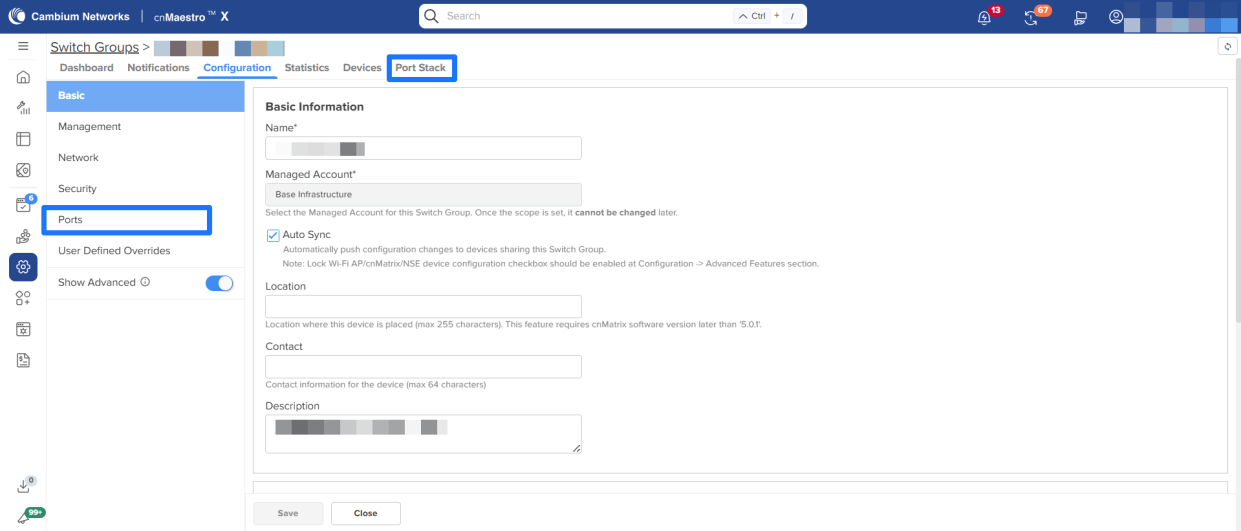
Switch Group UI Terminology Updates
Certain tabs and sections within Switch Group have been renamed to improve clarity and consistency:
- Port Mapping is now renamed to Ports
- Ports tab is now renamed to Port Stack
All related help text, tooltips, and pop -up information messages have been updated accordingly to reflect the new terminology.
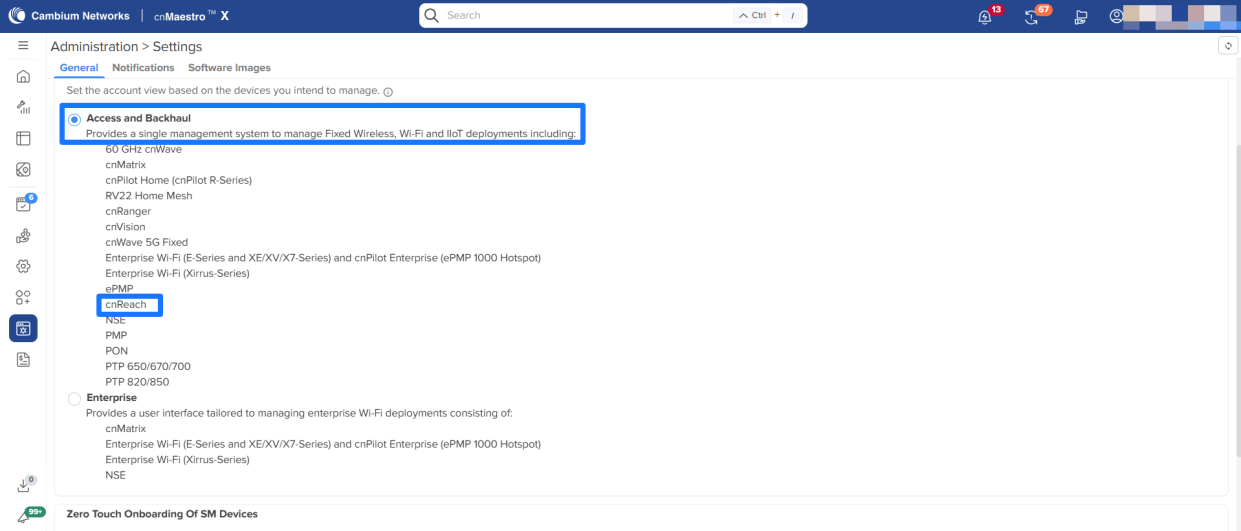
Removal of Industrial Internet Account Type
Starting with the 6.0.0 release, the Industrial Internet account type has been completely removed from cnMaestro and now supports only the following account types:
-
Access & Backhaul
-
Enterprise
Creation of new Industrial Internet accounts is no longer supported, and existing accounts have been migrated to the Access & Backhaul account type. To ensure continuity, cnReach device management has been migrated to the Access & Backhaul account type, preserving full functionality and device management capabilities.
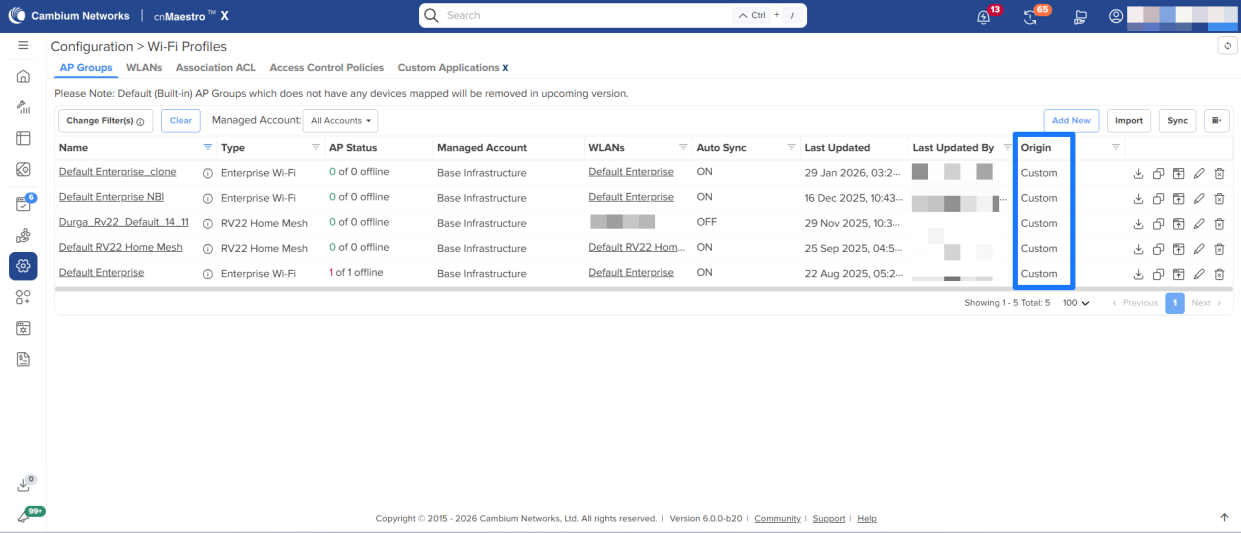
Removal of Default Group and Shared Scope Support
Starting with the 6.0.0 release, cnMaestro no longer supports the Default Group for Enterprise AP, Switch, NSE, and RV22 device types. Devices must now be associated with explicitly created groups to ensure clearer configuration management and policy control.
In addition, the “Shared” scope is no longer supported for new configurations. The Shared scope option has been removed from configuration workflows and is no longer available for Templates.
As part of this change, built-in configurations are now handled as follows:
-
Built-in configurations mapped to devices are automatically converted to custom configurations.
-
Built-in configurations previously modified by users are converted to custom configurations.
-
Built-in configurations can now be deleted if no longer required
Side Navigation and Header Icons Revamp
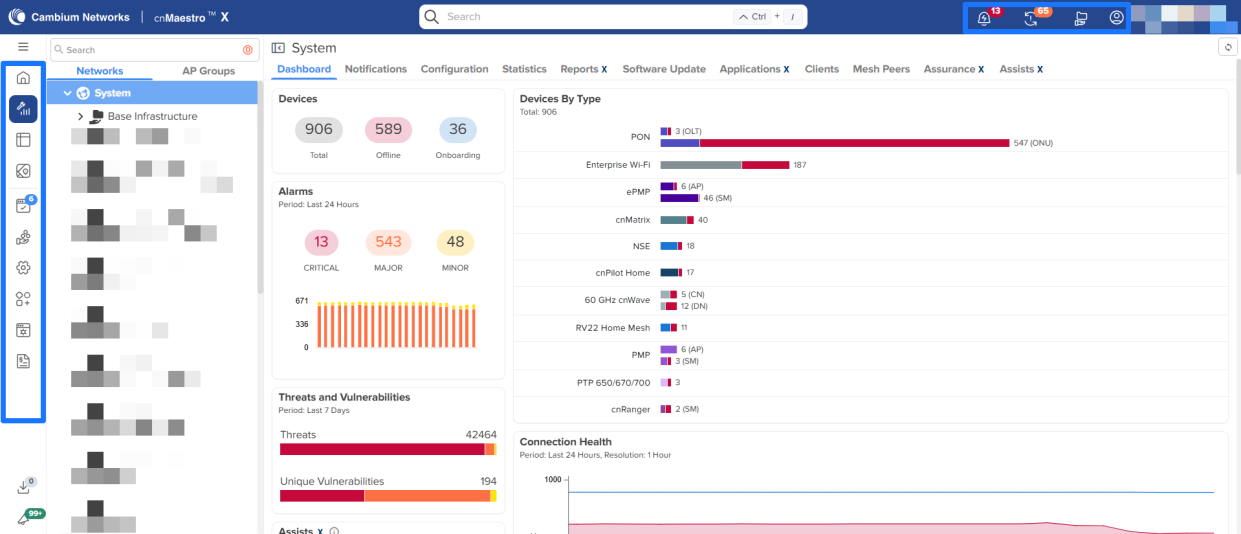
cnMaestro has refreshed the side navigation and header icons by replacing legacy Font Awesome icons with modern SVG-based icons. This update enhances visual clarity, improves design consistency, and provides better scalability across the user interface for a more polished user experience.
Assists – KPI Visualization Enhancement Across All Levels
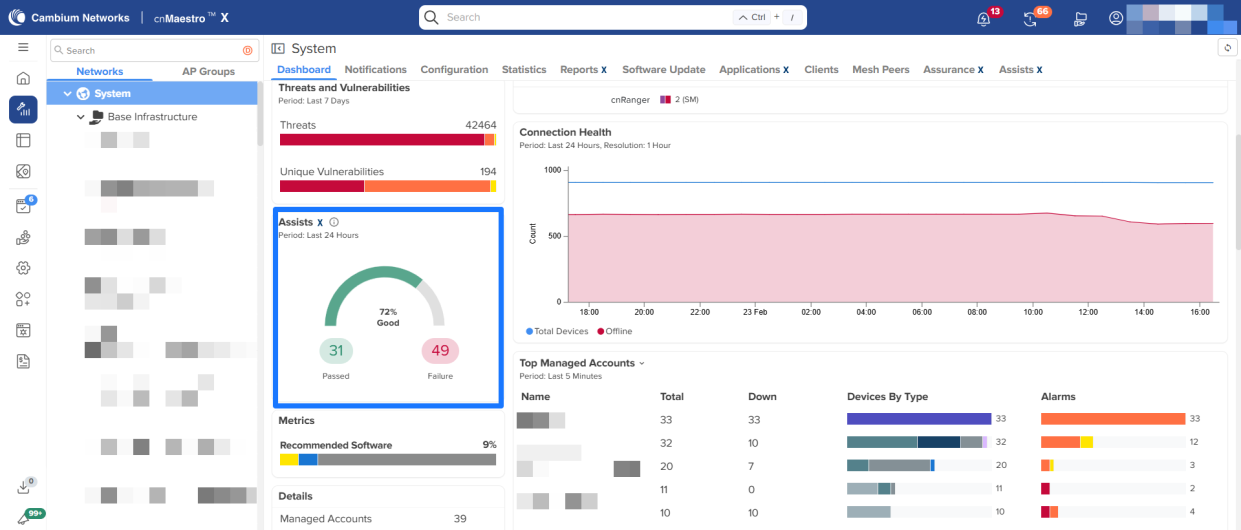
Assists KPI visualization has been updated across all hierarchy levels to align with standard health indicator conventions. Success metrics are now displayed on the left (green), and failure metrics are shown on the right (red)
API Updates
See the full release notes for API updates in 6.0.0