Yes, you can move from one controller to another. But by the sounds – it ALL needs to happen before October 1st. Or we ALL turn into a pumpkin… Unless they release new on-prem that includes FULL “X” licensing and zero cloud anchor/backend calls.
I could do with the Hyper-V vhds If you don’t mind please Tom!
@ntox In regard to upgrading, how would you go about upgrading a cnMaestro install on Hyper-V? Do you just spin-up a new VM with the same IP address and copy over the database from the previous version?
Hi Steve,
When I attempted to restore from existing cnMaestro backups to a net-new virtual machine instance of on-prem – the restore FAILS. I belive its due to different serial that gets hard coded after initial setup of the cnMaestro appliance. I think the restore function is only for rolling back from backup on existing server..
If you wish to lift and shift an existing VM thats running. You would need to clone the current and export or move it to your new destination hypervisor.
Otherwise, have to rebuild and re-adopt to new server..
Maybe @KumarK can add more color to this around the existing restore functionality, if the backups are “portable” and we can import to a fresh install.
@ntox @kumark Thanks for the reply. I would really like to go ahead and start migrating to the on-premise controller. I’m worried that I’ll get everything migrated over, and then Cambium will release an update that will remove the cloud anchor dependency. I just don’t want to get stuck in a scenario where I have to spin up a VM with the new version and then have to do a migration all over again. Then there is the question that even if there is a way to upgrade easily, will it work on Hyper-V since it isn’t really supported. I’m trying to hold off a little longer hoping they will release something soon.
Great questions.
I think it’ll work fine in Hyper-V, as you’re still running the supported appliance images – just had converted the disks to appropriate format [vhd] for Hyper-V.
There is upgrade option within on-prem in settings. However, always take snapshot of running VM prior to any big changes or when attempting upgrade.
Hi Tom
Can you point me in the direction of the Hyper-V vhd?
Much appreciated
Patrick
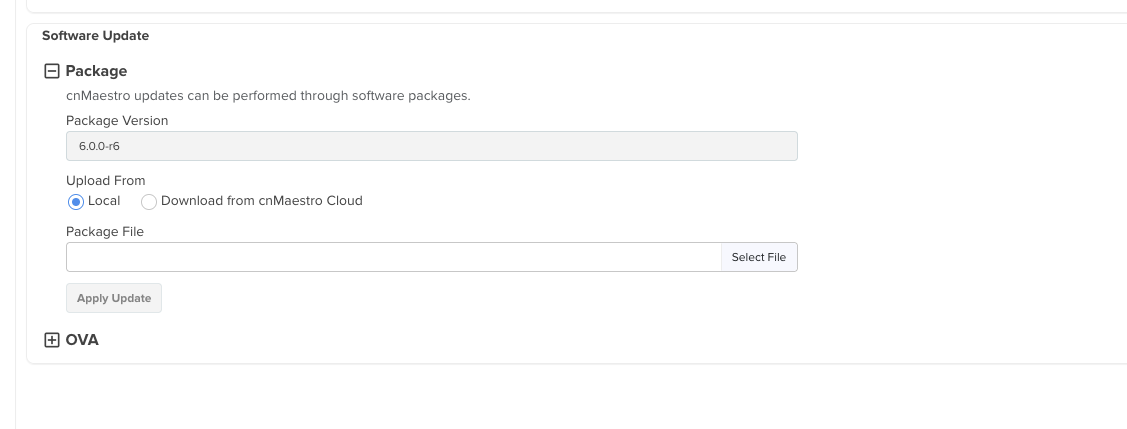
FWIW, I was able to use the “OVA” upgrade on my OnPrem Nutanix VM to go from 6.0.0-r6 up to the newly-released v6.0.0-r11. I’m not using Hyper-V, but Nutanix AHV is definitely different from ESXI, and it did still upgrade correctly.
The VM reboots when you tell it to “Apply” the OVA through the WebUI, and then it did take a few minutes for the UI to be accessible again after the reboot (it was showing a “service not available” splash screen for a while), but it went smoothly and I didn’t have to do anything special.
Awesome to hear! I’m attempting an update on my on-prem Hyper-V VM right now. I’ll post back shortly to let everyone know if it upgraded correctly or not.
Well, unfortunately, my VM is no longer booting. Not sure I followed the correct procedure, but here is what I did…
- Uploaded the OVA. It took a bit for it to upload and then stage and install the update.
- Once the update was applied to partition 2, I clicked the apply button next to partition 2 and then the VM rebooted. Unfortunately, it stopped at the grub boot menu unable to boot into the upgraded partition. EDIT: Actually, I can’t boot using anything listed on the grub menu, so it looks like the VM is screwed.
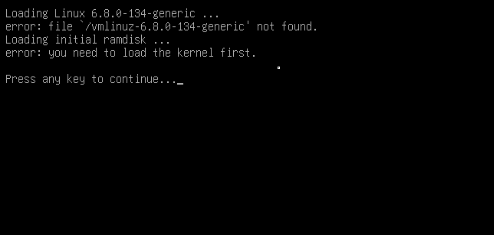
That’s odd, it seems like something got screwy with the partition table throughout the process, based on that error message.
Did you start with an installed & functional 6.0.0-r6 and then try to upgrade to -r11?
Yes, I had r6 installed and working. I hadn’t adopted any devices yet. Figured I would do the upgrade to r11 using the web UI to see what would happen in the future. I’m not sure where to go from here.
Ran into this same issue upgrading from 5.2.0 to 6.0.0 ; IIRC the upgrade didn’t properly update a pointer in grub.cfg (or
What does your /boot/grub/grub.cfg file look like? Specifically in the last section, verify the first root UUID and vmlinuz entries are correct, similar to:
### BEGIN /etc/grub.d/40_cnmaestro ###
/dev/mapper/system-os1 on /mnt/os1 type ext4 (rw,noatime)
menuentry “cnMaestro Active Service (6.0.0-r6)” {
set root=(hd0,msdos1)
search --no-floppy --fs-uuid --set=root SHOULD_BE_UUID_FOR_YOUR_BOOT_PARTITION_JUST_LIKE_IN_FSTAB
echo ‘Loading Linux 6.8.0-134-generic …’
linux /vmlinuz-6.8.0-134-generic root=/dev/mapper/system-os2 ro net.ifnames=0 biosdevname=0 audit_backlog_limit=8192
echo ‘Loading initial ramdisk …’
initrd /initrd.img-6.8.0-134-generic
}
menuentry “cnMaestro Active Recovery” {
set root=(hd0,msdos1)
search --no-floppy --fs-uuid --set=root SHOULD_BE_UUID_FOR_YOUR_BOOT_PARTITION_JUST_LIKE_IN_FSTAB
echo ‘Loading Linux 6.8.0-134-generic …’
linux /vmlinuz-6.8.0-134-generic root=/dev/mapper/system-os2 ro recovery nomodeset net.ifnames=0 biosdevname=0 audit_backlog_limit=8192
echo ‘Loading initial ramdisk …’
initrd /initrd.img-6.8.0-134-generic
}
menuentry “cnMaestro Backup Service (5.2.0-r3)” {
set root=(hd0,msdos1)
search --no-floppy --fs-uuid --set=root SHOULD_BE_UUID_FOR_YOUR_BOOT_PARTITION_JUST_LIKE_IN_FSTAB
echo ‘Loading Linux 5.15.0-46-generic …’
linux /vmlinuz-5.15.0-46-generic root=/dev/mapper/system-os1 ro net.ifnames=0 biosdevname=0 audit_backlog_limit=8192
echo ‘Loading initial ramdisk …’
initrd /initrd.img-5.15.0-46-generic
}
menuentry “cnMaestro Backup Recovery” {
set root=(hd0,msdos1)
search --no-floppy --fs-uuid --set=root SHOULD_BE_UUID_FOR_YOUR_BOOT_PARTITION_JUST_LIKE_IN_FSTAB
echo ‘Loading Linux 5.15.0-46-generic …’
linux /vmlinuz-5.15.0-46-generic root=/dev/mapper/system-os1 ro recovery nomodeset net.ifnames=0 biosdevname=0 audit_backlog_limit=8192
echo ‘Loading initial ramdisk …’
initrd /initrd.img-5.15.0-46-generic
}END /etc/grub.d/40_cnmaestro
I have hyper V r6 installed and I was wondering how to upgrade to r11 and if using the OVA option would break the install.. Perhaps staying on r6 would be the best option.
I’ve already nuked the VM and all the files. I’ll give it another go and let you know though. I’m just really tired of dealing with all of this crap. It would be nice if something just worked the way it was supposed to work.
So, I reinstalled r6 on Hyper-V again, did a snapshot, and then upgraded to r11 again. This time it worked! lol. So, I guess something screwed up last time during the upgrade.
Part of the problem is that the whole OnPrem thing was developed for ESXi and presumably they didn’t give a lot of thought to making it “easily compatible” with other systems, especially since they really would prefer that everyone use Cloud so your data can be monetized…
Since you got it to work the second time it definitely seems like (as you said) something went weird during the first upgrade though.
I have finally launched the on prem successfully on Hyper V. Our current licenses have 303 days remaining.. what happens after that?
I’m assuming your “current licenses” are the ones you have paid for on your old Cloud instance?
AFAIK there is no way to migrate any of those to an OnPrem controller. (More specifically, I think it’s possible to do, but requires someone from Cambium support to help, and good luck with that at this stage.)
The new OnPrem controller + Cloud anchor should’ve given you 90 days of X licensing “free” (as a “trial”), although you have to go into the OnPrem controller and “enable” / start the trial after you have “linked” it to the Cloud Anchor.
The public documentation from what’s left of Cambium says that if nobody buys the Enterprise Wifi & Switching lines, they are going to release another update to the OnPrem controller that eliminates the licensing, giving all of the OnPrem X features “free.” That should give us all some breathing room to then slowly migrate away from Cambium for new installs / etc, or keep limping your existing environment along indefinitely (although without any new firmware updates or security patches to cnMaestro itself, that’s more than a little scary/dangerous).
Please do raise support tickets to get cloud licenses transferred to anchor accounts. Those requests are being processed, just at a slower rate than usual.
(In the meantime, activating the free trial is the best way to get cnMaestro X until your licenses have been transferred)