Introduction
- This document provides a step-by-step guide for integrating Cisco Identity Services Engine (ISE) with Cambium Access Points to enable RADIUS-based authentication and Change of Authorization (CoA) using standard RADIUS attributes.
- It outlines the configuration of AAA services, SSID settings, and authorization profiles required for successful deployment. The document also demonstrates how to trigger CoA actions from Cisco ISE and validate their enforcement on Cambium APs. Also, verification steps using AP logs and packet captures (Wireshark) are included to confirm correct RADIUS message exchange and CoA processing.
Requirements
It is recommended that you have a basic understanding of the following topics:
- Supported RADIUS attributes on Cambium Access Points
- Supported Change of Authorization (CoA) messages on Cambium Access Points
- Network connectivity between Cambium Access Points and Cisco ISE
- Configuration of network device profiles, as well as authentication and authorization policies in Cisco ISE
- Identity Management concepts and configuration in Cisco ISE
Components Used
This document is based on the following software and hardware components:
- Cambium Access Points XV3-8 with software version 6.6.2.1-r5
- Note : The CoA behavior is same in version 7.1 0
- Cisco ISE hosted on VMware ESXi 7.0.3
- Cisco ISE version 3.3 with Patch 4
Configuration
About Change of Authorization (CoA)
- Change of Authorization (CoA) is a network policy mechanism that allows dynamic modification of session parameters for active authentication, authorization, and accounting (AAA) sessions.
- It enables administrators to update user access and enforce new policies without requiring the user to disconnect and reconnect.
- CoA supports actions such as: Session query, Reauthentication, Session termination, Port bounce, Port shutdown Dynamic activation or deactivation of service templates
How CoA Reauthentication Works
CoA reauthentication allows administrators to apply updated policies to active sessions dynamically, after the initial authentication has already occurred.
- When a policy is modified for a user or user group in the AAA system, the administrator can trigger a RADIUS CoA request.
- The AAA server, such as Cisco Identity Services Engine (ISE), sends a CoA packet to the network device.
- Upon receiving the CoA request, the device initiates reauthentication for the active session.
- The session is re-evaluated, and the updated authorization policies are applied without requiring manual user intervention.
Key Points:
- CoA enables real-time policy enforcement for active users.
- It reduces the need for session termination or user reconnects.
- The RADIUS interface supports multiple CoA primitives, which define the actions performed during a CoA event.
These primitives are essential for applying updated policies efficiently to users or groups during an active session.
Cisco ISE CoA supports – Other vendor AP
- Cisco ISE uses RADIUS Cisco AV-Pair attributes (e.g., subscriber: command) to define actions on a Network Access Device (NAD).
- Many third-party devices do not support AV-Pairs and instead use standard RFC CoA (3576/5176).
- RFC CoA includes two main message types:
- Disconnect Request (DM): Terminates the session to force reconnection
- CoA Request (CoA Push): Updates session parameters without disconnecting
- Cisco ISE supports both methods, ensuring compatibility with Cisco and third-party devices.
- Cisco ISE uses Network Device Profiles (NDPs) to support third-party vendors and define behavior for sessions, CoA, and URL redirection.
- Authorization Profiles are linked to NDPs, and behavior is applied after authentication.
- This enables seamless integration with non-Cisco devices.
- NDPs can be customized or created to match vendor-specific requirements.
Cambium AP Supported CoA messages
| CoA Message | Supported by MAB (Wired Clients) | Supported by the AP |
|---|---|---|
Disconnect client |
 Yes Yes |
Yes |
Update VLAN |
Yes |
Yes |
Session Timeout |
 No No |
Yes |
Accounting Interval |
Yes |
Yes |
Quota Limit |
No |
Yes |
Reference: Supported RADIUS Attributes for CoA
For detailed information on supported standard RADIUS attributes and their use with Change of Authorization (CoA), refer to the official Cambium documentation linked below.
This guide provides a comprehensive list of RADIUS override attributes supported on Enterprise Wi-Fi APs, including those applicable for dynamic authorization and policy enforcement.
Reference Document:
Enterprise Wi-Fi Access Point User Guide
WLAN Profile configuration


The SSID is configured to use ISE as AAA server for RADIUS-based authentication, accounting, and dynamic authorization (CoA). The configuration also supports custom attribute handling and dynamic VLAN assignment for connected clients. Please refer to the screenshots below for detailed SSID AAA configuration.
Create Network Access user
The following network access users are created to validate SSID authentication.
Navigate to: Administration → Identity Management → Identities → Users → Add
Configure the user details as follows:
- Username: Enter the desired username (this will be used by the client to connect to the SSID)
- Password Type: Select Internal Users
- Login Password: Enter the desired password
- User Groups: Select the appropriate user group based on the access policy (for example, WPA2)
After entering the required details, click Save to create the user.

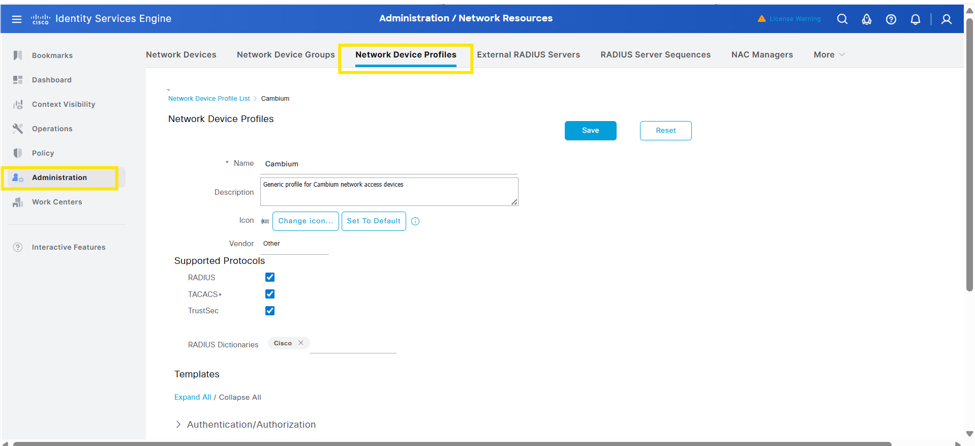
Adding a Network Device Profile (Cambium Vendor)
Follow the steps below to create a Network Device Profile for Cambium devices:
Navigate to: Administration → Network Resources → Network Device Profiles → Add
Create a new profile and configure the required settings, including:
- Protocols: Enable and configure the appropriate protocols as per deployment requirements
- Templates: Select or customize templates based on the attributes and policies needed for Cambium devices
After completing the configuration, click Save to apply the profile.
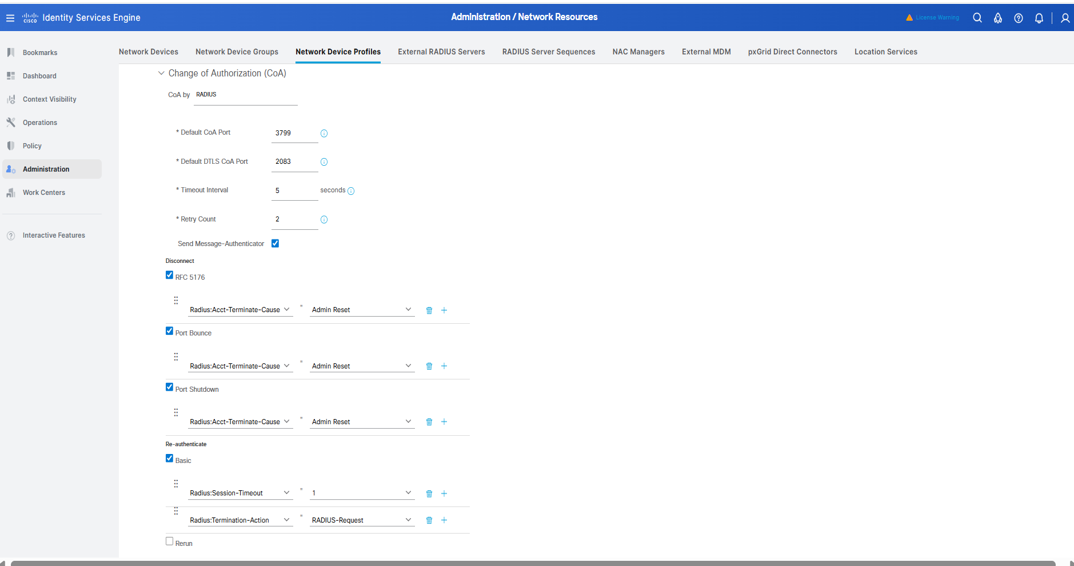
Please use the following CoA Template Settings to support the dynamic authorization with Cambium AP for various CoA methods based on the requirement:
Disconnect (RFC 5176)
- Enabled: Yes
- Attribute: Radius:Acct-Terminate-Cause = Admin Reset
CoA (Change of Authorization) Settings
- CoA Type: RADIUS
- Default CoA Port: 3799
- Default DTLS CoA Port: 2083
- Timeout Interval: 5 seconds
- Retry Count: 2
- Message-Authenticator: Enabled
Re-authenticate:
- Attributes Used:
- Radius:Session-Timeout = 1
- Radius:Termination-Action = RADIUS-Request
CoA Push: (RFC 5176)
- Enabled: Yes
Port Bounce
- Enabled: Yes
- Attribute: Radius:Acct-Terminate-Cause = Admin Reset
Port Shutdown
- Enabled: Yes
- Attribute: Radius:Acct-Terminate-Cause = Admin Reset
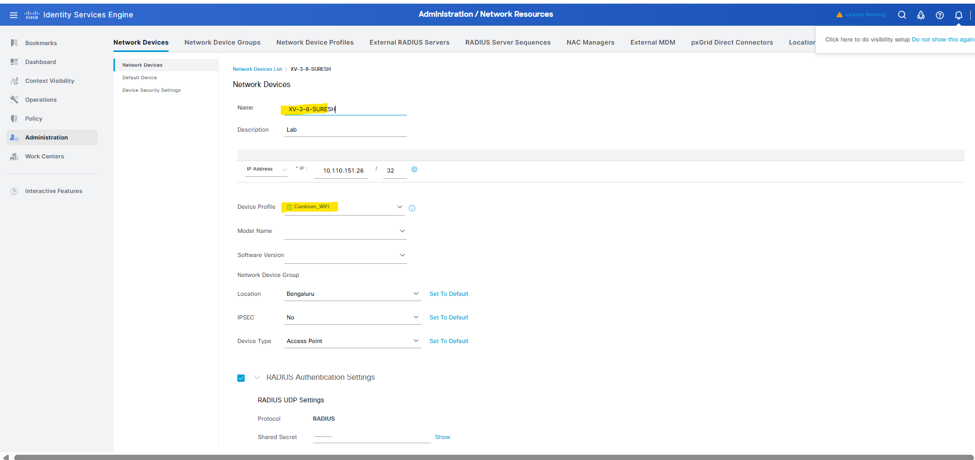
Adding the device to Network devices
Please follow the steps below to add the Cambium access point to Cisco ISE:
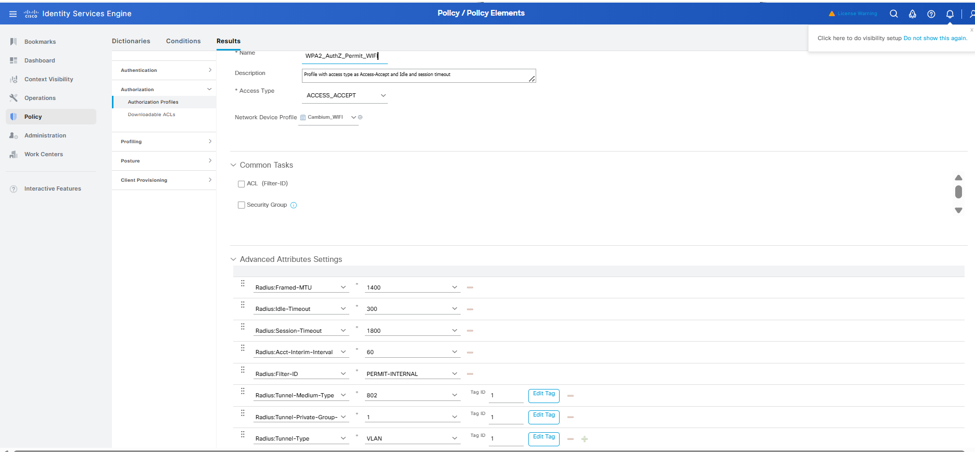
ISE Authorization Profile
Below authorization profiles have been created to assign and enforce required RADIUS attributes as part of the client authorization process.
Verification of CoA Processing Using Wireshark, AP Logs, and ISE
Verify Dynamic Authorization (CoA)
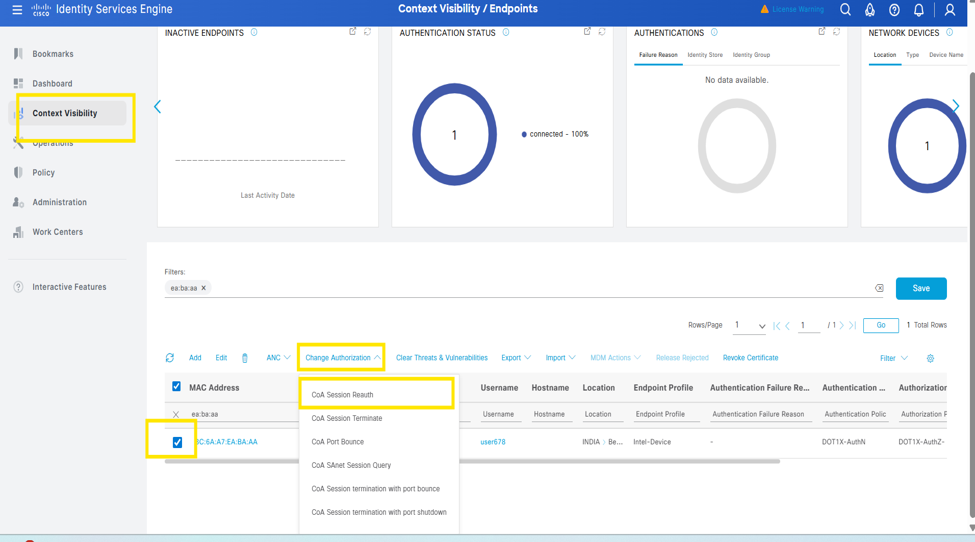
Follow the steps below (as shown in the screenshot) to manually trigger Change of Authorization (CoA) actions from Cisco Identity Services Engine:
- Navigate to Context Visibility → Endpoints
- Locate and select the target client (MAC address)
- Click Change Authorization
- Choose the required CoA action based on the use case, such as:
- CoA Session Reauth (trigger reauthentication)
- CoA Session Terminate (disconnect client)
- Other available CoA options as needed
Once triggered, ISE sends the corresponding CoA request to the access point, which then enforces the action on the client session.
Verification of Disconnect-Request (RFC 5176)
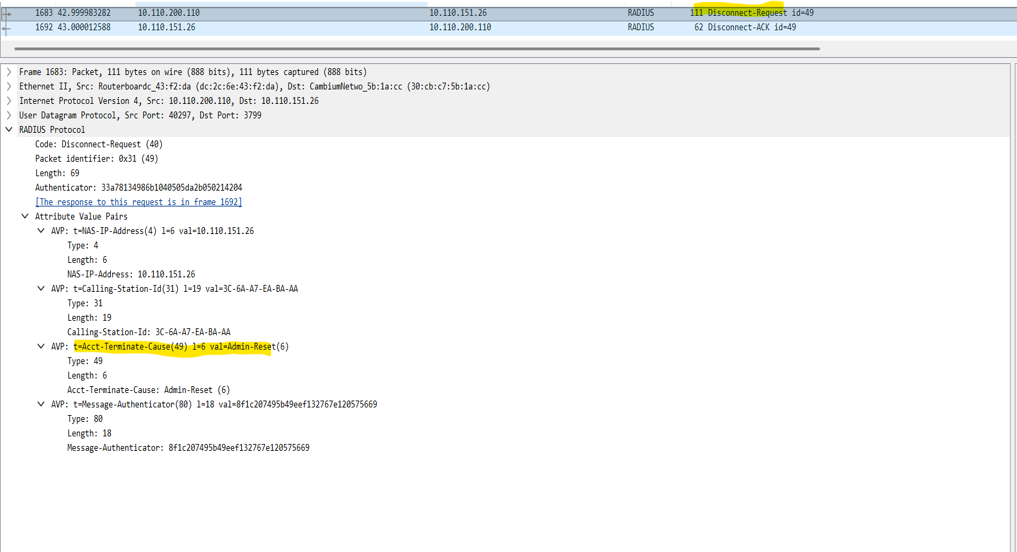
- The Wireshark capture below confirms that a Disconnect-Request is sent from Cisco ISE to the access point (AP), including the attribute Acct-Terminate-Cause = Admin Reset. The AP responds with a Disconnect-ACK, indicating successful processing of the request.
- Upon receiving the Disconnect-Request, the AP immediately terminates the active client session. This behavior is validated through AP logs, which show the reception of the dynamic authorization disconnect request followed by the client disconnection event. The logs further confirm that the AP issues a de-authentication to the client and removes the session from its internal state.
- This behavior demonstrates that Disconnect-Request (RFC 5176) provides immediate and deterministic session termination, ensuring that policy changes are enforced without delay.
AP Log Verification – Disconnect-Request Behavior
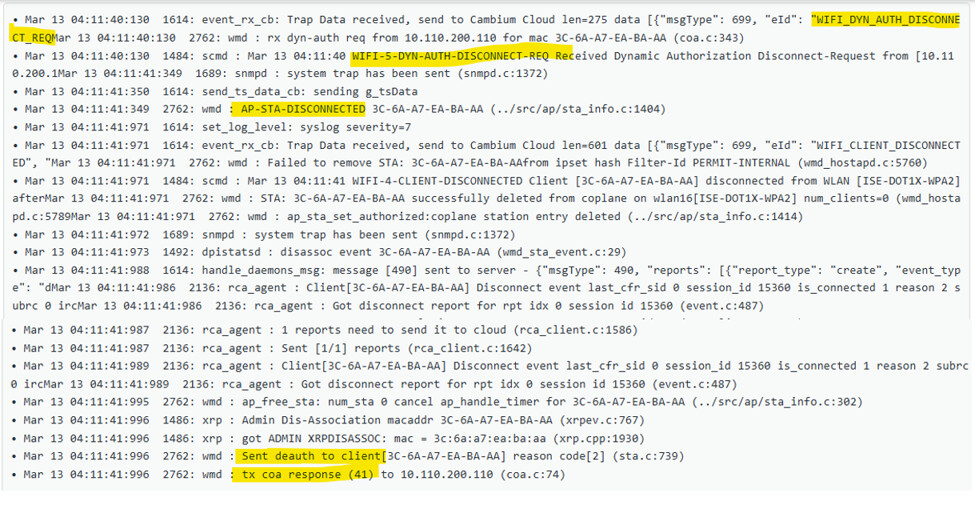
- The AP logs below confirm that upon receiving a Disconnect-Request (RFC 5176) from Cisco ISE, the AP immediately terminates the client session.
- The logs show the reception of the dynamic authorization disconnect request, followed by the client disconnection event (AP-STA-DISCONNECTED). The AP then issues de-authentication to the client and removes the session from its internal state.
- The AP subsequently sends the CoA response (ACK) back to ISE, confirming successful processing of the request.
This behavior validates that Disconnect-Request (RFC 5176) results in immediate session termination , followed by client reconnection and a new authentication cycle.
Key Log Indicators – Disconnect-Request
- WIFI-5-DYN-AUTH-DISCONNECT-REQ → Disconnect-Request received
- AP-STA-DISCONNECTED → Session terminated
- WIFI-4-CLIENT-DISCONNECTED → Client disconnected from SSID
- Sent deauth to client → AP enforces disconnect
- coa response → ACK sent to Cisco Identity Services Engine
Cisco ISE Dynamic Authorization Report – Disconnect Action
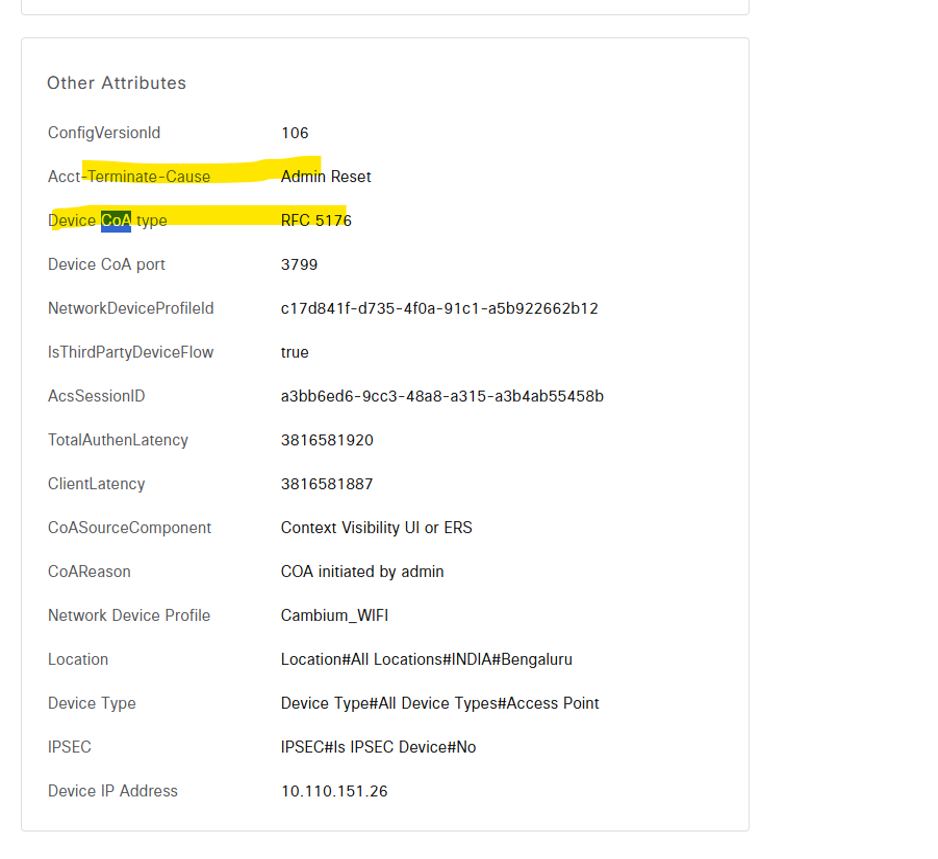
Cisco ISE Dynamic Authorization report below shows the CoA action details for the Disconnect-Request (RFC 5176). It highlights key attributes such as Acct-Terminate-Cause = Admin Reset and Device CoA Type = RFC 5176, confirming that the session termination was explicitly triggered by an administrative action.
Verification of Standard RADIUS Attributes
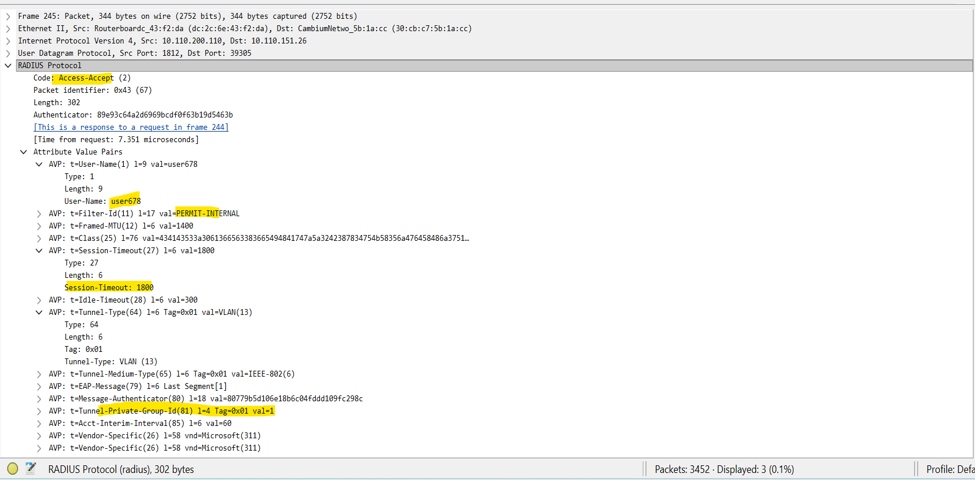
- The Wireshark capture below confirms that the Cambium AP successfully receives standard RADIUS attributes from Cisco Identity Services Engine in the Access-Accept response during client authentication.
- These attributes validate that the Cambium AP correctly processes the authorization parameters and applies the assigned policies (such as VLAN, ACL, and session timeout) during session establishment.
Verification of CoA-Request:
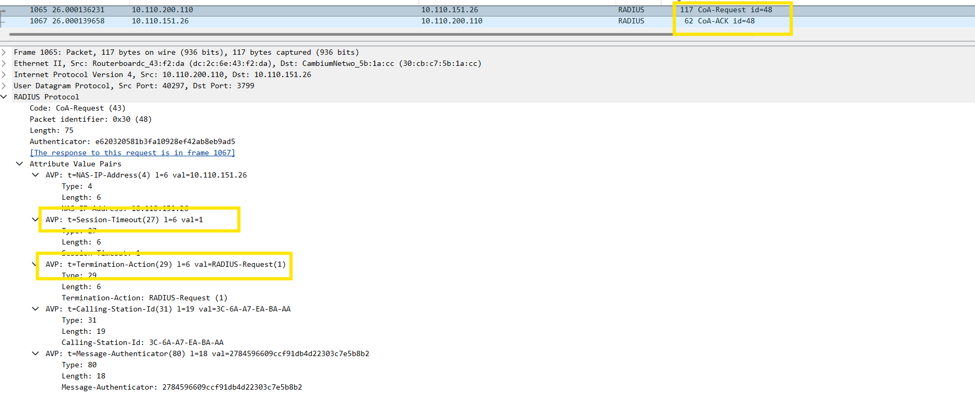
- The Wireshark capture below confirms that a CoA-Request is sent from Cisco Identity Services Engine to the access point (AP), followed by a successful CoA-ACK response from the AP.
- The capture highlights key RADIUS attributes such as Session-Timeout and Termination-Action = RADIUS-Request, indicating that the CoA is intended to trigger reauthentication after session expiry.
- This exchange verifies that the CoA request was successfully received and acknowledged by the AP, after which the AP enforces the updated policy by terminating the existing session and initiating a new authentication cycle.
AP Log Verification of CoA Request (Dynamic Authorization)
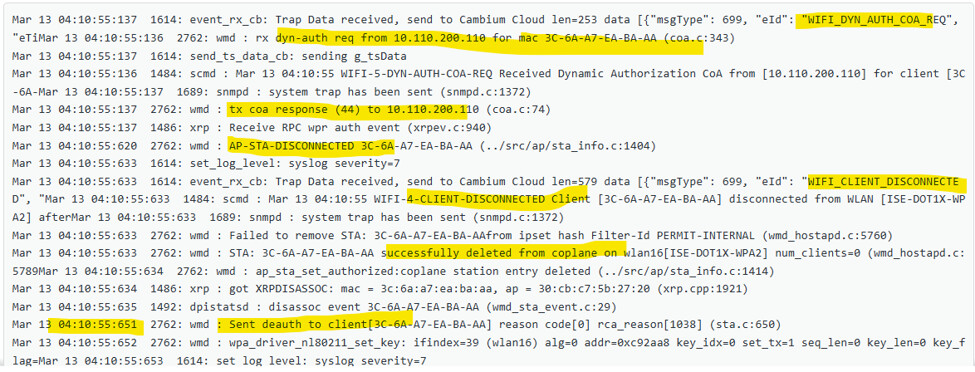
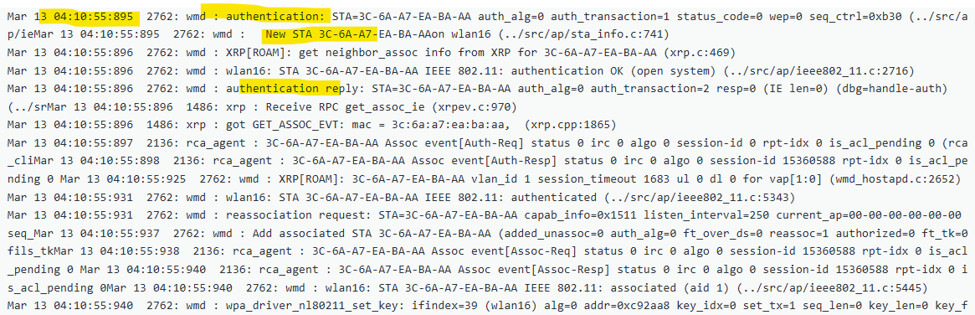
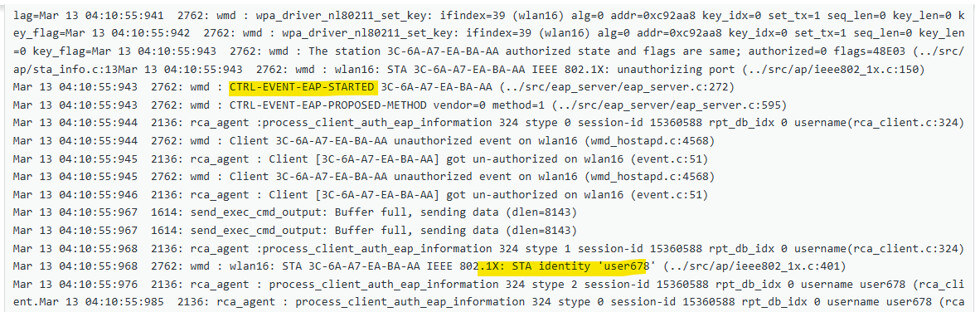
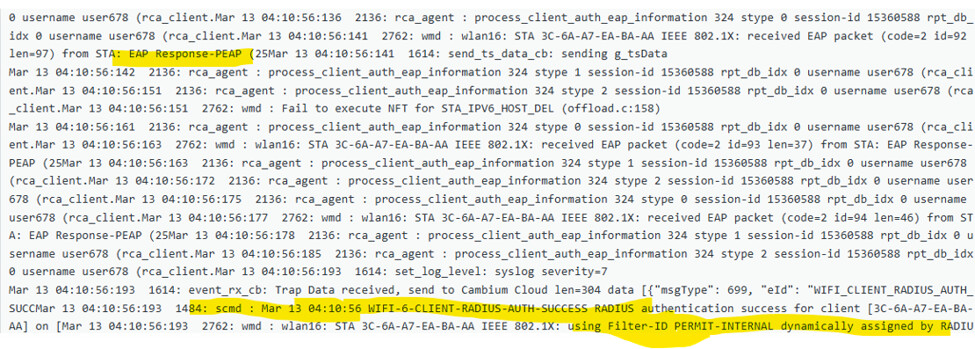
- The AP logs below confirm the successful reception and processing of a CoA-Request from Cisco ISE.
- The logs show the event WIFI-5-DYN-AUTH-COA-REQ, indicating that the AP received a dynamic authorization request for the client. The AP immediately responds with a CoA-ACK, confirming that the request was accepted.
- Following the CoA, the AP enforces the updated policy by terminating the existing client session (AP-STA-DISCONNECTED) and deauthenticating the client. The client then reconnects to the SSID and initiates a new authentication process, as seen from the subsequent association and 802.1X/EAP exchange logs.
- This confirms that the CoA request was successfully processed, resulting in session termination and reauthentication.
Key Log Indicators – CoA Request
- WIFI-5-DYN-AUTH-COA-REQ → CoA request received
- tx coa response → CoA-ACK sent to ISE
- AP-STA-DISCONNECTED → Client session terminated
- CLIENT-DISCONNECTED → Client removed from WLAN
- New STA / authentication logs → Client reconnect and reauthentication
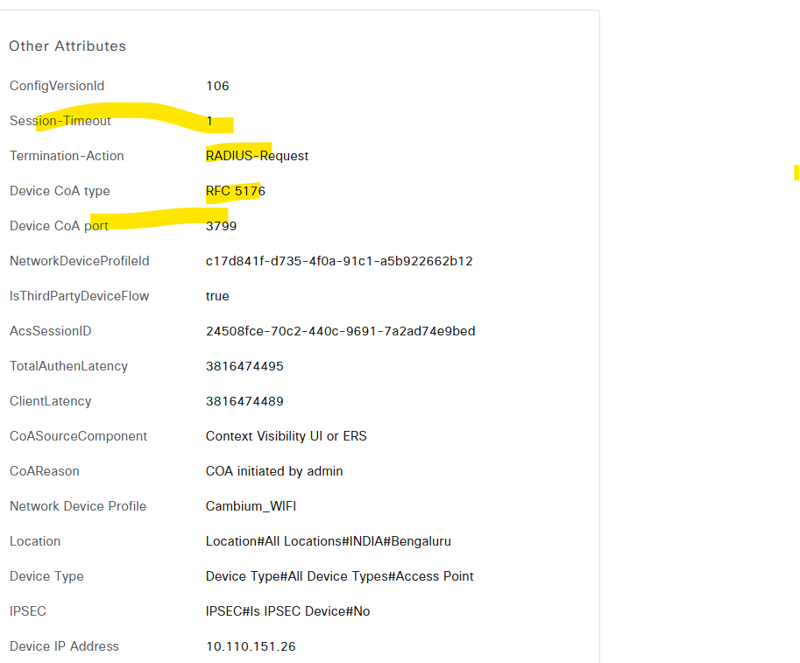
Cisco ISE Dynamic Authorization Report – CoA Request
- The Cisco ISE Dynamic Authorization report below displays the details of the CoA-Request action triggered by Cisco ISE.
- The report highlights key attributes such as Session-Timeout = 1 and Termination-Action = RADIUS-Request, indicating that the CoA is configured to trigger reauthentication upon session expiry. It also confirms that the Device CoA Type = RFC 5176 and that the request was initiated by administrative action.
- These details validate that the CoA request was successfully generated and sent to the access point, which then enforces the updated policy by terminating the session and initiating a new authentication cycle.
Troubleshoot
Troubleshooting – Capturing RADIUS Packets on Cambium AP
If CoA is not working as expected capture RADIUS traffic between the AAA server and the Cambium AP to verify packet exchange.
Steps:
Navigate to Packet Capture on the Cambium AP
Select the Ethernet interface (Eth1) used for RADIUS communication
Set Direction = Both
Use default settings (or apply filters if needed)
Click Start Now to begin capture
After completion:
Download the capture file from the AP
Open it using Wireshark (or any packet analyzer) to inspect RADIUS traffic
This helps confirm whether CoA messages are sent by the AAA server and correctly received and processed by the Cambium AP.

Troubleshooting – Capturing RADIUS Packets using ISE TCP Dump
If CoA behavior needs to be verified from the server side, packet capture can be performed directly on Cisco Identity Services Engine using the built-in TCP dump tool.
Steps:
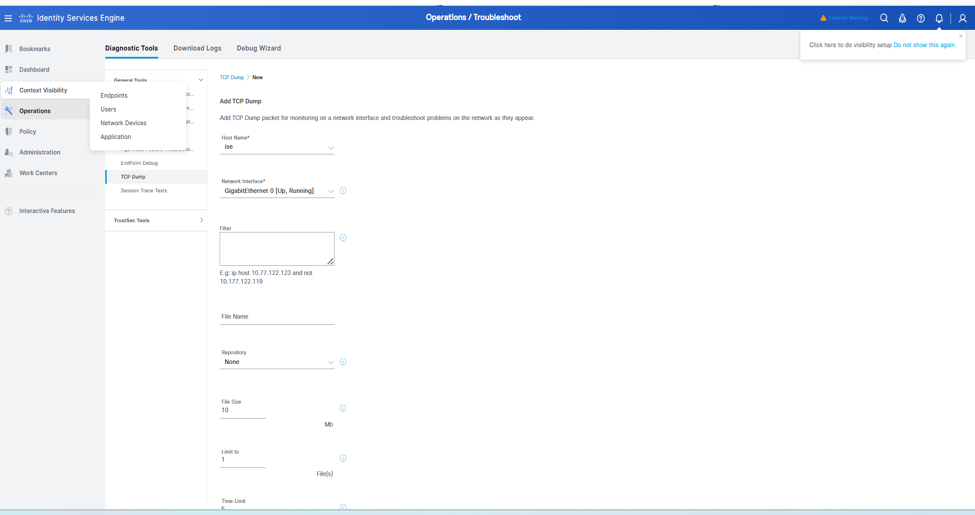
- Navigate to Operations → Troubleshoot → Diagnostic Tools → TCP Dump
- Select the appropriate network interface (e.g., GigabitEthernet 0)
- (Optional) Apply a filter for the AP IP or RADIUS ports
- Click Start to begin the capture
After completion:
- Download the capture file from ISE
Open it using Wireshark (or any packet analyzer) to inspect RADIUS traffic (UDP 1812/1813/3799)
This helps verify whether Disconnect packets/CoA are being sent from ISE and reaching the access point.