We’re pleased to announce the introduction of Full IPsec tunnel on the Cambium Networks NSE3000. This feature enables complete traffic encryption between branch and headquarters, ensuring that all outbound traffic from the remote site is securely routed through an IPsec tunnel.
With Full IPsec Tunnel Mode, only local inter-VLAN and NSE control traffic (for cnMaestro connectivity and management) remain outside the tunnel, providing an optimal balance between security and operational flexibility.
Additionally, this feature can be used to establish secure IPsec tunnels between the NSE3000 and cloud-based services such as Microsoft Azure, Cloudflare, or other IPsec-compatible VPN gateways, enabling direct and encrypted connectivity to your cloud workloads and applications.
This enhancement strengthens end-to-end protection for distributed networks, simplifies configuration, and ensures that all branch communications benefit from centralized security and policy enforcement.
For a step-by-step guide to enable this feature, please see the instructions below.
Purpose
The Full IPsec Tunnel ensures that all traffic from the remote site passes through the IPsec tunnel to the central site (for example, HQ or data center).
Only the local inter-VLAN traffic and control traffic generated by the NSE (e.g., cnMaestro Cloud connectivity) will bypass the tunnel.
Network Topology Diagram

Spoke NSE3000 acts as the IPsec Initiator.
Hub NSE3000 acts as the IPsec Responder (Concentrator).
All outbound traffic from the Spoke NSE will be encrypted and sent through the IPsec tunnel.
Traffic between the Red, Blue, and Green VLANs should not traverse the tunnel, it should be routed locally instead.
Spoke NSE VLAN Configuration:
- VLAN Red: 192.168.30.0/24
- VLAN Blue: 192.168.31.0/24
- VLAN Green: 192.168.32.0/24
Hub NSE Configuration:
- Server VLAN: 192.168.10.0/24
Prerequisites
NSE firmware version 1.8 or higher must be installed on both devices.
Configuration
Responder (Hub NSE3000) Configuration
- Enter a tunnel name to identify the connection.
- Select the IKE version (default: IKEv2).
- Choose the role as Responder (waits for the request).
- Enter the Local ID and Remote ID.
- Set the Local Subnet to 0.0.0.0/0 so that all traffic from the Spoke VLANs is forwarded over the tunnel.
- Define the Remote Subnets.
- Configure the Local and Remote Pre-Shared Keys (PSK).
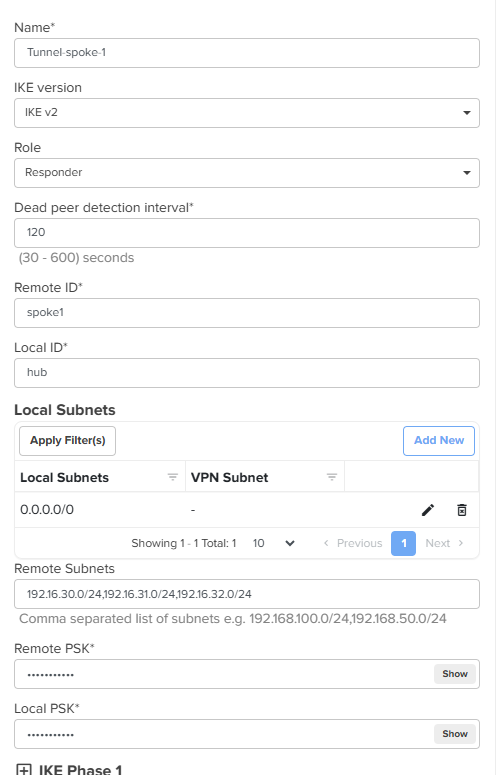
CLI configuration
!
site-to-site-vpn
 vpn ipsec 1
  name Tunnel-spoke-1
  ike-version ikev2
  role responder
  dead-peer-detection interval 120
  remote-id spoke1
  local-id hub
  remote-subnets 192.16.30.0/24 192.16.31.0/24 192.16.32.0/24
  local-subnets translation 0.0.0.0/0
  remote-psk $crypt$1$w6eRNJXxj2LneaIifYqd80aotfBRVXKK
  local-psk $crypt$1$FwxWhIZ9mgQh383c4yFVbndL1w8zfz8H
  ike phase 1
   encryption aes192 aes192-gcm16 aes128-gcm16
   integrity sha256
   dh-group 15
   key-lifetime 4
   exit
  ike phase 2
   encryption aes192 aes192-gcm16 aes128-gcm16
   integrity sha256
   pfs dh-group 15
   key-lifetime 4
   exit
  exit
!
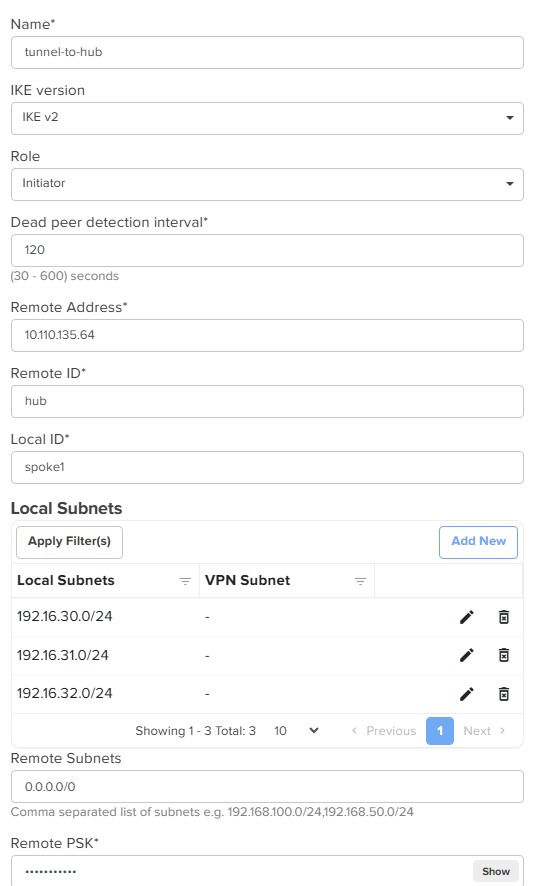
Initiator (Spoke NSE3000) Configuration
- Enter a tunnel name to identify the connection.
- Select the IKE version (default: IKEv2).
- Choose the role as Initiator (sends the request to establish the tunnel).
- Enter the Local ID and Remote ID strings.
- Specify the Local Subnet(s) whose traffic should be forwarded over the tunnel.
- Set the Remote Subnets to
0.0.0.0/0so that all traffic is directed through the tunnel from the local VLANs - Configure the Local and Remote Pre-Shared Keys (PSK).
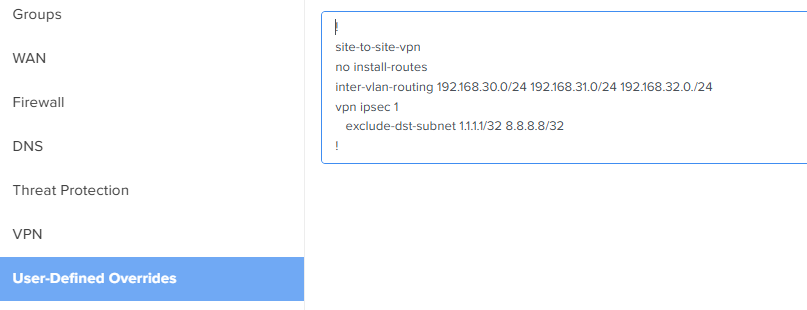
Additional configuration on Spoke applied from User-Defined Overrides
Add the following overrides to keep inter-VLAN traffic local and to exclude specific subnets from the tunnel:
-
no install-routes
Prevents NSE-generated traffic from being routed through the IPsec tunnel. -
inter-vlan-routing <subnet1> <subnet2>
Enables inter-VLAN routing locally when the IPsec tunnel is configured as a full tunnel. -
exclude-dst-subnets <1.1.1.1/32>
Allows local breakout for specific subnets without sending traffic through the tunnel.
After applying the configuration and overrides, the system will automatically generate and apply the CLI configuration.
After applying the configuration from user defined overrides the Cli configuration on the device should show those commands.
!
site-to-site-vpn
 bypass-lan
+ no install-routes
+ inter-vlan-routing 192.168.30.0/24 192.168.31.0/24 192.168.32.0./24
 vpn ipsec 1
 name tunnel-to-hub
 ike-version ikev2
 role initiator
 dead-peer-detection interval 120
 remote-address 10.110.135.64
 remote-id hub
 local-id spoke1
 remote-subnets 0.0.0.0/0
 local-subnets translation 192.16.30.0/24
 local-subnets translation 192.16.31.0/24
 local-subnets translation 192.16.32.0/24
+ exclude-dst-subnets 1.1.1.1/32 8.8.8.8/32
 remote-psk $crypt$1$ZBIeHEU6WRd1jENmnM9iGSfmrPvVtsiO
 local-psk $crypt$1$U35RV2soQE5c/6Vq7hewa7aJKU80+kTu
 ike phase 1
  encryption aes192 aes192-gcm16 aes128-gcm16
  integrity sha256
  dh-group 15
  key-lifetime 4
  exit
 ike phase 2
  encryption aes192 aes192-gcm16 aes128-gcm16
  integrity sha256
  pfs dh-group 15
  key-lifetime 4
  exit
exit
!
Verify the Tunnel statistics & Events
On Responder
Check the tunnel status, statistics, and event logs under Network > VPN Sites.


On Initiator
Check the tunnel status, statistics, and event logs under Network > VPN Sites.


Troubleshooting
Possible reasons for tunnel failure include:
- Peer not reachable
- Local ID / Remote ID mismatch
- Pre-shared key mismatch
- Local and remote subnet mismatch
- DH group mismatch
- Encryption or integrity algorithm mismatch
Run the debug command to identify the failure reason. Navigate to Tool/remote-cli and execute the following command: service show debug-logs vpn
Summary
The Full IPsec Tunnel configuration on the NSE3000 ensures that all outbound traffic from remote sites is securely routed through an encrypted tunnel to the central site.