When you create an anchor account, set your own onboarding key in the onboarding key field and save it somewhere so you can later copy it in your new on-premise cnMaestro instance, if that was what you were asking. Once the account is created, you can also change the onboarding key, in any case remember to save it for future use.
We have some cnWave 60Ghz PTP links on a cloud instance we’d like to migrate. We tried with one link that’s reachable to us through VPN, but even if we exported the SNs, the very moment we tried to migrate the CN, deleting it from the old cloud instance, the device became unreachable, and we had to onboard it again (and adding the link again on the cnMaestro cloud). We are thinking of trying again, by changing the management URL to the new URL of the on-premise instance BEFORE deleting the radio from the cloud instance, but we’d like to know is someone else has already done it and if there’s a correct procedure for cnWave 60Ghz described anywhere, thank you in advance.
Many thanks, ah it’s something we define ourselves. I’d assumed it may have been an auto-generated key set by the cnMaestro system. Appreciate you taking time to respond.
I’m following this as well. Have 4x of these in a different country. On a different continent …
We changed the management URL etc then deleted from the cloud portal. It worked for us with a cnpilot.
We have used On-Prem since the beginning. For everyone asking about the default cloud.cambiumnetworks.com hard coded into the devices. They also do a DNS request if your DHCP server supplies a domain name. They will look for cnmaestro.DOMAIN.NAME on boot and connect to that instead of the cloud if they get a response. For businesses that have their own DNS server, or you can add a static DNS entry in their router, this may help to get truly remote devices to connect to your cloud with a CNAME or other pointer back to your new instances.
To give a couple examples and expand on my previous reply above. DHCP should hand out the domain-name option to devices requesting an address. Most enterprise-ready DHCP servers should allow you to set this.
In linux dhcpd - the option is:
option domain-name "mydomain.com";
MikroTik’s can hand this out in their DHCP server with the setting:
/ip/dhcp-server/network set # domain="mydomain.com"
In Windows it was under DHCP Server → Domain → IPv4 → Server Options → 015 DNS Domain Name. IPv6’s option is named “00024 Domain Search List”. I only have Windows Server 2008 R2 to reference at the moment, but I don’t think it has changed too much since then.
Then in the DNS for that domain, set a record for cnmaestro.DOMAIN (in my examples it would be cnmaestro.mydomain.com but obviously change that to your domain) to point to the new on-prem instance.
Here are the steps I’ve successfully performed. If I do adopt too soon, the device gets stuck in perpetual “waiting for subscription” - or errors claimed by another account.
Here is our current playbook if anyone needs guidance:
Claiming by Cambium ID needs to be ENABLED within your on-prem server onboarding setting
-
Be sure all your WLAN and AP profiles are loaded, and network sites created
-
Onboard >> Claim device via serial [if using web]. - but DO NOT YET APPROVE!
-
Alternatively - manual via CLI [our preferred, as we can better monitor]
Remote SSH to each of your access points:
management cambium-remote url https://YOUR_NMS_FQDN
cambium-id YOUR_ANCHOR_ID onboarding-key
cambium-remote enable
save
show management
While the cnMaestro CLOUD is still active - you technically do not need to use CLI from each AP, you can instead re-claim them to the new on-prem using the device serial number.
Once you submit command to change management to your on-prem FQDN. Give it around 1-minute and the device(s) should then appear within your onboarding section as online.
-
Select newly added device – modify and add your provisioning settings. Staged!
-
Go back to your cambium CLOUD tenant and DELETE the original device. Give it 1-2 minutes to remove associated subscriptions
- Go to your on-prem and ACCEPT the new device. This should take no less than 5-minutes to approve and then start configuring itself. If it gets stuck waiting on subscription, you forgot to remove from the original tenant.
Wishing we still had MikroTik’s at the customer sites - but majority we “upgraded” to Cambium as we needed a better way to manage and to cut time/costs of said remote management of those devices.
Thankfully we still have mixed customers that have MikroTik core and we can remotely handle the re-adoption of AP’s at site.
What hurts, is customers [some restaurant customers] where we do not manage their firewall - but only had provided wireless [guest wifi, etc]… those are stuck…
Yeah, we had a hotel that was managed that way. It required a physical on-site to change their management to the cloud when they asked for more features like the token access system, etc.
We have had luck lately getting some customers with managed VoIP phones/WiFi devices to allow us to place a small MikroTik inside their network that requests a WireGuard connection to a local router. If a customer needs assistance, we enable the connection on our side temporarily for that device and are able to use the in-built web-proxy over the VPN tunnel to manage our devices remotely and help them. It is purely a trust based system so far, but I am working towards setting the mode button on a couple routers to toggle the wireguard peer on, so the customer has control as to when a system is “calling out” to ours for help.
Yep - similar as to how we do it. but would be dedicated EoIP tunnels from us to customer network. We didnt fully migrate to WG based – as we started moving to Cambium NSE’s…
Sounds like we offer similar services 
Man, the Cambium community is great.. This is sad.
What manages services? Will that ability go away when account switches to essentials?
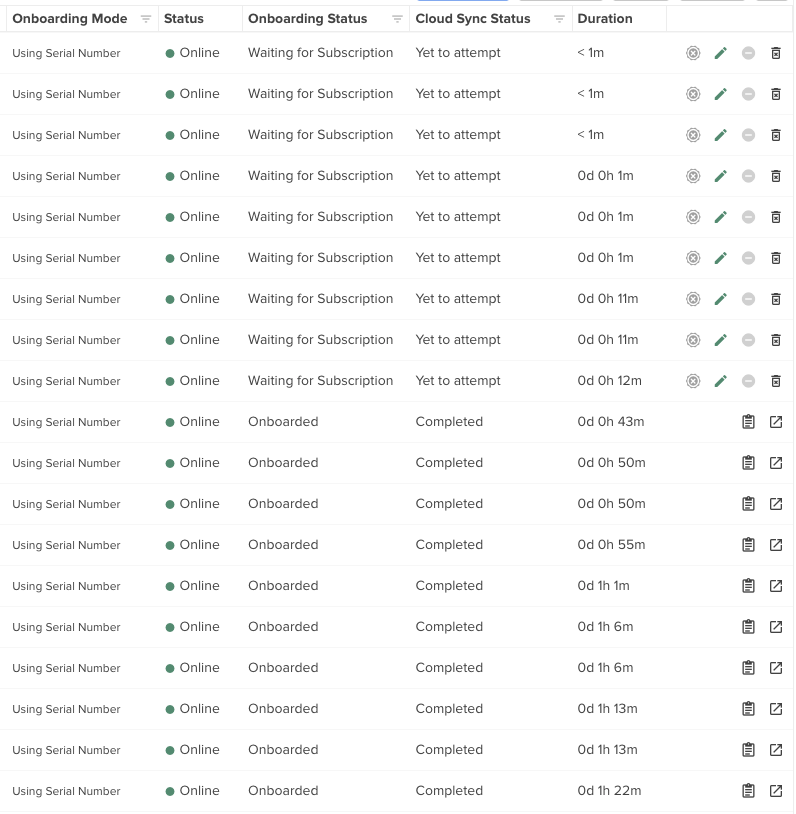
I had the problem where the onboarding status always showed “Waiting for Subscription” and the “Cloud Sync Status” remained at “Yet to attempt.”
I reinstalled the on-prem controller once more and was then able to successfully onboard APs. That worked without any issues for 15 APs. Now, 9 newly adopted APs are showing “Yet to attempt” and “Waiting for Subscription” and I can’t proceed any further. I don’t get it. I didn’t do anything differently.
Hi Daryn, as Anthony comment, we will lose the MSP feature, so we are implementing one cnMaestro On-Promise instance for each client, trying to be more clean; and we are using our datacenter with virtual servers (more cheaper than AWS).
Concur Joel! <3. This is the way… 
For customers already running cnMaestro On-Prem who have paid for cnMaestro X licenses, is Cambium considering issuing a perpetual/unlimited X license if cnMaestro Cloud or the licensing/Anchor infrastructure is discontinued?
We use X functionality with our cnWave deployment, so reverting to Essentials would mean losing functionality we have already paid for. If the business is not acquired, it would be helpful to know whether Cambium plans to unlock X permanently on existing On-Prem installations.
“Starting 17 Sep 2026, all new anchor accounts will include a 90-day cnMaestro X trial license. This will allow the on-premises instance to operate in X mode.”
This is not working. Onboarded on-prem instances are still showing as essential. This is with a brand new Anchor account and we see the 90 day trial licenses.
EDIT - https://IP-Address/#/0/home-view/monetization/subscriptions
When did you make your anchor account on the cambium website?
I was testing at home last night an noticed the trial licenses for the first time, something i hadnt seen with my other test anchor account from a few days ago.
Can we get clarification on MSP Mode, it seems we are not going to be given an easy way to transfer our subscriptions from maestro x nms accounts to the anchor.
If the maestro x/MSP Mode subscriptions expire, what will happen to our config mgmt and view? It sounds like a safer option to configure multiple on-prem instances as a precaution per site instead and monitor whether the enterprise gets purchased or you release firmwares to change this.
Yeah, now that I zoomed in to the images in the docs (I would complain about them not being clickable to enlarge, but that seems like yelling into the void at this point), I can see that a single Anchor can handle multiple onprem, but the onprem appear to behave like the cloud where a single X license “taints” the entire instance.
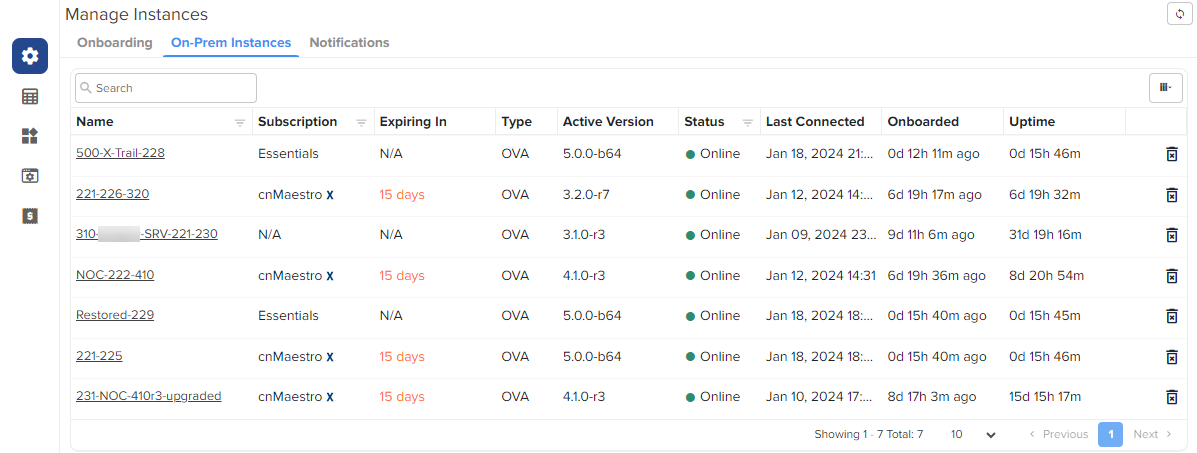
On the one hand I tend to agree with you, I feel like the licenses may just end… But on the other hand, if someone swoops in to keep honoring existing licenses / etc, I’d rather not have to migrate our non-X stuff a second time later, so I may go through the pain now to just stand up two onprem servers from the beginning. It’s going to make the actual onboarding a bit more frustrating, but thankfully our DHCP servers are all Mikrotik so I have some flexibility in DHCP options / domain names in the pools / etc.
Anybody know if a non-X onprem server still has the ridiculous 10 user account limitation?