LINKPlanner BOM Estimator has been updated to version 1.2.0 and is available at LINKPlanner BOM Estimator.
Key Features
Cloud Project Management
BOM projects can now be saved, loaded, renamed, cloned, and deleted directly within user accounts. Projects are neatly organized in a new Project List Modal that sorts by the last-modified date.
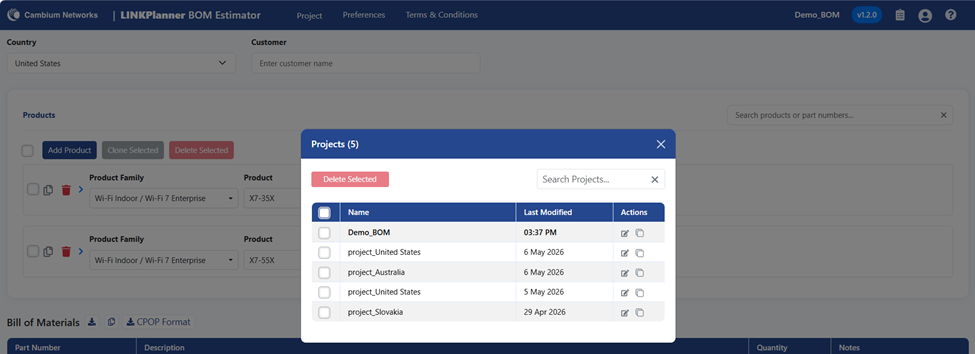
Upon saving for the first time, a custom name can be assigned to the project, which stays conveniently visible in the header. If a BOM is started while logged out, the local save will automatically sync to the cloud upon login.
Why this matters: Enables easy management of multiple deployments, iteration on different project versions using the clone tool, and secure access to saved BOMs from any device.
Smarter Unsaved Changes Protection
Prevents accidental loss of configuration edits. The save icon will now turn red whenever there are unsaved changes. Attempting to open a different project or start a new BOM will proactively trigger a warning prompt, providing the option to save progress or discard the changes.

Import and Export Moved Under Projects Menu
Import and Export options are now available under the Projects menu. Imported projects will automatically save for logged-in users.
Note: The Export function is disabled when there is no data in the project to prevent empty downloads.
Added support for Cambium SSO and Channel Partner Portal SSO login
Authentication options have been expanded. Sign-ins can now be completed seamlessly via the Cambium Channel Partner Portal in addition to the standard Cambium SSO.
Profile Menu in Header
A new user avatar dropdown has been added to the top menu bar, providing quick access to logout. The Project Name, release version, and release notes have also been added to the top menu bar.
Search Clear Button
Added a convenient ‘X’ icon inside both the product search and project list search bars, allowing for the instant clearing of search queries.
Product Updates
EX3000 25 Gbps Fiber Transceivers
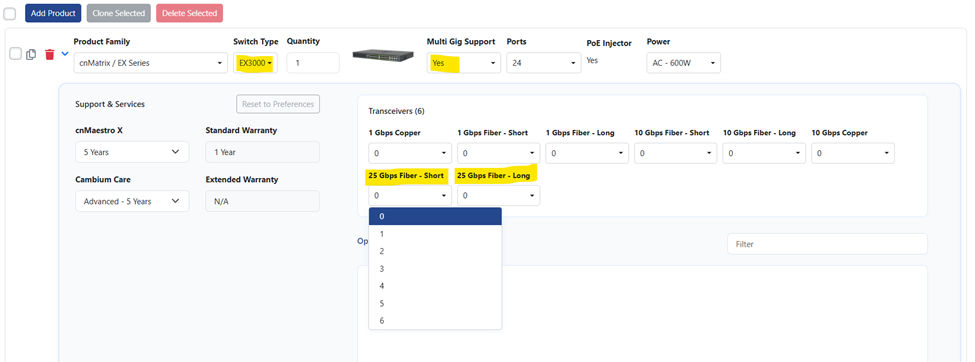
Added new “25 Gbps Fiber - Short” and “25 Gbps Fiber - Long” options. These become available for cnMatrix EX3030RM-P and EX3052RM-P switches (when MultiGig is enabled for EX3000 switches)
New “25 Gbps Fiber - Short” and “25 Gbps Fiber - Long” options are added for cnMatrix EX3030RM-P and EX3052RM-P switches (when MultiGig is enabled for EX3000 switches)
Egypt-Specific WiFi 6 SKUs
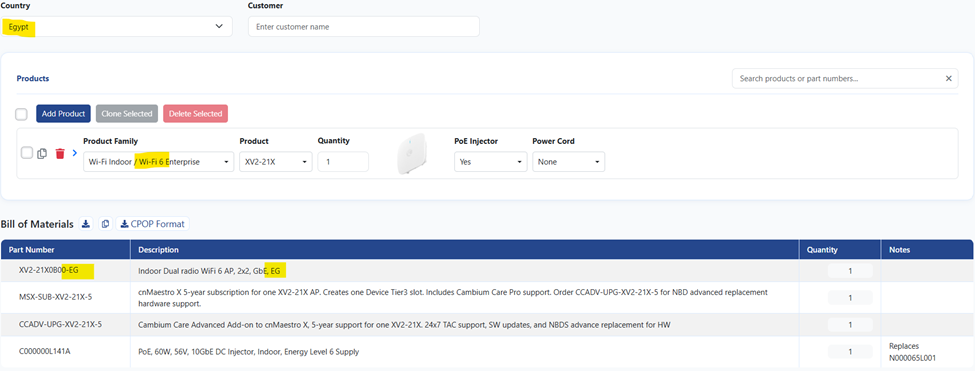
When Egypt is selected as the country, the XV2-2X, XV2-21X, XE3-4, and XV2-23T models will now automatically populate with Egypt-specific part numbers.
Retired PoE Replaced
Across all default BOMs, the retired part number N000000L142A has been replaced with the C000000L141A. The retired part has also been removed from the optional extras list.
Bug Fixes
- Removed the RJ-45 connector from the cnWave 60 GHz products’ default BOM when PoE is not selected.
- Fixed a bug in the Bridge in a Box cnWave Support & Services configuration.