LINKPlanner online has been updated to version 6.4.2
The key features of the 6.4.2 release are:
New Features
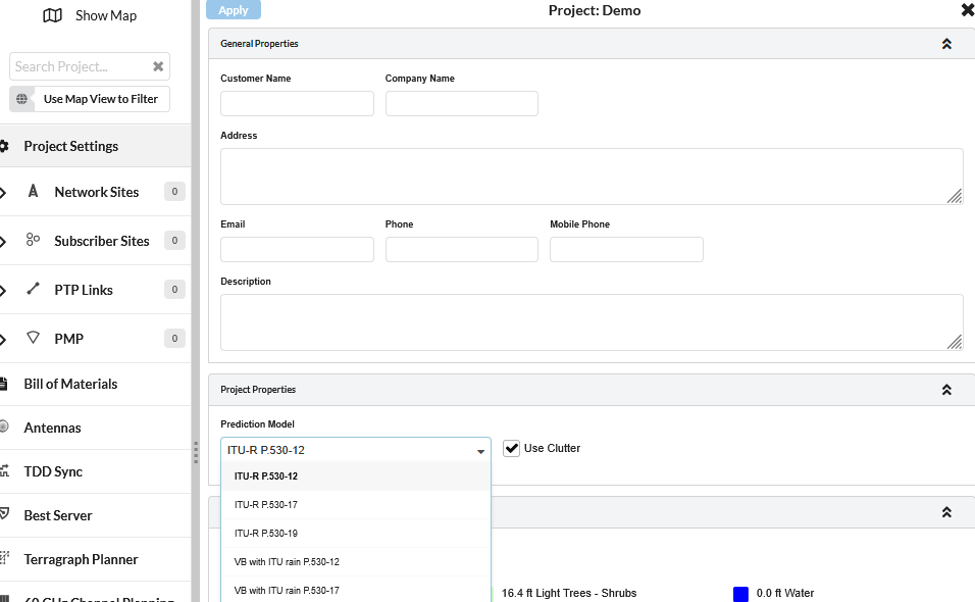
Added ITU-R P.530-19 Prediction Model support
LINKPlanner now includes support for the ITU-R P.530-19 Prediction Model.
This update allows users to plan links using the latest supported ITU-R P.530-19 prediction model, helping improve alignment with current prediction modelling standards. This is particularly useful when evaluating microwave link availability and performance under prediction conditions defined by the updated recommendation.
To select the ITU-R P.530-19 Prediction Model, go to:
Project Settings > Project Properties > Prediction Model
Then select ITU-R P.530-19 from the available model options.
Added a project-level Revert Profile option
A new project-level Revert Profile option has been added under the Tools menu.
This option allows users to revert the project profile more easily at the project level, improving workflow efficiency when changes need to be rolled back or when users need to return to the default profiles.
To access this option, open the project and navigate to:
Tools > Refresh Project Profiles in the top menu bar,

Project Profiles pop-up window opens,
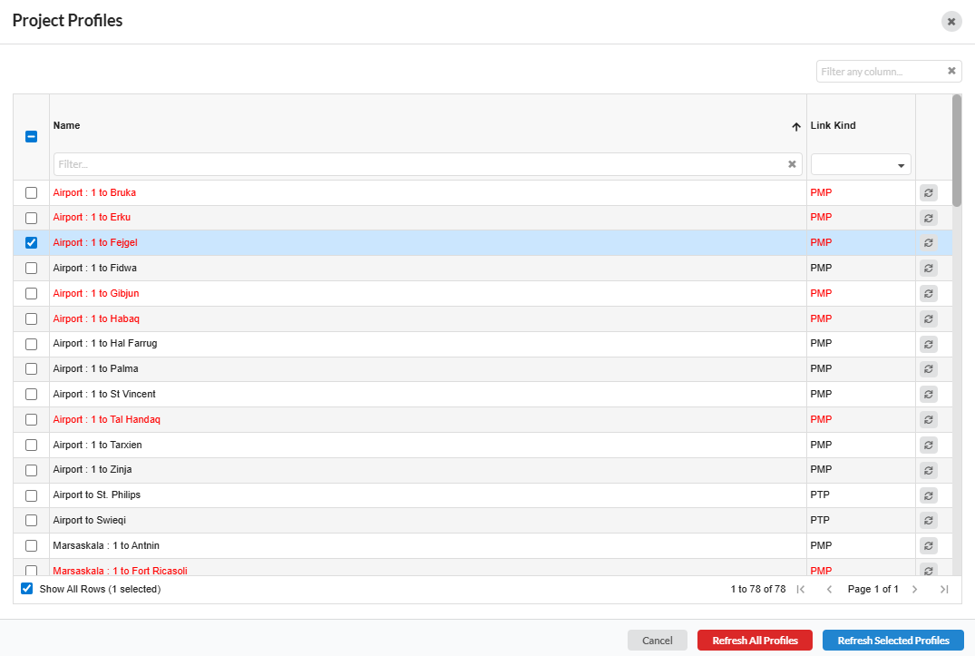
- To refresh the profile of the individual link, click
 on the right side of the link row.
 - To refresh the profile of the multiple links, select the required links using the select checkboxes and then click
 on the bottom of the page.
 - To refresh all the profiles in the project, click on
 the bottom of the page.
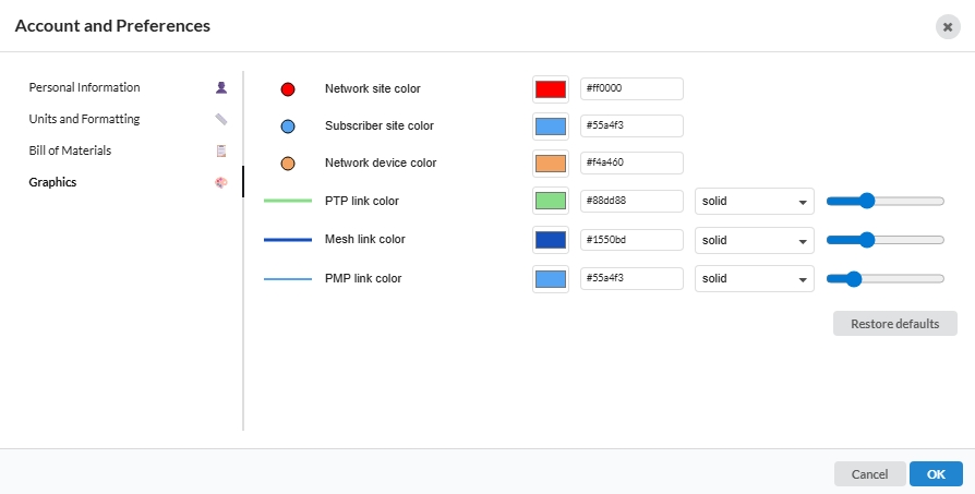
Added the ability for users to customise styles and colours for PTP Links, PMP APs, PMP Links, and Mesh Links through the Preferences top menu.
Users can now customise styles and colours for the following network elements:
- Sites
- PTP Links
- PMP APs
- PMP Links
- Mesh Links
The new styling options make it easier to visually organise and identify different sites, APs or different link types.
This option is available through the Preferences top menu.
To configure these options, navigate to:
Preferences > Graphics
Added the ability to search the product list under the Tools menu.
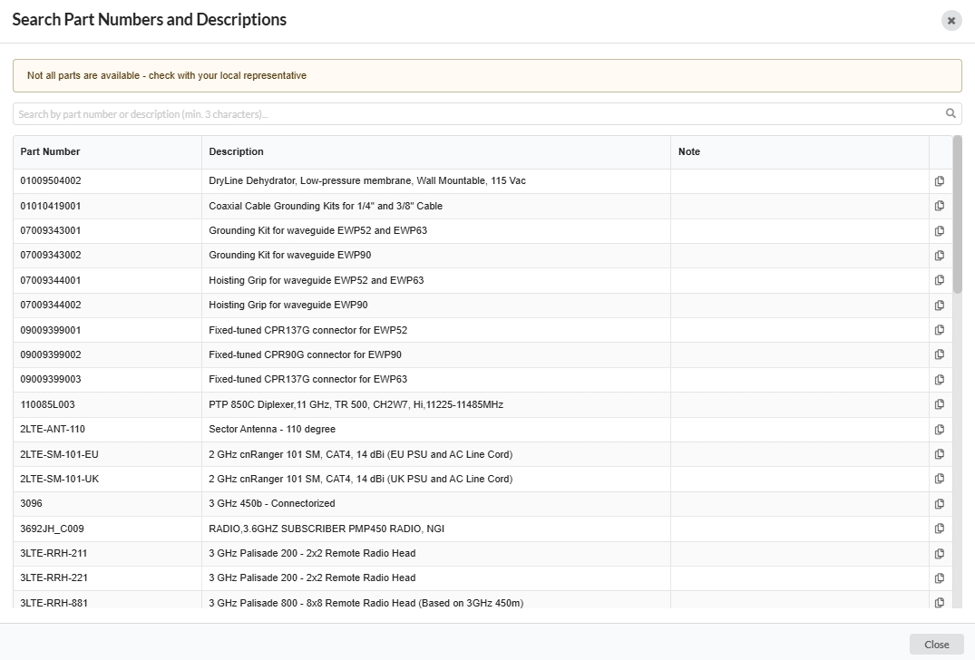
A new product list search option has been added under the Tools menu.
This helps users quickly to search Cambium Networks parts in the product list without manually scrolling through the available options.
To use this feature, navigate to:
Tools > Search Part Numbers and Descriptions
Enter the required part number in the search bar. Click in a cell to copy the contents of the cell or click in the Copy icon on the right side of the row to copy the entire row.
AFC
Updated 6 GHz ePMP 11ax GPS precision values
The 6 GHz ePMP 11ax GPS precision values have been updated to improve AFC EIRP responses in line with Release 5.11.0.
This update helps ensure that AFC calculations for supported 6 GHz ePMP 11ax products use the latest GPS precision values, providing improved EIRP response handling for AFC-enabled deployments.
PTP 820/850
Added PTP 850C product in the 38 GHz band
This addition expands the available product options for PTP 820/850 link planning in the 38 GHz frequency band.
Added RFU-SX products in the 23 GHz band
The following products are now available in the 23 GHz band:
- PTP 820A with RFU-SX
- PTP 850GP with RFU-SX
This update provides additional RFU-SX configuration options for users planning links in the 23 GHz band.
Added ETSI Regulation in the 7 GHz band for PTP 820A with RFU-D HP
ETSI Regulation support has been added in the 7 GHz band for PTP 820A with RFU-D HP.
Retired PTP 820C HP in the 11 GHz band
PMP 450
Added New Zealand regulatory support and updated Australia regulatory settings
New Zealand regulatory support has been added for PMP 450 products in the 3 GHz band.
Australia regulatory support for PMP 450 in the 3 GHz band has also been updated. In addition, Australia regulatory support is now available in the 3.9 GHz band, in line with the latest Australia regulatory requirements.
These updates help ensure that PMP 450 planning options reflect the latest supported regional regulatory configurations for Australia and New Zealand, as per Release 25.1.
ePMP
Updated sensitivity for F4525, F4525L, and F4625 to Release 5.11.0.
Updated Dynamic Tx powers for F4616 and F4518 to Release 5.11.0
The sensitivity values for the following products have been updated to align with Release 5.11.0:
- F4525
- F4525L
- F4625
Dynamic Tx power values have also been updated for the following products in line with Release 5.11.0:
- F4616
- F4518
Updated FCC backoffs for ePMP 4600 products
FCC EIRP limits have been updated to 36 dBm from 35 dBm for the following ePMP products:
- ePMP 4600
- ePMP 4600L
- ePMP 4600C
Retired and replaced ePMP 3000 ROW parts with ePMP 3000 FSR parts
The ePMP 3000 ROW parts have been retired and replaced with ePMP 3000 FSR parts.
For EU regions, FSR models are not available. As a result, ePMP 3000 has been retired in those regions.
General
Retired PoE Injector N000000L142
Retired QD Positioner Accessories
QD Positioner Accessories have been retired.
These accessories were previously available as optional extras for the following products:
- PMP 450i
- PTP 670
- PTP 700
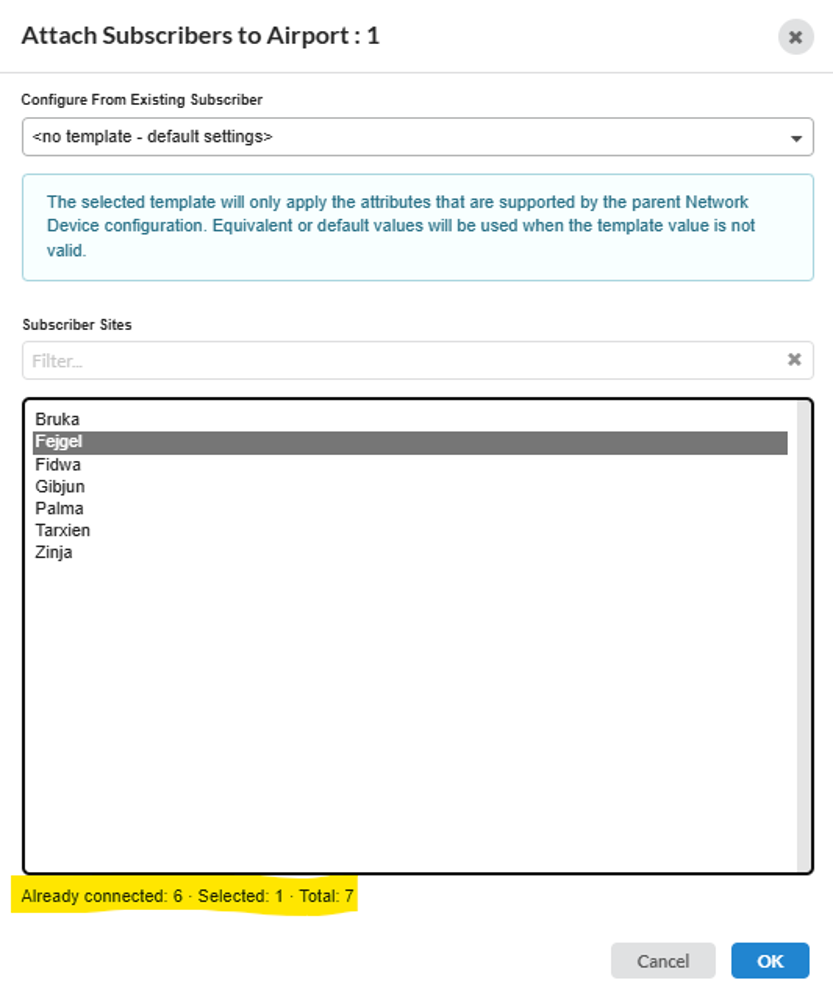
Added number of selections in the Add a new SM pop-up window
The Add a new SM pop-up window now shows the number of selected items.
This usability improvement makes it easier for users to confirm how many selections have been made before proceeding.
Improved Show All Rows in table views by remembering the setting across all table view windows.
The Show All Rows option in table views has been improved.
LINKPlanner now remembers the Show All Rows setting across all table view windows, reducing the need to repeatedly reapply the same display preference when moving between tables.
Added Installation Receive Power column to the PTP, Mesh and PMP Links table views.
Bug Fixes
- The following issues have been resolved in this release:
- Fixed an issue where MRC Gain was incorrectly applied when restricting EIRP based on regulatory limits.
- Resolved an issue where projects could not be exported when the BOM contained quantity edits.
- Resolved an issue where projects could not be imported when the hub BOM contained quantity edits.
- Fixed string-based sorting by changing the Fresnel Zone Clearance column to use number-based sorting.