Applicable platforms: AX
Applicable versions: 5.11.0 and above
New 5.11.0 release firmware AFC Analyzer feature is introduced for ePMP46XX.
Automated Frequency Coordination (AFC) is a set of techniques used to enable safe channel sharing in the 6 GHz band between outdoor Wi-Fi 6E devices and existing incumbent users. As defined by the FCC, any newly installed Access Point (AP) operating in the 6 GHz band must query a certified AFC database to ensure that its operation will not interfere with registered incumbent users in that area on a given channel.
Before the introduction of the new feature, AFC worked in the following way: the AFC service provider server would receive the AP’s coordinates and automatically assign the maximum allowed EIRP based on the AP’s location and the local RF environment.
With the new AFC Analyzer feature, the AP now operates in conjunction with its associated SMs. The system takes into account the maximum permitted EIRP not only for the AP but also for the SMs, allowing customers to evaluate and select the most suitable channel for Cambium radios operating within FCC-regulated 6 GHz zones.
On GUI navigate to AP > Tools > AFC Analyzer
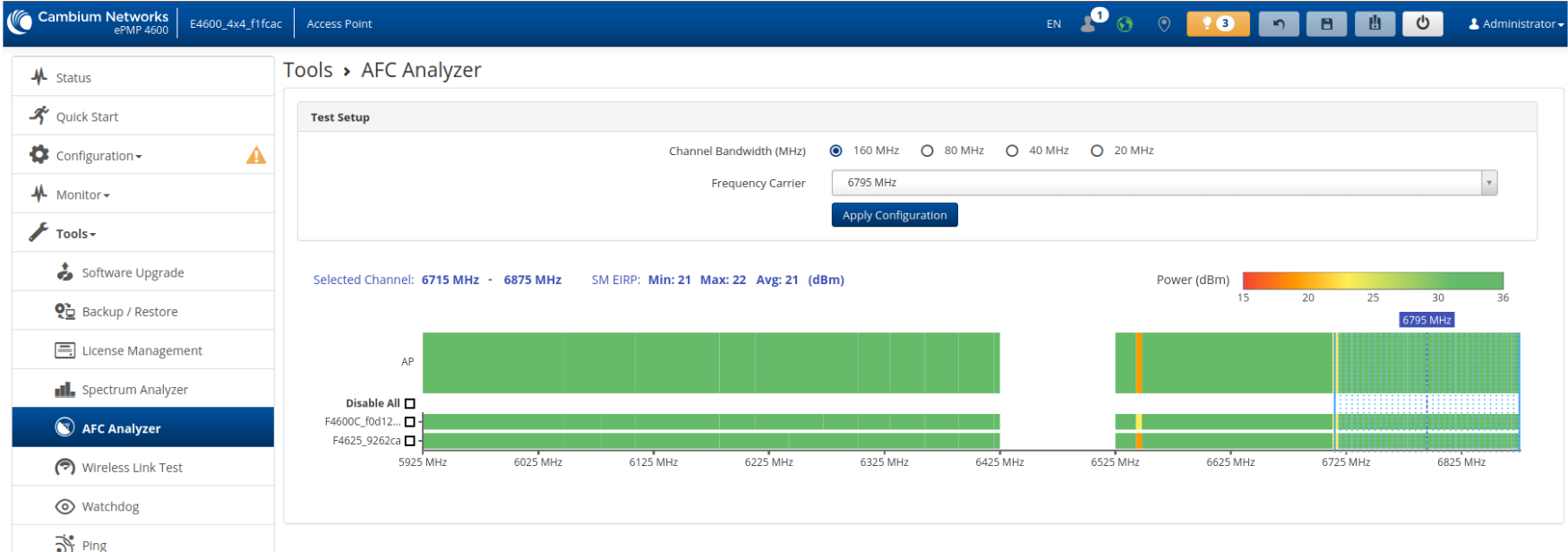
On the AFC Analyzer page, you can select the Channel Bandwidth and Frequency Carrier, view the frequency range of the chosen channel, and see the Minimum, Maximum, and Average EIRP available for that channel.
Previously, differences in EIRP across channels were visualized using taller or shorter bars. This has now been improved by using color-coded visualization, making it easier to interpret EIRP values at a glance.
A colored bar in the upper-right corner of the graph shows which color corresponds to each dBm level to help customers quickly identify the best channels for operation.
The graph is also divided into separate sections showing the AFC spectrum for the AP and for each connected SM individually.
You can exclude specific SMs or all of them from the analysis by checking the box next to the SM’s name. This will remove them from the sector EIRP limitation calculations.
When you hover your mouse over the graph, you will see New Channel under Selected Channel, with the channel’s frequency range and the corresponding EIRP limitations.
You can simply click on the desired channel to select it - there is no need to manually change the value in the Frequency Carrier field above.
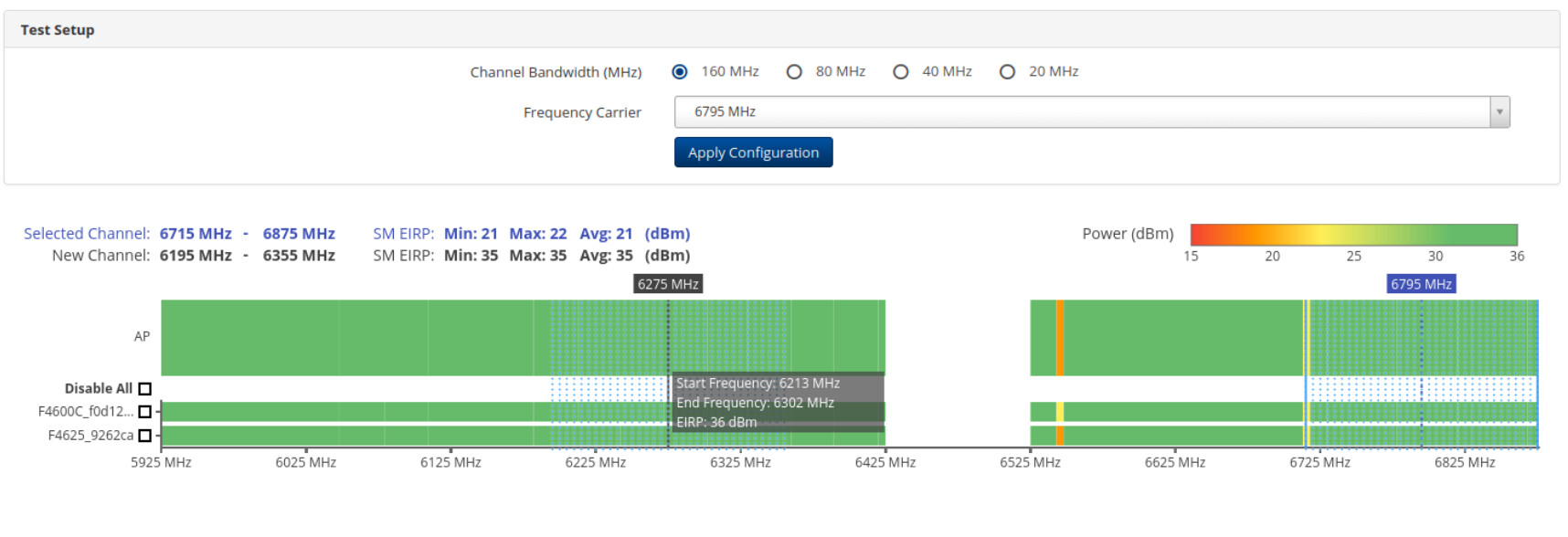
After selecting the best possible channel, click Apply Configuration and the AP will switch to the chosen frequency carrier.
Note: The Apply Configuration button does not update the SM scan list.
If the selected frequency carrier is not already included in the SMs’ scan list, you must add it before applying the configuration.
For example:
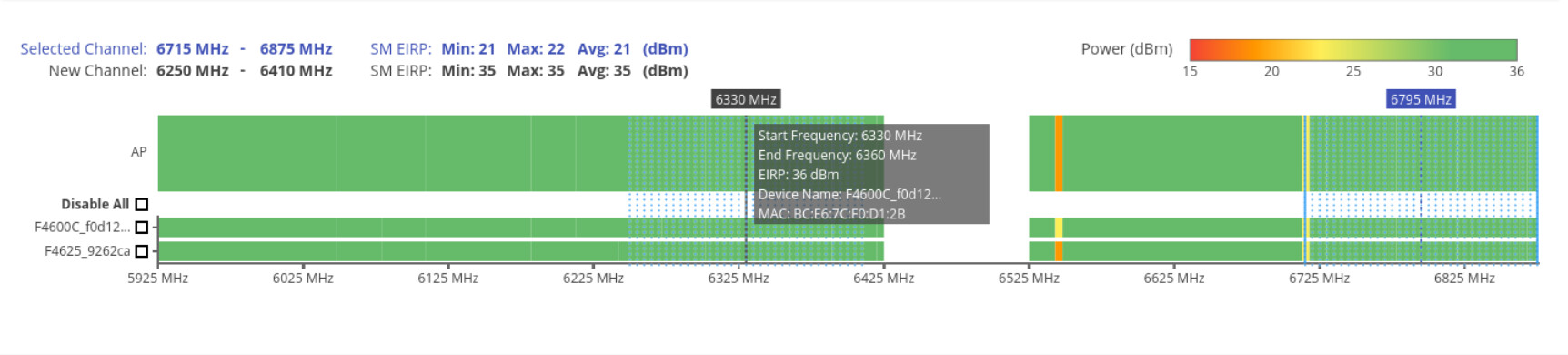
If you see that channel 6330 provides significantly better EIRP limits compared to your current channel 6795, you can simply click on channel 6330 in the graph and then select Apply Configuration.
Benefits and Recommendations
The AFC Analyzer significantly simplifies channel selection in the 6 GHz band by providing clear, visual insight into available EIRP limits for both the AP and connected SMs. By considering real sector conditions rather than AP-only limits, it helps operators choose channels that deliver better performance and avoid suboptimal configurations.
Key benefits include:
-
Faster identification of the best-performing channels
-
Improved EIRP utilization across the sector
-
Better visibility into how individual SMs impact channel selection
-
Reduced trial-and-error during deployment and optimization
Recommendation:
It is strongly recommended to use the AFC Analyzer during initial deployment, sector optimization, or when troubleshooting throughput issues in 6 GHz FCC-regulated environments. This ensures that the selected channel provides the best possible balance between regulatory compliance and real-world performance.