Applicable platforms: AX
Applicable versions: 5.11.0 and above
New 5.11.0 release firmware PPPoE Intermediate Agent feature is introduced for ePMP45XX/ePMP46XX.
When the PPPoE Intermediate Agent feature is enabled, the AP inserts access-loop identification information into PPPoE PADR packets during the PPPoE Discovery phase. This mechanism allows service providers to identify end hosts connected behind an ePMP subscriber device (for example, home routers connected via Ethernet).
The feature is disabled by default.
GUI >> Configuration >> Network >> Advanced
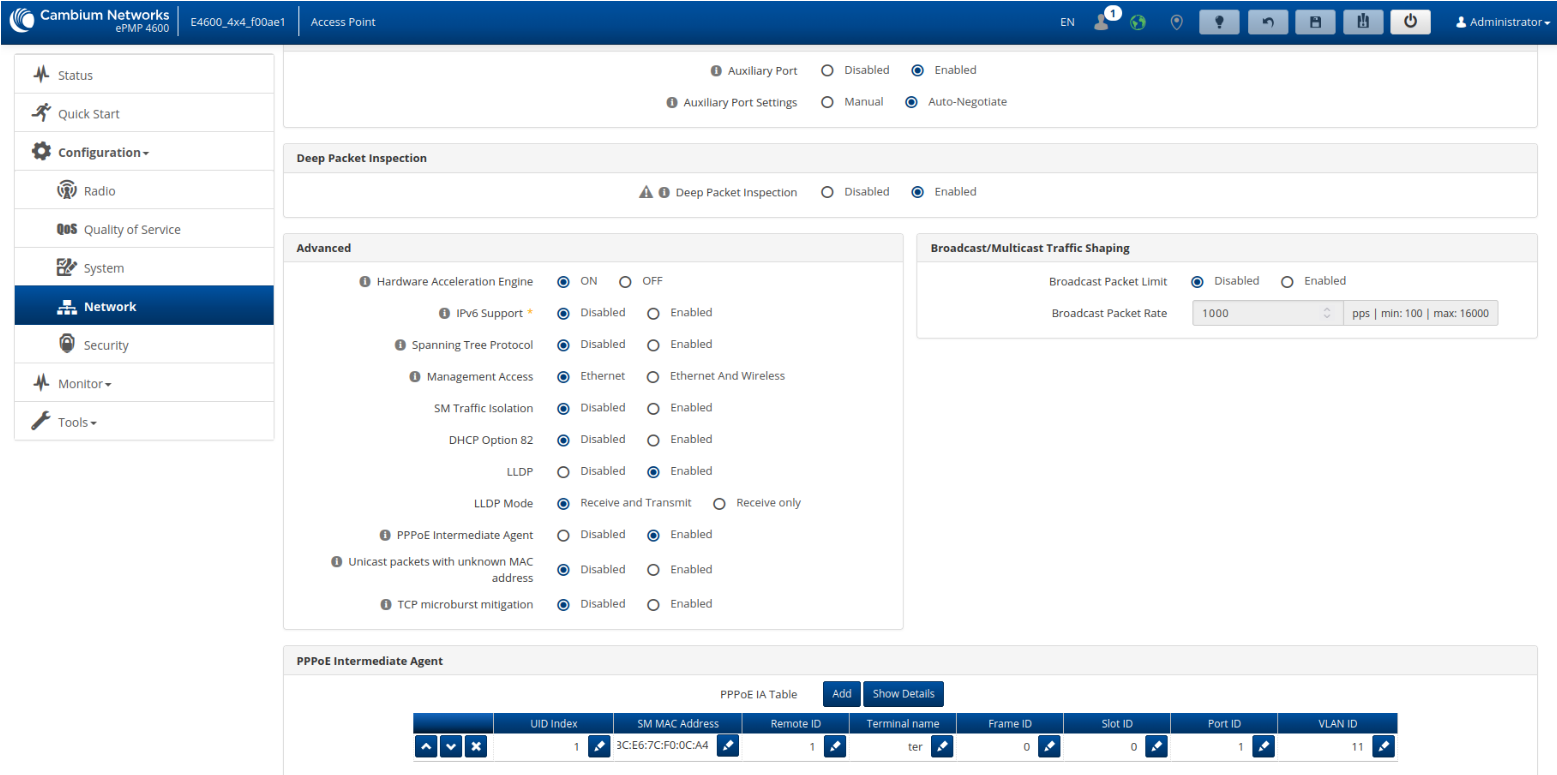
On the AP, the PPPoE Intermediate Agent provides subscriber line identification by tagging Ethernet frames with Vendor-Specific PPPoE Tags:
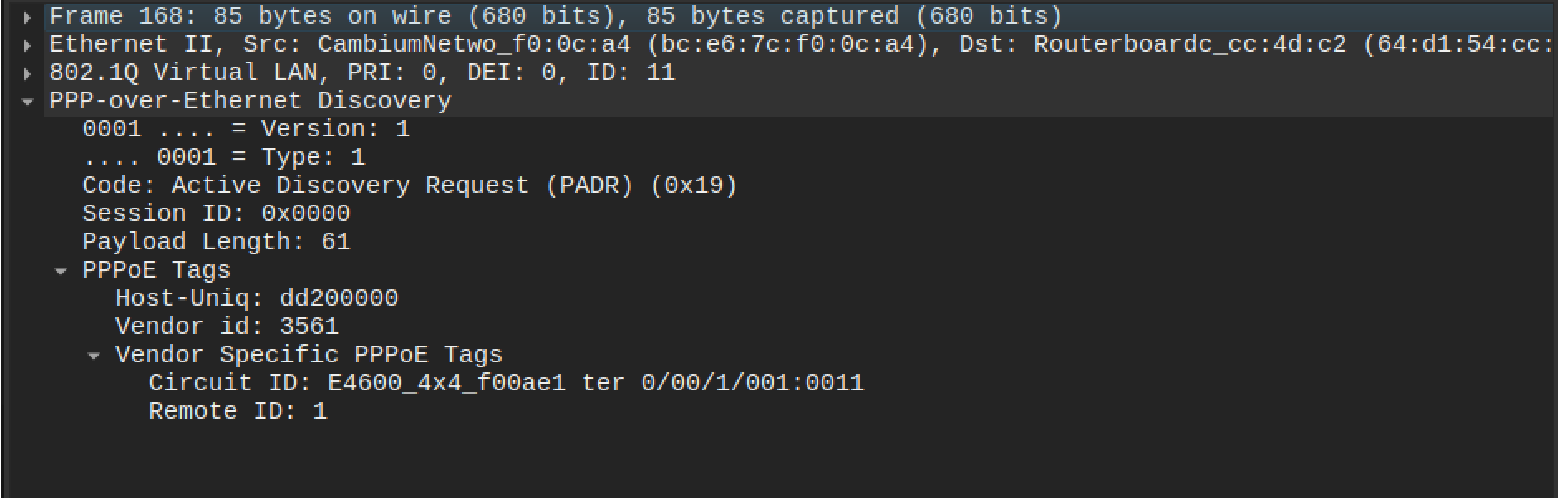
- Circuit ID — includes AP name, frame, slot, port, and VLAN ID information.
- Remote ID — typically includes the subscriber’s phone number.
Below is a capture of a sample Active Discovery Request (PADR) message illustrating these newly added fields:
cnMaestro template
{
    "device_props": {
        "networkPPPoEIAEnable": "1",
        "networkPPPoEIATable": [
            {
                "networkPPPoEIAIndex": "",
                "networkPPPoEIAUID": "1",
                "networkPPPoEIASMMAC": "BC:E6:7C:F0:0C:A4",
                "networkPPPoEIAPhoneNumber": "1",
                "networkPPPoEIATerminal": "ter",
                "networkPPPoEIAFrame": "0",
                "networkPPPoEIASlot": "0",
                "networkPPPoEIAPort": "1",
                "networkPPPoEIAVlanId": "11"
            }
        ]
    }
}
MIB object
networkPPPoEIAEnable OBJECT-TYPE
	SYNTAX     Integer32 (0|1)
	MAX-ACCESS read-write
	STATUS     current
	DESCRIPTION
		"PPPoE Intermediate Agent
		0 - Disable
		1 - Enable
		Device Allocation: AP"
	DEFVAL  { 0 }
	::= { networkPPPoE 1 }
networkPPPoEIAIndex OBJECT-TYPE
	SYNTAX     Integer32 (0..127)
	MAX-ACCESS read-write
	STATUS     current
	DESCRIPTION
		"PPPoE IA Table Index
		Table Entry is cleared if Index is set to zero
		Device Allocation: AP"
	::= { networkPPPoEIAEntry 1 }
networkPPPoEIAUID OBJECT-TYPE
	SYNTAX     Integer32 (1..128)
	MAX-ACCESS read-write
	STATUS     current
	DESCRIPTION
		"PPPoE IA UID
		Device Allocation: AP"
	::= { networkPPPoEIAEntry 2 }
networkPPPoEIASMMAC OBJECT-TYPE
	SYNTAX     DisplayString (SIZE(0|11..17))
	MAX-ACCESS read-write
	STATUS     current
	DESCRIPTION
		"PPPoE IA Registered SM MAC Address
		Device Allocation: AP"
	::= { networkPPPoEIAEntry 3 }
networkPPPoEIAPhoneNumber OBJECT-TYPE
	SYNTAX     DisplayString (SIZE(0..63))
	MAX-ACCESS read-write
	STATUS     current
	DESCRIPTION
		"PPPoE IA Remote ID
		Device Allocation: AP"
	::= { networkPPPoEIAEntry 4 }
networkPPPoEIATerminal OBJECT-TYPE
	SYNTAX     DisplayString (SIZE(0..3))
	MAX-ACCESS read-write
	STATUS     current
	DESCRIPTION
		"PPPoE IA Terminal ID
		Device Allocation: AP"
	::= { networkPPPoEIAEntry 5 }
networkPPPoEIAFrame OBJECT-TYPE
	SYNTAX     DisplayString (SIZE(0..1))
	MAX-ACCESS read-write
	STATUS     current
	DESCRIPTION
		"PPPoE IA Frame ID
		Device Allocation: AP"
	::= { networkPPPoEIAEntry 6 }
networkPPPoEIASlot OBJECT-TYPE
	SYNTAX     DisplayString (SIZE(0..2))
	MAX-ACCESS read-write
	STATUS     current
	DESCRIPTION
		"PPPoE IA Slot
		Device Allocation: AP"
	::= { networkPPPoEIAEntry 7 }
networkPPPoEIAPort OBJECT-TYPE
	SYNTAX     DisplayString (SIZE(0..1))
	MAX-ACCESS read-write
	STATUS     current
	DESCRIPTION
		"PPPoE IA Port number
		Device Allocation: AP"
	::= { networkPPPoEIAEntry 8 }
networkPPPoEIAVlanId OBJECT-TYPE
	SYNTAX     Integer32 (1..4095)
	MAX-ACCESS read-write
	STATUS     current
	DESCRIPTION
		"PPPoE IA VLAN ID
		Device Allocation: AP"
	::= { networkPPPoEIAEntry 9 }