Applicable Versions: 5.11
Applicable Platforms: Force 4600C, ePMP4600L, Force 400, Force425, ePMP4500L
The 5.11 release introduces enhancements to the Primary AP Reconnect feature. This improvement adds a smart Monitor Radio Scan capability, enabling Subscriber Modules (SMs) with a dedicated spectrum analysis interface to verify the availability of the Primary AP in real time and automatically reconnect when possible.
The feature prevents SMs from disconnecting when the Primary AP is unavailable and helps reduce downtime for end users.
The feature works in conjunction with the Primary AP Reconnect feature and requires the Spectrum Analyzer to be disabled. It is disabled by default and must be explicitly configured on the SM.
How to configure:
- Navigate to SM GUI Configuration Radio page
- Configure Primary and Secondary APs SSIDs and Security.
- Enable Primary AP Reconnect feature
- Enable Monitor Radio Scan feature

The following status indicate that SM has reconnected back to Primary AP:
“SM deregistered - Reconnect to Primary AP”
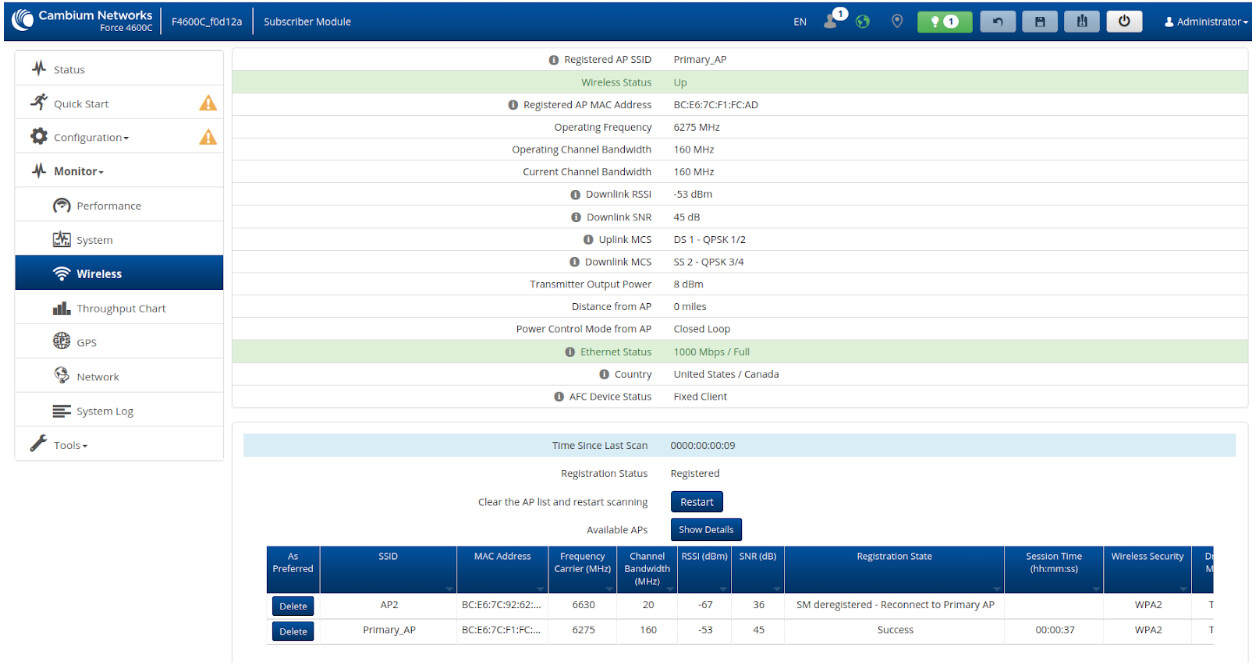
MIB objects
wirelessInterfaceReconnectPrimaryAPEnable OBJECT-TYPE
	SYNTAX     Integer32 (0|1)
	MAX-ACCESS read-write
	STATUS     current
	DESCRIPTION
		"Primary AP reconnect feature.
		If enabled, SM will periodically disconnect from secondary AP (if connected) and scan for primary AP.
		1 - feature enabled
		0 - feature disabled
		Device Allocation: SM"
	::= { reconnectPrimaryAPSelectIface 1 }
spectralMonitorRadioScanEnable OBJECT-TYPE
	SYNTAX     Integer32 (0|1)
	MAX-ACCESS read-write
	STATUS     current
	DESCRIPTION
		"Monitor radio scan feature.
		If enabled, SM will perform scan on monitor radio.
		Same frequencies, as selected for the main radio will be scanned.
		1 - feature enabled
		0 - feature disabled
		Device Allocation: SM"
	::= { cambiumSpectral 2 }
cnMaestro template
{
    "device_props": {
        "spectralMonitorRadioScanEnable":  "1"
    }
}