Applicable platforms: AX
Applicable versions: 5.11.0 and above
New 5.11.0 release firmware WLT MU-MIMO feature is introduced for ePMP4500/4600.
MU-MIMO mode has been added to the Wireless Link Test, allowing customers to identify which SMs are eligible for MU2/MU3 grouping and to test and compare their throughput under MU-MIMO conditions.
On GUI navigate to AP > Tools > Wireless Link Test
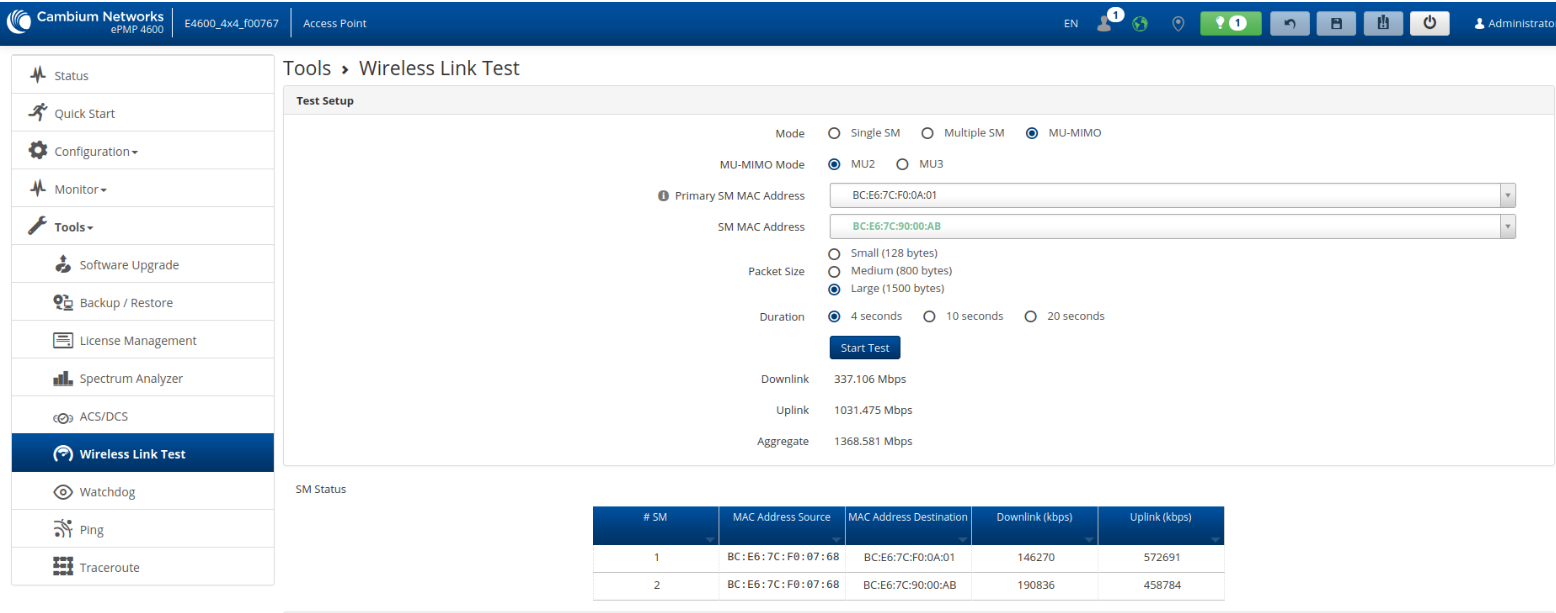
SM which can form the MU-MIMO group will be in the list when you choose Primary SM and highlighted in green color.
What MU2 and MU3 Mean
MU-MIMO (Multi-User MIMO) allows an access point (AP) to transmit data to multiple Subscriber Modules (SMs) at the same time.
-
MU2 means the AP can transmit simultaneously to 2 SMs.
-
MU3 means the AP can transmit simultaneously to 3 SMs.
Hardware capability determines whether the AP can form MU2 or MU3 groups:
-
ePMP 4600 (4×4) supports MU2 only.
-
ePMP 4500 (8×8) supports both MU2 and MU3 because it has more spatial streams and antenna pairs available for multi-user transmission.
How MU-MIMO Works
Depending on the deployment and SM characteristics, you may sometimes see no SMs available in the MU2 or MU3 lists. This simply means that the system cannot form valid MU-MIMO groups with the current configuration or SM conditions.
Let’s walk through the basics:
SU-MIMO (Single-User MIMO) Mode
In SU-MIMO, each SM receives data in its own dedicated time slot.
The AP schedules every SM individually:
-
SM1 gets its slot
-
SM2 gets its slot
-
…and so on
There is no parallel transmission to multiple SMs.
MU-MIMO (Multi-User MIMO) Mode
In MU-MIMO, the AP evaluates whether two or more SMs can be grouped together based on channel conditions, spatial separation, and correlation between their signals.
If the AP determines that SM1 and SM2 can form a group:
-
It can transmit to both SMs at the same time during one SM’s scheduled slot.
-
However, each SM still retains its own time slot.
-
The benefit is that during SM1’s slot, the AP can simultaneously transmit to SM2, and vice versa.
So MU-MIMO does not split one time slot between two users.
Instead, it adds additional parallel transmission capability inside each user’s normal slot.
This increases total sector throughput.
MU2 vs MU3 Explained
MU-MIMO performance depends heavily on how many antenna pairs the AP can form:
-
MU2 requires two independent spatial streams, each directed to a different SM.
-
MU3 requires three independent spatial streams, which is only possible with more complex antenna arrays.
Hardware Perspective
-
ePMP 4600 (4×4)
Has enough antenna resources to support two spatial layers → MU2 only -
ePMP 4500 (8×8)
With double the antenna resources, it can support:-
MU2 (2 users simultaneously), or
-
MU3 (3 users simultaneously)
-
In simple terms:
More antennas = more spatial streams = more SMs served in parallel.
For example, this is how looks like Frame for SU:
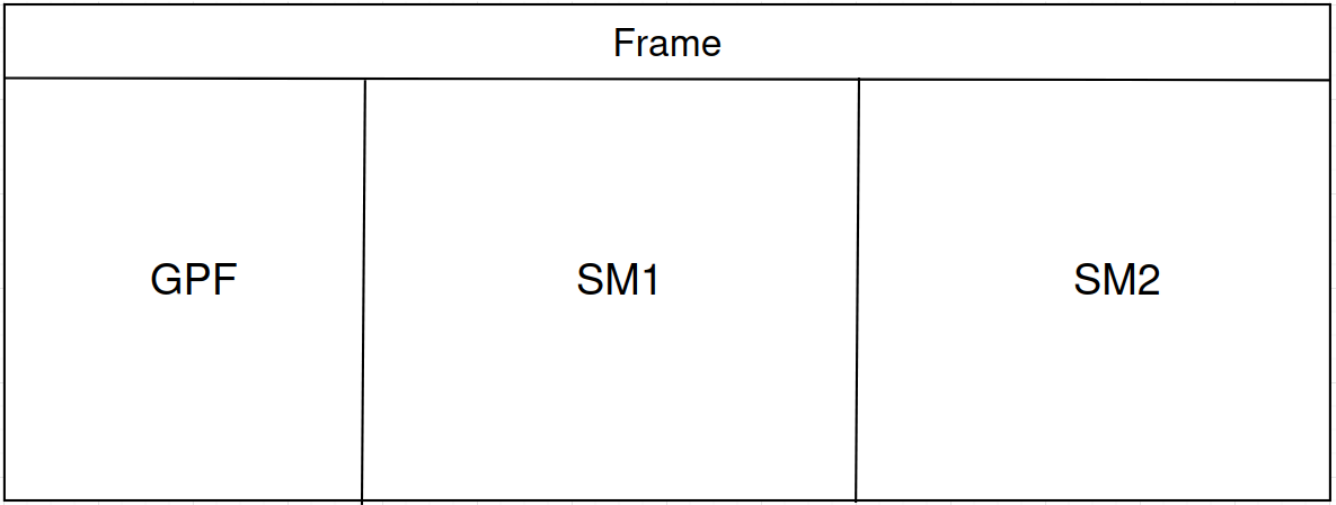
And this is how looks like Frame for MU:

The main purpose of this feature is to help customers verify that MU-MIMO is operating correctly in their network.
In some scenarios, even when radios are properly installed and fully capable of MU-MIMO, users may not observe any throughput improvement. This does not necessarily indicate that MU-MIMO is not working. In many cases, the reason is simply that there is little or no traffic coming from SMs that are groupable.
For example, if SM1 and SM3 are groupable, but SM2 is not groupable with them, you may encounter a situation where SM1 and SM2 generate most of the traffic, while SM3 sends very little. In this case, overall throughput may appear unchanged, because the scheduler allocates most transmission opportunities to SM1 and SM2 - leaving fewer opportunities for MU-MIMO to provide efficiency gains.
With the new MU-MIMO enhancements in the Wireless Link Test, users can clearly identify which SMs are groupable and evaluate the actual MU-MIMO performance and gains in their network.
Let’s take a look at how MU-MIMO grouping works.
For MU-MIMO grouping, the Access Point determines each SM’s azimuth angle relative to the sector antenna.
SMs can be grouped for MU-MIMO only if their angular separation meets the required criteria(you can find azimuth list in this article).
The diagram below illustrates this concept:
SM2 (green) can be grouped with SM1 because their azimuth difference falls within the allowable MU-MIMO range, while SM3(red) cannot be grouped with SM1 because its azimuth does not meet the required criteria.

MU-MIMO TPuT
To conclude, let’s look at how MU-MIMO improves throughput compared to single-beam beamforming and to operation without any beamforming or MU-MIMO.
The screenshots below show test results from an ePMP 4600 with multiple F4600C SMs operating on a 160 MHz channel with a 50/50 TDD ratio.
1)Wireless Link Test with Beamforming/MU-MIMO disabled

2)Wireless Link Test with Beamforming enabled

3)Wireless Link Test with MU-MIMO enabled

Benefits of the MU-MIMO Wireless Link Test Feature
The MU-MIMO mode in the Wireless Link Test provides clear visibility into how effectively MU-MIMO operates in a live network. It allows customers to immediately identify which SMs are eligible for MU2 or MU3 grouping and to validate real MU-MIMO gains under controlled test conditions.
Key advantages include:
-
Clear identification of MU2/MU3-groupable SMs, removing guesswork during troubleshooting and optimization
-
Accurate validation of MU-MIMO functionality, even in scenarios where live traffic patterns do not naturally expose MU gains
-
Direct throughput comparison between SU-MIMO and MU-MIMO operation
-
Faster issue isolation, distinguishing between MU-MIMO limitations and traffic or scheduling-related constraints
Recommendations
-
Use the MU-MIMO Wireless Link Test during network commissioning and optimization to confirm that MU-MIMO grouping is achievable.
-
Perform tests when multiple SMs generate traffic, as MU-MIMO gains are most visible under concurrent load.
-
Leverage MU-MIMO test results before concluding that MU-MIMO is not working in production, as lack of observable gains is often traffic-related rather than a radio limitation.