PMP450x System Release 25.0 is now available at https://support.cambiumnetworks.com/files/pmp450 and it will be available on cnMaestro cloud within 24hours.
Warnings, caveats and software upgrade notes
TX power adjustment on 4x4 APs after upgrading from Release 24.x to Release 25.x
The Configuration → Radio Transmit Power field now interprets and uses the operator entered value as a “per carrier” power and not a “per component carrier” power. Because of this, there are two cases where operators, after upgrading to this software, will need to manually increase their TX power on the AP/BHM to get the same transmit power they were using on release 24.2, for any carrier operating with two component carriers.
Scenario 1
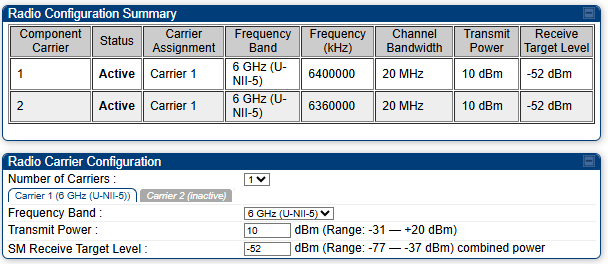
Configurations where an operator is using less than the maximum allowed to be configured for the carrier. For example, if an operator has a single 6 GHz carrier configured in Release 24.2.2 with two 20 MHz component carriers and they elected to configure only 10 dBm per component carrier in Release 24.2.2, that represented 13 dBm for the carrier in Release 24.2.2 as shown in the following figure:
After an upgrade to Release 25.0, operators must be aware that this same configured 10 dBm now means 10 dBm across the entire carrier or 7 dBm per component carrier as shown in the following figure:
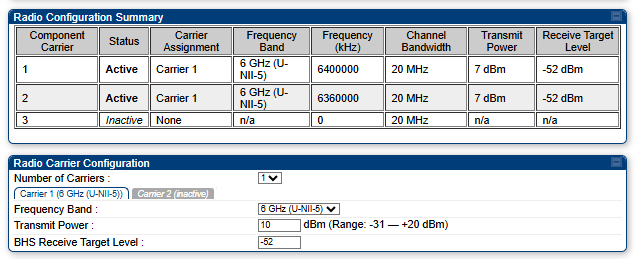
To maintain the same transmit power, this 10 value must be modified to 13 after the upgrade, and saved. No device restart is required.
Scenario 2
AFC Configurations (Canada and the United States) using bandwidth configurations of 15 MHz or less per component carrier, and having had two component carriers configured under a single carrier prior to the upgrade to Release 25.0. Unlike scenario 1 explained above, this concern is true for configurations where the maximum transmit power has been configured on the AP in Release 24.2.2. For example, the following figure shows a Release 24.2.2 configuration for two 10 MHz component carriers configured and operating at maximum power:
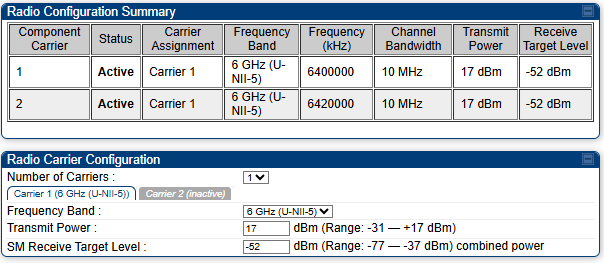
After the upgrade, the per-carrier range limit has been properly adjusted as shown in the following figure. But operators will need to make this one-time adjustment to the TX power to increase it from 17 to 20, since this value now represents the combined per carrier power:
Improved multiple component carrier user interface with cnMaestro Cloud 5.2.4
cnMaestro Cloud 5.2.4 contains many additional improvements to the dashboards and statistics for multiple component carrier 450v radios. cnMaestro On-Premises support is currently planned for a future release. Therefore, until multiple component carrier support is available on cnMaestro On-Premises, operators must obtain statistics directly from the radios rather than from cnMaestro for multiple component carrier sectors. Any operators that wish to migrate from cnMaestro On-Premises to Cloud can contact Cambium Support team for assistance in migrating.
Modified calculation of SNR for 450v radios
Cambium has modified the algorithm/calculation that is used to arrive at an SNR value, with this release. Operators might notice a slight change, increase or decrease, in the value of their SNR when upgrading to Release 25.0. This change only impacts 450v 4x4 and 2x2 radios.
Caution on component carrier to carrier assignments in a 3 CC configuration
After upgrading the AP to Release 25.0, operators must upgrade their SMs to Release 25.0 as well before configuring 3 component carriers on the AP.
New features introduced in Release 25.0
The following features have been added since Release 24.2.2.
Support for 3 Component carriers (instead of just 2) for 450v 4x4 AP/BHM and 4x4 SM/BHS radios
Cambium now supports up to 120 MHz bandwidth for 450v 4x4 radios, with three 40 MHz component carriers, spread across the two carriers. All other bandwidth options are supported as well, for example, three 10 MHz component carriers, for a total of 30 MHz. However, all bandwidths must be the same for all component carriers, in this release.
For an explanation on component carriers vs carriers, see the PMP 24.2.2 Configuration Guide. These three component carriers cannot be configured on the same carrier. They must be spread across both carriers. These three component carriers can be all contained in the same subband, or in two different subbands. A subband is, for example, 6 GHz U-NII-5, 6 GHz U-NII-7, 5.8 GHz.
Virtual AP
To give operators more control and flexibility over which component carriers (2x2 SMs and 4x4 SMs) use for traffic, rather than them always using all component carriers they are capable of using, Cambium has introduced the Virtual AP feature. The virtual AP feature allows operators to envision scenarios where rather than all 2x2 SMs using two CCs and all 4x4 SMs using three CCs, it could be preferable instead to use a lower number of CCs for traffic on some of these 450v SMs. This saves more bandwidth for the older single CC capable SMs in the sector. The virtual AP feature uses the frequency scan list on each SM. In Release 24.2.2 and earlier software, an SM only really had to have one frequency selected for air interface registration, then all available component carriers were used for traffic, even if those scan list frequencies were not selected on the SM. With the virtual AP feature, each SM or link will use only the frequencies selected in the scan list of that SM, for traffic. An operator can clear a particular frequency from the scan list of an SM, then force a session drop via Tools → Sessions → “SM” drop selected Session. While not a requirement, it is a best practice to make sure the 450v SM is not using the frequency that is planned to be unselected as its primary component carrier before deselecting it and dropping session. This allows for a safe and easy fallback should the SM have any issues using a different center frequency for air interface registration. There are a couple of ways to check which component carrier the SM considers its primary component carrier:
-
One method is to log in to the GUI of the SM and view the Session Status list of frequencies on the HOME > General Status page of the SM. The first frequency in the list is the primary frequency (component carrier) of that SM. In the following figure, 5810 is the primary component carrier.
-
The second method is to execute an SNMP get command on the SM for OID
.1.3.6.1.4.1.161.19.3.2.2.67.0. The returned frequency will be the primary component carrier of the SM. To safely move the primary frequency of an SM to a different component carrier, the current primary frequency can be temporarily disabled on the AP, long enough for the SM to re- register during a maintenance window.
Improvements to 450v SMs AP and component carrier evaluation / selection algorithm
Cambium introduced tested procedures for how operators can control which carrier or carriers a 450v SM uses for air interface registration (and subsequent traffic). However, with the more recent evaluation / selection improvements in this release, these procedures are usually no longer necessary. This release adds the following improvements:
-
When selecting which component carrier to use, the number of component carriers configured on a carrier on the AP is taken into consideration in the selection algorithm for 2x2 SMs. In most cases this results in 2x2 450v SMs selecting the carrier with two component carriers configured on it instead of the carrier with only a single component carrier, in three component carrier sectors. Only in cases where there is an extreme difference in RSSI and/or the number of SMs registered on the different carriers, would the SM software select the single CC carrier. If an operator wants to force the 2x2 SM to a particular carrier, this can still be done via the procedures described in the knowledge base article. An example where this could be desired would be a three component carrier sector with two component carriers on 5 GHz and one on 6 GHz, and the operator wants to force the 2x2 SM to 6 GHz.
-
Whether a center frequency is selected on the SM factors into the bandwidth and scoring calculations when a 450v is selecting between multiple primary color code APs. In other words, the virtual AP feature is also used for scoring or selection. One example of this could be, 4x4 SMs at or near the coverage area borders of two 450v sectors, both of them running three component carriers, but different frequencies configured on these two different APs. The below example describes this 4x4 SM scenario as well as how these scoring improvements in general automatically handle the other SM models:
-
AP1 configured with 5770, 6000, 6050. Sector has a large number of 5 GHz only SMs and 5 GHz CC is near capacity. Operator wants 4x4 SMs to not use any 5 GHz resources on this sector.
-
AP2 configured with 5820, 6800, 6850. The load on the 5 zGHz carrier is lighter—less than that seen on the 5 GHz carrier of AP 1. Optimal configuration is for 4x4 SMs to use all available 120 MHz bandwidth.
-
With the above scenario, an operator could clear 5770 from all 4x4 SMs in these two AP coverage areas, while selecting the other five frequencies. 2x2 SMs can have all six frequencies selected. 5 GHz only SMs can have both 5 GHz frequencies selected. 450b6 SMs can have all four of the example frequencies selected that they support.
-
4x4 SMs near that border will automatically select AP2 due to its much higher available bandwidth of 120 MHz vs 80 MHz.
-
4x4 SMs closer to AP1 and further from AP2 would automatically select AP1 due to its stronger RSSI relative to AP2.
-
2x2 SMs will automatically select the 6 GHz two CC carrier of whichever AP it is physically closer to.
-
5 GHz only single CC SMS will select 5770 or 5820, depending primarily on which AP they are closer to.
-
450b6 SMs will select 5820 or 5770, or 6000 to 6050, as they support 5 GHz and the lower portion of the U-NII-5 6 GHz band. First and most important criteria for a 450b6 will typically be the RSSI, determined by which AP the SM is closer to. If closer to AP1, it’s likely the RSSIs of these three component carriers will be very similar, in which case the number of SMs currently using each component will be the determining factor.
-
-
For an SM to scan all available and configured channels and select the optimal channel as described in the example above, a full scan on the SM must be forced. Adding a third component carrier after upgrading to Release 25.0 forces session drops on all SMs, but doesn’t force a full scan. The easiest method for forcing a full scan is, from the AP, Tools > Sessions > “Local” “Drop Selected Session.”
- As explained in the 24.2.2 release notes for Legacy SM load balancing between different 5 GHz component carriers, it’s advised to do all these session drops one at a time, or a few at a time. Doing, for example, a Tools > Sessions > “Local” “Drop All Current Sessions” can result in scanning SMs incorrectly thinking that the component carriers under its current sector all have zero SMs registered under them. Not only can this prevent proper balancing between the component carriers of the current sector, but it can also result in an SM staying on the current AP when moving to a different AP is more optimal as described above
-
Follow-me improvements for 450v SMs
In early Release 25.0 builds, there were limitations with the follow-me feature where unselected scan frequencies were automatically selected by the software when and only when the primary center frequency was modified, not when secondary frequencies were modified for multi-component carrier SMs. However, with improvements in this release, modifications to the center frequency of any of the component carriers currently used by an SM, per SM, will result in the new frequency being selected. This improvement applies of course, only to sectors that do not preselect all scan frequencies, but instead only select a subset of them on the SMs.
Select all center frequencies in a subband via configuration template
Operators can now select all frequencies in a subband with a configuration template download, rather than using SNMP, or placing all center frequencies themselves in the template. An example is shown below for 5.1 GHz. See a recent release MIB for the different options available for SNMP (and now for configuration template download).
512 Deep VC depth for 450v 2x2 and 4x4 radios
When Deeper VC was introduced in release 24.2, most of the PMP hardware models were moved from a depth of 64 packets to 256 packets. With this release, 2x2 and 4x4 450v radios now use 512 depth in both directions. This depth improvement was necessary to see the performance benefits of three component carriers.
Auto Contention for 450v sectors
The Auto Contention feature is now supported on 450v APs. Operation is the same as that with 450i and Micropop APs, except with the 450v, the number of contention slots in use is dynamically adjusted per component carrier. For more details on the Auto Contention feature, see the System Statistics > Interpreting Frame Utilization statistics of the PMP Configuration Guide and the following forum posting: Auto Contention - #7 by Charlie.
5 GHz support for Australia and New Zealand, for 450v products
Release 25.0 adds support for 5 GHz frequencies, 5.1 GHz, and 5.8 GHz, for Australia and New Zealand regions. Support for 6 GHz on 450v for these countries is expected in a future release.
Problems and limitations corrected in Release 25.0
| Products Affected | Tracking | Description |
|---|---|---|
| 450v radios | CPY-19886 | Fatal Error Resets - FPGA task message was displayed when attempting to restart the radio that was triggered by the SNMP. |
| 450v radios | CPY-19883 | The engineering.xml log file was unreadable, because non- printable characters were published in that file. |
| SM, BHS | CPY-19881 | SMs were sending registration requests with a very low value of -31 dBm, if they calculated the desired TX power to be greater than 63 dBm. |
| 450v AP/BHM radios | CPY-19879 | Export and re-import of a 450v configuration file was resetting the TX power and Target Rcv Level parameters to the default values. |
| 450v radios | CPY-19877 | Some engineering operations resulted in a fatal error that caused a 450v radio hangup. This fix also addresses some occurrences of 450v lockups observed. |
| 450v radios | CPY-19873 | 5.1 GHz PTP 450v TX power drops to 6 GHz FCC/Canada limits when 6 GHz carrier was added to configuration. This was incorrectly restricting the 5.1 GHz PTP power for BHM and BHS when a 6 GHz carrier was also added to the sector. |
| 450v radios | CPY-19871 | “Invalid value” error was displayed when attempting to configure IPv6 address and a few other attributes on 450v radio GUI. When configuring and saving these values, the web UI would display this error message and provide a false impression that the configuration attempt did not work. However, the configuration actually was successful. The erroneous message is now eliminated. |
| 450v | CPY-19866 | In a multi-component carrier configuration, increasing the bandwidth on the AP/BHM can result in a configuration where the existing center frequencies are no longer valid – if they are now configured too close together for example. This change improves how the software handles such changes by either auto-setting one of the component carrier center frequencies to none rather than auto-selecting a different center frequency via software, or disallowing the bandwidth increase until the center frequencies are modified. If a bandwidth option is not selectable, it means that it would cause overlap between CCs or the transmission would extend beyond the allowed boundaries for the current subband. To select the bandwidth , first recofigure the center frequencies to avoid overlapping or extending beyond the subband’s boundaries. |
| 450v radios | CPY-19865 | FPGA throughput improved for 450v scenarios where one component carrier has very poor RF conditions. |
| 450v AP/BHM | CPY-19861 | The 450v spectrum scan was always incorrect, displaying noise measured vs the frequency it is shown under, when CC1 is sharing a carrier with another CC on a 450v AP/BHM. |
| cnMaestro | CPY-19853 | cnMaestro software upgrade failed with curl error when IPv6 was configured, but no IPv6 addresses were present on the radio. |
| 450v radios | CPY-19847 | 450v SM radios uplink transmit power was incorrectly limited to 36 EIRP when operating in FCC/ISED regions for 5.1 GHz. The limit that should apply is only the platform limit of 50 dbm. |
| All | CPY-19846 | APs wanted SNMP reported values for running TX power and EIRP to align to the recent digital gain changes. |
| All | CPY-19844 | LQI rate and EVM displayed incorrect details on the session status page. |
| All | CPY-19843 | 6 GHZ AP TX power was too high when adding additional carrier/CC with poor AFC allowed PSD. |
| All | CPY-19839 | Spectrum scan on AP prevented GPS sync acquisition. When an AP performed a spectrum analysis, the GPS state machine was sometimes reset internally and was not coming back in sync until the AP/BHM was restarted. |
| All | CPY-19829 | Corrected invalid Rcv Fragment length errors that resulted in VC errors, primarily in the downlink direction, and is also expected to address “stuck session” issues seen. This software release must be installed on the SMs, and not just the APs, to correct these issues. |
| CBRS | CPY-19802 | 3 GHz CBRS radios must not be configured with region / country as OTHER / FCC. |
| 450v BHS | CPY-19799 | Subsequent registration requests from a 450v BHS were sometimes transmitted only on the V polarization. This fix improves the registration success rates slightly for 450v backhaul slaves on PTP setups. |
| 450v SM/BHS | CPY-19792 | TX power limit that was applied on the 450v 10 MHz three CC configuration, where all component carriers are in the same subband, was slightly too restricted or weak. |
| 450m | CPY-19789 | In the previous release, uplinks were mistakenly limited to 6X for all 5 GHz non-DFS bands on 450m. This has been corrected to limit only for DFS bands. |
| 450 SMs | CPY-19667 | Update default custom frequency range on 3 GHz band to include extended frequencies. Except for legacy 450 SMs, all 3 GHz SMs will have the entire band on 10 MHz raster with 5 MHz raster for CBRS frequencies, selected by default. |
| 450i AP | CPY-19598 | PMP450i AP was unresponsive in spectral scan in release 24.2, and was unable to start a spectrum scan. |
| 450v SM/BHS | CPYV-988 | Improved to registration handling for weak RF links where the 6 Ghz uplink is just inside the edge of viability. |
| 450v radios | CPYV-984 | Problems with accurate reporting EVM in cases where a component carrier becomes inactive or deactivated. |
| 450v SM/BHS | CPYV-971 | 450v PTP backhaul slave sensitivity is improved resulting in better PTP downlink performance. |
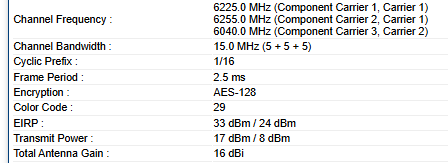
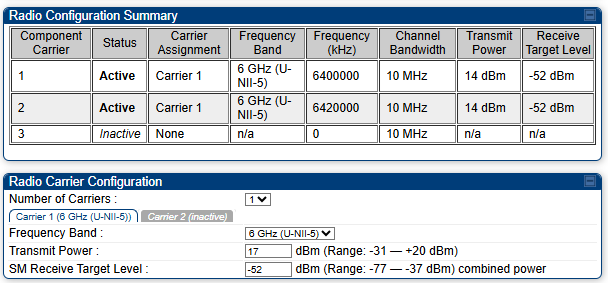
| 450v radios | CPYV-962 | The “Transmit Power” Configured on the Configuration > Radio page of the 450v AP/BHM was applied per component carrier. This value now represents the combined power for both component carriers. Similarly, the HOME > General Status page of 450v APs and SMs now shows transmit power values per carrier. For example, on this 450v BHM running Release 25.0, the 17 dBm Transmit Power means each component carrier of carrier 1 is transmitting at 14 dBm, while the single component carrier on carrier 2 is transmitting at 8 dBm. In previous releases, that same 17 dBm displayed would have represented 17 dBm per component carrier, or 20 dBm combined for carrier 1. This change may require, in a couple different configurations, an operator manually increase the AP/BHM transmit power after upgrading to Release 25.0 to maintain the same power as seen with older software. For more information, see TX power adjustment on 4x4 APs after upgrading from Release 24.x to Release 25.x. |