I have two sites using R195P routers. This is a critical application as we are carrying audio to a radio transmitter through these routers. They are going offline every so often. Sometimes a couple of times a day and then they stay up for a few days. I have a ticket on this but I’m not getting anywhere as I’m being told the router is not getting through to the cnMaestro server. The logs show pong not returned from so many pings to the server. The problem is that even though the routers are online and carrying data they seem to be rebooting and then they are totally offline until the reboot is over. I have seen this message in the notifications in cnMaestro.:
rebootReason.DEV_PING_TIMEOUT
I have seen this reason too:
Device CLI initiated reboot
I have a ticket on this and I am just being told that the router is losing the ability to reach cloud.cambiumnetworks.com That is one problem, but the reboots are what is really causing me the headache as our radio station goes off the air during the reboot. I don’t see any settings regarding a watchdog timer in the router menu that I can turn off. Why the router is losing touch with cnMaestro is another question. These are both set as static with our ISP. Does anybody have any ideas on how I can get this fixed? I suppose I could set them to not use cnMaestro but I really like to be able to see them
This is what tech support has told me on my ticket, but it hasn’t helped me figure out what to do next. Here is the word from my ticket:
Hi Steve Schuh,
The problem is below, the router can’t reach the cloud.cambiumnetworks.com, please make sure you have firewall rules/internet that are allowed to reach the Cambium cloud.
/var/log/device-agent.log
2026-05-21 00:39:57 27359:Attempting (re)connection in 5 seconds
2026-05-21 00:40:05 27359:da_use_IPV6_preferred 0
2026-05-21 00:40:05 27359:Resolved cloud.cambiumnetworks.com to IPv4 address
2026-05-21 00:40:05 27359:connect() success
2026-05-21 00:40:05 27359:Connected socket 8 IP [140.190.22.114]
2026-05-21 00:40:05 27359:CheckConnection: us-e1-s1-cmjbcvncy6.cloud.cambiumnetworks.com is available
2026-05-21 00:40:32 27359:NTPEnabled 1
2026-05-21 00:40:32 27359:handle_cns_msg: MSG_REGISTER_SUCCESS received
2026-05-21 06:53:30 27359:Not received PONG for the last ping (1)
2026-05-21 06:53:54 27359:Not received PONG for the last ping (2)
2026-05-21 07:21:52 27359:Not received PONG for the last ping (1)
2026-05-21 07:22:15 27359:Not received PONG for the last ping (2)
2026-05-21 07:30:08 27359:Not received PONG for the last ping (1)
2026-05-21 07:30:24 27359:Not received PONG for the last ping (2)
2026-05-21 07:39:02 27359:Not received PONG for the last ping (1)
/var/log/lws.log
2026-05-21 00:40:05:LWS: CAMBIUM: >>>>> AWAITING_TIMEOUT 30
Device management through cambium cloud: Network port requirement:
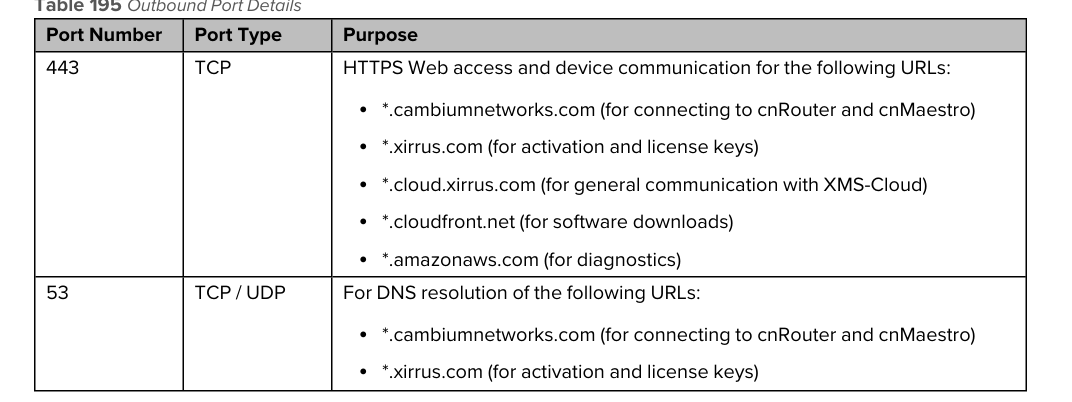
Thanks for any ideas.
Steve