Posting here as I cannot reach a qualified engineer via the paid cambium support channels.
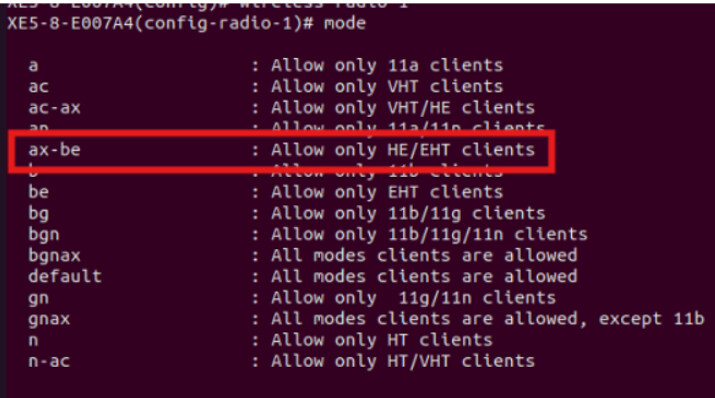
I’ve noticed that when selecting ‘ax-be’ as the radio mode on the X7-35X running the latest code that a/b/g/n/ac clients can no longer connect. According to Cambium documentation when selecting ‘ax-be’, it should be additive, meaning, ax-be clients and all other clients (b/g/n/etc) should be able to connect. However, that is not what I am seeing. Selecting the ‘ax-be’ mode appears to be exclusive, not additive. Has anyone else experienced this? Is the documentation wrong? Bug?
This behavior is expected. In ‘ax-be’ mode, the radio permits associations only from HE/EHT-capable clients. I’m not aware of any documentation indicating that legacy (a/b/g/n/ac) clients should also be supported in this mode. Could you please share the document you are referring to?
On the X7-35X, when the radio is set to the “mode default”, it accepts associations from all client types, including legacy and HE/EHT-capable devices.
Good morning @ads100 . I’ve included the Cambium documentation below. The actual observed behavior is not expected as it does not follow the documentation. When setting the radio mode in cnMaestro, most options say something like “Allow clients to connect in xxxxx mode”. One, and only one option, says “Only xxx clients can connect”. This relates to the guidelines in the documentation in the sections called Understanding Mode Selections and Additive vs. Exclusive Modes,
===== Cambium doc starts here =====
Radio Modes Explained
In cnMaestro, the available radio modes for AP groups typically allow you to define the specific Wi-Fi standards that client devices can use to connect to the access point.
Understanding Mode Selection
Choosing a mode like ‘ax’ does not inherently negate other modes; it simply indicates which standards are supported for connections. For instance, selecting ‘ax’ allows devices compatible with Wi-Fi 6 to connect, but it does not disable connections from devices supporting older standards like ‘ac’ or ‘n,’ unless explicitly restricted.
Regarding the GUI’s indication of exclusivity (e.g., ‘allow ONLY xxxx modes’), this means that only the specified standards will be permitted to connect. This setting is useful for ensuring that only the latest or preferred standards are used, potentially enhancing performance.
Additive vs. Exclusive Modes
When configuring radio settings, the terms you observe imply whether multiple standards can function simultaneously (additive) or are restricted to specific ones (exclusive).
· Additive Mode: If no exclusivity is stated, the configuration generally allows compatible devices across multiple standards to connect.
· Exclusive Mode: Any setting that specifies ‘ONLY’ will limit connectivity to those listed standards.
@ads100 Is the documentation wrong? Is the AP not behaving as it’s supposed to? Why is there a discrepancy between how the docs indicate the AP should behave and the way the AP actually behaves? Can I get some clarity on this issue? I’ve been told by other Cambium support staff that the docs are correct, which would indicate the APs are not behaving as designed.
From:@CAM_TSKWe apologize for the inconvenience. Upon reviewing the documentation, we identified a discrepancy in one of the definitions. This will be addressed in early Q1 2026. The issue is being tracked under CNSSNG-50517.
@CAM_TSK Can you clarify what the discrepancy is? The operation of the radio mode selections is still not clear.
@CAM_TSK Thanks for clearing that up. It would appear that the documentation is 100% wrong then in this instance. You might want to spread that information internally to your support folks, one of them confirmed with me earlier this week that the documentation was correct.