Applicable Versions: 5.12.0 and later
Affected Platforms: ePMP4XXX
Starting from firmware version 5.12.0, the Hairpin Acceleration feature on AX platforms has been reworked.
Hairpin functionality is used in scenarios where traffic enters and exits the wireless link while maintaining the same Layer 3 flow information. This commonly occurs in routed wireless deployments where the same flow traverses the wireless link in both directions.
The updated implementation improves traffic flow identification by introducing additional Layer 2 hashing methods used by the Hardware Acceleration Engine.
Recommendation
Cambium recommends enabling Hairpin Acceleration only when required by the network design.
If your network does not use hairpin traffic, or routed topologies where the same flow may traverse the wireless link in both directions, it is recommended to keep Hairpin Acceleration disabled to maximize throughput performance.
Hairpin traffic occurs when packets with identical Layer 3 flow information:
- Source IP address
- Destination IP address
- Source port
- Destination port
- Protocol type
can appear in both uplink (UL) and downlink (DL) directions on the same wireless device.
Note: Hairpin Acceleration and Deep Packet Inspection (DPI) cannot be used simultaneously. When DPI is enabled, Hairpin Acceleration is not supported.
Use Case 1 Inter-VLAN Traffic Traversing the Wireless Link Twice
Network Diagram:
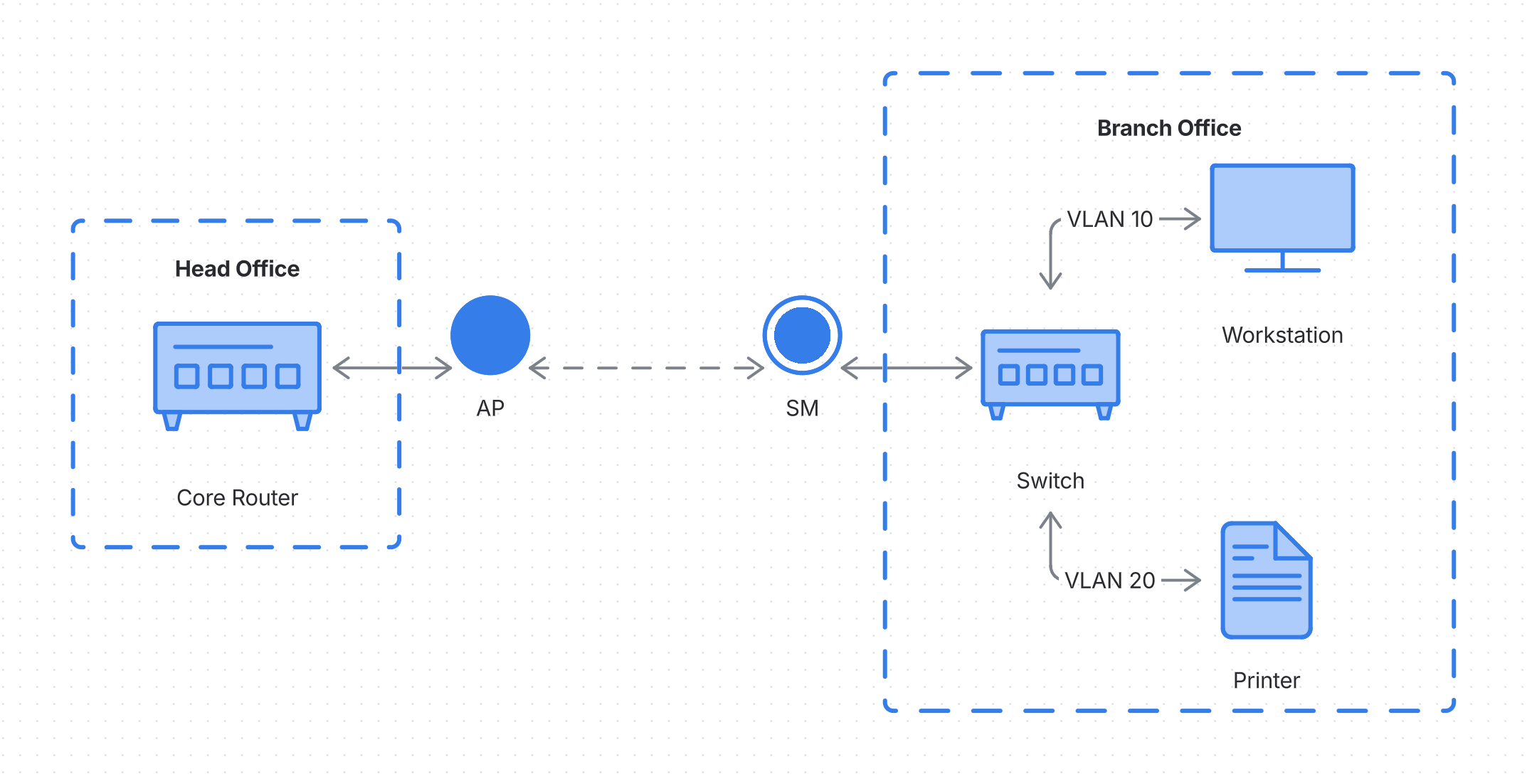
In this deployment:
- The workstation and printer reside at the remote site.
- The workstation and printer belong to different VLANs.
- Inter-VLAN routing is performed by a core router located at the central site.
- The wireless PtP link transparently transports both VLANs.
When the workstation communicates with the printer, the traffic flow follows this path:
- The packet travels from the workstation across the wireless link toward the central-site router.
- The router performs inter-VLAN routing and forwards the packet back toward the remote site.
- The packet traverses the same wireless link a second time before reaching the printer.
As a result, the same Layer 3 flow is observed in both uplink and downlink directions of the wireless link.
Without additional flow identification mechanisms, hardware acceleration may not always correctly distinguish between these traffic directions. In previous releases, this could result in certain traffic types being dropped while others continued to pass normally.
Use Case 2 Routed PtP Link with OSPF Failover
Network Diagram:
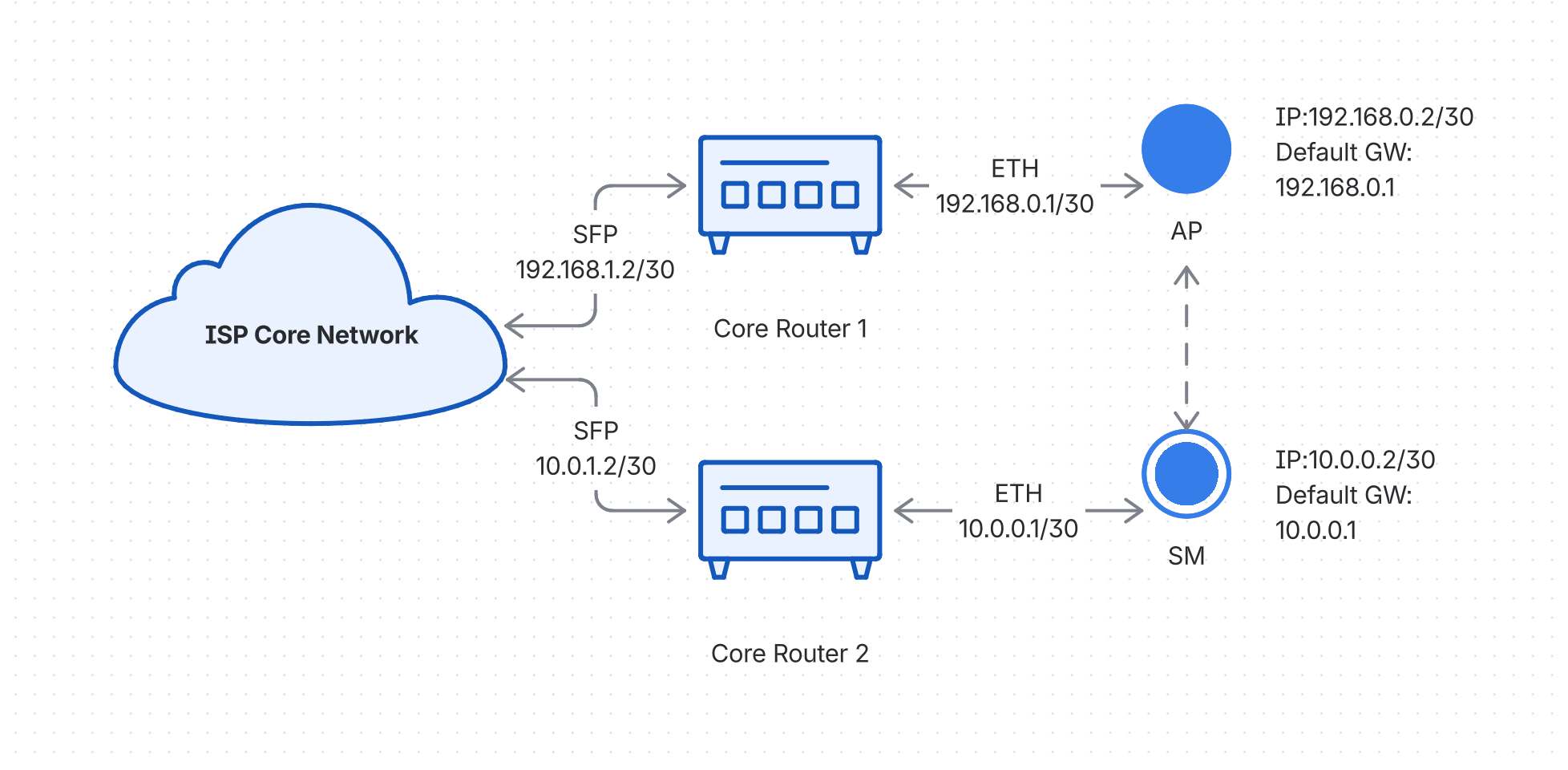
In this deployment:
- The AP has a local network connected to Router1 and uses Router1 as its default gateway.
- The SM has a local network connected to Router2 and uses Router2 as its default gateway.
- OSPF is used to exchange routes between the routers.
Under normal operation, traffic follows the preferred routed path.
However, after an OSPF topology change or failover event, traffic may be redirected through the wireless PtP link. In this situation, packets belonging to the same Layer 3 flow can traverse both uplink and downlink directions of the wireless link.
From the Hardware Acceleration perspective, this creates a hairpin traffic scenario, requiring additional flow identification mechanisms.
Hairpin Acceleration Modes
The following Hairpin Acceleration modes are available:
Disabled
Hairpin Acceleration is disabled.
This is the recommended setting unless the network specifically requires support for hairpin traffic scenarios.
VLAN Hashing
This mode uses:
- VLAN information
- Layer 3 flow information
Ethernet MAC addresses are not included in the hash calculation.
Recommended usage
Use VLAN Hashing when uplink and downlink traffic are separated by VLANs.
VLAN and MAC Hashing
This mode uses:
- VLAN information
- Ethernet MAC header information
- Layer 3 flow information
The hash is calculated using packet header information between the beginning of the Ethernet header and the beginning of the IPv4 packet.
Recommended usage
Use VLAN and MAC Hashing when uplink and downlink traffic are not separated by VLANs and identical Layer 3 flows may appear in both directions.
Performance Considerations
When Hairpin Acceleration is enabled, the device performs additional hashing calculations during packet processing.
As a result, both VLAN Hashing and VLAN and MAC Hashing modes may slightly reduce maximum throughput performance compared to the Disabled mode.
For this reason, Hairpin Acceleration should be enabled only when required by the network topology and traffic patterns.
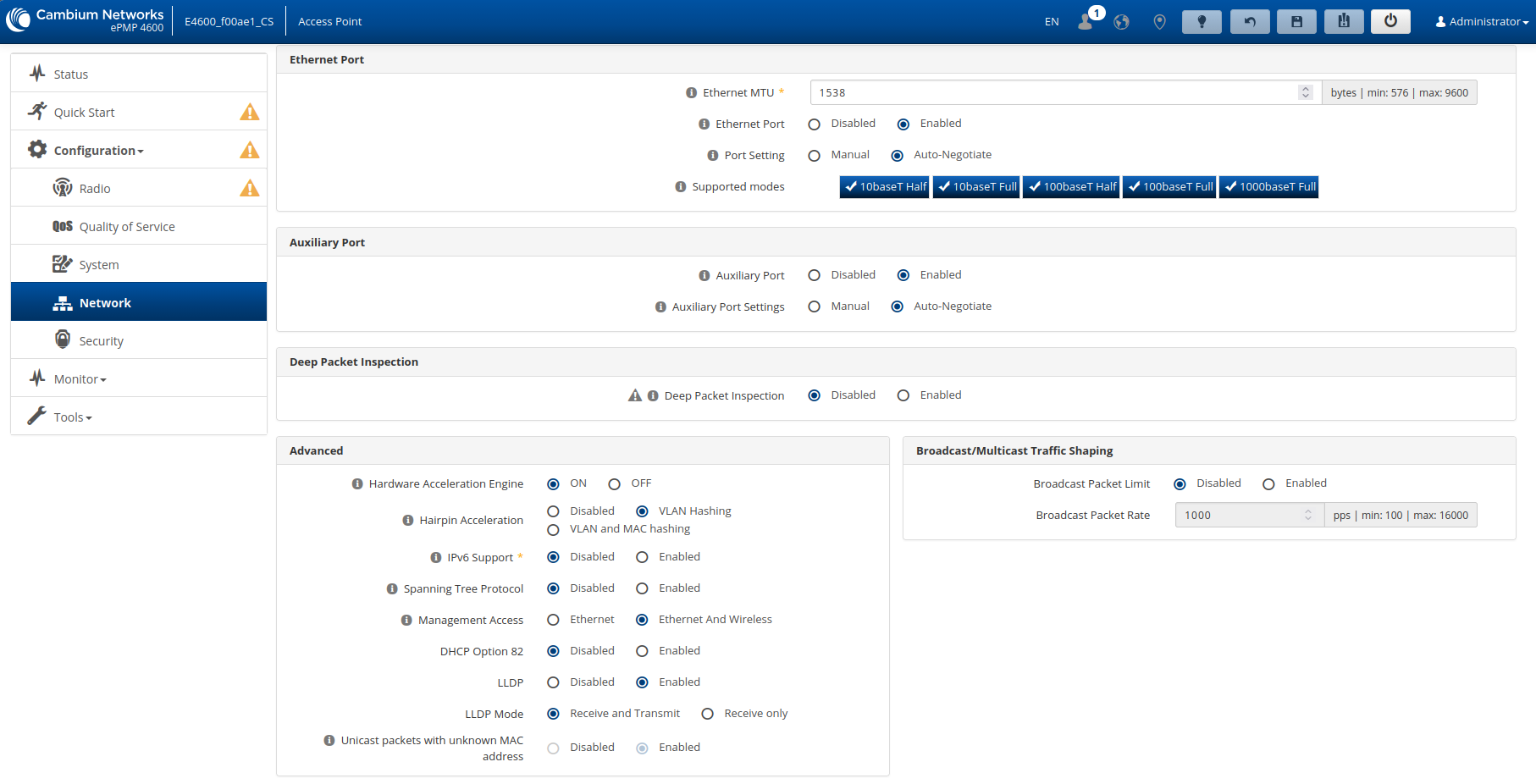
How to configure:
Navigate to:
AP/SM → Configuration → Network → Advanced
MIB objects
cambiumHairpinAccelStatus OBJECT-TYPE
	SYNTAX		Integer32 (0|1|2)
	MAX-ACCESS	read-only
	STATUS		current
	DESCRIPTION
		"Current Hairpin acceleration status
			0 - Hairpin acceleration is disabled,
			1 - Hairpin acceleration for tagged traffic,
			2 - Hairpin acceleration for tagged traffic and L2 addr migration
		Device Allocation: AP, SM"
	::= { cambiumGeneralStatus 58 }
cambiumHairpinAccelEnable OBJECT-TYPE
	SYNTAX		Integer32 (0|1|2)
	MAX-ACCESS	read-write
	STATUS		current
	DESCRIPTION
		"Current Hairpin acceleration Configuration
			0 - Hairpin acceleration is disabled,
			1 - Hairpin acceleration for tagged traffic,
			2 - Hairpin acceleration for tagged traffic and L2 addr migration
		Device Allocation: AP, SM"
	::= { accelerationEngine 2 }
cnMaestro Template
{
    "device_props": {
        "cambiumHairpinAccelEnable": "1”
    }
}