ePMP Software Release 5.12.0 is now available

Supported Platforms

  • ePMP AX Platforms
  • ePMP AC Platforms
  • ePMP N Platforms

Download the firmware and documentation from:

Features description

ePMP 4xxx Series SM to AP Upgrade (8 SMs)
ePMP 46XX Series AFC Enchantments
Per-SM Throughput Maximization
Hairpin Acceleration Feature Rework

Problems corrected

Tracking ID Products Description
ACG-16852 ePMP 3000 Only one SM appeared on the Monitor Wireless page for ePMP 3000 Gen radios.
AXG-14883 All A memory leak occurred in early Release 5.12.0 release candidates (RCs).
AXG-14858 All The default WPA2 key from SMs could not be applied on the AP.
AXG-14817 All Submenu items could not be selected on mobile devices or in mobile view.
AXG-14534 All ePMP4600L devices now report accurate Noise Floor (NF) and RSSI values.
AXG-14517 All 5 GHz and 6 GHz SMs now retain the configured transmit power after reboot when operating in Tx Power manual mode.
AXG-14478 All Regulatory settings for the Singapore country code have been updated.
AXG-14374 All dnsmasq has been updated to prevent vulnerabilities.
AXG-14185 All Hardware Acceleration now operates correctly when both Firewall and Hairpin Acceleration are enabled.
AXG-14024 All SNMP Domain Access parameters are now available in the UI.
AXG-13988 All SMs are now reachable through the Separate Management Wireless Interface.
AXG-13897 All OUI database for cnDiscovery has been updated.
AXG-13584, AXG-13091 All Multiple stability improvements.
AXG-12951, AXG-12638 All Multiple stability improvements.
AXG-11754, AXG-11228 All Multiple stability improvements.
AXG-13584 All Packets per MCS statistics now display the correct transmission MCS values instead of SS MCS 0.
AXG-13387 All Ping loss no longer occurs on Force 4625 devices when using 80 MHz or 160 MHz channel widths.
AXG-12966 All Uplink Packets per MCS statistics now display correct data when operating in Migration Compatibility mode.
AXG-14169 All SMs remain connected when MIR is enabled.
AXG-12626 All The AFC Analyzer page now scales correctly when the browser zoom level is changed.
AXG-12282 All GRE over PPPoE traffic is now accelerated.
AXG-11703 All The backup configuration file now includes the complete AFC Proxy Server configuration.

I have just upgraded a 4500 sector to version 5.12. Before the upgrade, most SMs were able to operate at MCS 11 in the downlink, but now none of them go beyond MCS 9.

All SMs are currently running version 5.11.1. I also upgraded one SM to version 5.12, but it still does not go beyond MCS 9.

No configuration changes were made on the AP, and the Downlink Max Rate is set to Auto.

Hello @pdinoto,

Could you please PM me the tech support files from both the AP and the SM while the SM is running version 5.12.0?

Please ensure the files contain some traffic statistics. If there is no active traffic after the upgrade, kindly run a wireless link test before generating the files.

Thank you!

Hi @aka
PM sent, thank you.

I upgraded our system, 4600s, 4625s and 4616s, to 5.12.0 last night. I have fiber feeding to the 4600s on one site, with 40 SMs on one 4600 (we’ll call that AP NWT2). I’m running 80 Mhz wide channel.

I’ve tried setting NWT2 at both 50/50 scheduling and Flexible.

I’m using one particular SM as test point.

With Flexible set, I can get as much as 400 to 500 Mbps download on a TP-Link router at that location. Upload will run around 150 Mbps, give or take (100 to 175 Mbps).

With 50/50 set, I get around 300 to 350 Mbps download, and upload is around 150 Mbps.

Using 50/50, I would expect to see better upload. We try to provide symmetrical bandwidth to our customers, with right now isn’t possible even with 50/50 if we offer over 100 Mbps service.

I did a link test (50/50 scheduling) and saw similar numbers to the real-world TCP test: 280 Mbps download, 175 Mpbs upload and a second test 293 Mbps download and 153 Mbps upload.

Any ideas as to what might be causing such a wide spread between download and upload bandwidth even in 50/50 mode?

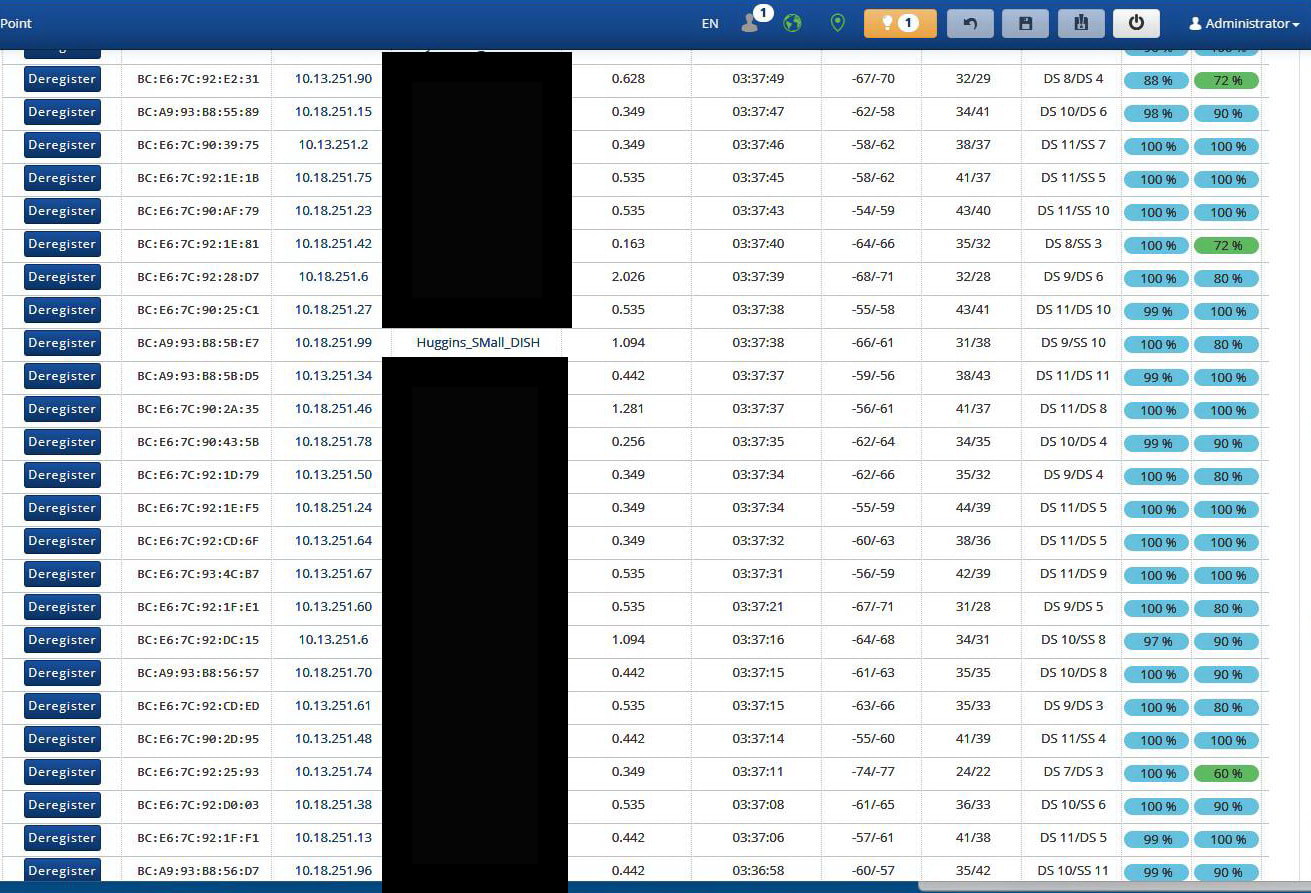
Sounds like your uplink rates to the AP are lower than the downlink rates, which would make sense, unless your subscribers are quite close due to the limited EIRP involved and AP antenna gain.

I’m making assumptions of course, but if you post the monitor → wireless page from the ap that would probably shed some light on it.

The upload bandwidth rates are definitely much lower than download, even with 50/50 scheduling.

At the point in time that I got this screen capture, it DS9/DS9 with which I’m testing. However, I noticed that the upload DS number is varying quite a bit, on most (if not all) of the SMs, even on SMs where the upload RSSI is pretty strong, whereas the download DS numbers seem to be more stable.

Yeah, all your UL links are worse than your DL - and 9 of them are SS modulations… which is a problem. :folded_hands:

And they change rather quickly as I watch them. They aren’t stable at all.

But, even for those that are DS and good, the upload is still just a fraction of what the download is.

That’s almost certainly noise at your tower end. Have you got other APs nearby on the same frequency?

No nearby APs on the same frequency.

What you’re seeing is actually normal.

The MCS values aren’t static. They’re most meaningful when traffic is actively flowing because the radios are constantly adapting to current RF conditions. When a link is idle, you’ll often see the displayed MCS drop or fluctuate, then jump back up as soon as data starts passing. That’s expected behavior and, by itself, isn’t an indication of a problem.

As for scheduling, 50/50 and Flexible behave very differently.

With 50/50, the AP reserves half of the airtime for downlink and half for uplink, regardless of whether either direction actually needs it. This provides predictable performance in both directions, but it also means unused airtime in one direction can’t always be borrowed by the other.

Flexible scheduling, on the other hand, dynamically allocates airtime based on demand. If there’s significantly more upload traffic than download traffic, the AP can devote most of its airtime to uploads, allowing more than 50% of the available airtime to be allocated to uplink whenever demand requires it. If download demand is higher, it’ll shift airtime the other way. The result is better overall efficiency and typically higher peak throughput because airtime isn’t wasted. An example might be that one moment the scheduler is allocating approximately 95% of the airtime to downlink and 5% to uplink. As traffic patterns change, it may shift to 40/60, then later to 10/90. The exact ratio is constantly adjusted based on current demand, allowing the scheduler to make the most efficient use of the available airtime.

Keep in mind that all SMs on the AP share the available airtime. If multiple subscribers are simultaneously pushing large uploads, they’re all competing for that same uplink airtime, so each customer will naturally see lower throughput than if they were the only one transmitting.

In general, Flexible is the preferred scheduling mode whenever you can use it. The main exception is when you’re running GPS synchronization with other APs or have another reason that requires a fixed frame structure. Otherwise, Flexible makes the best use of the available airtime and will generally deliver the highest aggregate throughput while still allowing the scheduler to fully utilize both uplink and downlink whenever demand exists.

Hi!

Today we installed the update on one of our AP 3000 units (mostly with SM 130s). We ran into issues with only three clients: they updated successfully but lost their network connection to the customer’s router—the router wasn’t detected and didn’t appear in the Monitoring/Networks tab. We reverted to version 5.11, and everything returned to normal.

Hola!

Hoy instalamos la actualización en uno de nuestros AP 3000 con SM 130 en su mayoría, tuvimos detalles con 3 clientes únicamente que si se actualizacion pero perdieron su conexión de red con el router del cliente, no lo detectaba en la pestaña de Monitoreo/Networks no aparecía el router regresamos a la versión 5.11 y regreso todo a la normalidad..

Looking at other threads there’s issues with NAT mode and DHCP on 5.12. Kind of odd because I have one AP running one of the 5.12 beta’s so the bug must have been introduced quite late into the code.

Just to clarify… I don’t think anyone has reported DHCP issues with 5.12 on e4k. The problems seem to be with legacy e1k/e2k 802.11n-based radios.

Hello Community,

We’ve identified an issue where N-series radios fail to issue DHCP Offers on 5.12.0. This behavior occurs regardless of whether PPPoE is used.

Interestingly, we haven’t seen this issue on AC-series radios.

Could anyone confirm if they are experiencing this same DHCP behavior on Force 300 or Force 300 L models? Any techsupport from your setup would be greatly appreciated!